2 layers35 × 42 mm
AstroUniBoard
xlazam01/AstroUniBoard
STM32G0B1-based telescope focuser/rotator controller — OnStepX firmware port + KiCad PCB
146 parts1GPL-3.0

 xlazam01/OpenWheel
Astronomy Filter Wheel Project
Filter wheel is an open-source printed circuit board by xlazam01, from the xlazam01/OpenWheel repository on GitHub, published under the GPL-3.0 licence. It is a 2-layer board of 26.9 × 35.2 mm with 62 parts on 70 nets, routed with 381 tracks and 181 vias.
It is built around the 24AA64T-I/OT, RT9193-33GB and TMC2209-LA, with the USBLC6-2SC6, TS-1088-AR02016 and MC-311D among its other parts. Its parts include 25 capacitors, 19 resistors, 5 ICs, 3 connectors and 2 diodes. It belongs with the STM32 boards of this library.


Open-source motorised filter wheel for astrophotography (up to 9 filters; the DIY release takes 4 × 2"). It appears on the PC as a USB serial device, is detected automatically, and is driven from NINA and other ASCOM clients, or from KStars/Ekos through INDI.
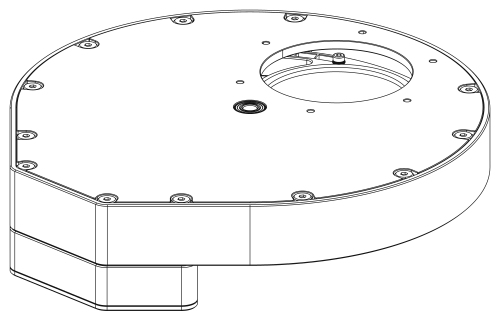
| Build guide | step-by-step pages drawn from the CAD model, also as PDF |
| Bill of materials | printed, CNC and bought parts with sources; PCB parts with LCSC numbers (CSV) |
| User manual | mounting, drivers, buttons and LEDs, errors, changing filters, firmware update |
| DIY notes | every dimension and design decision behind the mechanics |
| Schematic | PCB schematic (PDF); board renders: top, bottom, 3D |
| Protocol | serial commands for your own software |
| MCU | STM32G0B1 (native USB CDC), PlatformIO + Arduino framework |
| Motor | stepper on a TMC2209 (UART configured) |
| Position | hall sensor + a different-length magnet per slot; calibration, filter names and focus offsets are stored in a 24AA64 I2C EEPROM |
| Host protocol | text commands :NN[params]#, 115200 baud, every command is answered |
| USB ID | VID 0x1209 (pid.codes), PID see docs/USB_IDS.md |


Controller PCB (V3.1, rendered from hw/filter_wheel.kicad_pcb)
| Folder | Content |
|---|---|
fw/ | firmware (PlatformIO project, target STM32G0B1) |
hw/ | KiCad schematic and PCB |
cad/diy/ | mechanical models of the DIY release (SolidCraft sources, STEP, 3MF for printing) |
driver/ASCOM/ | ASCOM driver for NINA & co.: core library, COM local server, setup dialog, tests, installer script |
driver/INDI/ | INDI driver for KStars/Ekos on Linux, wheel simulator, tests |
tools/gui/ | small Python/Qt test GUI |
tools/hwtest/ | pytest acceptance tests that run against a real board over USB |
tools/manual/ | generator for the build-guide pages (CAD view DXF → SVG/PDF) |
docs/ | build guide, BOM, user manual, DIY notes, protocol reference, USB IDs |
release/ | one folder per release: firmware binary, PCB fabrication files, CAD exports — latest 1.0.0 |
pio run -d fw -e STM32G0B1                 # build
pio run -d fw -e STM32G0B1 -t upload       # flash over USB (DFU)
Entering the bootloader (DFU):
:31# does the same without touching the button (flag in RAM + reset, see
docs/BOOTLOADER.md).Open fw/ (not the repository root) in VS Code with the PlatformIO extension.
:33# / :34#).pip install -r tools/gui/requirements.txt && python tools/gui/main.pypython -m pytest tools/hwtest --port COM13Full reference with every command: docs/PROTOCOL.md. In short:
Link: USB CDC serial port (115200 8N1, the speed is nominal over USB). Do not rely on DTR.
Framing: a command is :NN[params]# where NN is a two-digit command number. Bytes outside
:...# are ignored; a new : restarts the command. Keep a command to 46 characters and send one
at a time (a large burst can overrun the USB receive buffer and lose the #).
Every command is answered with one line ending in #:
| Answer | Meaning |
|---|---|
<value># | query result (number, text, or comma separated list) |
OK# | set / action accepted (a move answers as soon as it has started) |
ERR,<code># | rejected, see error codes below |
Slots are numbered from 0. Parameters accept :07 3#, :07,3# and :073#.
Identify first. After power-on and each time a host opens the port, only :25# and :32#
are accepted; anything else answers ERR,16 until :32# has been sent (protocol 3, firmware 1.4).
Example session:
:25#        ->  OK#                                       ping
:33#        ->  ERR,16#                                   not identified yet
:32#        ->  OPENWHEEL,G0B1,FW1.4.0,3,207834924B31#    identify: model, firmware, protocol version, serial
:33#        ->  S,1,0,-1,4,0,3#                           status: idle, slot 0, 4 slots, no error
:07 2#      ->  OK#                                       start moving to slot 2
:33#        ->  S,2,-1,2,4,0,3#                           moving (slot -1), target 2
:07 9#      ->  ERR,7#                                    bad parameter
:33#        ->  S,1,2,-1,4,0,3#                           arrived at slot 2
Main commands:
| Command | Purpose | Answer |
|---|---|---|
:25# | ping | OK# |
:32# | identify (automatic detection; unlocks all other commands) | OPENWHEEL,model,firmware,protocol,serial# |
:33# | status | S,state,slot,target,slots,error,flags# |
:06# | current slot, -1 while moving or unknown | number |
:07 N# | move to slot N | OK# |
:20# | home | OK# |
:30# | halt | OK# |
:35# | start calibration | OK# |
:16# | number of slots found by calibration | number |
:34# / :34,0# | read / clear the sticky device error | E,code# / OK# |
:36# / :37 N,name# | get all filter names / set the name of slot N | a,b,c# / OK# |
:38# / :39 N,offset# | get all focus offsets / set the offset of slot N | a,b,c# / OK# |
:40# | health: MCU temperature, supplies, driver temperature, warnings | H,...# (see docs/PROTOCOL.md) |
:41# / :42 N# | stall detection: threshold and load readings / set threshold (0 = off) | G,...# / OK# |
:43# / :44 N# | status LED brightness 0..100 % (0 = off) / set it | number / OK# |
:45# | live Hall sensor state, also uncalibrated (magnet polarity check) | 1# switched / 0# |
:18# / :19# | firmware version / name | text |
:31# | reboot into the DFU bootloader | OK# |
Status fields: state 0 init, 1 idle, 2 moving, 3 homing, 4 calibrating, 5 error; slot is
the current slot (-1 while moving or when the position is unknown); target the slot of a move;
slots the calibrated slot count (0 = not calibrated); error the sticky error code; flags
bit 0 calibrated, bit 1 position known, bit 2 button held at boot, bit 3 EEPROM fault, bit 4 health
warning (details with :40#).
Error codes:
| Code | Meaning | Code | Meaning |
|---|---|---|---|
| 0 | none | 7 | bad parameter |
| 1 | homing timed out | 8 | busy (moving, homing or calibrating) |
| 2 | move timed out | 9 | not calibrated |
| 3 | calibration failed | 10 | unknown command |
| 4 | EEPROM missing or write failed | 11 | malformed command |
| 5 | motor driver (TMC2209) fault | 12 | not changeable at runtime |
| 6 | no hall sensor pulse seen | 13 | motor stalled (stall detection) |
Codes 1 to 6 and 13 are device faults: the wheel signals them on the LEDs for 10 s and keeps the code
until it is cleared with :34,0#. Codes 7 to 12 are only returned in the reply to a rejected command.
Filter names and focus offsets (:36 to :39) are stored in the wheel's EEPROM, in their own
region, so they survive a calibration reset and follow the wheel to any PC. A name has up to 15
printable ASCII characters and must not contain , # : or |.
driver/ASCOM contains an ASCOM Platform 7 driver (IFilterWheelV3, ProgID
ASCOM.OpenWheel.FilterWheel). It finds the wheel by its USB ID (VID 0x1209) and then confirms it
with :32#, so there is no COM port to choose.
Position is -1 while the wheel moves; faults are reported as ASCOM exceptions with a readable reason.Names and FocusOffsets come from the wheel. The imaging software keeps its own filter list and
can import these (NINA: clear its cached filter list after renaming).Status (JSON, including temperatures, supply voltages and warnings),
Home, Halt, ClearError, Calibrate (parameter confirm).%LOCALAPPDATA%\OpenWheel\driver.log.Build and register for development (the second command asks for administrator rights itself):
dotnet build driver/ASCOM/OpenWheel.Ascom -c Release
OpenWheel.Ascom.Server.exe /regserver          # use /unregserver to remove it
Tests: dotnet test driver/ASCOM/OpenWheel.Core.Tests (simulated misbehaving devices) and
conformu conformance ASCOM.OpenWheel.FilterWheel (ConformU).
driver/INDI contains indi_openwheel, an INDI::FilterWheel driver for libindi 2.x (Raspberry Pi,
Astroberry, StellarMate). It behaves like the ASCOM driver:
:32#.It comes with a simulated wheel (openwheel_sim) and tests against it. Building, installing and the
udev rule are described in driver/INDI/README.md. It has not been tested with
the real wheel yet.
The firmware (protocol v2) passes the hardware acceptance tests on a real board. The ASCOM driver
passes ConformU 4.5.2 with no errors, warnings or issues (report in driver/ASCOM/conformance/).
An Inno Setup installer script exists (driver/ASCOM/installer/) but has not been run yet; NINA field
testing is in progress.
Many thanks to the authors of the myFilterWheel ASCOM DIY
project (Robert Brown, Clive Stachon and contributors, MIT licence). The basic :NN# serial
protocol of OpenWheel was inspired by theirs and then extended with new features: acknowledged
replies, error codes, a status command and device identification for automatic detection.
OpenWheel is an independent project and is not affiliated with myFilterWheel.
hw/, cad/): CERN-OHL-S-2.0, see LICENSE-HARDWARE.fw/lib/ keep their own licences (TMCStepper, SparkFun External EEPROM).| Qty | Value | Footprint | References |
|---|---|---|---|
| 6 | 5k1 | OpenWheel:R_0402_1005Metric | R1, R2, R10, R11, R12, R13 |
| 5 | 100nF | OpenWheel:C_0402_1005Metric | C4, C7, C8, C9, C13 |
| 5 | 10k | OpenWheel:R_0402_1005Metric | R4, R7, R9, R14, R18 |
| 4 | 100nF/50V | OpenWheel:C_0402_1005Metric | C14, C15, C20, C22 |
| 4 | 10uF/10V | OpenWheel:C_0402_1005Metric | C6, C16, C17, C21 |
| 3 | 1uF | OpenWheel:C_0402_1005Metric | C2, C3, C10 |
| 3 | M2 | OpenWheel:MountingHole_2.2mm_M2_DIN965_Pad | H1, H2, H3 |
| 2 | 0.11R | OpenWheel:R_0805_2012Metric | R16, R17 |
| 2 | 100nF | OpenWheel:C_0402_1005Metric_v2 | C23, C25 |
| 2 | 12pF | OpenWheel:C_0402_1005Metric | C11, C12 |
| 2 | RED | OpenWheel:LED_0603_1608Metric | D1, D2 |
| 1 | 100R | OpenWheel:R_0402_1005Metric_v3 | R19 |
| 1 | 10k | OpenWheel:R_0402_1005Metric_v3 | R20 |
| 1 | 10k | OpenWheel:R_0402_1005Metric_v4 | R21 |
| 1 | 1M | OpenWheel:R_0402_1005Metric_v2 | R3 |
| 1 | 1k5 | OpenWheel:R_0402_1005Metric | R15 |
| 1 | 1nF | OpenWheel:C_0402_1005Metric_v3 | C24 |
| 1 | 22nF | OpenWheel:C_0402_1005Metric | C5 |
| 1 | 22nF/50V | OpenWheel:C_0402_1005Metric | C19 |
| 1 | 24AA64T-I/OT | OpenWheel:SOT-23-5 | U4 |
| 1 | 4.7nF | OpenWheel:C_0402_1005Metric_v2 | C1 |
| 1 | 47uF/10V | OpenWheel:C_1206_3216Metric | C18 |
| 1 | 510R | OpenWheel:R_0402_1005Metric | R8 |
| 1 | CCW / BOOT0 | OpenWheel:SW_Push_SPST_NO_Alps_SKRK | SW2 |
| 1 | CW | OpenWheel:SW_Push_SPST_NO_Alps_SKRK | SW3 |
| 1 | Hall | OpenWheel:JST_PH_B3B-PH-K_1x03_P2.00mm_Vertical | J4 |
| 1 | Logo_WorksOnMySky_13mm | OpenWheel:Logo_WorksOnMySky_13mm | G1 |
| 1 | MC-311D | OpenWheel:USB_C_Receptacle_G-Switch_GT-USB-7010ASV | J1 |
| 1 | Motor | OpenWheel:JST_PH_B4B-PH-K_1x04_P2.00mm_Vertical | J3 |
| 1 | RT9193-33 | OpenWheel:SOT-23-5_v2 | U2 |
| 1 | SMD0603P050TF | OpenWheel:Fuse_0603_1608Metric | F1 |
| 1 | STM32G0B1CBTx | OpenWheel:LQFP-48_7x7mm_P0.5mm | U3 |
| 1 | TAXM8M4RDBCCT2T / 8MHz | OpenWheel:Crystal_SMD_3225-4Pin_3.2x2.5mm | Y1 |
| 1 | TMC2209-LA | OpenWheel:QFN-28-1EP_5x5mm_P0.5mm_EP3.75x3.75mm_ThermalVias | U5 |
| 1 | USBLC6-2SC6 | OpenWheel:SOT-23-6 | U1 |
It measures 26.9 × 35.2 mm and has 2 copper layers, 1.6 mm thick.
62 parts, built around the 24AA64T-I/OT, RT9193-33GB, TMC2209-LA and USBLC6-2SC6. The full list of its parts is on this page, with links to each part's symbol and footprint where PCBKit's library has them.
From the xlazam01/OpenWheel repository on GitHub, at the commit this page was made from: the board is hw/filter_wheel.kicad_pcb and its schematic hw/filter_wheel.kicad_sch. PCBKit opens the board in the browser, with nothing to install.
Its repository publishes it under the GPL-3.0 licence: you may reuse it on that licence's terms (keep the author's notice, and for a copyleft licence share your changes alike).
xlazam01/AstroUniBoard
STM32G0B1-based telescope focuser/rotator controller — OnStepX firmware port + KiCad PCB

ikajdan/katia
A split keyboard with 6 by 3 column staggered keys and 3 thumb keys, based on the Crkbrd design


dilshan/star-pointer
DIY virtual electronic finderscope for astronomical telescopes