
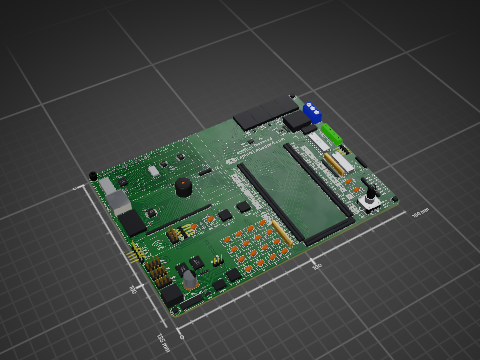
2 layers178 × 145 mm
Ultra DB X51 v1
ExploreEmbedded/8051_DevelopmentBoard
Design files and sample code for 8051 development Ultra Boards
145 parts70

 wkuMyeungsu/VEDA-final-3jo
FPGA control is an open-source printed circuit board by wkuMyeungsu, from the wkuMyeungsu/VEDA-final-3jo repository on GitHub. It is a 2-layer board of 81 × 60.5 mm with 21 parts on 63 nets, routed with 316 tracks and 20 vias.
It is built around the LTS-6960HR. Its parts include 10 resistors, 4 connectors, 2 diodes, 2 switches and 1 IC. It belongs with the fPGA and programmable logic boards and the FPGA and CPLD boards of this library.
한화비전 VEDA 프로그램 3조 팀 프로젝트 — CCTV 영상 분석 및 센서 융합을 통해 지게차 사각지대의 보행자를 감지하고 충돌을 방지하는 시스템입니다.
각 소프트웨어는 물리적으로 분리된 4개의 독립 하드웨어에서 구동되며 네트워크로 연동됩니다:
       ┌────────────────────────────────┐
       │   📹 CCTV (한화비전 네트워크)     │
       │   - 4채널 영상 및 AI 검출 메타데이터  │
       │   - IP: 192.168.0.3            │
       └──────────────┬─────────────────┘
                      │ RTSP (포트 554)
                      ▼
       ┌────────────────────────────────┐
       │  🍓 중앙 안전 서버 (라즈베리파이 #1)  │
       │  - server/ (C++ 안전 판정 서버)   │
       │  - IP: 192.168.0.13 (MQTT TLS 8883)│
       └──────┬─────────────────┬───────┘
              │ MQTT (위험 이벤트) │ MQTT (관제 데이터)
              ▼                 ▼
┌───────────────────────────┐  ┌───────────────────────────┐
│ 🚜 지게차 운전자 단말     │  │ 🖥️ 중앙 관제 센터        │
│ (라즈베리파이 #2 + FPGA)   │  │ (관제 PC / Windows)       │
│ - forklift-device/        │  │ - operator-device/        │
│ - 운전자 터치 UI & 경광등  │  │ - 3단계 계층 관제 화면    │
└───────────────────────────┘ └───────────────────────────┘| 디렉터리 | 배포 대상 기기 | 담당 역할 | 기술 스택 | 세부 가이드 |
|---|---|---|---|---|
forklift-device/ | 지게차 단말 (라즈베리파이 #2 + FPGA) | 운전자 터치 UI, 4채널 영상, 위험 경고 배너, FPGA 경광등/부저 제어 | Qt 6 / QML, C++17, Verilog | 바로가기 |
operator-device/ | 관제실 PC (Windows 10/11) | 3단계 계층 탐색(구역→카메라→4채널), 실시간 모니터링, 일일 안전일지 CSV 관리 | Qt 6 / QML, C++17 | 바로가기 |
server/ | 중앙 서버 (라즈베리파이 #1) | CCTV/센서 메타데이터 수신, 호모그래피 좌표 변환, 위험도 계산, MQTT 브로드캐스트 | C++17, Python, SQLite | 바로가기 |
cctv/ | 현장 CCTV (카메라 내부) | ArUco 마커 검출, 렌즈 왜곡 보정 및 메타데이터 전송 | C++, OpenCV, OpenSDK | 바로가기 |
~/VEDA_Final_project (저장소 루트)# 원클릭 빌드
./build_forklift.sh
# 데모 실행 (Mock 영상 및 이벤트)
./run_forklift.sh --demo --camera CAM_01_CH_01실행 후 키보드
Ctrl + Shift + D로 데모 조작 패널을 열 수 있습니다. (산출물:forklift-device/qt/build/operator_terminal)
C:\VEDA_Final_project (저장소 루트)# 원클릭 빌드
.\build_operator.bat
# 데모 실행
.\run_operator.bat로그인: ID
hanwha/ PIN5hanwha!(로그인 후Ctrl + Shift + D로 데모 패널 열기)
(산출물:operator-device\qt\build\windows-mingw\control_center.exe)
C:\VEDA_Final_project.\build_forklift.bat
.\run_forklift.bat💡 PowerShell 단축어:
. .\setup_aliases.ps1실행 시bo(관제 빌드),ro(관제 실행),bf(단말 빌드),rf(단말 실행) 사용 가능
forklift-device/README.mdoperator-device/README.mdserver/README.mdcctv/ArUCoDetector/README.md| Qty | Value | Footprint | References |
|---|---|---|---|
| 10 | R | Resistor_THT:R_Axial_DIN0207_L6.3mm_D2.5mm_P10.16mm_Horizontal | R1, R2, R3, R4, R5, R6, R7, R8, R9, R10 |
| 2 | Conn_01x11 | Connector_PinSocket_2.54mm:PinSocket_1x22_P2.54mm_Vertical | J3, J4 |
| 2 | LED | LED_THT:LED_D8.0mm | D1, D2 |
| 2 | SW_Push | Button_Switch_THT:SW_PUSH_6mm | SW1, SW2 |
| 1 | 74LS47 | Package_DIP:DIP-16_W7.62mm_Socket | U1 |
| 1 | Buzzer | Buzzer_Beeper:Buzzer_12x9.5RM7.6 | BZ1 |
| 1 | Conn_01x03 | TerminalBlock:TerminalBlock_MaiXu_MX126-5.0-03P_1x03_P5.00mm | J2 |
| 1 | Conn_01x03 | Connector_PinHeader_2.54mm:PinHeader_1x03_P2.54mm_Vertical | J1 |
| 1 | LTS-6960HR | Display_7Segment:7SegmentLED_LTS6760_LTS6780 | AFF1 |
ExploreEmbedded/8051_DevelopmentBoard
Design files and sample code for 8051 development Ultra Boards

Sciguy429/Qcode-Breakout-Board
This is an in-progress project that attempts to re add Qcode displays to lower end Asus motherboards. Asus has chosen to only provide this feature on its extremely high end boards, which now cost significantly more than…

lens42/D-Lev-All-in-One-PCB
This integrates the excellent D-Lev digital theremin design at D-Lev.com into a single surface mount PCB

dhanvantibhavsar/RiscV_Edge_AI_Workshop
This is a edited version of quantized AI model to work as starting point for RiscV Edge-AI Workshop


PotatoX/Band_Saw_Conversion
Cheap benchtop wood cutting band saw -> decent metal cutting

aalonsopuig/KiCad_Ejemplos
Ejemplos de circuitos utilizados en las clases que imparto en la universidad
It measures 81 × 60.5 mm and has 2 copper layers, 1.6 mm thick.
21 parts, built around the LTS-6960HR. The full list of its parts is on this page, with links to each part's symbol and footprint where PCBKit's library has them.
From the wkuMyeungsu/VEDA-final-3jo repository on GitHub, at the commit this page was made from: the board is forklift-device/gpio-control/hardware/FPGA_control.kicad_pcb and its schematic forklift-device/gpio-control/hardware/FPGA_control.kicad_sch. PCBKit opens the board in the browser, with nothing to install.
Its repository states no licence, so its author keeps all rights: ask wkuMyeungsu before reusing the design.