2 layers

 weensy/LXKB1
An open-source project that makes minimal keyboard with 60 keys.
LXKB is an open-source printed circuit board by weensy, from the weensy/LXKB repository on GitHub. It is a 2-layer board of 276.2 × 95.2 mm with 137 parts on 93 nets, routed with 908 tracks and 49 vias.
It is built around the ATMEGA16U4-AU and TPD2S017DBV. Its parts include 60 diodes, 60 switches, 8 capacitors, 4 resistors and 2 ICs. It belongs with the keyboards and input boards and the AVR (ATmega, ATtiny) boards of this library.



LXKB is an open-source project that makes minimal keyboard with 60 keys.
For coders, writers and for everyone.
This allows for fast typing with minimal movement.
In addition, it minimizes the burden on the shoulder even for long time use.
You should use a minimal keyboard for shoulder health.
A 60% keyboard is best for that.
So, is LXKB different from the normal 60% keyboard?
It's in the aesthetics of this keyboard.
is realized in Symmetry.
The following is the layout of LXKB for Windows. *see more layouts
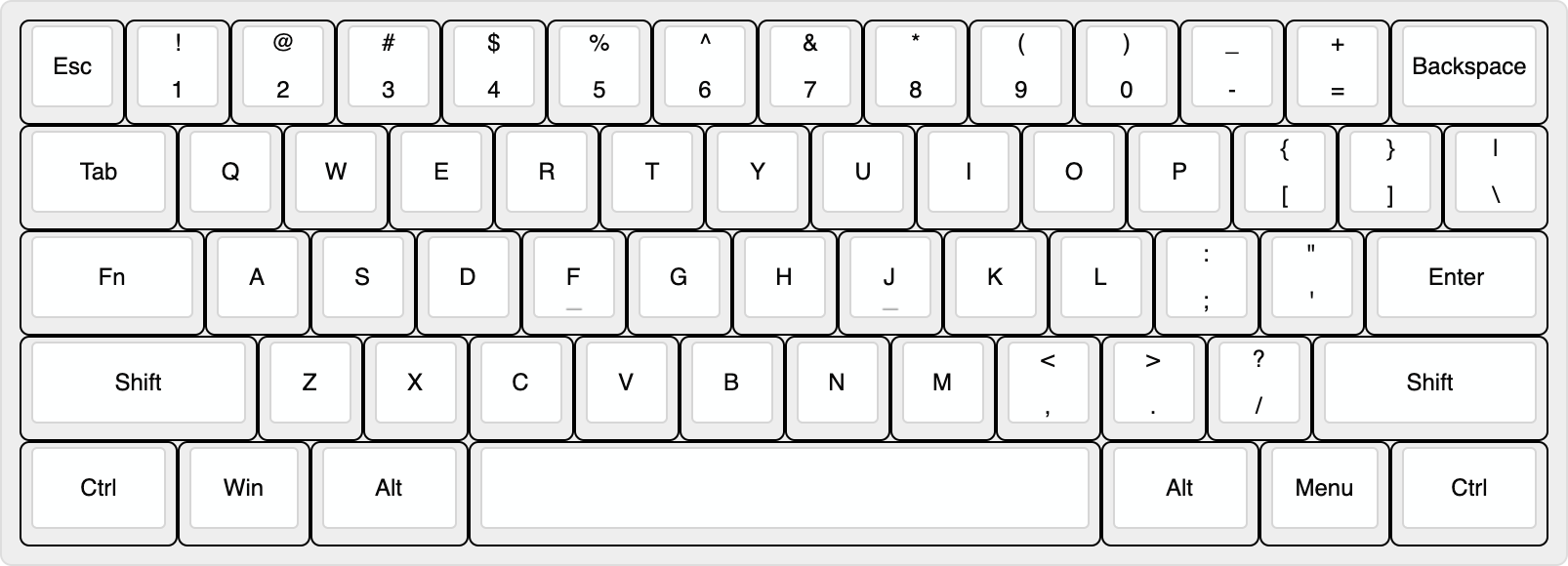
It is a completely symmetrical design.
Draw a line in the center:
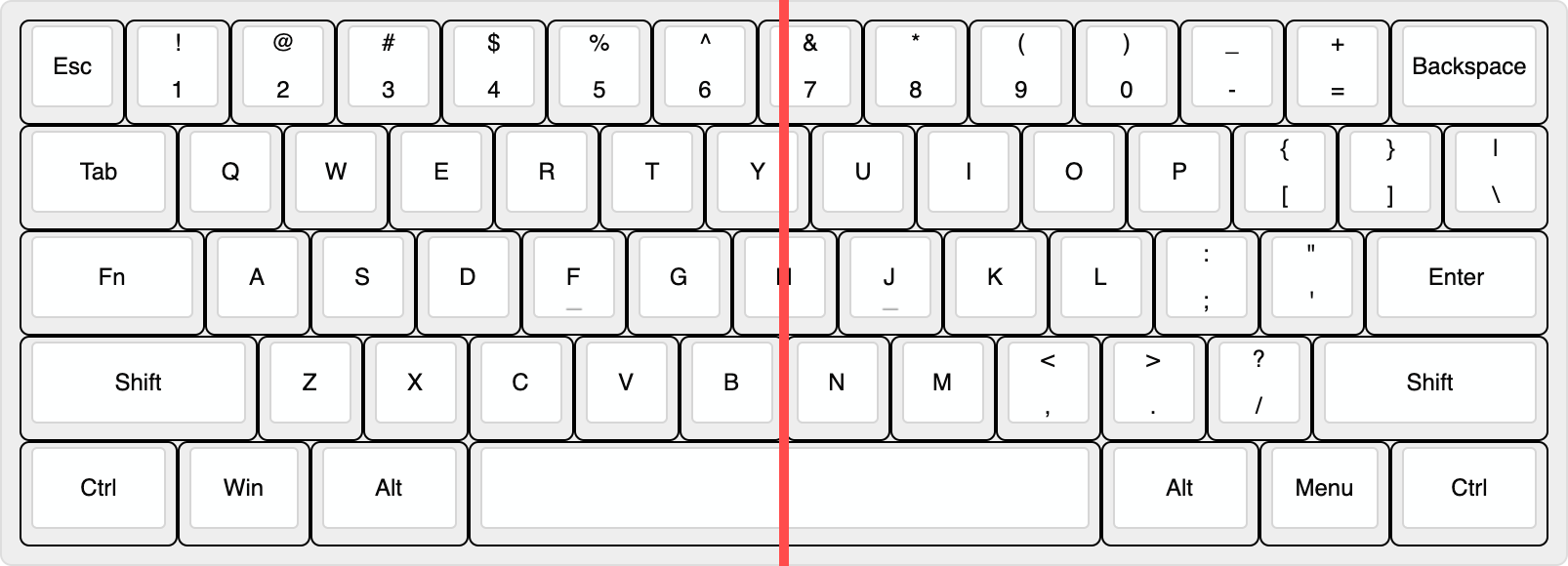
Row 1, 2 are diagonally symmetric. And row 3 to 5 are perfectly symmetrical. As is known, most people feel psychologically secure in symmetry.
The most striking feature is the position of the Fn key.
The usage of Caps lock is very infrequent. But among the non-letter keys, it is located in the most convenient place to press. This place is a waste for Caps lock! It is why we put Fn key here.
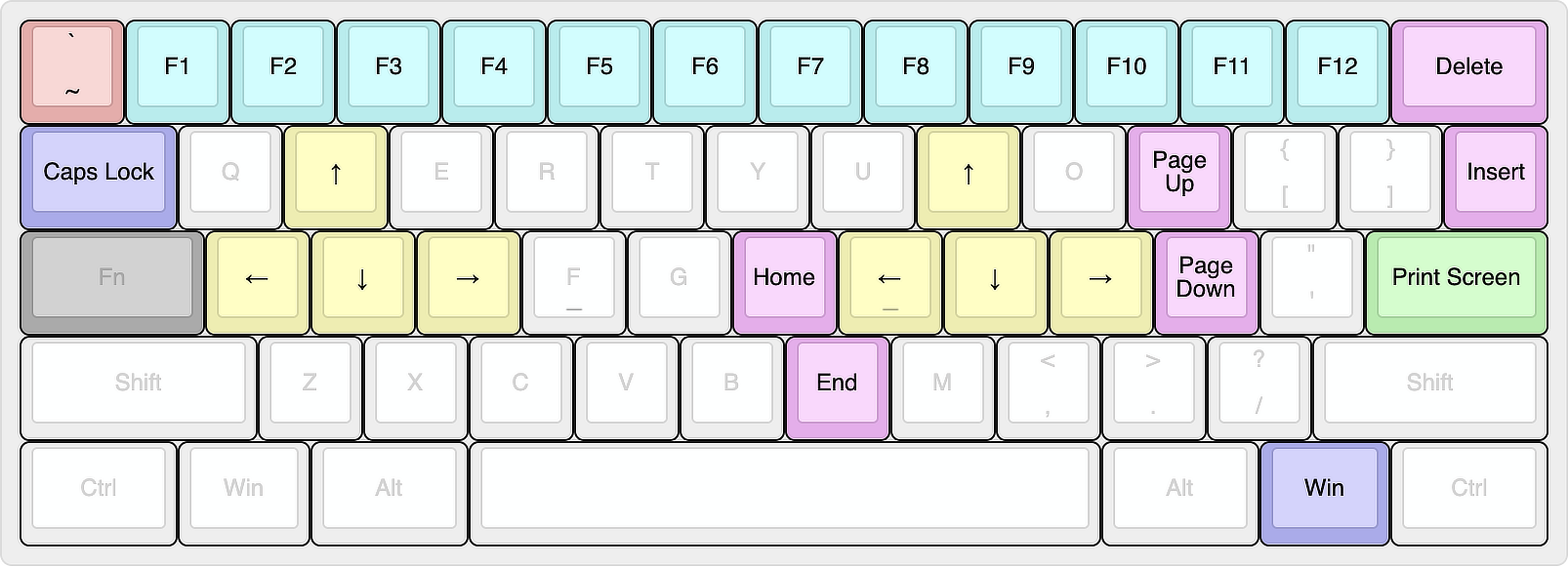
We have placed the rest of combination keys where comfortable to press.
People place their hands diagonally on the keyboard for body structural reasons. Therefore, the range of keys that can be pressed by moving only a finger from the default position is as follow:
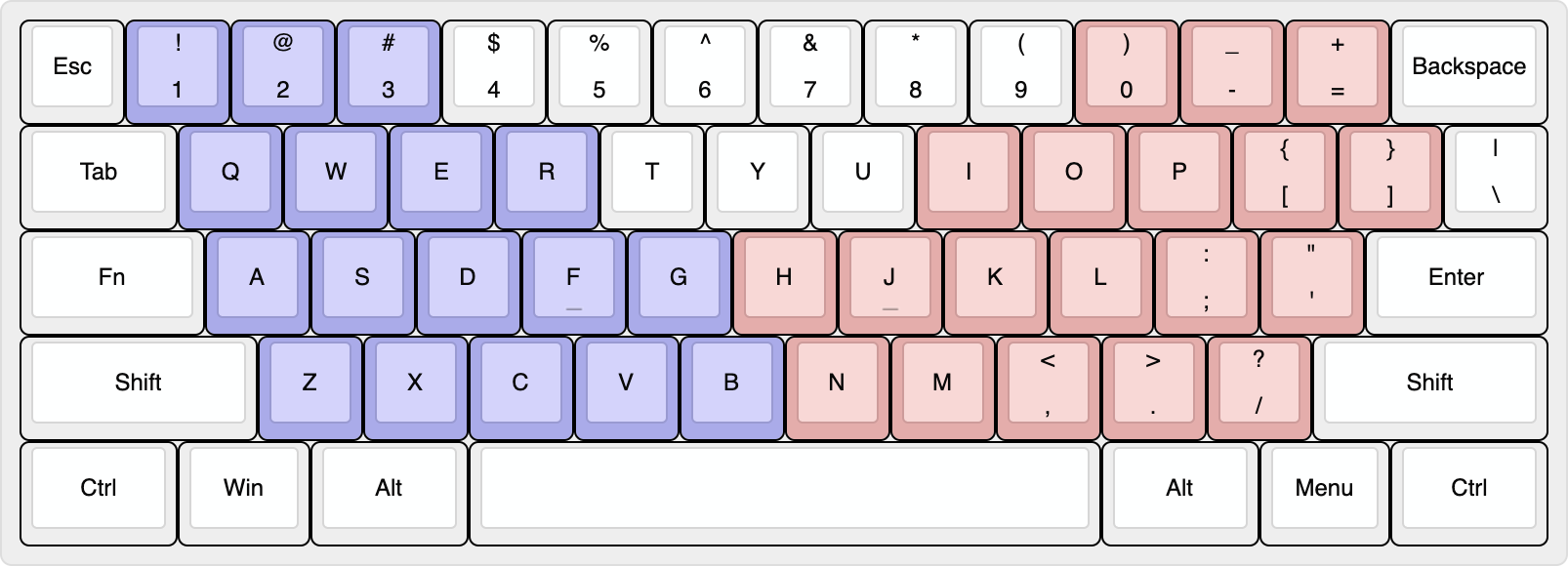
Blue is left hand, red is right hand. Since the left hand presses the Fn key, the combination keys are placed in the red range. Here is the result:
This layout is inspried by these keyboards.
This layout is not standard, so be careful when buying keycaps.
Here is a list of compatible keycap sets.
We want to provide sources for making keyboards that is:
Do you want to help? That’s awesome. We welcome contributions of all kinds from everyone.
The following open-source software was used for this project. Thanks for everything:
Licensed under the CC BY-NC-SA 4.0.
Almost everything is permitted, but not for commercial use.
| Qty | Value | Footprint | References |
|---|---|---|---|
| 60 | D | D_SOD-323F | D1, D2, D10, D11, D12, D13, D14, D15, D16, D17, D18, D19, D20, D21, D22, D23 +44 |
| 47 | SW_Push | SW_Cherry_MX_PCB_1.00u | SW1, SW2, SW10, SW11, SW12, SW13, SW16, SW17, SW18, SW19, SW20, SW21, SW22, SW23, SW24, SW25 +31 |
| 6 | SW_Push | SW_Cherry_MX_PCB_1.50u | SW14, SW15, SW54, SW56, SW58, SW60 |
| 4 | 0.1u | C_0603_1608Metric | C3, C4, C5, C6 |
| 2 | 10k | R_0603_1608Metric | R3, R4 |
| 2 | 22 | R_0603_1608Metric | R1, R2 |
| 2 | 22p | C_0603_1608Metric | C1, C2 |
| 2 | SW_Push | SW_Cherry_MX_PCB_1.25u | SW55, SW59 |
| 2 | SW_Push | SW_Cherry_MX_PCB_1.75u | SW29, SW41 |
| 2 | SW_Push | SW_Cherry_MX_PCB_2.25u | SW42, SW53 |
| 1 | 1u | C_0603_1608Metric | C8 |
| 1 | 4.7u | C_0603_1608Metric | C7 |
| 1 | ATmega16U4-AU | TQFP-44_10x10mm_P0.8mm | U1 |
| 1 | Crystal_GND24 | Crystal_SMD_3225-4Pin_3.2x2.5mm | Y1 |
| 1 | SW_Push | SW_Cherry_MX_PCB_6.00u | SW57 |
| 1 | SW_SPST | SW_SPST_TL3342 | RST |
| 1 | TPD2S017 | SOT-23-6 | U2 |
| 1 | USB_C_Receptacle_USB2.0 | USB_C_Receptacle_XKB_U262-16XN-4BVC11 | J1 |


OLIMEX/DIY-LAPTOP
Do It Yourself Open Source Hardware and Software Modular Hacker's Friendly Laptop

It measures 276.2 × 95.2 mm and has 2 copper layers, 1.6 mm thick.
137 parts, built around the ATMEGA16U4-AU and TPD2S017DBV. The full list of its parts is on this page, with links to each part's symbol and footprint where PCBKit's library has them.
From the weensy/LXKB repository on GitHub, at the commit this page was made from: the board is kicad/LXKB.kicad_pcb. PCBKit opens the board in the browser, with nothing to install.
Its repository states no licence, so its author keeps all rights: ask weensy before reusing the design.