
6 layers
Pc healthypi move sensor v9
Protocentral/healthypi-move-hw
Hardware files for the HealthyPi Move
124 parts160MIT
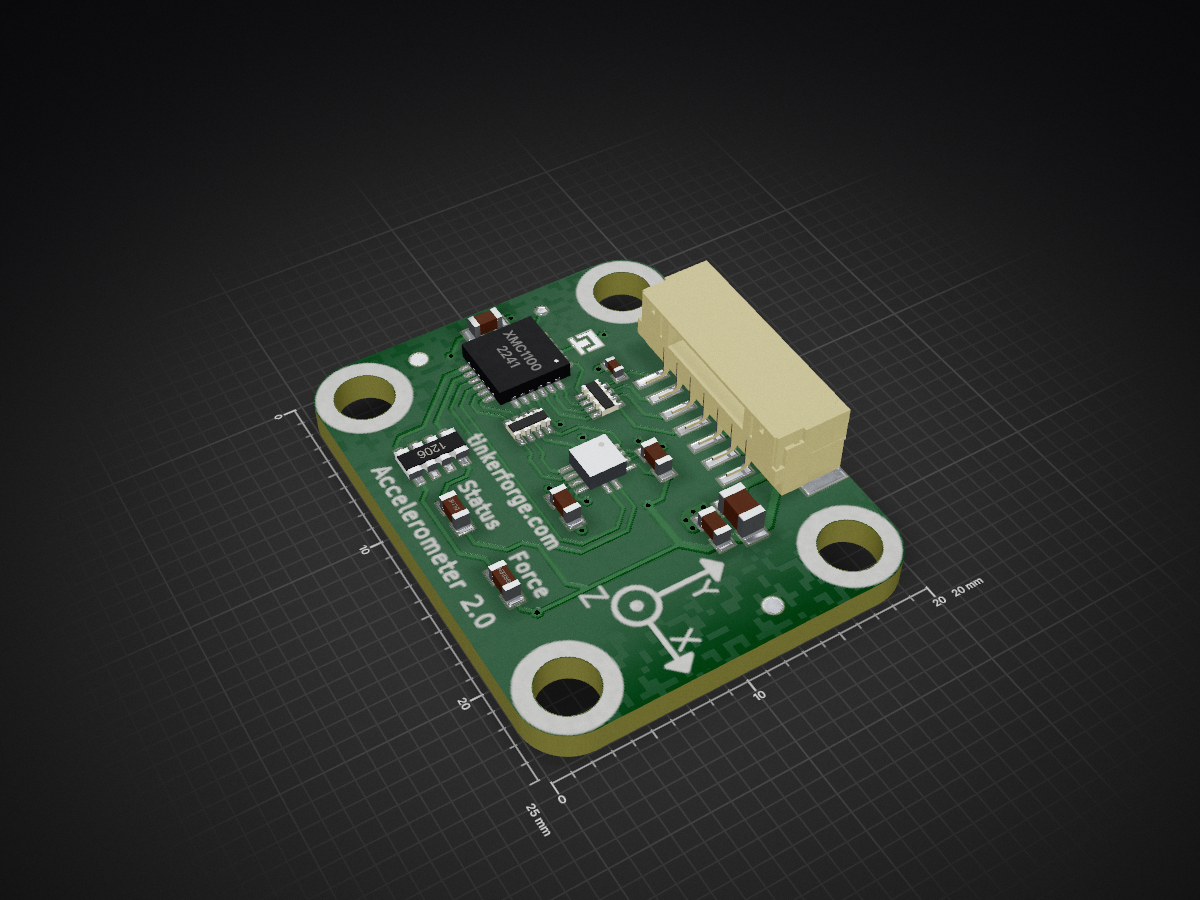
 Tinkerforge/accelerometer-v2-bricklet
Measures acceleration in three axis
Accelerometer v2 is an open-source printed circuit board by Tinkerforge, from the Tinkerforge/accelerometer-v2-bricklet repository on GitHub. It is a 2-layer board of 20 × 25 mm with 25 parts on 27 nets, routed with 229 tracks and 19 vias.
It is built around the KX122-1037. Its parts include 6 capacitors, 6 ICs, 3 connectors and 2 diodes. It belongs with the sensors and measurement boards of this library.
This repository contains the firmware source code and the hardware design files. The documentation generator configs can be found at https://github.com/Tinkerforge/generators
software/:
hardware/:
datasheets/:
The hardware is designed with the open source EDA Suite KiCad (http://www.kicad.org). Before you are able to open the files, you have to install the Tinkerforge kicad-libraries (https://github.com/Tinkerforge/kicad-libraries). You can either clone them directly in hardware/ or clone them in a separate folder and symlink them into hardware/ (ln -s kicad_path/kicad-libraries project_path/hardware). After that you can open the .pro file in hardware/ with KiCad and from there view and modify the schematics and the PCB layout.
If you want to do your own Brick/Bricklet firmware development we highly recommend that you use our build environment setup script and read the tutorial (https://www.tinkerforge.com/en/doc/Tutorials/Tutorial_Build_Environment/Tutorial.html).
To compile the C code we recommend you to install the newest GNU Arm Embedded Toolchain (https://launchpad.net/gcc-arm-embedded/+download). You also need to install bricklib2 (https://github.com/Tinkerforge/bricklib2).
You can either clone it directly in software/src/ or clone it in a separate folder and symlink it into software/src/ (ln -s bricklib_path/bricklib2 project_path/software/src/). Finally make sure to have CMake installed (http://www.cmake.org/cmake/resources/software.html).
After that you can build the firmware by invoking make in software/. The firmware (.zbin) can then be found in software/build/ and uploaded with brickv (click button "Flashing" on start screen).
| Qty | Value | Footprint | References |
|---|---|---|---|
| 4 | 100nF | kicad-libraries:C0603F | C3, C4, C5, C6 |
| 4 | DRILL | kicad-libraries:DRILL_NP | U3, U4, U5, U6 |
| 2 | 82 | kicad-libraries:4X0402 | RP1, RP2 |
| 2 | VAL** | Fiducial_Mark | Fiducial_Mark, Fiducial_Mark |
| 1 | 10uF | kicad-libraries:C0805 | C2 |
| 1 | 1k | kicad-libraries:4X0603 | RP3 |
| 1 | 220pF | kicad-libraries:C0402F | C1 |
| 1 | Boot | kicad-libraries:SolderJumper | P3 |
| 1 | CE_5mm | kicad-libraries:CE_5mm | VAL |
| 1 | CON-SENSOR | kicad-libraries:CON-SENSOR2 | P1 |
| 1 | Debug | kicad-libraries:DEBUG_PAD | P2 |
| 1 | KX122-1037 | kicad-libraries:KX122-1037 | U2 |
| 1 | LOGO | kicad-libraries:Logo_CoMCU | G*** |
| 1 | WEEE_7mm | kicad-libraries:WEEE_7mm | VAL |
| 1 | XMC1100 | kicad-libraries:QFN24-4x4mm-0.5mm | U1 |
| 1 | blue | kicad-libraries:D0603F | D1 |
| 1 | green | kicad-libraries:D0603F | D2 |
It measures 20 × 25 mm and has 2 copper layers, 1.6 mm thick.
25 parts, built around the KX122-1037. The full list of its parts is on this page, with links to each part's symbol and footprint where PCBKit's library has them.
From the Tinkerforge/accelerometer-v2-bricklet repository on GitHub, at the commit this page was made from: the board is hardware/accelerometer-v2.kicad_pcb and its schematic hardware/accelerometer-v2.kicad_sch. PCBKit opens the board in the browser, with nothing to install.
Its repository states no licence, so its author keeps all rights: ask Tinkerforge before reusing the design.
Protocentral/healthypi-move-hw
Hardware files for the HealthyPi Move


google/mozc-devices
Circuit diagrams and firmware source code for Gboard DIY keyboards

davidphilipbarr/Sweep
Sweep - a small promicro based keyboard inspired by the Ferris.


hackclub/OnBoard
💡 Join 1,000 teenagers and make your first PCB with a $100 grant!

xyphro/UsbGpib
Versatile, cheap and portable USB to GPIB converter (USBTMC class based)