2 layers50 × 47 mm
 tiefpunkt/arduinoretrogames
Custom PCB for Rob Cai's Arduino VGA games
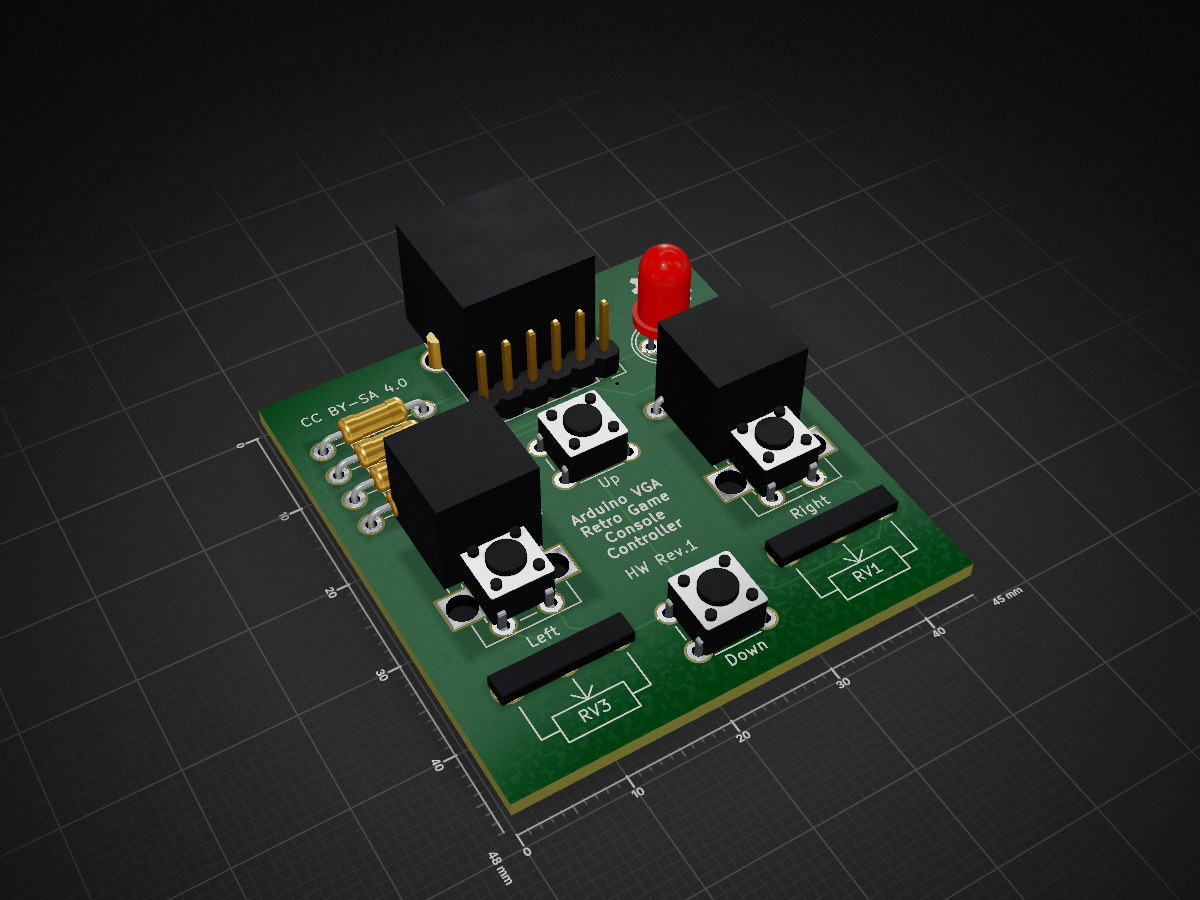
Controller is an open-source printed circuit board by tiefpunkt, from the tiefpunkt/arduinoretrogames repository on GitHub. It is a 2-layer board of 45 × 48 mm with 17 parts on 7 nets, routed with 127 tracks and 3 vias.
Its parts include 5 resistors, 4 switches, 2 connectors and 1 diode.
Rob Cai published two Instructables in which he used an Arduino to emulate some old-school videogames. I didn’t want to build the project on protoboard, so I designed these PCBs for that.
The hardware of the retro videogame console is made up of a mainboard, and two different controller types.
The mainboard runs the video games, and connect to the VGA monitor, one or two controllers, and to power. It's made up of an Arduino Pro Mini, a few resistors, some more connectors, and possibly a buzzer for audio.
| Part Number | Type |
|---|---|
| R1 | Resistor 470Ω |
| R2 | Resistor 470Ω |
| R3 | Resistor 68Ω |
| R4 | Resistor 68Ω |
| P1 | Jumper 2x3 for color setting (see below) |
| P2 | Jumper 2x3 for color setting (see below) |
The arduino outputs two color signals, and you can choose, which colors those should represent on the monitor. To do that, you have the two color jumpers in the bottom right corner of the board. You can check out our recommendations in the table below.
| Game | Color1 | Jumper Setting for Color 1 | Color 2 | Jumper Setting for Color 2 |
|---|---|---|---|---|
| Tetris | ??? | : : [:] | ??? | : [:] : |

 Depending on the game you want to play, two different types of
controllers are necessary. One has one button and one knob
(potentiometer), the other one simply 4 buttons. Both are based on the
same PCB, just with different parts put in place
Part number | Description | Necessary for | Necessary for |
|---|---|---|---|
D1 | 5mm LED | (x) | (x) |
J1 | RJ12 connector | x | x |
R1 | Resistor 150Ω | (x) | (x) |
R2 | Resistor 1kΩ | - | x |
R3 | Resistor 1kΩ | - | x |
R4 | Resistor 1kΩ | - | x |
R5 | Resistor 1kΩ | x | x |
RV2 | Potentiometer 10kΩ | x | - |
RV4 | Potentiometer 10kΩ | - | - |
SW1 | Pushbutton | - | x |
SW2 | Pushbutton | - | x |
SW3 | Pushbutton | - | x |
SW4 | Pushbutton | x | x |
R1 and D1 are for an optional LED which lights up when the controller is connected to the mainboard.
The games for the Arduino Retro Videogame Console are made by Rob Cai, and can be found on Instructables
Licensed under Creative Commons Attribution-ShareAlike 4.0 Unported License (CC BY-SA 4.0)
| Qty | Value | Footprint | References |
|---|---|---|---|
| 5 | 1k | Resistors_THT:Resistor_Horizontal_RM10mm | R1, R2, R3, R4, R5 |
| 2 | 10k | added:Potentiometer_Alpha-RV09 | RV2, RV4 |
| 2 | 10k | Potentiometers:Potentiometer_WirePads | RV1, RV3 |
| 1 | CONN_01X06 | Pin_Headers:Pin_Header_Straight_1x06 | P1 |
| 1 | Down | Buttons_Switches_THT:SW_PUSH_6mm_h5mm | SW3 |
| 1 | LED | LEDs:LED-5MM | D1 |
| 1 | Left | Buttons_Switches_THT:SW_PUSH_6mm_h5mm | SW4 |
| 1 | RJ12 | Connectors:RJ12_E | J1 |
| 1 | Right | Buttons_Switches_THT:SW_PUSH_6mm_h5mm | SW2 |
| 1 | Up | Buttons_Switches_THT:SW_PUSH_6mm_h5mm | SW1 |
The 16 most common of 17 parts.
It measures 45 × 48 mm and has 2 copper layers, 1.6 mm thick.
17 parts. The full list of its parts is on this page, with links to each part's symbol and footprint where PCBKit's library has them.
From the tiefpunkt/arduinoretrogames repository on GitHub, at the commit this page was made from: the board is hardware/controller/controller.kicad_pcb. PCBKit opens the board in the browser, with nothing to install.
Its repository states no licence, so its author keeps all rights: ask tiefpunkt before reusing the design.


hoglet67/RGBtoHDMI
Bare-metal Raspberry Pi project that provides pixel-perfect sampling of Retro Computer RGB/YUV video and conversion to HDMI


hackclub/OnBoard
💡 Join 1,000 teenagers and make your first PCB with a $100 grant!

DDeGonge/OS-ARM
This arm is not industrial and it will not be fast, but that is not my goal. But it will hopefully be a very nice looking arm fully capable of 6dof motion, cheap enough to keep it accessable but capable enough to…

