4 layers122.5 × 99.5 mm

 the2fye/PocketStockV1
ESP32-based dual OLED stock ticker displaying real-time market data
PocketStockV2 is an open-source printed circuit board by the2fye, from the the2fye/PocketStockV1 repository on GitHub, published under the MIT licence. It is a 4-layer board of 31 × 40 mm with 7 parts on 16 nets, routed with 29 tracks and 2 vias.
It belongs with the lEDs and displays boards of this library.
A palm-sized, WiFi-connected stock ticker built from under $10 of parts. Live prices, sparkline charts, and a market clock — on your desk, off your phone.

ESP32-C3 · SSD1306 OLED · 3 buttons · Finnhub API · $9.45 BOM · 100% open source
PocketStock is a tiny desktop gadget that pulls live stock quotes from the Finnhub API over WiFi and displays them on a crisp 0.96" OLED. Scroll through your watchlist, open a ticker, and get:
Navigation is a simple three-button menu system — up, down, select — with long-press to go back. No touchscreen, no app, no subscription.
Is it going to replace the military-grade supercomputer in your other pocket? No. But it's a dedicated, glanceable market display that doesn't buzz, doesn't distract, and doesn't try to sell you anything. It just tells you the number. (V1 runs off USB power — true pocket portability is on the roadmap.)
Oh, and there's Pong hidden in the settings menu. Because every good gadget needs a game.
The entire build costs $9.45 in parts:
| Ref | Part | Qty | Cost |
|---|---|---|---|
| U1 | ESP32-C3 SuperMini | 1 | $6.00 |
| U2 | SSD1306 OLED display, 128×64 I²C (addr 0x3C) | 1 | $3.00 |
| SW1–SW3 | 6mm tactile push buttons | 3 | $0.45 |
| Total | $9.45 |
Plus a custom PCB and a 3D-printed enclosure (STLs in cad/psv1-stls). Full parts list with supplier links: hardware/bill-of-materials-psv1.csv
Everything you need to reproduce or remix the board is included: ready-to-fab gerbers in hardware/gerbers, the full KiCad project (schematic + board layout) in hardware/pcb, and a STEP model of the assembled PCB for designing your own enclosure around it.
| Signal | ESP32-C3 pin |
|---|---|
| OLED SDA | GPIO 4 |
| OLED SCL | GPIO 5 |
| Button — Up | GPIO 6 |
| Button — Down | GPIO 7 |
| Button — Select | GPIO 8 |
Buttons are active-low using the ESP32's internal pull-ups — wire each button between its GPIO and GND. No external resistors needed.
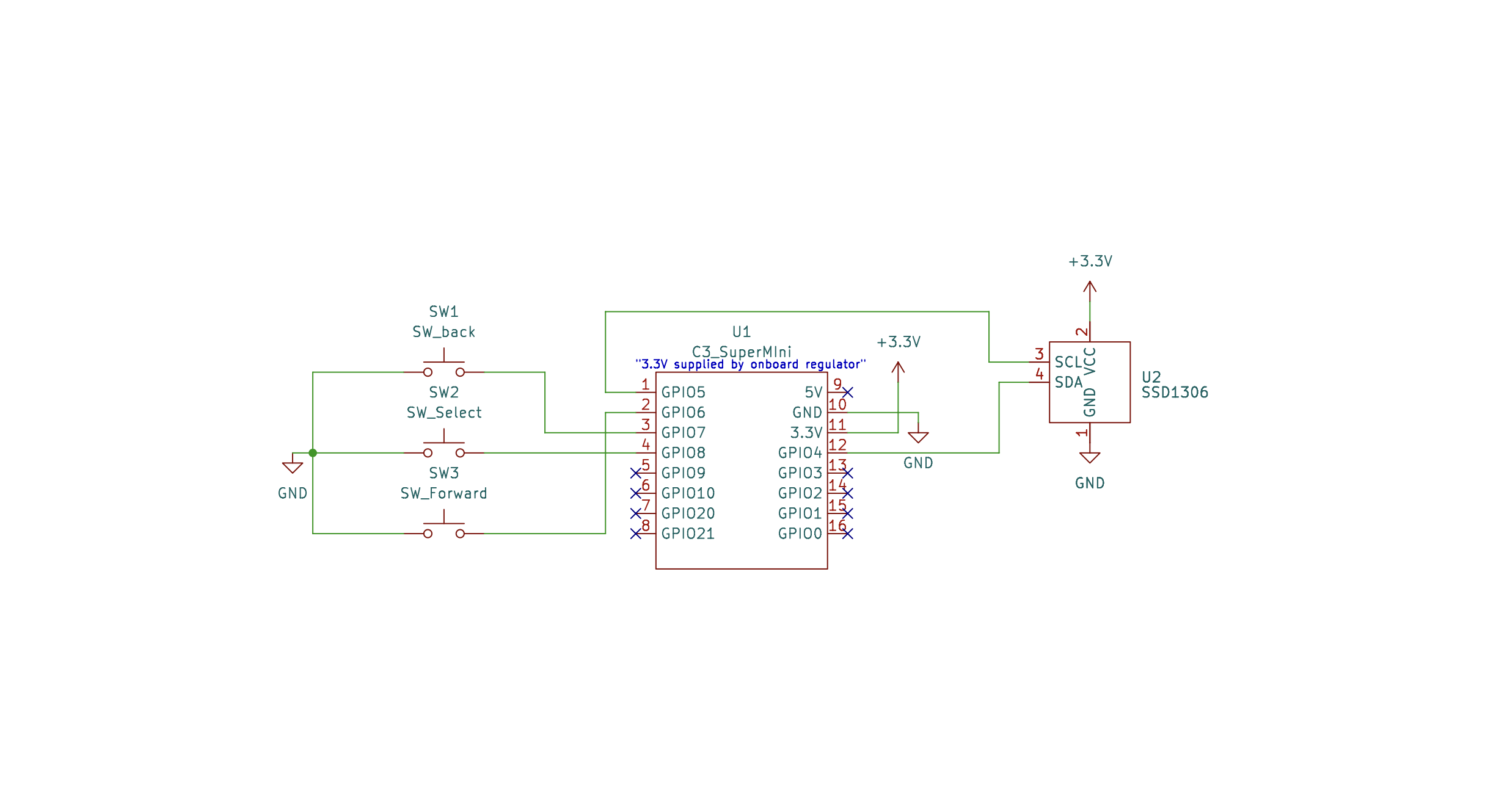
Full vector version: hardware/schematics/psv1-sch.pdf · KiCad source: hardware/schematics
Print the three STLs in cad/psv1-stls: base-v3.stl, lid-v3.stl, and button-v3.stl (×3).
Upload the files in hardware/gerbers to your favorite fab (JLCPCB, PCBWay, OSH Park). Prefer to breadboard first? The schematic above is all you need — or open the full KiCad project in hardware/pcb to modify the board itself.
Adafruit SSD1306Adafruit GFX LibraryArduinoJsonfirmware/PocketStockV1/PocketStockV1.ino and set your own values:const char* ssid = "YOUR_WIFI_SSID"; // open networks supported; add a password arg to WiFi.begin() for secured ones
const char* apiKey = "YOUR_FINNHUB_API_KEY"; // free at https://finnhub.iostocks[] array to build your own watchlist — any Finnhub-supported ticker works.Note: Finnhub's free tier allows 60 calls/minute. PocketStock polls every 3 seconds (20/min), so you're well within limits — but get your own free key rather than sharing one.
| Action | What it does |
|---|---|
| Up / Down | Move through menus and your stock list |
| Select (short press) | Open the highlighted item |
| Select (hold ~0.7s) | Go back |
| Up / Down (in Pong) | Move your paddle 🏓 |


├── cad/
│   ├── psv1-stls/    3D-printable enclosure (base, lid, buttons)
│   └── renders/      Enclosure renders
├── docs/             Architecture doc — how the firmware & hardware work
├── firmware/         ESP32-C3 Arduino sketch
└── hardware/
    ├── gerbers/      Ready-to-fab PCB files
    ├── pcb/          Full KiCad project + STEP model + board renders
    ├── schematics/   Schematic (PNG, PDF, KiCad source)
└── bill-of-materials-psv1.csvSee LICENSE. Fork it, print it, mod it — and if you build one, open an issue with a photo. I'd love to see it.
| Qty | Value | Footprint | References |
|---|---|---|---|
| 2 | LOGO | LOGO | G***, G*** |
| 1 | C3_SuperMIni | esp_32:ESP_32_C3_SuperMini | U1 |
| 1 | SSD1306 | esp_32:SSD1306 | U2 |
| 1 | SW_Forward | Button_Switch_THT:SW_PUSH_6mm | FORWARD |
| 1 | SW_Select | Button_Switch_THT:SW_PUSH_6mm | SELECT |
| 1 | SW_back | Button_Switch_THT:SW_PUSH_6mm | BACK |
It measures 31 × 40 mm and has 4 copper layers, 1.6 mm thick.
7 parts. The full list of its parts is on this page, with links to each part's symbol and footprint where PCBKit's library has them.
From the the2fye/PocketStockV1 repository on GitHub, at the commit this page was made from: the board is hardware/pcb/PocketStockV2.kicad_pcb and its schematic hardware/pcb/PocketStockV2.kicad_sch. PCBKit opens the board in the browser, with nothing to install.
Its repository publishes it under the MIT licence: you may reuse it on that licence's terms (keep the author's notice, and for a copyleft licence share your changes alike).

MicroCoreLabs/Projects
Ted Fried's MicroCore Labs Projects - FPGA CPU cores and emulators for the 8088, 8086, 8051, 6502, 68000, Z80, Risc-V, and also Typewriter and EPROM Emulator projects.


agranlund/raven
Homemade MC68060 + DSP56303 Atari-compatible computer. Hardware, firmware, and software stack

rjwalters/kicad-tools
Standalone Python tools for parsing and manipulating KiCad schematic and PCB files

Board-Folk/MegaCD-Main-BD
Reproductions of main board PCBs for Sega's Mega CD/Sega CD add-on for the Mega Drive/Genesis console.

shibukawa/bdf
BDF is a browser document-preview suite: it combines converters for many formats (Go/WASM), a browser renderer of about 23 KB gzipped, and a compact intermediate format.

marsairforce/breakout_boards
Small circuit boards to assist with breadboard prototyping with SMD packages.