
2 layers159.5 × 30 mm
Type f
google/mozc-devices
Circuit diagrams and firmware source code for Gboard DIY keyboards
25 parts3kApache-2.0
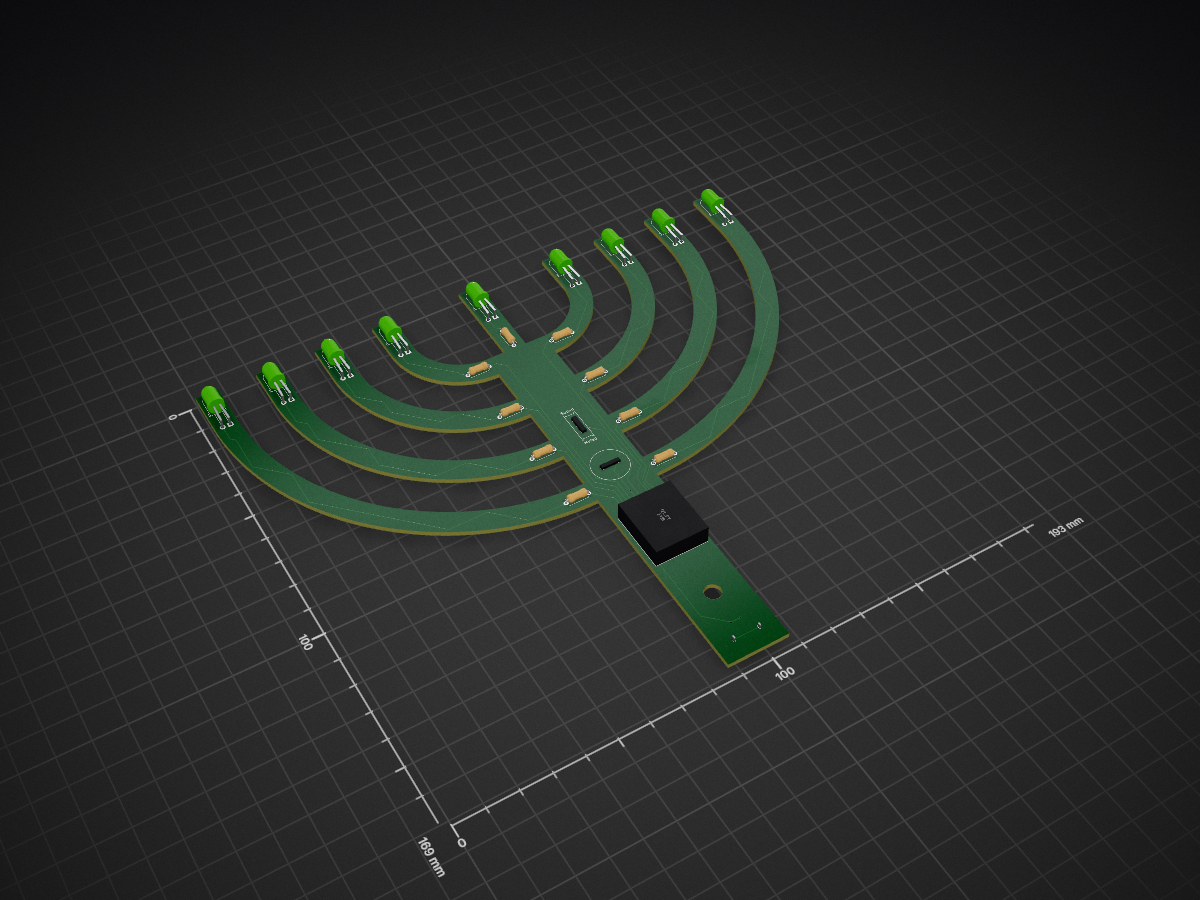
 tekktrik/CircuitPythonukiah_HW
A modern menorah
CircuitPythonukiah is an open-source printed circuit board by tekktrik, from the tekktrik/CircuitPythonukiah_HW repository on GitHub. It is a 2-layer board of 193 × 169 mm with 25 parts on 26 nets, routed with 235 tracks and 5 vias.
Its parts include 9 resistors, 9 diodes, 1 IC, 1 connector and 1 switch.



Hardware required for the CircuitPythonukiah project
Here are all the things needed: to physically build your very own CircuitPythonukiah:
The project makes use of two custom parts. The first is the custom PCB that is the heart
of the CircuitPythonukiah. The second is a base that can be 3D printed, which holds the
PCB upright. You can find the PCB KiCAD design and fabrication files in the
electrical/ folder, and you can find both the PCB's STEP file representation, as well
as the STEP and STL files for the base in the mechanical/ folder.
This project uses the following off-the-shelf mechanical components:
This project uses the following off-the-shelf electronic components:
There isn't necessarily one way to do this, but I can mention how I did it:
I used JLCPCB to fabricate my boards, mostly because I knew they could do blue PCBs and the quote for the weirdly shaped PCB was better than others I had looked at.
For the base, I used 0.2 mm layer thickness and 20% infill. I also didn't use supports when I printed since it came out pretty well without them, and I had a lot of trouble removing the breakway supports otherwise. I'm leaving it up to Hubs (the printing service I'll be using) to figure that last bit out (not sure I can specify either). I decided to print this in black rather than blue since the black made the board "pop" more.
This is by far the most labor-intensive step. Since I didn't plan on this being any kind of big operation, I decided to hand-solder eerything to the board. This was fairly straight forward with the exception of a couple things:
I used a small hand tool to screw in the self-tapping screw, which helped make sure the board wasn't rattling too much when everything is assembled. Don't forget to add the spacer before tightening everything!
The hardware for this project is licensed under the CERN-OHL-S license, and uses components, both original and modified, with the following licenses:
| Qty | Value | Footprint | References |
|---|---|---|---|
| 9 | 100 | Resistor_THT:R_Axial_DIN0207_L6.3mm_D2.5mm_P7.62mm_Horizontal | R1, R2, R3, R4, R5, R6, R7, R8, R9 |
| 9 | LED | LED_THT:LED_D5.0mm_Horizontal_O6.35mm_Z3.0mm | D1, D2, D3, D4, D5, D6, D7, D8, D9 |
| 1 | LOGO | CircuitPythonukiah:OSHWA Mark | G*** |
| 1 | MountingHole_5.3mm_M5 | MountingHole:MountingHole_5.3mm_M5 | M5 |
| 1 | OSHW Logo 18mm | CircuitPythonukiah:OSHW Logo 18mm | G*** |
| 1 | QT_Py | Adafruit:QT Py | U1 |
| 1 | SW_DIP_x01 | E-Switch:EG1218 | SW1 |
| 1 | Speaker | Adafruit:Piezo Buzzer | LS1 |
| 1 | USB_B_Micro | CUI Devices:CUI_UJC-VP-3-SMT-TR | J1 |
It measures 193 × 169 mm and has 2 copper layers, 1.6 mm thick.
25 parts. The full list of its parts is on this page, with links to each part's symbol and footprint where PCBKit's library has them.
From the tekktrik/CircuitPythonukiah_HW repository on GitHub, at the commit this page was made from: the board is electrical/CircuitPythonukiah.kicad_pcb and its schematic electrical/CircuitPythonukiah.kicad_sch. PCBKit opens the board in the browser, with nothing to install.
Its repository states no licence, so its author keeps all rights: ask tekktrik before reusing the design.
google/mozc-devices
Circuit diagrams and firmware source code for Gboard DIY keyboards

davidphilipbarr/Sweep
Sweep - a small promicro based keyboard inspired by the Ferris.


hackclub/OnBoard
💡 Join 1,000 teenagers and make your first PCB with a $100 grant!

xyphro/UsbGpib
Versatile, cheap and portable USB to GPIB converter (USBTMC class based)


jes/scamp-cpu
A homebrew 16-bit CPU with a homebrew Unix-like-ish operating system.
