
2 layers100 × 100 mm

A custom 65% keyboard with two knobs and two function layers to maximize my productivity.
Keeb is an open-source printed circuit board by sharonbasovich, from the sharonbasovich/keeb repository on GitHub. It is a 2-layer board of 309.1 × 121.7 mm with 144 parts on 104 nets, routed with 413 tracks and 1 via.
Its parts include 70 switches and 68 diodes. It belongs with the keyboards and input boards and the RP2040 boards of this library.
A custom 65% keyboard with two knobs and two function layers to maximize my productivity.
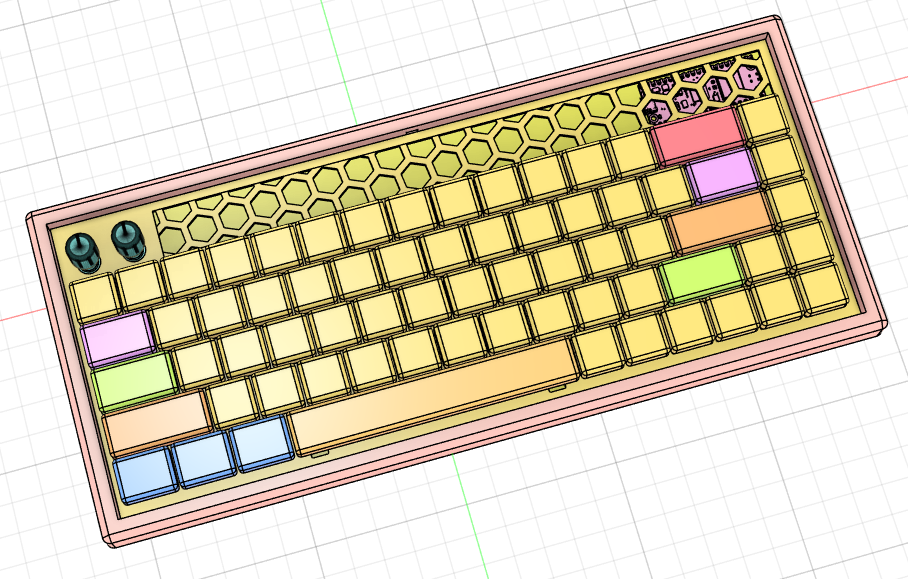
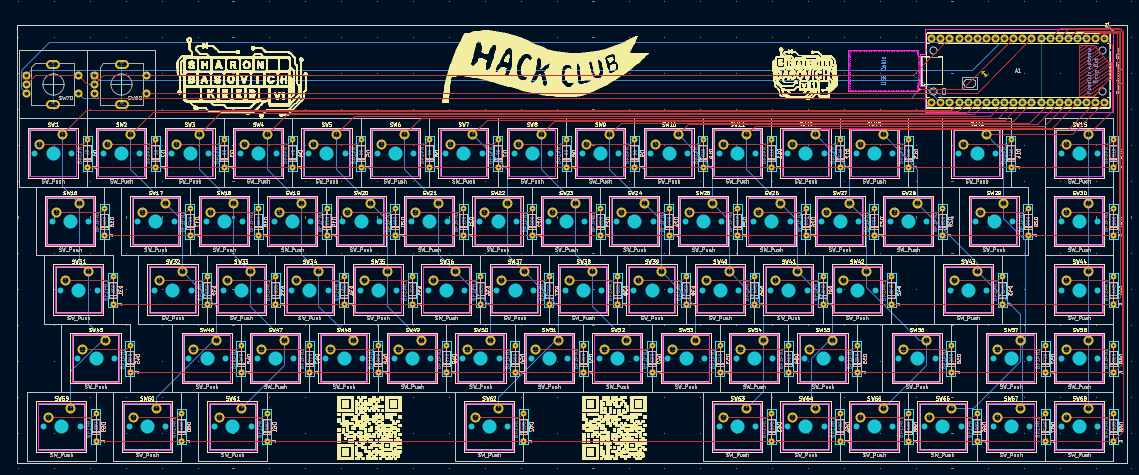
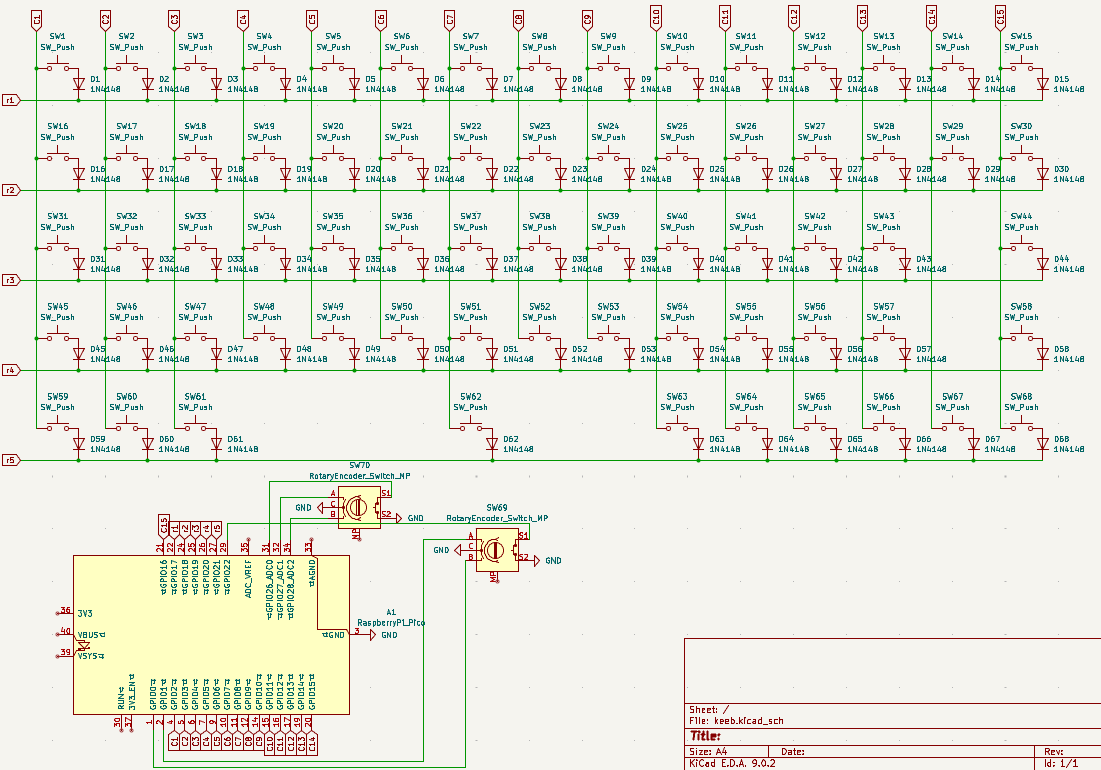
Apart from improving at CAD, KiCAD, programming, and soldering, my goal with this project was to make a keyboard that matched my preferences (such as two knobs) and could be made with readily available components. It uses standard switches, diodes, and encoders. Also, everything is THT which means I can use it to teach my friends soldering (like I did with my extra hackpad PCBs).
| Row | C1 | C2 | C3 | C4 | C5 | C6 | C7 | C8 | C9 | C10 | C11 | C12 | C13 | C14 | C15 |
|---|---|---|---|---|---|---|---|---|---|---|---|---|---|---|---|
| R1 | ESC | 1 | 2 | 3 | 4 | 5 | 6 | 7 | 8 | 9 | 0 | - | = | BSPC | DEL |
| R2 | TAB | Q | W | E | R | T | Y | U | I | O | P | [ | ] | BSLS | HOME |
| R3 | CAPS | A | S | D | F | G | H | J | K | L | ; | ' | ENTER | N/A | PGUP |
| R4 | LSFT | Z | X | C | V | B | N | M | , | . | / | RSFT | UP | N/A | PGDN |
| R5 | LCTL | LGUI | LALT | N/A | N/A | N/A | SPACE | N/A | N/A | RALT | FN1 | FN2 | LEFT | DOWN | RGHT |
| Item | Quantity | Link | Price |
|---|---|---|---|
| Raspberry Pi Pico | 1 | https://amazon.com/dp/B09KVB8LVR | 8.14 |
| Key Switches (JWICK Ultimate Black) | 68 | https://www.amazon.com/Ultimate-Switch-Switches-Mechanical-Keyboard/dp/B0C391QDFB/?th=1 | 19.99 |
| 1N4148 Diodes | 68 | https://www.amazon.com/McIgIcM-1n4148-switching-Standard-Through/dp/B06XB1R2NK/ | 4.99 |
| EC11 Rotary Encoder | 2 | https://www.amazon.com/Original-Rotary-Encoder-Digital-Potentiometer/dp/B07VP4847G/ | 3.10 |
| Keycaps | 68 | https://www.amazon.ca/Keycaps-Doubleshot-Switches-Mechanical-Keyboard/dp/B0D6QXTZT4/ | 35.99 |
| Stabilizers | 5 | https://www.amazon.com/DUROCK-Stabilizer-Innovative-Pre-clipped-Stabilizers/dp/B0D4QF6TGB/ | 9.99 |
| PCB | 1 | https://jlcpcb.com/ | 24.30 |
| Case Bottom | 1 | None, 3DP at home | |
| Case Top | 1 | None, 3DP at home |
| Qty | Value | Footprint | References |
|---|---|---|---|
| 68 | 1N4148 | Diode_THT:D_DO-35_SOD27_P7.62mm_Horizontal | D1, D2, D10, D11, D12, D13, D14, D15, D16, D17, D18, D19, D20, D21, D22, D23 +52 |
| 68 | SW_Push | Button_Switch_Keyboard:SW_Cherry_MX_1.00u_PCB_Sharon | SW1, SW2, SW10, SW11, SW12, SW13, SW14, SW15, SW16, SW17, SW18, SW19, SW20, SW21, SW22, SW23 +52 |
| 2 | RotaryEncoder_Switch_MP | ScottoKeebs_Scotto:Encoder_EC11_MX | SW69, SW70 |
| 1 | LOGO | highway:SBfinal | G*** |
| 1 | LOGO | highway:qr2 | G*** |
| 1 | LOGO | highway:sbkeeb | G*** |
| 1 | LOGO | highway:hc | G*** |
| 1 | LOGO | highway:qr1 | G*** |
| 1 | RaspberryPi_Pico | Module:RaspberryPi_Pico_Common_THT | A1 |
It measures 309.1 × 121.7 mm and has 2 copper layers, 1.6 mm thick.
144 parts. The full list of its parts is on this page, with links to each part's symbol and footprint where PCBKit's library has them.
From the sharonbasovich/keeb repository on GitHub, at the commit this page was made from: the board is pcb/keeb.kicad_pcb and its schematic pcb/keeb.kicad_sch. PCBKit opens the board in the browser, with nothing to install.
Its repository states no licence, so its author keeps all rights: ask sharonbasovich before reusing the design.

hackclub/OnBoard
💡 Join 1,000 teenagers and make your first PCB with a $100 grant!


rgoulter/keyboard-labs
Repo with my PCB designs and keyboard firmware


portlandhodl/nyan-keys-hardware
Hardware document for the nyan keys keyboard