
4 layers99 × 53.3 mm
PSLab
fossasia/pslab-hardware
PSLab Hardware Design and Schematics https://pslab.io
199 parts1.7kApache-2.0
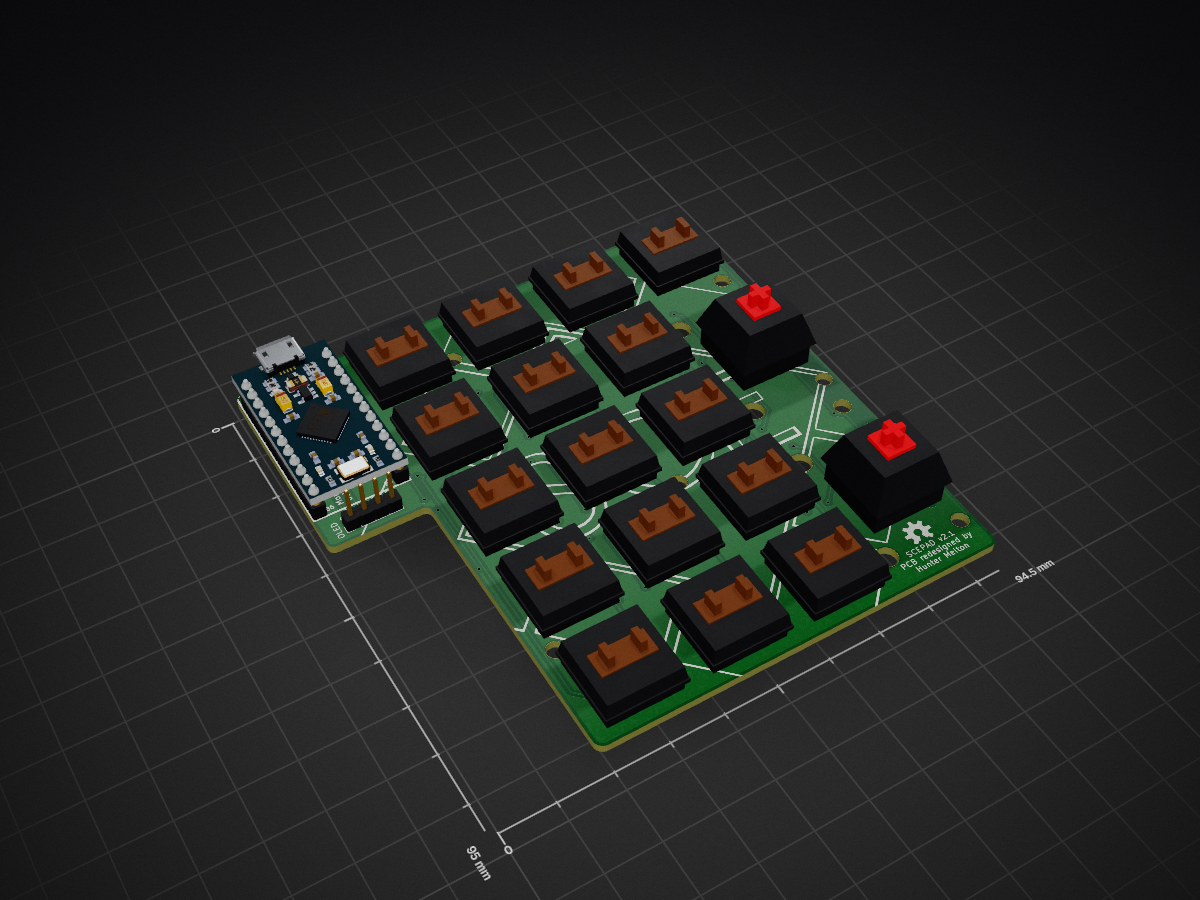
 SCE-Development/SCEPad1
SCE Workshop Macropad
SCEpad v2 is an open-source printed circuit board by SCE-Development, from the SCE-Development/SCEPad repository on GitHub. It is a 2-layer board of 94.5 × 95 mm with 65 parts on 49 nets, routed with 408 tracks and 64 vias.
It is built around the WS2812B. Its parts include 27 diodes, 18 switches, 9 capacitors and 1 IC. It belongs with the keyboards and input boards and the AVR (ATmega, ATtiny) boards of this library.
SCEPad




The SCE Pad is a instructional tool used during our soldering workshop series.
| Qty | Item | Notes |
|---|---|---|
| 1 | Arduino Pro Micro (ATmega32u4) | Alternatively you can use the Elite-C or Nice!Nano |
| 18 | Cherry MX compatible swtiches | |
| 18 | SOD-123 1N4148/1N4148W diodes | |
| 18 | Kailh PCB sockets CPG151101S11 | |
| 9 | WS2812B RGB LEDs | |
| 9 | SMD 0805 100nF capacitors | |
| 1 | I2C 0.91" 128*32 OLED Display Module | The ones using SSD1306 driver IC over I2C |
| 1 | 6mm*6mm button switch | |
| 1 | SCEPad PCB | Available in SCE Club Room (ENG294) |
| 5 | M3 screws |
Requirements
After installing QMK toolbox, assuming you are using the default ProMicro controller, plug the device into your computer and you should see it show up as a new device in the console. Make sure the MCU selected is an ATmega32U4. Auto-flash is useful here but its preference.
Select your hex-file and flash your microcontroller.
| Qty | Value | Footprint | References |
|---|---|---|---|
| 18 | D | Diode_SMD:D_SOD-123 | D0, D1, D2, D3, D10, D11, D12, D13, D20, D21, D22, D30, D31, D32, D40, D41 +2 |
| 16 | KEYSW | kailh-pcb-sockets:Kailh-PCB-Socket-1U-Cutout | K0, K1, K2, K3, K10, K11, K12, K20, K21, K22, K30, K31, K32, K40, K41, K42 |
| 9 | 104 | Capacitor_SMD:C_0805_2012Metric_Pad1.15x1.40mm_HandSolder | C0, C1, C2, C3, C4, C5, C6, C7, C8 |
| 9 | WS2812B | LED_SMD:LED_WS2812B_PLCC4_5.0x5.0mm_P3.2mm | LED0, LED1, LED2, LED3, LED4, LED5, LED6, LED7, LED8 |
| 5 | MountingHole_3.2mm_M3 | MountingHole:MountingHole_3.2mm_M3 | M3, M3, M3, M3, M3 |
| 2 | KEYSW | kailh-pcb-sockets:Kailh-PCB-Socket-2U | K13, K43 |
| 2 | LOGO | LOGO | G***, G*** |
| 1 | Sparkfun-Aesthetics:OSHW-LOGO-M | ||
| 1 | Conn_01x04 | Connector_PinHeader_2.54mm:PinHeader_1x04_P2.54mm_Vertical | OLED |
| 1 | ProMicro | Keebio-Parts:ArduinoProMicro | U0 |
| 1 | SW_Push | Button_Switch_THT:SW_PUSH_6mm | RST |
It measures 94.5 × 95 mm and has 2 copper layers, 1.6 mm thick.
65 parts, built around the WS2812B. The full list of its parts is on this page, with links to each part's symbol and footprint where PCBKit's library has them.
From the SCE-Development/SCEPad repository on GitHub, at the commit this page was made from: the board is PCB/SCEpad_v2.kicad_pcb and its schematic PCB/SCEpad_v2.kicad_sch. PCBKit opens the board in the browser, with nothing to install.
Its repository states no licence, so its author keeps all rights: ask SCE-Development before reusing the design.
fossasia/pslab-hardware
PSLab Hardware Design and Schematics https://pslab.io

FrameworkComputer/ExpansionCards
Reference designs and documentation to create Expansion Cards for the Framework Laptop


PrintersForAnts/Micron
If you want to purchase full kits there are 3 available (Kits are slowly updating to R1 hardware just make sure to double check the included hardware in your kit and if you have any questions reach out in the discord)


