
4 layers99 × 53.3 mm
PSLab
fossasia/pslab-hardware
PSLab Hardware Design and Schematics https://pslab.io
199 parts1.7kApache-2.0

 sat0ken/wio-gopher
Wio Terminal の背面 40pin ヘッダに挿す、Gopherくんデザインの基板です。 Gopher の目に WS2812B (フルカラー LED) を 2 個載せていて、TinyGo で光らせます。
Wio gopher is an open-source printed circuit board by sat0ken, from the sat0ken/wio-gopher repository on GitHub, published under the MIT licence. It is a 2-layer board of 90.7 × 127 mm with 6 parts on 35 nets, routed with 55 tracks and 7 vias.
It is built around the WS2812B. Its parts include 2 diodes and 1 connector.
Wio Terminal の背面 40pin ヘッダに挿す、Gopherくんデザインの基板です。 Gopher の目に WS2812B (フルカラー LED) を 2 個載せていて、TinyGo で光らせます。
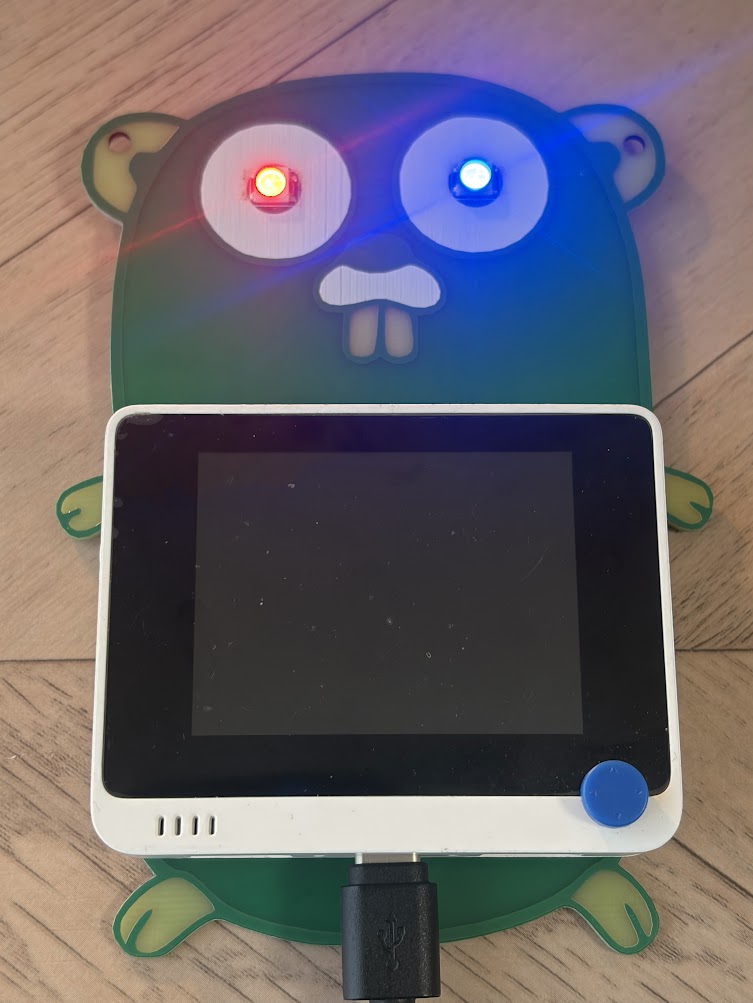
| パス | 内容 |
|---|---|
wio-gopher.kicad_pro / .kicad_sch / .kicad_pcb | KiCad プロジェクト |
lib/, lib.pretty/ | Wio Terminal 40pin ヘッダのシンボル / フットプリント |
wio-gopher/, wio-gopher.zip | ガーバー・ドリルデータ |
firmware/ | TinyGo のファームウェア |
| Wio Terminal 40pin | 接続先 |
|---|---|
| 1 (3V3) | D1, D2 VDD |
| 7 (PB14 / BCM4) | D1 DIN |
| GND | D1, D2 VSS |
D1 の DOUT は D2 の DIN につながっています。
パチンコ台風に、次の流れで光ります。
通常 (虹色) → リーチ (赤青の交互点滅が加速) → 抽選 → 大当たり (ストロボ連発) / ハズレ (赤がフェードアウト)
Wio Terminal を USB で PC につないで、次を実行します。
cd firmware
tinygo flash -target=wioterminal .OUTPUT_CTR_3V3 (PC15) を Low にしないと出力されません。TinyGo は起動時にこれを設定しないので、ファームウェアの中で有効にしています。firmware/main.go の brightness を下げてください。| Qty | Value | Footprint | References |
|---|---|---|---|
| 2 | WS2812B | LED_SMD:LED_WS2812B_PLCC4_5.0x5.0mm_P3.2mm | D1, D2 |
| 1 | LOGO | gopher:gopher2 | G*** |
| 1 | WioTerminal_GPIO_2x20 | lib:WioTerminal_Carrier_PinHeader_2x20 | J1 |
The 4 most common of 6 parts.
It measures 90.7 × 127 mm and has 2 copper layers, 1.6 mm thick.
6 parts, built around the WS2812B. The full list of its parts is on this page, with links to each part's symbol and footprint where PCBKit's library has them.
From the sat0ken/wio-gopher repository on GitHub, at the commit this page was made from: the board is wio-gopher.kicad_pcb and its schematic wio-gopher.kicad_sch. PCBKit opens the board in the browser, with nothing to install.
Its repository publishes it under the MIT licence: you may reuse it on that licence's terms (keep the author's notice, and for a copyleft licence share your changes alike).
fossasia/pslab-hardware
PSLab Hardware Design and Schematics https://pslab.io

FrameworkComputer/ExpansionCards
Reference designs and documentation to create Expansion Cards for the Framework Laptop


PrintersForAnts/Micron
If you want to purchase full kits there are 3 available (Kits are slowly updating to R1 hardware just make sure to double check the included hardware in your kit and if you have any questions reach out in the discord)


