4 layers190 × 70 mm
 samscam/clocklet2
A fancy clock implementation for ESP32
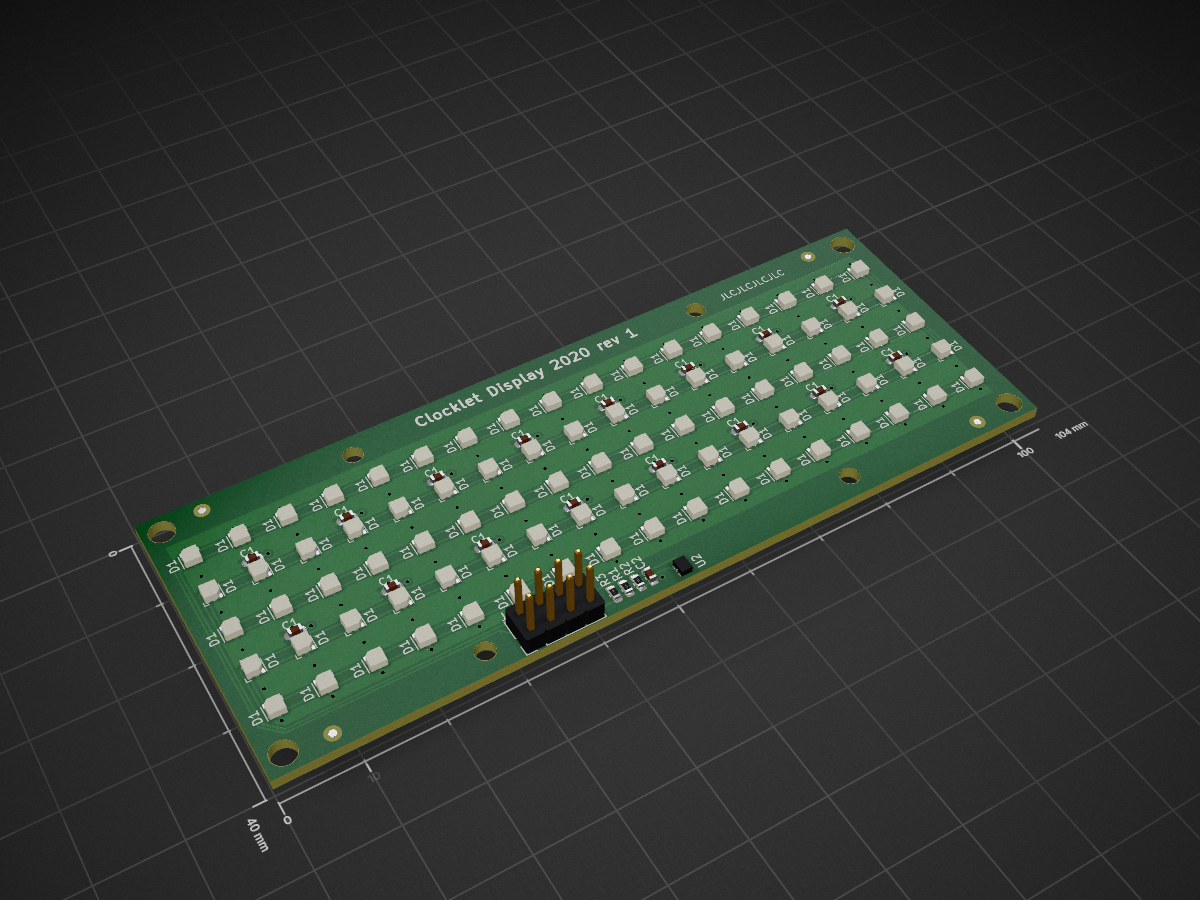
Display is an open-source printed circuit board by samscam, from the samscam/clocklet repository on GitHub, published under the MIT licence. It is a 4-layer board of 104 × 40 mm with 120 parts on 10 nets, routed with 487 tracks and 118 vias.
It is built around the APDS-9005-020 and SK9822-EC20. Its parts include 85 diodes, 17 capacitors, 3 resistors, 1 IC and 1 connector. It belongs with the lEDs and displays boards of this library.
See also clocklet.co.uk
This project is the firmware and client apps for clocks made by @samscam including:
Earlier prototypes used RGBDigit (WS2812B) 7-segment display and Adafruit Feather Huzzah32.
It's all a work in progress.
To build the the firmware:
Embedded directoryplatformio.ini or by invoking tasks for the specific environment in the editor/cli) this will probably be clockbrain/dev/cu.SLAB_USBtoUARTYou can connect to the clocklet's serial port from a computer with various tools (like screen, miniterm or putty) and see the Clocklet logging.
The important thing to note is that the baud rate of the serial connection is 115200.
The Clocklet serial port on Mac and Linux will be available as something like /dev/cu.SLAB_USBtoUART - you can do an ls /dev/cu.* before and after plugging it in to eliminate possibilities.
Then open it up in your tool of choice:
screen /dev/cu.SLAB_USBtoUART 115200
miniterm.py /dev/cu.SLAB_USBtoUART 115200
esptoolOn MacOS this can be done with homebrew: brew install esptool
On Linuxes it's probably available from apt install esptool or whatever package manager you're using.
Download the bin file of the firmware image you want from the releases section on here.
Plug in the Clocklet and figure out which port it is on - probably something like /dev/cu.SLAB_USBtoUART (that's what we'll use here but replace with whatever it is on your system)
Erase the flash (including settings)
esptool.py -b 115200 -p /dev/cu.SLAB_USBtoUART erase_region 0x9000 0xFF7000
Flash the new firmware image:
esptool.py -b 115200 -p /dev/cu.SLAB_USBtoUART write_flash 0x10000 clockbrain.bin
While we are here you can also use esptool to just erase settings (equivalent of doing a factory reset from the app):
esptool.py -b 115200 -p /dev/cu.SLAB_USBtoUART erase_region 0x9000 0x5000
Requires Xcode 16 To build, open via the workspace rather than the Xcode Project.
Contains an experimental library for gluing CoreBluetooth to Combine and SwiftUI via PropertyWrappers called "CombineBluetooth". This may get spun out into a separate project in the future - but for ease of development right now it's in here.
This is distributed under the MIT License
MIT License

Copyright (c) 2017-2020 Sam Easterby-Smith

Permission is hereby granted, free of charge, to any person obtaining a copy
of this software and associated documentation files (the "Software"), to deal
in the Software without restriction, including without limitation the rights
to use, copy, modify, merge, publish, distribute, sublicense, and/or sell
copies of the Software, and to permit persons to whom the Software is
furnished to do so, subject to the following conditions:

The above copyright notice and this permission notice shall be included in all
copies or substantial portions of the Software.

THE SOFTWARE IS PROVIDED "AS IS", WITHOUT WARRANTY OF ANY KIND, EXPRESS OR
IMPLIED, INCLUDING BUT NOT LIMITED TO THE WARRANTIES OF MERCHANTABILITY,
FITNESS FOR A PARTICULAR PURPOSE AND NONINFRINGEMENT. IN NO EVENT SHALL THE
AUTHORS OR COPYRIGHT HOLDERS BE LIABLE FOR ANY CLAIM, DAMAGES OR OTHER
LIABILITY, WHETHER IN AN ACTION OF CONTRACT, TORT OR OTHERWISE, ARISING FROM,
OUT OF OR IN CONNECTION WITH THE SOFTWARE OR THE USE OR OTHER DEALINGS IN THE
SOFTWARE.| Qty | Value | Footprint | References |
|---|---|---|---|
| 85 | SK9822-EC20 | _Custom:SK9822-2020 | D1, D1, D1, D1, D1, D1, D1, D1, D1, D1, D1, D1, D1, D1, D1, D1 +69 |
| 16 | 0.1µF | Capacitor_SMD:C_0603_1608Metric | C1, C1, C1, C1, C1, C1, C1, C1, C1, C1, C1, C1, C1, C1, C1, C1 |
| 4 | Fiducial | Fiducial:Fiducial_1mm_Mask2mm | FID1, FID2, FID3, FID4 |
| 4 | MountingHole | MountingHole:MountingHole_2.5mm | H5, H6, H7, H8 |
| 4 | MountingHole | MountingHole:MountingHole_3.2mm_M3 | H1, H2, H3, H4 |
| 1 | 10K | Resistor_SMD:R_0603_1608Metric | R1 |
| 1 | 10µF | Capacitor_SMD:C_0603_1608Metric | C2 |
| 1 | 12k | Resistor_SMD:R_0603_1608Metric | R2 |
| 1 | 5k | Resistor_SMD:R_0603_1608Metric | R3 |
| 1 | APDS-9005 | _Custom:APDS-9005 | U2 |
| 1 | Conn_02x07 | Connector_PinHeader_2.54mm:PinHeader_2x04_P2.54mm_Vertical | J1 |
| 1 | TouchPad | _Custom:Touch_Pad | T1 |
It measures 104 × 40 mm and has 4 copper layers, 1.6 mm thick.
120 parts, built around the APDS-9005-020 and SK9822-EC20. The full list of its parts is on this page, with links to each part's symbol and footprint where PCBKit's library has them.
From the samscam/clocklet repository on GitHub, at the commit this page was made from: the board is Electronics/v5/Display-2020/Display.kicad_pcb and its schematic Electronics/v5/Clocklet-board.kicad_sch. PCBKit opens the board in the browser, with nothing to install.
Its repository publishes it under the MIT licence: you may reuse it on that licence's terms (keep the author's notice, and for a copyleft licence share your changes alike).


Mitchlol/Open-Pixel-Poi
Open source, 3D printable, LED pixel Poi: PlatformIO / Flutter / KiCad / STLs

starduststorm/motionhexa
PCB designs and code for a motion-reactive, battery-powered hexagonal glowy object.

LEDs-by-glowingkitty/GlowCore
The easiest way to control your DIY LED project.

LEDs-by-glowingkitty/GlowCore-Mini
A small PCB for controlling an LED strip via USB-C or DC power. WLED compatible and with an integrated microphone for sound reactive animations!

LEDs-by-glowingkitty/GlowBand
GlowBand is an exciting LED wristband. For dancing at parties and festivals, for long-time exposure photography, and for everyday situations that need some light.

starduststorm/helixloop
PCB designs and code for a wreathed-spirals LED design with a self-contained controller

