2 layers166 × 103 mm

 rukai/rukey
keyboard?
Sofle Pico is an open-source printed circuit board by rukai, from the rukai/rukey repository on GitHub. It is a 2-layer board of 50 × 74 mm with 11 parts on 11 nets, routed with 94 tracks and 0 vias.
Its parts include 5 diodes, 5 switches and 1 connector. It belongs with the keyboards and input boards and the RP2040 boards of this library.
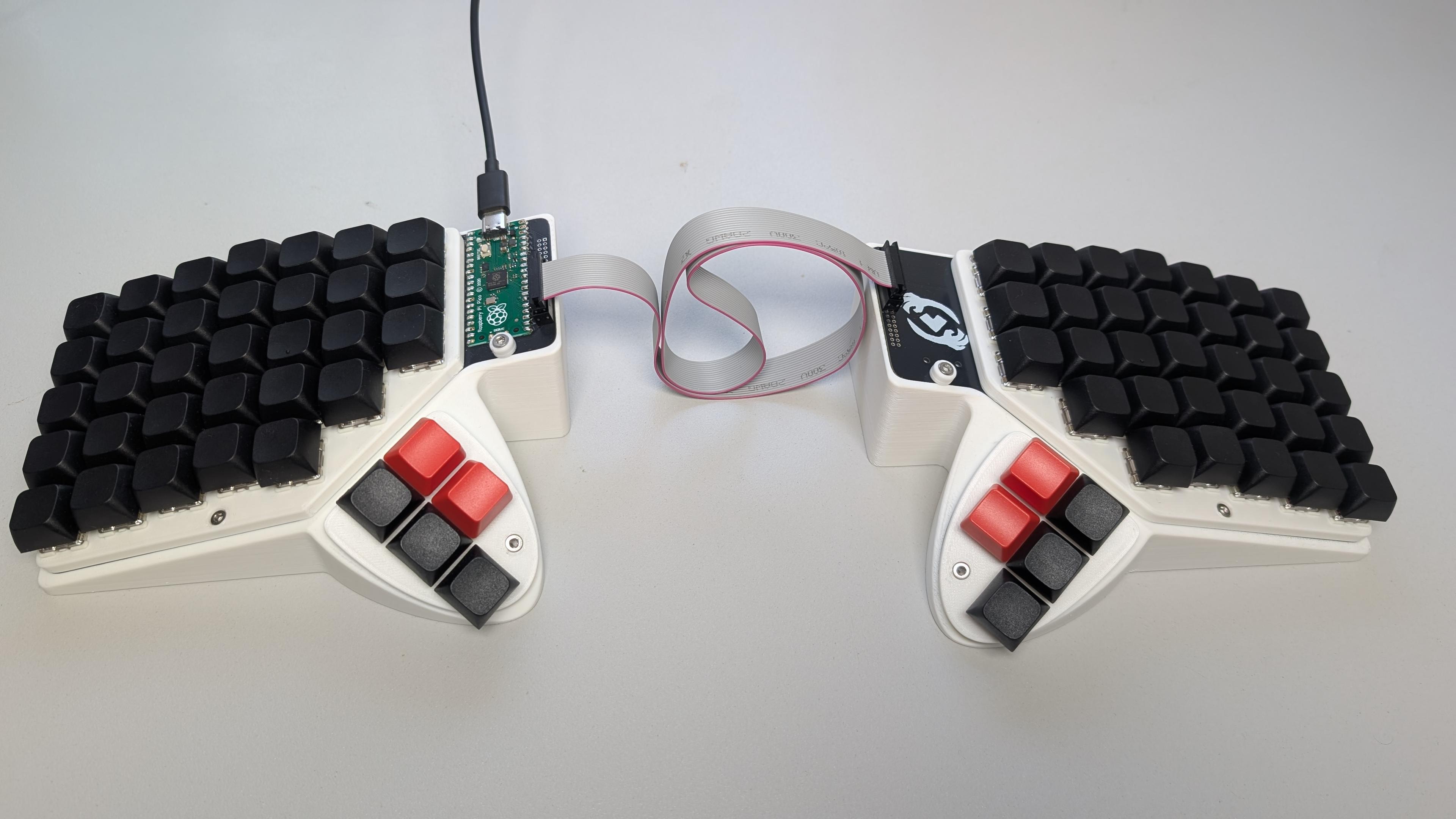
This was designed quickly as my personal keyboard, I would like to make this a properly documented project that others can build but don't have the capacity at the moment.
I used the sofle pico as a base but changed pretty much everything in order to recreate the moonlander but with the goal of being a budget build.
| Quantity | Item | Note |
|---|---|---|
| 74 | MX compatible switches | |
| 74 | MX compatible kailh hotswap sockets | |
| 74 | Surface mount SOD-123 1N4148 diodes | |
| 2 | 2x08 2.00mm IDC straight socket | |
| 1 | 2x08 2.00mm IDC cable - at least 20cm long | |
| 4 | 2x03 2.00mm pin header | used as IDC socket in tight area |
| 2 | 2x03 2.00mm IDC cable - ~10cm long | |
| 1 | printed left base | print with supports for the bridge, can be done with auto supports configured to 1 degree |
| 1 | printed right base | same as above |
| 1 | printed switch plate - left main | no supports |
| 1 | printed switch plate - right main | no supports |
| 1 | printed switch plate - left thumb cluster | no supports |
| 1 | printed switch plate - right thumb cluster | no supports |
| 2 | printed washers | no supports |
| 4 | m3 machine screws - 25mm long | |
| 2 | m3 machine screws - 20mm long | |
| 2 | m3 machine screws - 14mm long | |
| 2 | m3 machine screws - 12mm long | |
| 10 | m3 square nuts | |
| 2 | main PCB | |
| 2 | thumb cluster PCB |
| Qty | Value | Footprint | References |
|---|---|---|---|
| 5 | D | Sofle_Pico:D_SOD-123_DO-35_Hybrid_DoubleSided_V2 | D1, D2, D3, D4, D5 |
| 5 | SW_PUSH | Sofle_Pico:Cherry_MX_DS_Hotswap_v3.5.4 | SW1, SW2, SW3, SW4, SW5 |
| 1 | Conn_02x03 | Connector_PinHeader_2.00mm:PinHeader_2x03_P2.00mm_Vertical | J3 |

google/mozc-devices
Circuit diagrams and firmware source code for Gboard DIY keyboards


FrameworkComputer/ExpansionCards
Reference designs and documentation to create Expansion Cards for the Framework Laptop

hoglet67/RGBtoHDMI
Bare-metal Raspberry Pi project that provides pixel-perfect sampling of Retro Computer RGB/YUV video and conversion to HDMI

hackclub/OnBoard
💡 Join 1,000 teenagers and make your first PCB with a $100 grant!


tardate/LittleArduinoProjects
a collection of "Little Electronic & Arduino Projects", most involving electronics or an Arduino in one way or another!

basilfx/TRADFRI-Hacking
Hacking IKEA TRÅDFRI products, such as light bulbs, window blinds and other accessories.
It measures 50 × 74 mm and has 2 copper layers, 1.6 mm thick.
11 parts. The full list of its parts is on this page, with links to each part's symbol and footprint where PCBKit's library has them.
From the rukai/rukey repository on GitHub, at the commit this page was made from: the board is PCB_thumb_cluster/Sofle_Pico.kicad_pcb and its schematic PCB_main/Sofle_Pico.kicad_sch. PCBKit opens the board in the browser, with nothing to install.
Its repository states no licence, so its author keeps all rights: ask rukai before reusing the design.