2 layers123.4 × 91.9 mm
Scissorball left
rotep/scissorball
Split 36-key low-profile keyboard with Kailh PG1425 scissor switches and a 25mm PMW3360 trackball. KiCad / FreeCAD (scripted) / QMK.
45 partsGPL-3.0

 rotep/scissorball
Split 36-key low-profile keyboard with Kailh PG1425 scissor switches and a 25mm PMW3360 trackball. KiCad / FreeCAD (scripted) / QMK.
Scissorball right is an open-source printed circuit board by rotep, from the rotep/scissorball repository on GitHub, published under the GPL-3.0 licence. It is a 2-layer board of 123.4 × 91.9 mm with 46 parts on 35 nets, routed with 291 tracks and 13 vias.
It is built around the RP2040-ZERO, 1N4148W and K12, with the K13, K14 and K22 among its other parts. Its parts include 18 diodes, 18 switches, 2 connectors and 1 IC. It belongs with the keyboards and input boards and the RP2040 boards of this library.


A low-profile split keyboard with laptop-style scissor switches and a thumb trackball. 36 keys · Kailh PG1425 “X-Switch” · 25 mm trackball (PMW3360) under the right thumb · RP2040 · QMK · wired (TRRS)
日本語 README · Build guide (日本語)
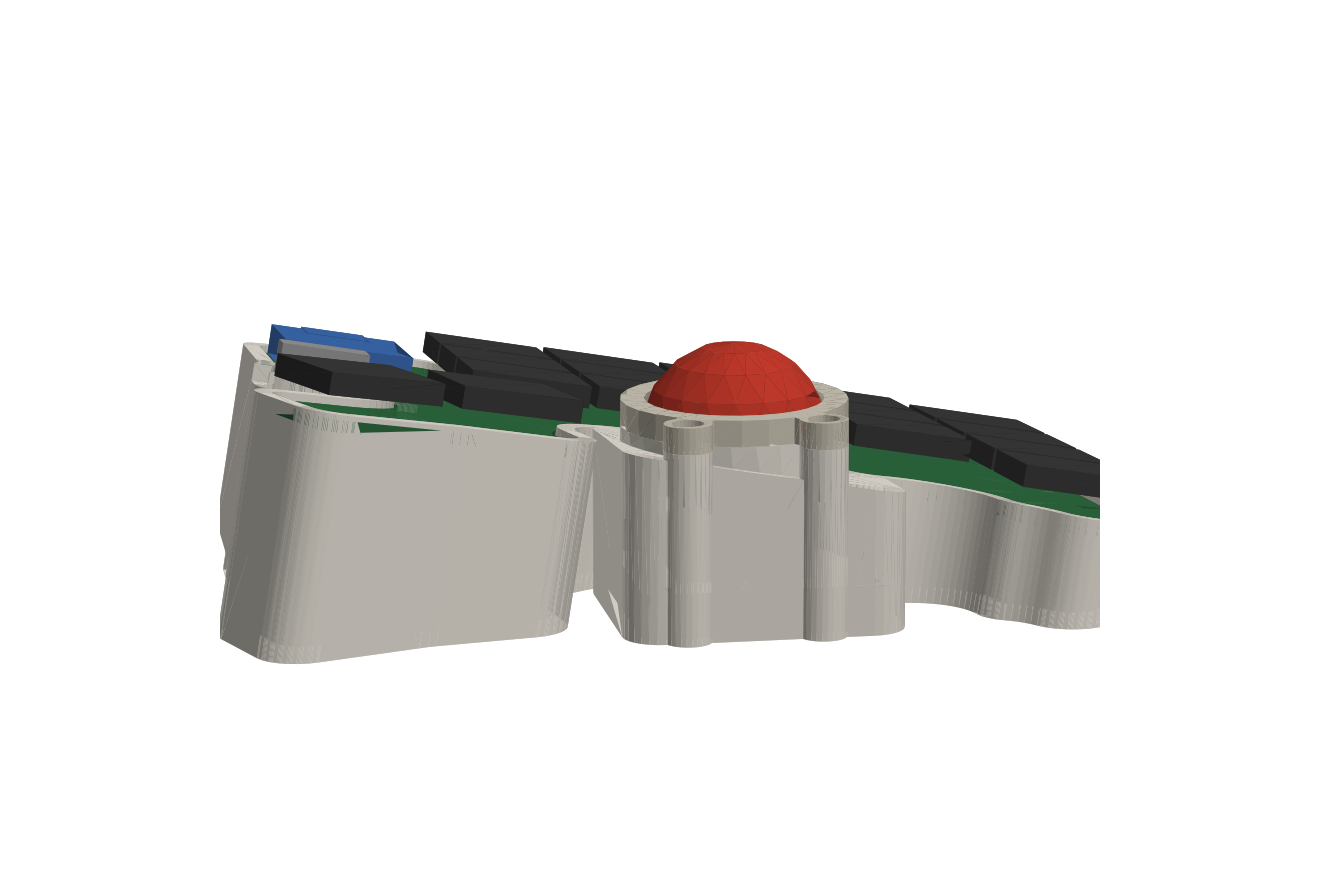
Status: rev 1.0 – designed, DRC-clean, not yet built. Everything here is generated and checked in software (routing, DRC, 3D interference). No physical prototype exists yet – see Known risks before ordering.
Scissor switches keep the key field thin, but a trackball is inherently tall (sensor stack + ball). ScissorBall keeps that step small by
| Height above desk (right half) | |
|---|---|
| Ball top | 36.6 mm |
| Thumb key next to the ball (T1) | 31.6 mm → 5 mm step |
| Innermost thumb key (T0) | 35.5 mm |
| Lowest corner (pinky top row) | 13.4 mm |
A flat build would put the keys at ~11.5 mm, i.e. a ~25 mm step up to the ball.
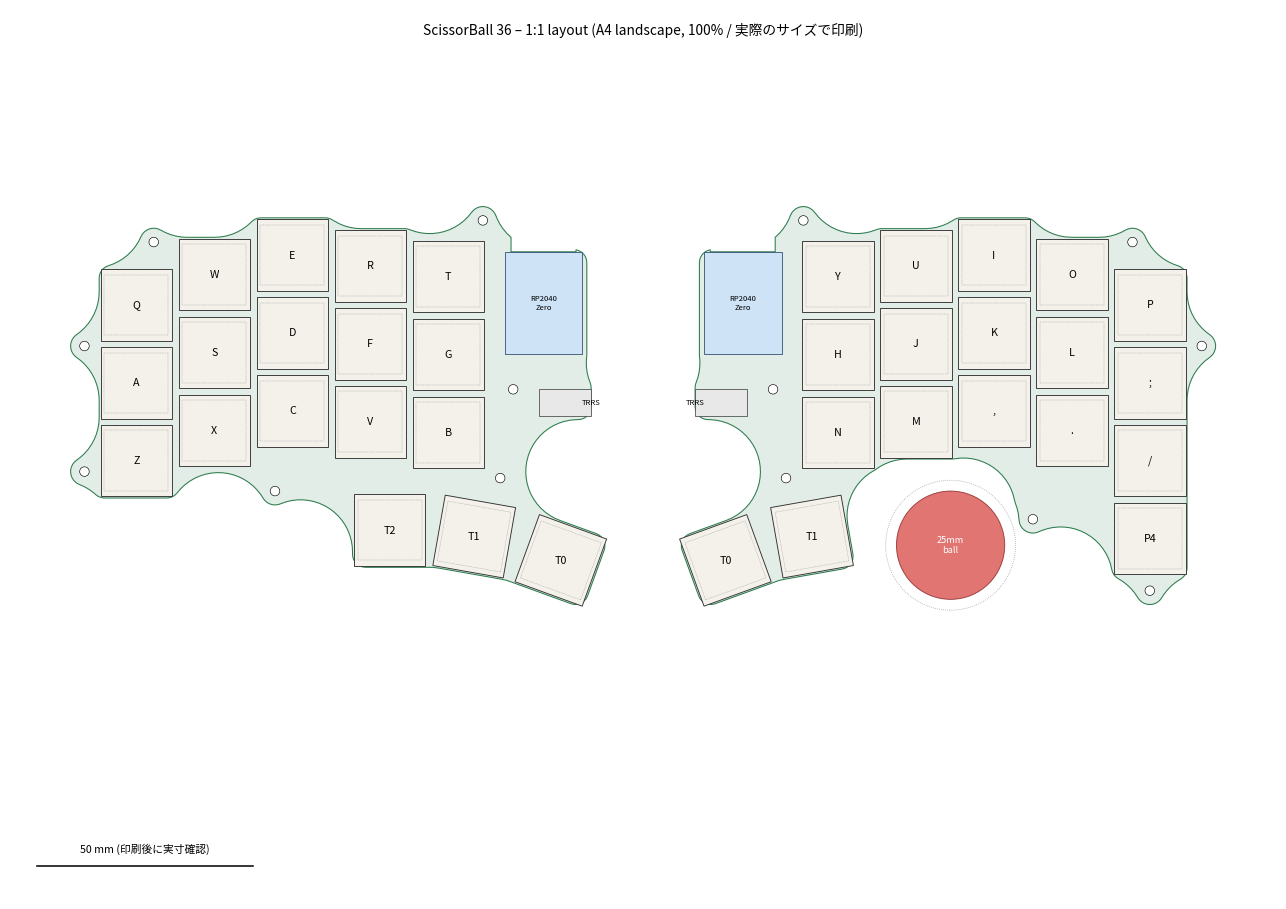
| Keys | 5×3 per hand + thumbs (left 3 / right 2) + 1 extra right-pinky key = 36 |
| Pitch / stagger | 18 × 18 mm, column stagger derived from Keyball39 |
| Switch | Kailh PG1425 (needs its dedicated scissor keycaps) |
| MCU | Waveshare RP2040-Zero ×2, mounted flat |
| Split link | TRRS, single-wire half-duplex serial (GP1) |
| Pointing | PMW3360 on the monkeypad breakout, 25 mm ball on three Ø2.5 mm ceramic balls |
| Firmware | QMK, one .uf2 for both halves (handedness pin GP29), auto mouse layer, drag-scroll |
| Case | 3D printed, fits a 256 mm bed (made for Bambu Lab P2S), no supports |
hardware/pcb/left|right   KiCad 9 boards (.kicad_pro/.kicad_pcb) + DRC report + board STEP
hardware/pcb/lib          custom footprints (PG1425, RP2040-Zero, PJ-320A)
hardware/case             case halves + ball bezel (STEP / STL / 3MF)
production                gerber + drill zip per half (JLCPCB-ready)
firmware/scissorball36    QMK keyboard definition + default keymap
firmware/*.uf2            prebuilt firmware
docs                      build guide, 1:1 printable layout & PCB PDFs, images
tools                     generators – everything above is produced from tools/layout.py
There is no schematic: the netlist lives in tools/pcb.py (switch matrix, MCU pin map, TRRS, sensor header) and the boards are placed and routed from it.
| PCB left | PCB right |
|---|---|
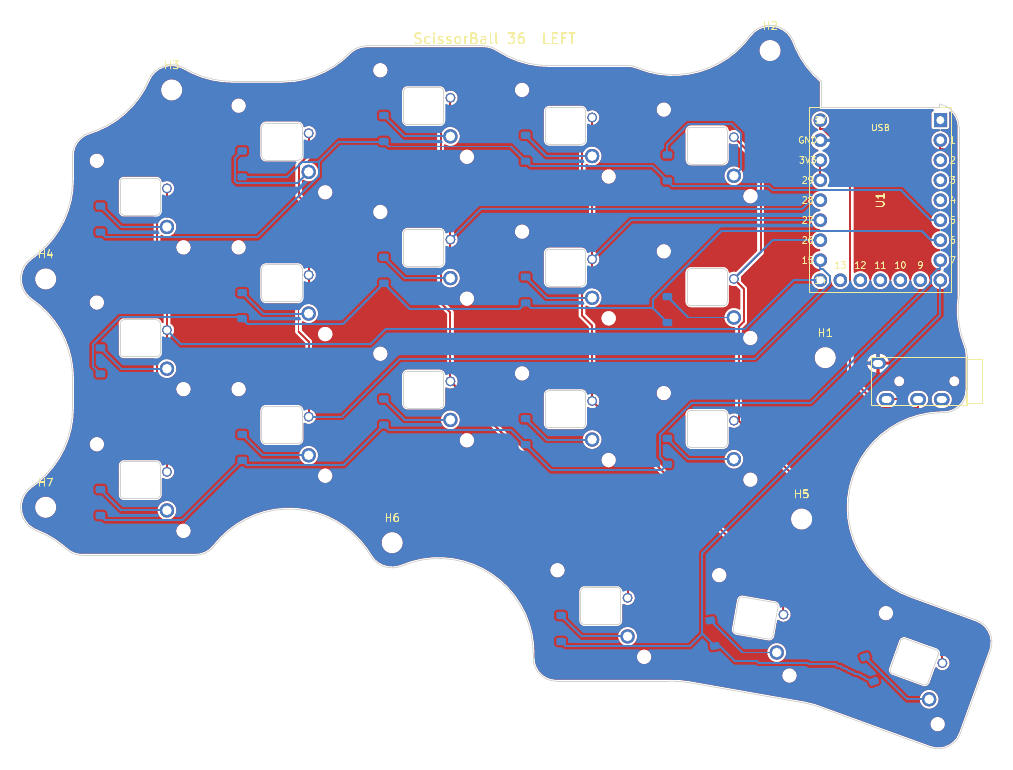 | 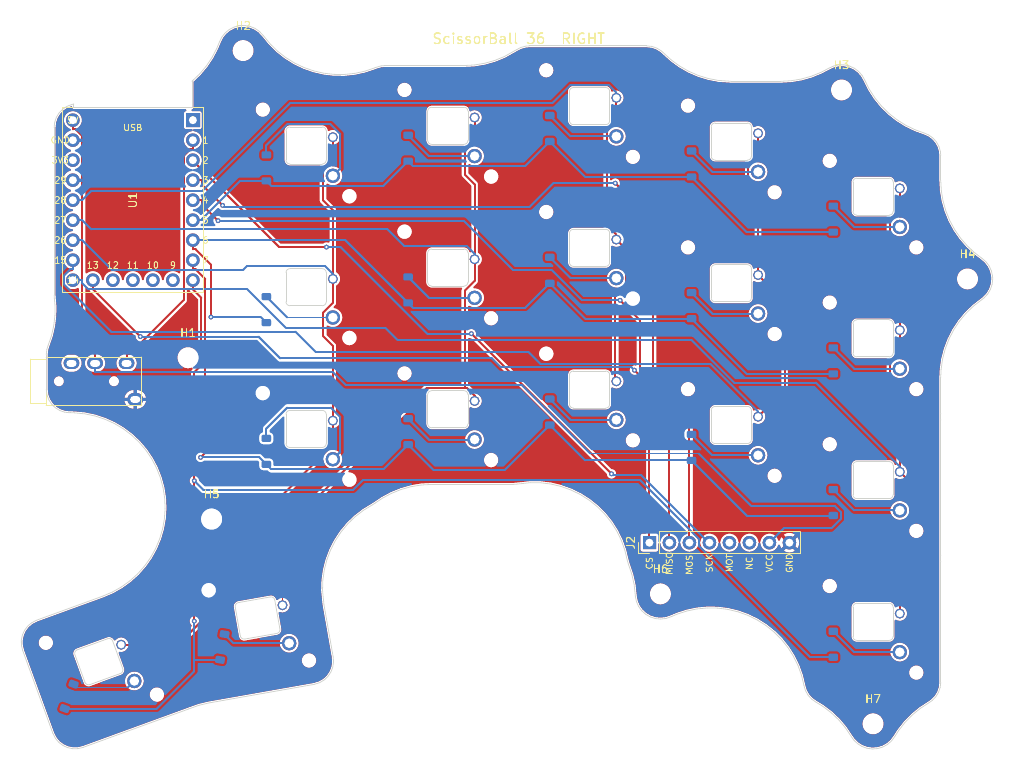 |
production/scissorball_left_gerber.zip and ..._right_...zip separately (2 layers, 1.6 mm). The small rectangular cut-out under every switch is intentional (clearance for the switch’s bottom boss).hardware/case/* – PETG or PLA, 0.2 mm, 3 walls, 15–20 % infill, no supports. Importing the STEP files into Bambu Studio gives the cleanest result.firmware/scissorball36_default.uf2 to both RP2040-Zeros (hold BOOT while plugging in).| Part | Qty |
|---|---|
| Kailh PG1425 X-Switch with keycaps | 36 |
| Waveshare RP2040-Zero | 2 |
| 1N4148W diode, SOD-123 | 36 |
| PJ-320A TRRS jack + 4-pole cable | 2 + 1 |
| PMW3360 breakout (monkeypad, incl. sensor + LM19-LSI lens) | 1 |
| 25 mm trackball + Ø2.5 mm ceramic balls (Si3N4/ZrO2) | 1 + 3 |
| M2 self-tapping screws (4–6 mm) | 20 |
| Rubber feet ≥ 1.5 mm | 8 |
cp -r firmware/scissorball36 $QMK_HOME/keyboards/
qmk compile -kb scissorball36 -km default
Default keymap: QWERTY base, NUM (left inner thumb), SYM (right inner thumb), FN (right pinky extra key), and an auto-activating MOUSE layer (J/K/L = left/middle/right click, H or ; held = scroll). The sensor looks up at the ball, so axis orientation may need flipping – adjust POINTING_DEVICE_ROTATION_* / POINTING_DEVICE_INVERT_* in config.h.
Edit tools/layout.py (pitch, stagger, ball position, TENT_DEG, TILT_DEG) and run:
make all KICAD_PY=<python with pcbnew> FREECAD_PY=<python with FreeCAD> FREEROUTING=/path/to/freerouting.jarmake pcb-left places parts, autoroutes with Freerouting, closes any leftover connections with a small A* router (tools/fixroute.py) and runs DRC. make check verifies the case against the PCB, key caps (at rest and pressed), MCU, jack, sensor board and ball, and renders the previews.
Toolchain used: KiCad 9.0, FreeCAD 1.0, Freerouting 2.0, QMK 0.34.
docs/pcb_*_1to1.pdf at 100 % and test-fit a switch first.PMW33XX_LIFTOFF_DISTANCE.Hardware, case and tools: GPL-3.0-or-later (see LICENSE; footprints derive from GPL-3.0 sources).
Firmware (firmware/): GPL-2.0-or-later, as part of QMK.
| Qty | Value | Footprint | References |
|---|---|---|---|
| 18 | 1N4148W | D_SOD-123 | D1, D2, D3, D4, D5, D6, D7, D10, D11, D12, D13, D14, D15, D16, D17, D18 +2 |
| 7 | MountingHole_2.2mm_M2 | MountingHole_2.2mm_M2 | H1, H2, H3, H4, H5, H6, H7 |
| 1 | K00 | SB_Kailh_PG1425 | SW1 |
| 1 | K01 | SB_Kailh_PG1425 | SW4 |
| 1 | K02 | SB_Kailh_PG1425 | SW7 |
| 1 | K03 | SB_Kailh_PG1425 | SW10 |
| 1 | K04 | SB_Kailh_PG1425 | SW13 |
| 1 | K10 | SB_Kailh_PG1425 | SW2 |
| 1 | K11 | SB_Kailh_PG1425 | SW5 |
| 1 | K12 | SB_Kailh_PG1425 | SW8 |
| 1 | K13 | SB_Kailh_PG1425 | SW11 |
| 1 | K14 | SB_Kailh_PG1425 | SW14 |
| 1 | K20 | SB_Kailh_PG1425 | SW3 |
| 1 | K21 | SB_Kailh_PG1425 | SW6 |
| 1 | K22 | SB_Kailh_PG1425 | SW9 |
| 1 | K23 | SB_Kailh_PG1425 | SW12 |
| 1 | K24 | SB_Kailh_PG1425 | SW15 |
| 1 | P4 | SB_Kailh_PG1425 | SW18 |
| 1 | PJ-320A | SB_TRRS_PJ-320A | J1 |
| 1 | PMW3360 breakout | PinHeader_1x08_P2.54mm_Vertical | J2 |
| 1 | RP2040-Zero | SB_RP2040_Zero | U1 |
| 1 | T0 | SB_Kailh_PG1425 | SW16 |
| 1 | T1 | SB_Kailh_PG1425 | SW17 |
rotep/scissorball
Split 36-key low-profile keyboard with Kailh PG1425 scissor switches and a 25mm PMW3360 trackball. KiCad / FreeCAD (scripted) / QMK.

markstory/ursa-minor-keyboard
Design and schematics for the ursaminor keyboard


alexBinos/Macropad
A 5x4 key macropad with rotary encoder, OLED display and per-key RGB lighting

BitPeppr/Hojicha44
Open Source Split wireless columnar 44-key keyboard with a focus on sound!
It measures 123.4 × 91.9 mm and has 2 copper layers, 1.6 mm thick.
46 parts, built around the RP2040-ZERO, 1N4148W, K12 and K13. The full list of its parts is on this page, with links to each part's symbol and footprint where PCBKit's library has them.
From the rotep/scissorball repository on GitHub, at the commit this page was made from: the board is hardware/pcb/right/scissorball_right.kicad_pcb. PCBKit opens the board in the browser, with nothing to install.
Its repository publishes it under the GPL-3.0 licence: you may reuse it on that licence's terms (keep the author's notice, and for a copyleft licence share your changes alike).