2 layers55.6 × 55.8 mm

 renatocampoy/Twitch-LED-Bot
Este projeto permite que você controle um strip de LED NeoPixel via comandos no chat da Twitch, utilizando a placa ESP8266.
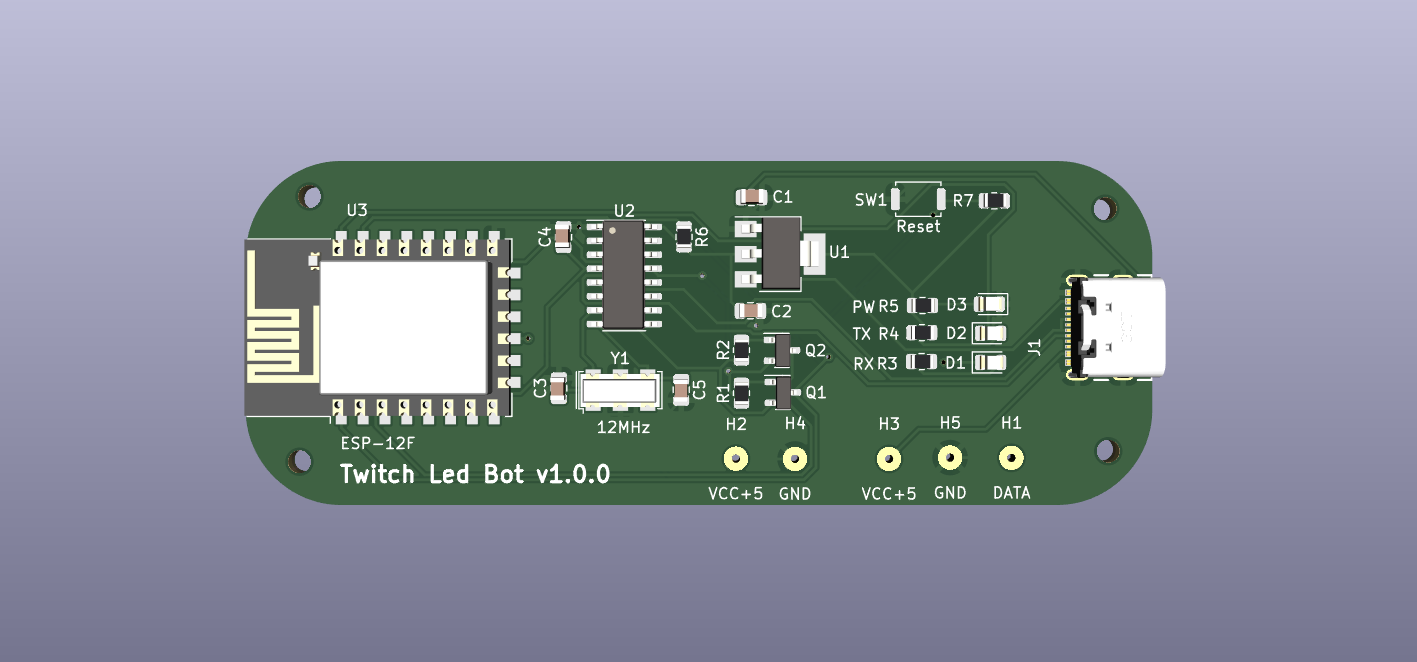
Twitch LED Bot is an open-source printed circuit board by renatocampoy, from the renatocampoy/Twitch-LED-Bot repository on GitHub, published under the GPL-3.0 licence. It is a 2-layer board of 83 × 31.5 mm with 32 parts on 42 nets, routed with 279 tracks and 13 vias.
It is built around the ESP-12F, CH340G and AMS1117-3.3, with the BC847 and USB4105-GF-A among its other parts. Its parts include 7 resistors, 5 capacitors, 3 ICs, 3 diodes and 2 transistors. It belongs with the ESP8266 boards of this library.


Criado por Eng. Renato Campoy.
Este projeto permite que você controle um strip de LED NeoPixel via comandos no chat da Twitch, utilizando a placa ESP8266. O código é escrito em C++ e utiliza a biblioteca WiFiManager para gerenciar a conexão Wi-Fi e a biblioteca Adafruit NeoPixel para controlar o strip de LED.
Para usar este código, você precisará de um token de OAuth da Twitch. Aqui estão as etapas para obtê-lo:
Tenha em mente que este token é equivalente à senha da sua conta da Twitch. Não compartilhe com ninguém.
Você precisará das seguintes bibliotecas para usar este projeto:
Estas bibliotecas podem ser instaladas através do Gerenciador de Bibliotecas do Arduino.
.ino no Arduino IDE.Uma vez que o código esteja funcionando, você poderá enviar comandos para o chat da Twitch para controlar a iluminação do strip de LED. Aqui estão alguns exemplos de comandos que você pode usar:
!led vermelho: muda a cor do LED para vermelho.!led #ff00ff: muda a cor do LED para o valor hexadecimal fornecido (neste caso, magenta).!led cores: lista todas as cores disponíveis.Além disso, o bot responde a comandos enviados via interface serial para reiniciar o ESP ou redefinir as configurações de WiFi ou Twitch. (vide código)
Este é um projeto open-source. Se tiver alguma sugestão ou melhoria, por favor, faça um fork do repositório e envie uma pull request.
Atualmente, o bot não responde a erros do servidor da Twitch. Se você experimentar algum problema, tente reiniciar o ESP.
Este projeto está licenciado sob a Licença GPLv3 - veja o arquivo LICENSE para mais detalhes.
| Qty | Value | Footprint | References |
|---|---|---|---|
| 4 | 10K | Resistor_SMD:R_0805_2012Metric | R1, R2, R6, R7 |
| 3 | 470 | Resistor_SMD:R_0805_2012Metric | R3, R4, R5 |
| 2 | 10u | Capacitor_SMD:C_0805_2012Metric | C1, C4 |
| 2 | 22p | Capacitor_SMD:C_0805_2012Metric | C3, C5 |
| 2 | BC847 | Package_TO_SOT_SMD:SOT-23 | Q1, Q2 |
| 2 | GND | MountingHole:MountingHole_2.1mm | H4, H5 |
| 2 | VCC +5 | MountingHole:MountingHole_2.1mm | H2, H3 |
| 1 | 100u | Capacitor_SMD:C_0805_2012Metric | C2 |
| 1 | 12MHz | Crystal:Crystal_SMD_2520-4Pin_2.5x2.0mm | Y1 |
| 1 | AMS1117-3.3 | Package_TO_SOT_SMD:SOT-223-3_TabPin2 | U1 |
| 1 | CH340G | Package_SO:SOIC-16_3.9x9.9mm_P1.27mm | U2 |
| 1 | ESP-12F | RF_Module:ESP-12E | U3 |
| 1 | LED DATA | MountingHole:MountingHole_2.1mm | H1 |
| 1 | PW | LED_SMD:LED_0805_2012Metric | D3 |
| 1 | RX | LED_SMD:LED_0805_2012Metric | D1 |
| 1 | Reset | Button_Switch_SMD:SW_Push_SPST_NO_Alps_SKRK | SW1 |
| 1 | TX | LED_SMD:LED_0805_2012Metric | D2 |
| 1 | USB4105-GF-A | USB4105-GF-A 2:GCT_USB4105-GF-A | J1 |
The 28 most common of 32 parts.


Phunkafizer/RFM-gateway
Hard- and software for the RFM-gateway, a universal platform for integrating sub-GHz radio into your WiFi network

greenMikeEU/shrdzm
SHRDZM (just a name, not an acronym) is an ESP8285/ESP8266 based sensor and actor integration platform.

galopago/iot-badge-legacy
Electronic conference badge for programming conventions, hacking events, etc.


It measures 83 × 31.5 mm and has 2 copper layers, 1.6 mm thick.
32 parts, built around the ESP-12F, CH340G, AMS1117-3.3 and BC847. The full list of its parts is on this page, with links to each part's symbol and footprint where PCBKit's library has them.
From the renatocampoy/Twitch-LED-Bot repository on GitHub, at the commit this page was made from: the board is Twitch-Led-Bot.kicad_pcb and its schematic Twitch-Led-Bot.kicad_sch. PCBKit opens the board in the browser, with nothing to install.
Its repository publishes it under the GPL-3.0 licence: you may reuse it on that licence's terms (keep the author's notice, and for a copyleft licence share your changes alike).