
4 layers16.9 × 119.4 mm

 randcanary/mkpico11
Welcome to MKPico, a framework designed for creating custom keyboard firmware using the Raspberry Pi Pico microcontroller. MKPico is built using FreeRTOS, Pico SDK and tinyUSB.
Selenium s is an open-source printed circuit board by randcanary, from the randcanary/mkpico repository on GitHub. It is a 2-layer board of 126.2 × 90.5 mm with 73 parts on 79 nets, routed with 526 tracks and 54 vias.
It is built around the WS2812B-2020. Its parts include 36 diodes, 34 switches, 2 connectors and 1 IC. It belongs with the RP2040 boards of this library.
Welcome to MKPico, a framework designed for creating custom keyboard firmware using the Raspberry Pi Pico microcontroller. MKPico is built using FreeRTOS, Pico SDK and tinyUSB.
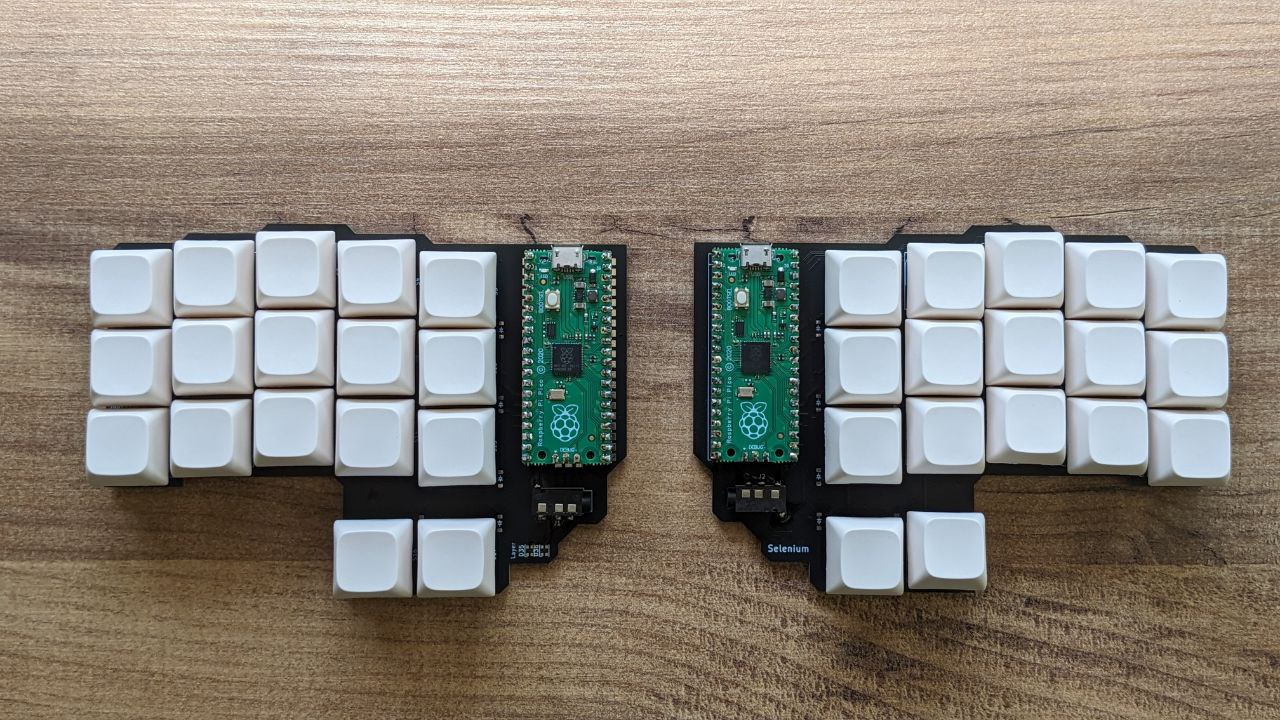
This repository is the home of MKPico, and it includes everything you need to get started with developing your own keyboard firmware. MKPico abstracts the complexities of USB communication and real-time task management, providing an easy-to-use framework that is both powerful and efficient.
The first project built using MKPico is Selenium S, a custom 34-key split keyboard that demonstrates the capabilities of the framework. Selenium S serves as a reference implementation and a starting point for your own projects.
The main goals of the project are:
The MKPico project is organized into several key directories, each serving a specific purpose in the development and configuration of custom keyboards. Below is an overview of the project structure:
config/:
include/:
include directory houses the internal API headers that define the interfaces and data structures used throughout the MKPico framework. These headers are essential for maintaining a clear and consistent API across different modules of the project, making it easier to develop and extend functionality.src/:
This section guides you through setting up the environment to work with FreeRTOS and the Raspberry Pi Pico SDK.
First, clone the FreeRTOS kernel repository:
git clone https://github.com/FreeRTOS/FreeRTOS-Kernel.git
cd FreeRTOS-Kernel
And move to the smp branch that supports multiple core:
git checkout -t remotes/origin/smp
git submodule update --initSecond, clone the Pico SDK repository:
git clone https://github.com/raspberrypi/pico-sdk.git
cd pico-sdk
git submodule update --initSet environment variables to point to the FreeRTOS and Pico SDK directories:
export FREERTOS_KERNEL_PATH=/path/to/FreeRTOS-Kernel
export PICO_SDK_PATH=/path/to/pico-sdkNow, clone your project repository and initialize it.
cd /path/to/your/workspace
git clone https://github.com/tknbr/mkpico.git
cd mkpico
git submodule update --initYou can now set up CMake and build the project:
mkdir build
cd build
cmake ..
makeThe development of MKPico and the Selenium S keyboard was greatly influenced and supported by the vibrant communities dedicated to mechanical keyboards and custom firmware development. We would like to extend our gratitude to the following communities and content creators for their invaluable resources, tutorials, and inspiration:
Mechanical Keyboard Enthusiasts on GitHub: The numerous open-source keyboard projects and libraries available on GitHub have been instrumental in shaping the direction of MKPico. Special thanks to repositories like QMK Firmware, which provided insight into advanced keyboard features and firmware structure.
YouTube Content Creators: Channels such as Joe Scotto and Ben Vallack have offered detailed build guides, reviews, and deep dives into keyboard design that have been incredibly helpful during the development process.
Online Keyboard Communities: Platforms like r/ErgoMechKeyboards on Reddit, and forums like Geekhack, have provided a wealth of information and community support that was crucial in overcoming challenges during the project.
This project would not have been possible without the contributions of these communities, and we encourage anyone interested in custom keyboard development to explore these resources and get involved.
| Qty | Value | Footprint | References |
|---|---|---|---|
| 34 | Diode | ScottoKeebs_Components:Diode_SOD-123 | D1, D2, D10, D11, D12, D13, D14, D15, D16, D17, D18, D19, D20, D21, D22, D23 +18 |
| 34 | Keyswitch | ScottoKeebs_Hotswap:Hotswap_MX_1.00u | S1, S2, S10, S11, S12, S13, S14, S15, S16, S17, S18, S19, S20, S21, S22, S23 +18 |
| 2 | AudioJack4 | Connector_Audio:Jack_3.5mm_PJ320D_Horizontal | J1, J2 |
| 2 | WS2812B-2020 | LED_SMD:LED_WS2812B-2020_PLCC4_2.0x2.0mm | D35, D36 |
| 1 | Raspberry_Pi_Pico | ScottoKeebs_MCU:Raspberry_Pi_Pico | U1 |
It measures 126.2 × 90.5 mm and has 2 copper layers, 1.6 mm thick.
73 parts, built around the WS2812B-2020. The full list of its parts is on this page, with links to each part's symbol and footprint where PCBKit's library has them.
From the randcanary/mkpico repository on GitHub, at the commit this page was made from: the board is config/selenium_s/pcb/v4.kicad_pcb and its schematic config/selenium_s/pcb/v4.kicad_sch. PCBKit opens the board in the browser, with nothing to install.
Its repository states no licence, so its author keeps all rights: ask randcanary before reusing the design.


VimDrones/AM32_esc_development_board
Open Source AM32 ESC development board

rianadon/Cosmos-Keyboard-PCBs
Open-Source keyboard PCB designs for the Cosmos Keyboard Generator

phil31/NerdEKO-Gamma
fork of the NerdOCTAXE-Gamma design (https://github.com/Patsch91/NerdOCTAXE-Gamma), with 12 x BM1370 (14TH/s SHA256)