2 layers288.8 × 160.1 mm
GRAM SLIM
GRAMCTRL/GRAM-SLIM
Open source low-profile leverless design with an integrated RP2040.
64 parts24GPL-3.0
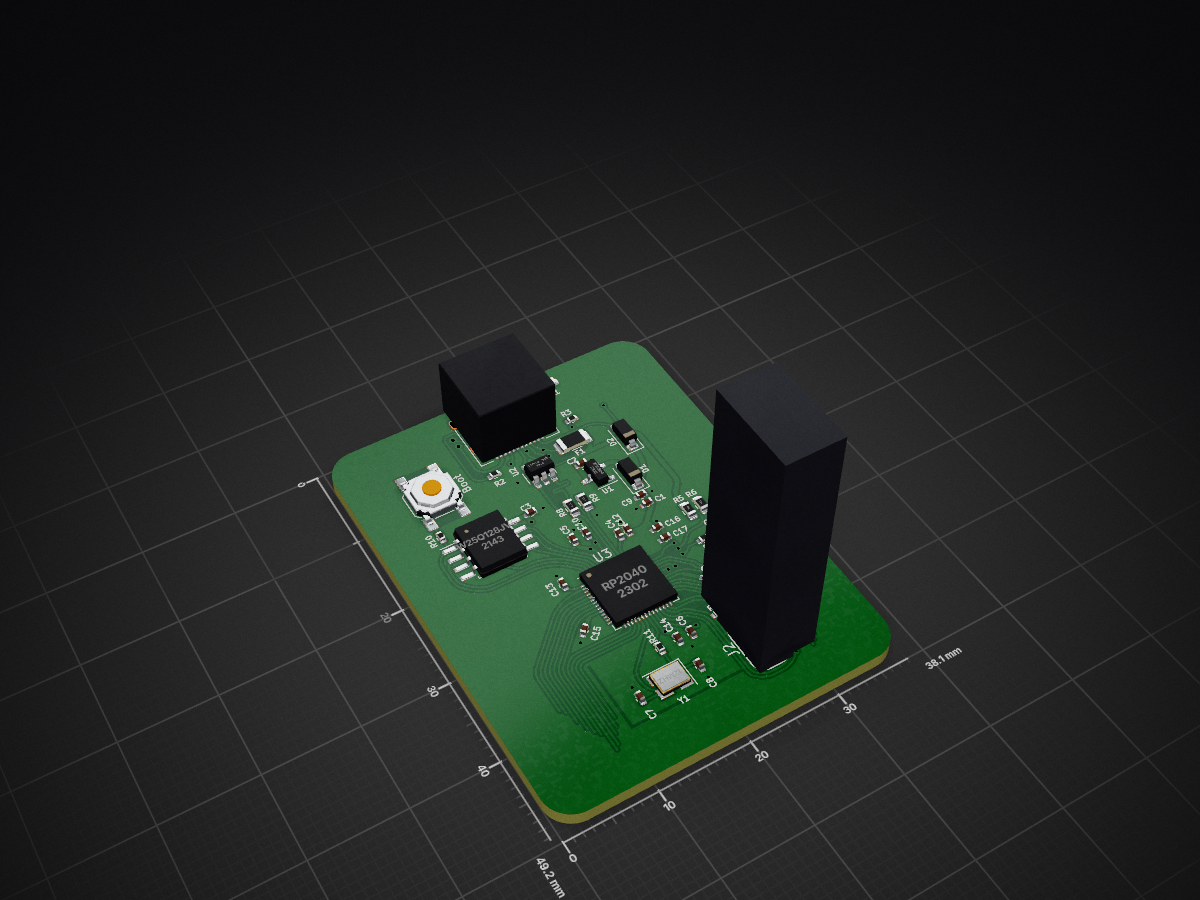
 quark-works/OpenRectangleTemplate9
RP2040 template for use with box style controllers for the GC
OpenRectangleTemplate is an open-source printed circuit board by quark-works, from the quark-works/OpenRectangleTemplate repository on GitHub, published under the MIT licence. It is a 2-layer board of 38.1 × 49.2 mm with 40 parts on 67 nets, routed with 411 tracks and 41 vias.
It is built around the RP2040, W25Q128JVSIQ and USBLC6-2SC6, with the XC6206-2.8V among its other parts. Its parts include 17 capacitors, 11 resistors, 4 ICs, 3 diodes and 2 connectors. It belongs with the RP2040 boards of this library.


RP2040 template for use with box style controllers for the GC

This template was created for the purpose of easing development of box-styled controllers (rectangles) that work with a GameCube console and Nintendo 64 via a USB C to console cable. It uses a RP2040 as its main controller so compatibility to other devices will be limited to the firmware you are using. (Such as HayBox, Pico-Rectangle, etc). There's already a footprint added for a compatible USB-C port that will allow you to used said cables, as well as a USB C to C cable, or C to A cable for PC or Switch.
Labels are already assigned to the default pinout of the most popular firmware available as well as in stock parts for every component from LCSC. I recommend using the Fabrication Toolkit plugin that can be installed through KiCad's PCM.
This templates requires for you to have a minium experience with Kicad and some EE basics. You can just download it as .zip and start creating your own. Make sure you are using Kicad 7.
Small section to highlight proyects that were devveloped using this template.
| Qty | Value | Footprint | References |
|---|---|---|---|
| 10 | 100nF | Capacitor_SMD:C_0402_1005Metric | C3, C5, C6, C11, C12, C13, C14, C15, C16, C17 |
| 4 | 1uF | Capacitor_SMD:C_0402_1005Metric | C1, C2, C4, C10 |
| 2 | 10k | Resistor_SMD:R_0402_1005Metric | R4, R7 |
| 2 | 1k | Resistor_SMD:R_0402_1005Metric | R10, R11 |
| 2 | 22pF | Capacitor_SMD:C_0402_1005Metric | C7, C8 |
| 2 | 27 | Resistor_SMD:R_0603_1608Metric | R8, R9 |
| 2 | 5.1k | Resistor_SMD:R_0402_1005Metric | R2, R3 |
| 2 | Schottky Diode | Diode_SMD:D_SOD-123 | D1, D2 |
| 1 | 10k | Resistor_SMD:R_0603_1608Metric | R6 |
| 1 | 10uF | Capacitor_SMD:C_0402_1005Metric | C9 |
| 1 | 12MHz | Crystal:Crystal_SMD_3225-4Pin_3.2x2.5mm | Y1 |
| 1 | 1M | Resistor_SMD:R_0603_1608Metric | R1 |
| 1 | 5.6k | Resistor_SMD:R_0603_1608Metric | R5 |
| 1 | 500 mA | Fuse:Fuse_1206_3216Metric | F1 |
| 1 | Boot | Button_Switch_SMD:SW_SPST_SKQG_WithStem | SW1 |
| 1 | GREEN | LED_SMD:LED_0805_2012Metric | D3 |
| 1 | JTAG_TC2030 | PCM_marbastlib-various:CON_TC2030_outlined | J2 |
| 1 | RP2040 | footprints:RP2040-QFN-56 | U3 |
| 1 | USB C Connector | footprints:TYPE-C_24P_QCHT | J1 |
| 1 | USBLC6-2SC6 | Package_TO_SOT_SMD:SOT-23-6 | U2 |
| 1 | W25Q128JVS | Package_SO:SOIC-8_5.23x5.23mm_P1.27mm | U4 |
| 1 | XC6206 | Package_TO_SOT_SMD:SOT-23 | U1 |
GRAMCTRL/GRAM-SLIM
Open source low-profile leverless design with an integrated RP2040.

quark-works/Integrated-OF1
Design files are available in this repository. Production files for JLCPCB in the releases page. Tested working and fitting previously mentioned Frame 1 cases.

GRAMCTRL/GRAM-PRISM
A modular and scalable design based on WunWae's Prism Controller

quark-works/OpenRectangle
Custom PCBs for a RP2040 powered rectangle controller


quark-works/tiebox
Labels are already assigned to the default pinout of the most popular firmware available as well as in stock parts for every component from LCSC.


It measures 38.1 × 49.2 mm and has 2 copper layers, 1.6 mm thick.
40 parts, built around the RP2040, W25Q128JVSIQ, USBLC6-2SC6 and XC6206-2.8V. The full list of its parts is on this page, with links to each part's symbol and footprint where PCBKit's library has them.
From the quark-works/OpenRectangleTemplate repository on GitHub, at the commit this page was made from: the board is OpenRectangleTemplate.kicad_pcb and its schematic Buttons.kicad_sch. PCBKit opens the board in the browser, with nothing to install.
Its repository publishes it under the MIT licence: you may reuse it on that licence's terms (keep the author's notice, and for a copyleft licence share your changes alike).