2 layers20.5 × 24.8 mm
 onurkarakoc79/Cargo-Damage-Detection-System
A monitoring system for detecting package damage in cargo transportation by logging G-force, temperature, pressure, and humidity data upon impact events.
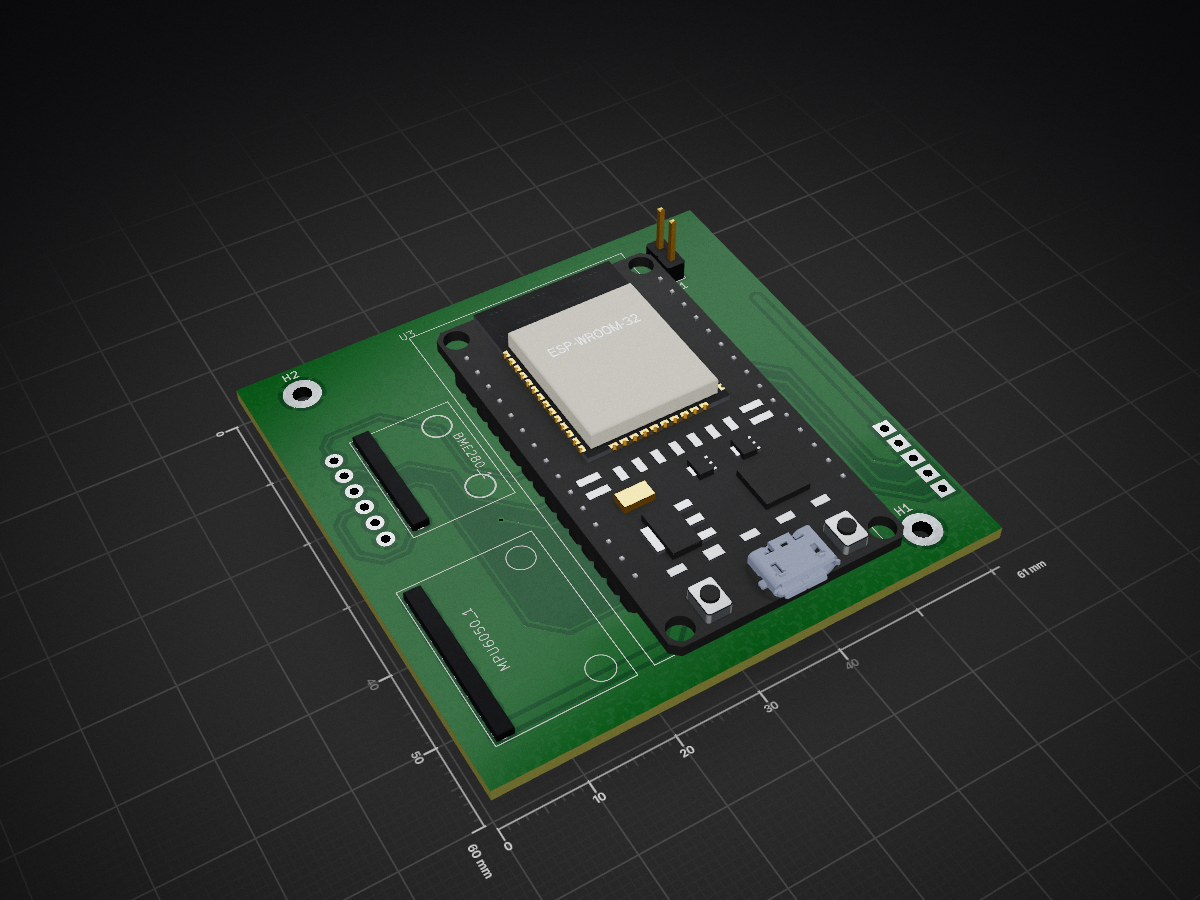
Through Hole Card is an open-source printed circuit board by onurkarakoc79, from the onurkarakoc79/Cargo-Damage-Detection-System repository on GitHub. It is a 2-layer board of 61 × 60 mm with 8 parts on 32 nets, routed with 81 tracks and 1 via.
Its parts include 1 IC and 1 connector.
This project is designed to detect and analyze potential causes of damage to packages during transportation by cargo firms. By monitoring environmental factors such as G-force, pressure, moisture, and temperature, the system determines whether the package has been mishandled or subjected to conditions likely to cause damage.
The system records data when a threshold G-force is exceeded, indicating a possible impact or mishandling event. The collected data is stored on an SD card for later analysis to identify the environmental conditions leading to the damage.
git clone https://github.com/onurkarakoc79/Cargo-Damage-Detection-SystemWire.h for I2C communicationAdafruit_Sensor.h for BME280The system logs data in CSV format for easy analysis. Each log entry includes the following fields:
| Timestamp | Temperature (°C) | Pressure (hPa) | Altitude (m) | Humidity (%) | AccX (g) | AccY (g) | AccZ (g) |
|---|---|---|---|---|---|---|---|
| 2025-01-25 12:00 | 22.5 | 1013.25 | 50.2 | 45 | 0.98 | -0.12 | -1.19 |
| 2025-01-25 12:01 | 23.0 | 1013.30 | 50.3 | 46 | 1.12 | 0.08 | -1.22 |
Contributions are welcome! Feel free to open an issue or submit a pull request to improve this project.
This project is licensed under the MIT License. See the LICENSE file for more details.
If you have any questions, feedback, or inquiries related to the project, feel free to reach out to me:
My personal mail: onurkarakoc79@gmail.com
I appreciate your interest in my projects and look forward to collaborating with you in the fascinating field of scientific exploration and discovery.
| Qty | Value | Footprint | References |
|---|---|---|---|
| 2 | MountingHole_Pad | MountingHole:MountingHole_2.2mm_M2_Pad | H1, H2 |
| 1 | Conn_01x02_Pin | Connector_PinHeader_2.54mm:PinHeader_1x02_P2.54mm_Vertical | J1 |
| 1 | ~ | Adafruit_Sensors:SDCard | SD_CARD1 |
| 1 | ~ | Adafruit_Sensors:MPU6050 | MPU6050_1 |
| 1 | ~ | Adafruit_Sensors:BME280 | BME280_1 |
| 1 | ~ | ESP32-C3-DEVKITC-02:ESP32-WROOM-32 | U3 |
| 1 | ~ | Adafruit_Sensors:DS1302_RTC_MODULE | RTC_DS1302_1 |

joeycastillo/Sensor-Watch
A board replacement for the classic Casio F-91W wristwatch

rusefi/rusefi
rusefi - GPL internal combustion engine control unit

hoglet67/RGBtoHDMI
Bare-metal Raspberry Pi project that provides pixel-perfect sampling of Retro Computer RGB/YUV video and conversion to HDMI

shanteacontrols/OpenDeck
A platform for building interactive control and sensing devices using MIDI and OSC built with Zephyr RTOS.

hackclub/OnBoard
💡 Join 1,000 teenagers and make your first PCB with a $100 grant!

dangiu/PicoMemcard
Emulating PSX Memory Card (or controller) using a Raspberry Pi Pico

OLIMEX/DIY-LAPTOP
Do It Yourself Open Source Hardware and Software Modular Hacker's Friendly Laptop
It measures 61 × 60 mm and has 2 copper layers, 1.6 mm thick.
8 parts. The full list of its parts is on this page, with links to each part's symbol and footprint where PCBKit's library has them.
From the onurkarakoc79/Cargo-Damage-Detection-System repository on GitHub, at the commit this page was made from: the board is PCB Card/Through-Hole-Card.kicad_pcb and its schematic PCB Card/Through-Hole-Card.kicad_sch. PCBKit opens the board in the browser, with nothing to install.
Its repository states no licence, so its author keeps all rights: ask onurkarakoc79 before reusing the design.