
2 layers43.9 × 27.7 mm

 omarkhorshid/OpenRad64
Introducing OpenRad, a simple radiation monitoring solution powered by the SBM-20 GM tube and TTGO ESP32 microcontroller. this project offers a user-friendly approach to way to track radiation levels.
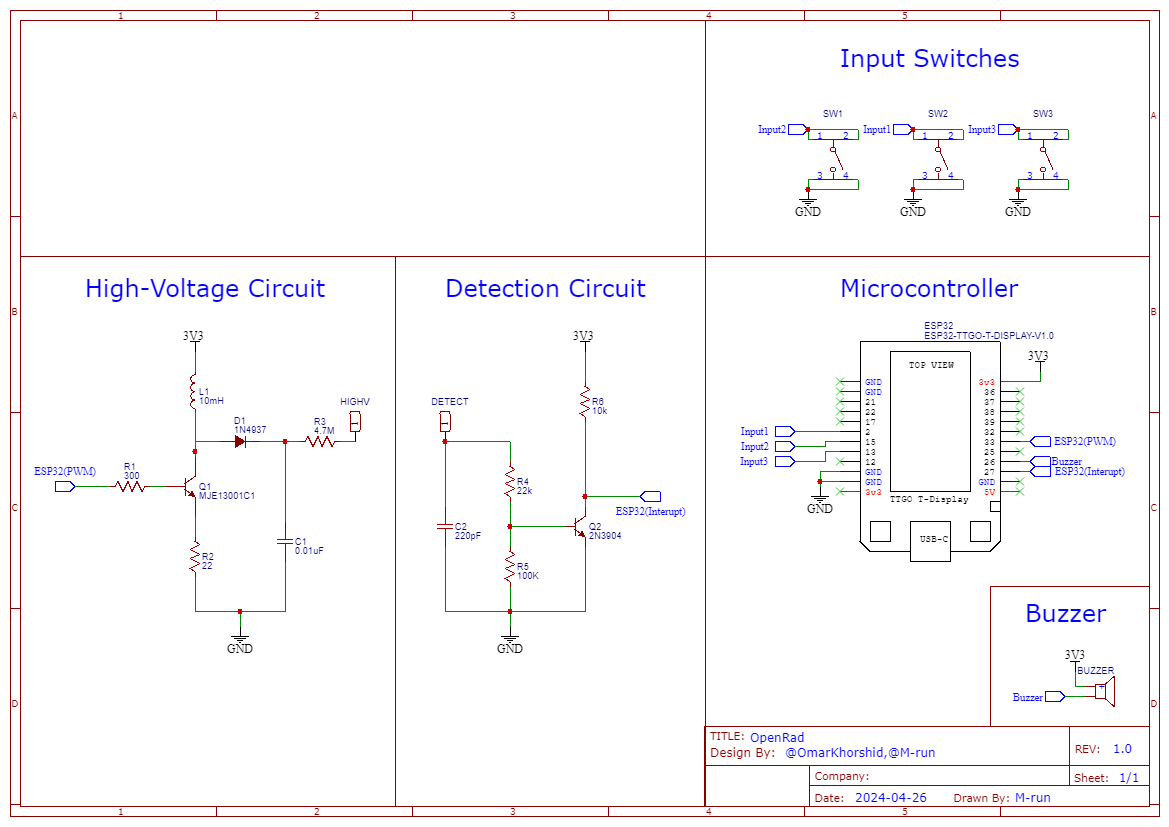
OpenRad is an open-source printed circuit board by omarkhorshid, from the omarkhorshid/OpenRad repository on GitHub, published under the BSD-3-Clause licence. It is a 2-layer board of 110 × 42 mm with 19 parts on 30 nets, routed with 90 tracks and 0 vias.
It is built around the MJE13001C1. Its parts include 6 resistors, 3 switches, 2 capacitors, 2 transistors and 1 diode. It belongs with the ESP32 boards of this library.
 [blocked]
Introducing OpenRad, a simple radiation monitoring solution powered by the SBM-20 GM tube and TTGO ESP32 microcontroller. this project offers a user-friendly approach to tracking and measuring radiation levels.

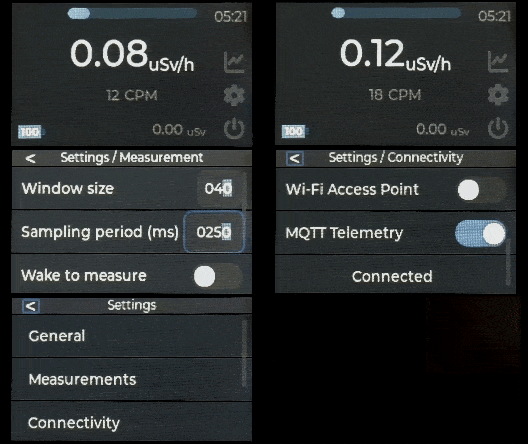


git clone https://github.com/omarkhorshid/OpenRad.githardware.cpp/h : Contains hardware init and functions.settings.cpp/h : Contains the settings.geiger.cpp/h : Contains geiger calculations.gui.cpp/h : Contains LVGL functions.connectivity.cpp/h : Contains all the connectivity functions.ui_events.c/h : Contains the UI events.index.html : Contains the web interface.chart.js : Chart.js Library file.Using the three buttons, up down and enter. ...
After uploading the code to the ESP, open the settings cogwheel, and change the settings you want.
OpenRad has WiFi and MQTT connectivity to be able to remotely monitor the radiation levels from the Web interface.
To connect to OpenRad and access the web interface:
If not connected to a Wifi network:
If Connected:
OpenRad is BSD-3 Licensed
| Qty | Value | Footprint | References |
|---|---|---|---|
| 3 | SW_Push | Button_Switch_THT:SW_PUSH_6mm_H13mm | SW1, SW2, SW3 |
| 1 | 0.01uF | Capacitor_THT:C_Rect_L18.0mm_W5.0mm_P15.00mm_FKS3_FKP3 | C1 |
| 1 | 100k | Resistor_THT:R_Axial_DIN0207_L6.3mm_D2.5mm_P10.16mm_Horizontal | R5 |
| 1 | 10k | Resistor_THT:R_Axial_DIN0207_L6.3mm_D2.5mm_P10.16mm_Horizontal | R6 |
| 1 | 10mH | Inductor_THT:L_Axial_L14.0mm_D4.5mm_P15.24mm_Horizontal_Fastron_LACC | L1 |
| 1 | 1N4937 | Diode_THT:D_DO-41_SOD81_P10.16mm_Horizontal | D1 |
| 1 | 22 | Resistor_THT:R_Axial_DIN0207_L6.3mm_D2.5mm_P10.16mm_Horizontal | R2 |
| 1 | 220pF | Capacitor_THT:C_Rect_L18.0mm_W5.0mm_P15.00mm_FKS3_FKP3 | C2 |
| 1 | 22k | Resistor_THT:R_Axial_DIN0207_L6.3mm_D2.5mm_P10.16mm_Horizontal | R4 |
| 1 | 2N3904 | Package_TO_SOT_THT:TO-92_Inline | Q2 |
| 1 | 300 | Resistor_THT:R_Axial_DIN0207_L6.3mm_D2.5mm_P10.16mm_Horizontal | R1 |
| 1 | 4.7M | Resistor_THT:R_Axial_DIN0414_L11.9mm_D4.5mm_P15.24mm_Horizontal | R3 |
| 1 | Buzzer | Buzzer_Beeper:Buzzer_12x9.5RM7.6 | BZ1 |
| 1 | DETECT | Super_extra:PAD_7X4 | DETECT1 |
| 1 | HIGHV | Super_extra:PAD_7X4 | HIGHV1 |
| 1 | MJE13001C1 | Package_TO_SOT_THT:TO-92_Inline | Q1 |
| 1 | TTGO_ESP32_TDISPLAY_V1.1 | extras:TTGO_ESP32_TDisplay_v1.1 | TTGO1 |

hackclub/OnBoard
💡 Join 1,000 teenagers and make your first PCB with a $100 grant!

polpo/picogus
Emulation of ISA sound cards and CD-ROM on Raspberry Pi Pico (GUS, SB/Adlib, MPU-401, Tandy, CMS, Panasonic CD-ROM) with USB mouse/joystick support


nkitanov/iaq_board
IAQ Board is a DIY (Do-It-Yourself) device for measuring internal air quality


Ardumower/ardumower
Develop an open source robotic lawn mower (HW+SW reference platform)

zmaker/arduino_cookbook
gli sketch del nuovo progetto Arduino Cookbook e dei video di YouTube
It measures 110 × 42 mm and has 2 copper layers, 1.6 mm thick.
19 parts, built around the MJE13001C1. The full list of its parts is on this page, with links to each part's symbol and footprint where PCBKit's library has them.
From the omarkhorshid/OpenRad repository on GitHub, at the commit this page was made from: the board is Hardware/KiCad_project/OpenRAD.kicad_pcb and its schematic Hardware/KiCad_project/OpenRAD.kicad_sch. PCBKit opens the board in the browser, with nothing to install.
Its repository publishes it under the BSD-3-Clause licence: you may reuse it on that licence's terms (keep the author's notice, and for a copyleft licence share your changes alike).