

2 layers70 × 73.1 mm
Neopico hd
fliperama86/neopico-hd
Digital video and audio capture with HDMI output for Neo Geo MVS arcade hardware using Raspberry Pi Pico 2
37 parts90Unlicense
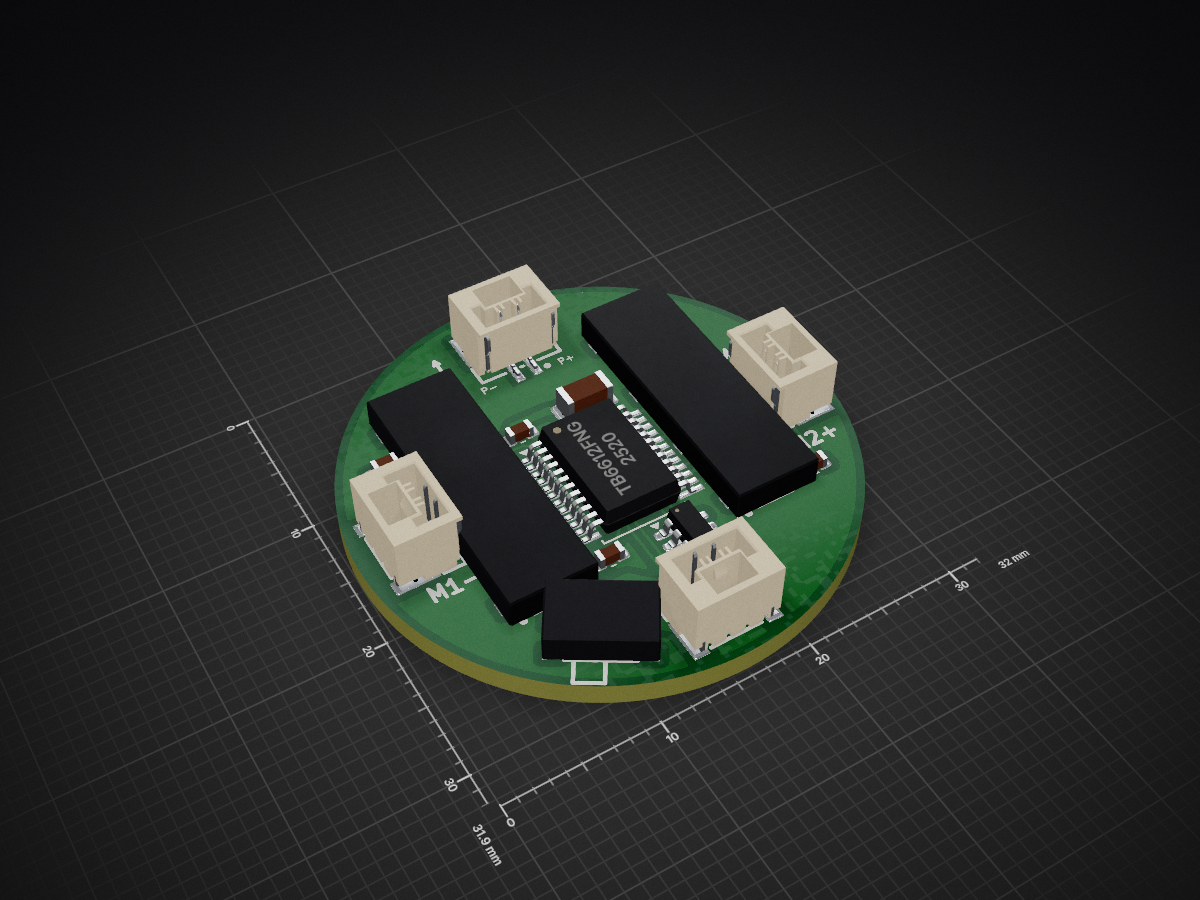
 offmor/RoboTheater2
Code, hardware designs, and documentation for RoboTheater: A tabletop multi-robot platform that translates LLM-generated scripts into robot motion and multimedia output.
Robot mainboard is an open-source printed circuit board by offmor, from the offmor/RoboTheater repository on GitHub, published under the MIT licence. It is a 2-layer board of 9.4 × 31.9 mm with 23 parts on 24 nets, routed with 194 tracks and 52 vias.
It is built around the SN74LVC2G14DBV. Its parts include 5 capacitors, 4 ICs, 4 connectors and 1 switch. It belongs with the robots and motor control and computers and single-board computers boards of this library.


Build your own desktop multi-robot storytelling theater.
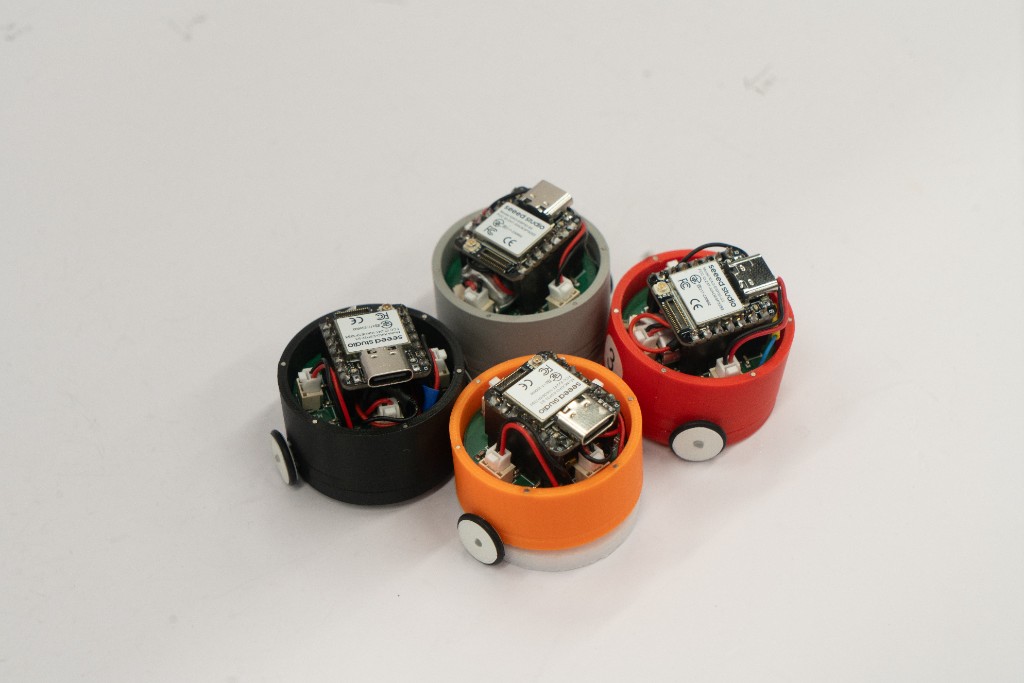
RoboTheater turns LLM-generated scripts into embodied storytelling on a desktop scenario: multiple tabletop robots speak, move, and act out characters over a wireless network.
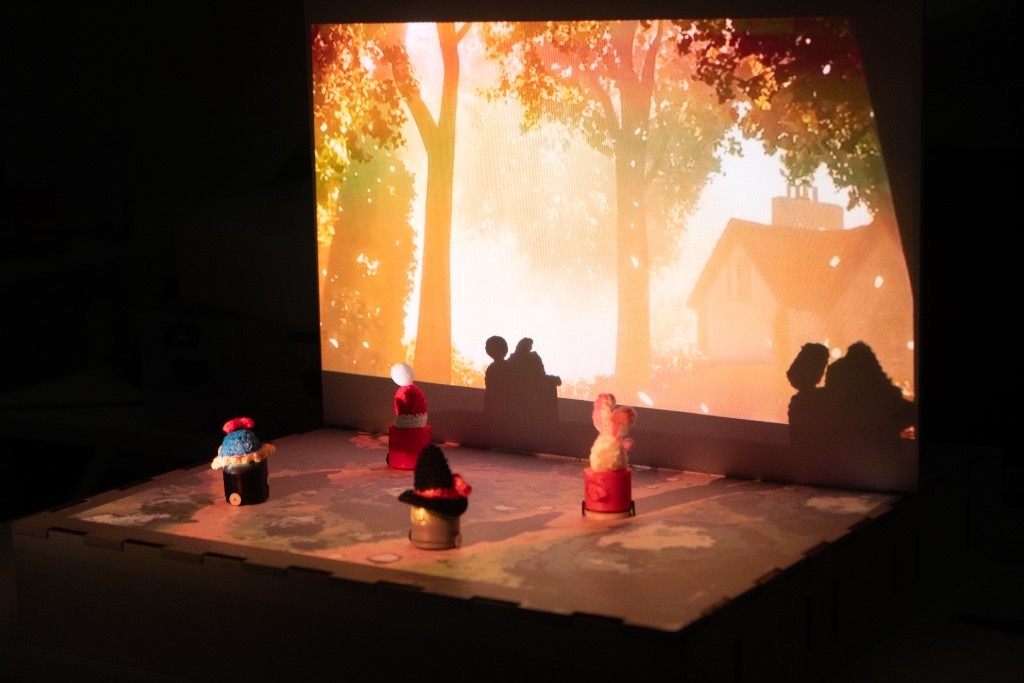
RoboTheater: A Multi-Robot Storytelling Platform from LLM Scripts to Stage Performance
Yinghao Gao, Yongbo Yang, Chenwan Halley Zhong, Xinyi Zhang, Junrong Song, Lawrence H. Kim, Tengfei Chang, Xin Tong
TEI '26 · DOI: 10.1145/3731459.3779333
RoboTheater/
├── apps/
│   ├── authoring-tool/      # LLM story generation (Flask + web UI)
│   └── performance-runner/  # TTS playback + MQTT motion
├── firmware/
│   ├── robot-controller/    # Robot firmware (PlatformIO)
│   └── test/                # Motor / fidget hardware tests
├── electronics/
│   ├── kicad/               # Mainboard schematic & PCB
│   └── fabrication/         # Gerbers, BOM, positions
├── mechanical/              # 3D chassis & wheel models
├── example/                 # Sample story JSON scripts
├── assets/                  # Images for this README
├── .env.example             # Environment variable template
├── CITATION.cff
└── LICENSEPrint / fabricate the chassis and assemble each robot:
mechanical/models/ (top, middle, bottom STEP; wheel STL)electronics/ (mainboard with TB6612FNG, Seeed Studio XIAO ESP32-S3)See mechanical/README.md and the files under electronics/.
Install PlatformIO, then for each robot:
cd firmware/robot-controller
cp include/config.example.h include/config.h
Edit include/config.h with your Wi-Fi SSID/password, MQTT broker IP, and a unique ROBOT_ID (e.g. robot1, robot2).
pio run --target uploadDetails: firmware/robot-controller/README.md.
Requirements: Python 3.10+, an MQTT broker on the same LAN as the robots, VLC, plus OpenAI and ElevenLabs API keys.
cp .env.example .env
# Edit .env — fill in OPENAI_API_KEY, ELEVENLABS_API_KEY, MQTT_BROKER, MQTT_PORT
Load the variables into your shell before running the apps:
set -a && source .env && set +aInstall dependencies:
cd apps/authoring-tool/backend && pip install -r requirements.txt
cd ../../performance-runner && pip install -r requirements.txt| Variable | Purpose |
|---|---|
OPENAI_API_KEY | Story generation / update |
ELEVENLABS_API_KEY | Speech synthesis (cached after first run) |
MQTT_BROKER | Broker host (default localhost) |
MQTT_PORT | Broker port (default 1883) |
cd apps/authoring-tool/backend
python app.py
Open apps/authoring-tool/frontend/ in a browser (e.g. Live Server on port 5500). Set stage size, theme, robot count, and length, then click Submit.
With robots online and the MQTT broker running:
cd apps/performance-runner
python run_performance.py ../authoring-tool/backend/story.json --audio-mode local
Or click Perform in the authoring UI. Speech plays locally via VLC; motion commands go to the robots over MQTT.
Try a sample script first (no robots required with --dry-run):
cd apps/performance-runner
python run_performance.py ../../example/A\ Magical\ Christmas\ Conspiracy.json --dry-run
More detail: apps/README.md, example/README.md.
| Item | Notes |
|---|---|
| Tabletop robots | STEP/STL models in mechanical/models/ |
| MCU | Seeed Studio XIAO ESP32-S3 |
| Mainboard | Including motor driver TB6612FNG; KiCad project + fab files in electronics/ |
| Setup | Runs on a table |
| Optional | External speaker / projector for narration and visuals |
If you use RoboTheater in academic work, please cite:
@inproceedings{10.1145/3731459.3779333,
  author    = {Gao, Yinghao and Yang, Yongbo and Zhong, Chenwan Halley and Zhang, Xinyi and Song, Junrong and Kim, Lawrence H and Chang, Tengfei and Tong, Xin},
  title     = {RoboTheater: A Multi-Robot Storytelling Platform from LLM Scripts to Stage Performance},
  year      = {2026},
  isbn      = {9798400718687},
  publisher = {Association for Computing Machinery},
  address   = {New York, NY, USA},
  url       = {https://doi.org/10.1145/3731459.3779333},
  doi       = {10.1145/3731459.3779333},
  booktitle = {Proceedings of the Twentieth International Conference on Tangible, Embedded, and Embodied Interaction},
  articleno = {73},
  numpages  = {7},
  keywords  = {Multi-Robot Systems; Human-Robot Interaction (HRI); Storytelling},
  series    = {TEI '26}
}This project is released under the MIT License.
| Qty | Value | Footprint | References |
|---|---|---|---|
| 9 | ~ | TestPoint:TestPoint_Pad_1.5x1.5mm | 3V3, D4, D5, D6Tx, D7Rx, D8, D9, D10, GND |
| 4 | 100nF | Capacitor_SMD:C_0603_1608Metric | C1, C2, C3, C5 |
| 4 | ~ | xiao ESP32S3_PCB:CONN-TH_2P-P1.25_XUNPU_WAFER-GH1.25-2PLB | CN1, CN2, CN3, CN4 |
| 2 | ~ | xiao ESP32S3_PCB:HDR-SMD_7P-P2.54-V-M-S4.8 | U1, U4 |
| 1 | 22uF/25V | Capacitor_SMD:C_1206_3216Metric | C4 |
| 1 | SN74LVC2G14DBV | Package_TO_SOT_SMD:SOT-23-6 | U3 |
| 1 | TB6612FNG | Package_SO:SSOP-24_5.3x8.2mm_P0.65mm | U2 |
| 1 | ~ | xiao ESP32S3_PCB:SW-SMD_MSK12CO2 | SW1 |
It measures 9.4 × 31.9 mm and has 2 copper layers, 1.6 mm thick.
23 parts, built around the SN74LVC2G14DBV. The full list of its parts is on this page, with links to each part's symbol and footprint where PCBKit's library has them.
From the offmor/RoboTheater repository on GitHub, at the commit this page was made from: the board is electronics/kicad/robot-mainboard.kicad_pcb and its schematic electronics/kicad/robot-mainboard.kicad_sch. PCBKit opens the board in the browser, with nothing to install.
Its repository publishes it under the MIT licence: you may reuse it on that licence's terms (keep the author's notice, and for a copyleft licence share your changes alike).
fliperama86/neopico-hd
Digital video and audio capture with HDMI output for Neo Geo MVS arcade hardware using Raspberry Pi Pico 2


maximus64/opendiag-hardware
OpenDIAG - Open Source OBD2 Interface (Hardware)

mpiraux/OpenTRV-ESP
An open-source and open-hardware thermostatic radiator valve based on the ESP32C6 and the 28BYJ-48 stepper motor.

axpaul/KinetiCoreDC
Compact STM32G0-based DC motor controller board featuring TI DRV8874 H-bridge drivers, RS485 communication, optoisolated I/O, and hardware power protection.


