
4 layers42 × 50 mm
SimpleFC G
wangyeee/OpenHardware
Collections of hardware design related to my drone project.
134 parts10BSD-3-Clause

 NTNU-TDT4295/slamdunk7
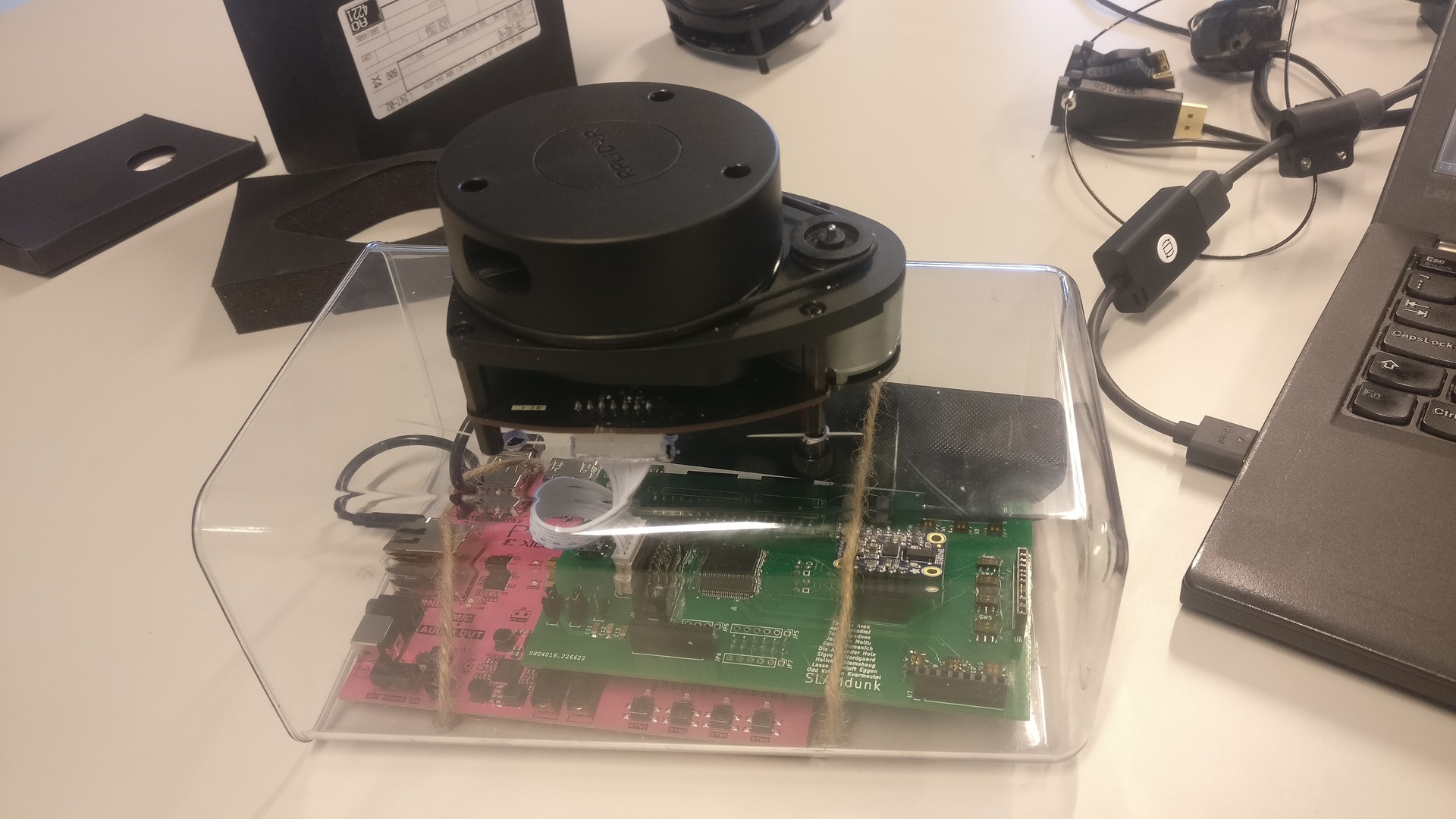
SLAMdunk is a project built to map out environments, using a custom built PCB shield meant for a Xilinx PYNQ-Z1.
Slamdunk is an open-source printed circuit board by NTNU-TDT4295, from the NTNU-TDT4295/slamdunk repository on GitHub. It is a 4-layer board of 122.9 × 69.6 mm with 99 parts on 193 nets, routed with 1,046 tracks and 71 vias.
It is built around the BSS138 and M10. Its parts include 35 resistors, 13 capacitors, 13 switches, 12 transistors and 7 ICs. It belongs with the Silicon Labs (EFR32, EFM) boards of this library.

SLAMdunk is a project built to map out environments, using a custom built PCB shield meant for a Xilinx PYNQ-Z1.
Contains common recipes for building the modules of SLAMdunk (e.g. makefiles).
Code to run MCU on the custom PCB. Functionality includes reading sensor data from RPLIDAR A1, BNO055, HC-SR04, and communicating over serial protocols such as UART, I2C and SPI.
Schematics for the custom PCB shield.
General utilities used for deployment to PYNQ. e.g. kernel modules for Wi-Fi and virtual serial port on USB, and other scripts to get started.
The actual SLAMdunk implementation. All functionality related to running the Hector SLAM algorithm on the PYNQ resides there. This includes an FPGA implementation of an SPI slave, with double buffering of the incoming data, as well as the entire implementation required to run SLAM on a PYNQ. Also contains compiled bit files needed to deploy to FPGA fabric.
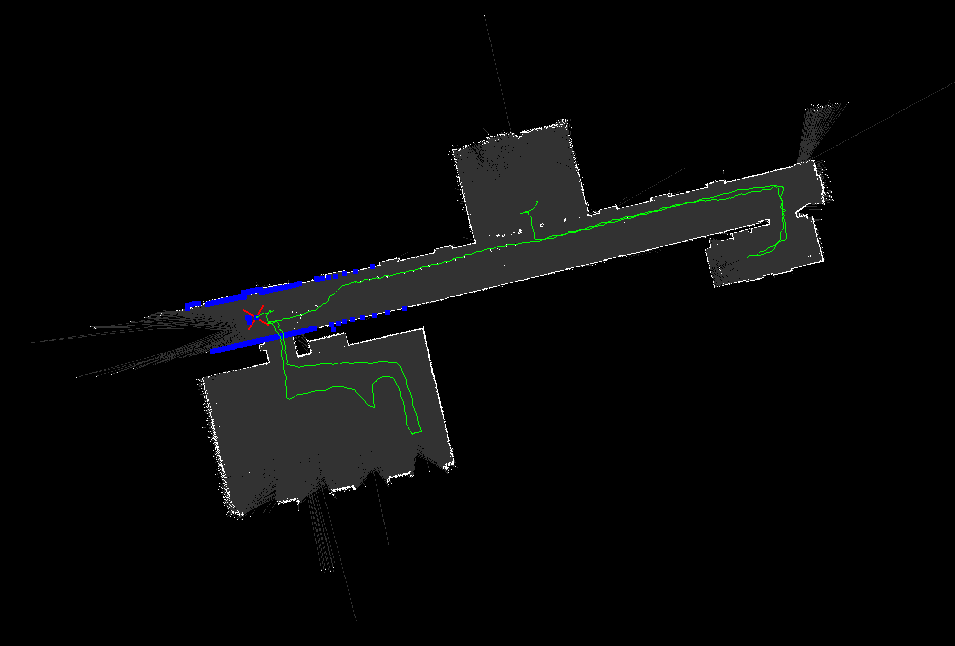
Software running a remote machine for visualizing the output from pynqslam.
Utilities for testing etc., mainly used in previous iterations of the system:
| Qty | Value | Footprint | References |
|---|---|---|---|
| 24 | 10k | Resistor_SMD:R_1206_3216Metric_Pad1.42x1.75mm_HandSolder | R10, R11, R12, R13, R14, R15, R16, R17, R18, R19, R20, R21, R22, R23, R24, R25 +8 |
| 12 | BSS138 | digikey-footprints:SOT-23-3 | Q1, Q2, Q3, Q4, Q5, Q6, Q7, Q8, Q9, Q10, Q11, Q12 |
| 9 | SW_2xSPDT | localization-footprints:CAS-D20TB | SW3, SW4, SW5, SW6, SW7, SW8, SW9, SW10, SW11 |
| 8 | R | Resistor_SMD:R_1206_3216Metric_Pad1.42x1.75mm_HandSolder | R1, R2, R3, R4, R32, R33, R34, R35 |
| 5 | 100n | Capacitor_SMD:C_1206_3216Metric_Pad1.42x1.75mm_HandSolder | C1, C3, C4, C6, C8 |
| 4 | LED | LED_SMD:LED_1206_3216Metric_Pad1.42x1.75mm_HandSolder | D1, D2, D3, D4 |
| 4 | M08 | Connector_PinHeader_2.54mm:PinHeader_1x08_P2.54mm_Vertical | JP1, JP2, JP3, JP8 |
| 4 | SW_PUSHBUTTON | myfootprint:SW_PUSHBUTTON_SMD | SW1, SW2, SW12, SW13 |
| 3 | ULTRASONIC-GPIO | Connector_PinHeader_2.54mm:PinHeader_1x08_P2.54mm_Vertical | U5, U6, U7 |
| 2 | 10nF | Capacitor_SMD:C_1206_3216Metric_Pad1.42x1.75mm_HandSolder | C2, C5 |
| 2 | 1uF | Capacitor_SMD:C_1206_3216Metric_Pad1.42x1.75mm_HandSolder | C7, C10 |
| 2 | Jumper_NC_Dual | Connector_PinHeader_2.54mm:PinHeader_1x03_P2.54mm_Vertical | JP9, JP10 |
| 2 | M06 | Connector_PinHeader_2.54mm:PinHeader_1x06_P2.54mm_Vertical | JP5, JP7 |
| 1 | 1 | Resistor_SMD:R_1206_3216Metric_Pad1.42x1.75mm_HandSolder | R5 |
| 1 | 100nF | Capacitor_SMD:C_1206_3216Metric_Pad1.42x1.75mm_HandSolder | C13 |
| 1 | 10u | Capacitor_SMD:C_1206_3216Metric_Pad1.42x1.75mm_HandSolder | C9 |
| 1 | 10μF | Capacitor_SMD:C_1206_3216Metric_Pad1.42x1.75mm_HandSolder | C11 |
| 1 | 1μF | Capacitor_SMD:C_1206_3216Metric_Pad1.42x1.75mm_HandSolder | C12 |
| 1 | 2.2k | Resistor_SMD:R_1206_3216Metric_Pad1.42x1.75mm_HandSolder | R6 |
| 1 | 4.7k | Resistor_SMD:R_1206_3216Metric_Pad1.42x1.75mm_HandSolder | R7 |
| 1 | 742792662 | Inductor_SMD:L_1206_3216Metric_Pad1.42x1.75mm_HandSolder | L1 |
| 1 | ARDUINO_PYNQ_SHIELD | localization-footprints:ARDUINO_PYNQ_SHIELD | U2 |
| 1 | Battery | Connector_PinHeader_2.54mm:PinHeader_1x02_P2.54mm_Vertical | BT1 |
| 1 | Conn_02x03_Counter_Clockwise | Connector_PinSocket_2.54mm:PinSocket_2x03_P2.54mm_Vertical | J2 |
| 1 | Conn_02x10_Odd_Even | Connector_Multicomp:Multicomp_MC9A12-2034_2x10_P2.54mm_Vertical | J1 |
| 1 | Crystal_GND23 | Crystal:Crystal_SMD_3225-4Pin_3.2x2.5mm_HandSoldering | Y1 |
| 1 | EFM32GG980 | efm32-footprints:EFM32GG980 | U1 |
| 1 | IMU | Adafruit-BNO055-Breakout-PCB-master:BNO055 | U3 |
| 1 | M04 | Connector_PinHeader_2.54mm:PinHeader_1x04_P2.54mm_Vertical | JP6 |
| 1 | M10 | Connector_PinHeader_2.54mm:PinHeader_1x10_P2.54mm_Vertical | JP4 |
| 1 | lidar | Connector_Molex:Molex_SPOX_5267-07A_1x07_P2.50mm_Vertical | U4 |
wangyeee/OpenHardware
Collections of hardware design related to my drone project.


kqrla/keeberia
browser-based intuitive visual builder for custom macropads & keyboards with pixel-level control over parts, layout and functionality for the pcb, parametric case parts, keycaps and firmware.


baldengineer/addohms
Projects and files from AddOhms Tutorials

Acliad/Nifty-Numpad
Full sized numpad with an extra row and two extra columns of macro keys. It was created as a companion to my TKL keyboard for CAD design.

It measures 122.9 × 69.6 mm and has 4 copper layers, 1.6 mm thick.
99 parts, built around the BSS138 and M10. The full list of its parts is on this page, with links to each part's symbol and footprint where PCBKit's library has them.
From the NTNU-TDT4295/slamdunk repository on GitHub, at the commit this page was made from: the board is pcb/pcb.kicad_pcb. PCBKit opens the board in the browser, with nothing to install.
Its repository states no licence, so its author keeps all rights: ask NTNU-TDT4295 before reusing the design.