
2 layers96.6 × 82.8 mm

 npsboy/Starbie-PCB-Design
A small KiCad PCB project: a handheld board built around a Seeed XIAO ESP32-C3, with an I2C OLED display (128x64), an MPU6050 motion sensor (GY-521), and push buttons (Cherry MX switches).
Starbie is an open-source printed circuit board by npsboy, from the npsboy/Starbie-PCB-Design repository on GitHub. It is a 2-layer board of 98 × 98.8 mm with 7 parts on 27 nets, routed with 33 tracks and 8 vias.
It is built around the DHT11. Its parts include 2 ICs, 2 connectors, 2 switches and 1 resistor. It belongs with the ESP32 and RISC-V boards of this library.
A small KiCad PCB project: a handheld board built around a Seeed XIAO ESP32-C3, with an I2C OLED display (128x64), an MPU6050 motion sensor (GY-521), and push buttons (Cherry MX switches).
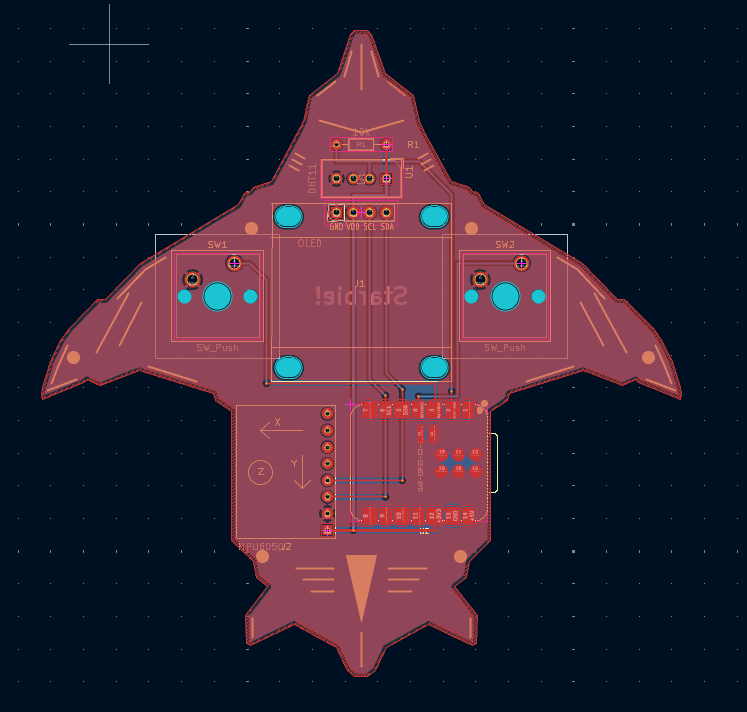
The Starbie is a handheld PCB with an embedded OLED display that acts as a digital pet. You can interact with the digital character using push buttons and using the gyroscope (motion sensor), which can detect tilts, shakes and so on.
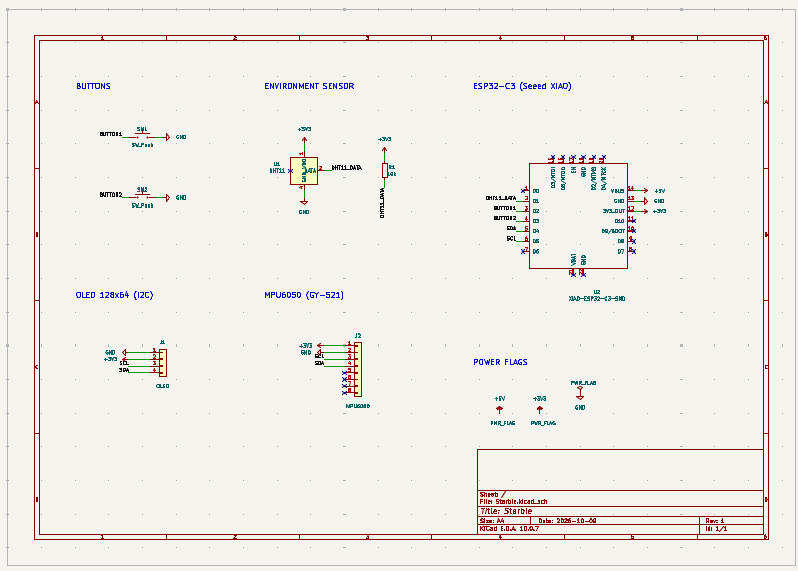
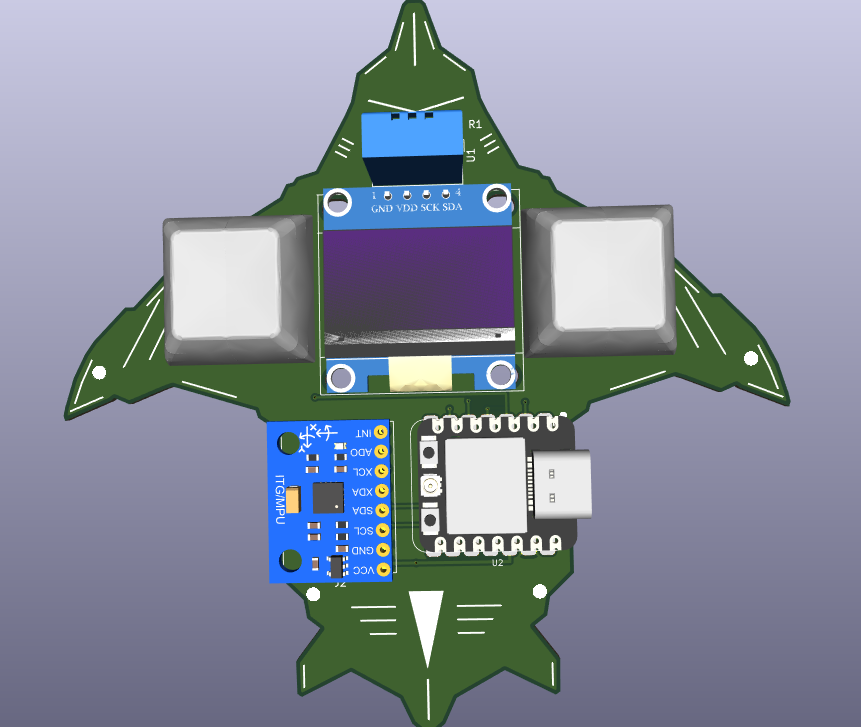
Full BOM with vendor links and notes: Starbie_BOM.csv (prices in USD, vendors in India).
| Part | Ref | Purpose | Qty | UNIT | Vendor |
|---|---|---|---|---|---|
| Seeed Studio XIAO ESP32C3 | U2 | Microcontroller (Wi-Fi, main loop) | 1 | 15.91 | Amazon |
| 0.96in 128x64 I2C OLED, 4-pin | J1 | Shows the pet and the menu | 1 | 1.68 | Ktron |
| MPU6050 GY-521 accelerometer/gyro | J2 | Tilt to steer the menu, shake detection | 1 | 1.99 | Ktron |
| DHT11 temperature/humidity sensor, bare 4-pin | U1 | Senses room temperature and humidity | 1 | 0.96 | Ktron |
| MX-style mechanical keyboard switches | SW1, SW2 | The two buttons (menu and stats) | 1 pack | 8.28 | Amazon |
| Blank MX keycaps | SW1, SW2 | Caps for the two buttons | 1 pack | 7.18 | Amazon |
| PCB fabrication, 2-layer FR4, 98.04x98.8 mm | The bare Starbie board (Rs 2,166 for 5 boards, about Rs 433 each) | 1 order (5 boards) | 22.45 | LionCircuits |
Starbie.kicad_sch / Starbie.kicad_pcb / Starbie.kicad_pro: KiCad project fileslibs/: custom symbols, footprints and 3D modelsgerbers/, Starbie_Gerbers.zip: manufacturing outputsStarbie_BOM.csv: bill of materials with vendors and prices (India)Starbie_CPL.csv: component placement list for PCB assemblyrenders/: top and bottom board renders| Qty | Value | Footprint | References |
|---|---|---|---|
| 2 | SW_Push | Button_Switch_Keyboard:SW_Cherry_MX_1.00u_PCB | SW1, SW2 |
| 1 | 10k | Resistor_THT:R_Axial_DIN0204_L3.6mm_D1.6mm_P7.62mm_Horizontal | R1 |
| 1 | DHT11 | Sensor:Aosong_DHT11_5.5x12.0_P2.54mm | U1 |
| 1 | MPU6050 | Starbie_Parts:MPU6050_Module | J2 |
| 1 | OLED | Starbie_Parts:Display_128x64_096_I2C | J1 |
| 1 | XIAO-ESP32-C3-SMD | Starbie_Parts:XIAO-ESP32-C3-SMD | U2 |

lansidev/conveyor-belt
Miniature 3D printed conveyor belt for simulation and fun working with sensors, all controllable with Raspberry Pi


ebrithiljonas/OMG_PCB
All in One PCB for the OpenMQTTGateway Project

GeorgK/SniffingTrinket
A room climate monitor using the Adafruit Trinket Pro

bhaskar9980/Guardian
Guardian is an advanced, fully automated hydroponics system designed to optimize plant growth and maximize yield.

Twistx77/Firefly
Open WIFI-enabled RGB lamp with temperature, humidity, suspended air particles and eCO2 sensors.

unla-investigacion-desarrollo/ecosistema-iot
Antes de desarrollar el sistema final, realizamos una etapa de exploración donde investigamos y experimentamos con las siguientes tecnologías:
It measures 98 × 98.8 mm and has 2 copper layers, 1.6 mm thick.
7 parts, built around the DHT11. The full list of its parts is on this page, with links to each part's symbol and footprint where PCBKit's library has them.
From the npsboy/Starbie-PCB-Design repository on GitHub, at the commit this page was made from: the board is Starbie.kicad_pcb and its schematic Starbie.kicad_sch. PCBKit opens the board in the browser, with nothing to install.
Its repository states no licence, so its author keeps all rights: ask npsboy before reusing the design.