2 layers304.8 × 165.1 mm
Comix-35
schlae/comix-35
The COMIX-35 is an improved clone of the COMX-35 1802 home computer
173 parts138

 nimitvijayvargee/keyboardv1
Keyboardv1 is an open-source printed circuit board by nimitvijayvargee, from the nimitvijayvargee/keyboardv1 repository on GitHub. It is a 2-layer board of 320 × 190 mm with 173 parts on 117 nets, routed with 1,180 tracks and 78 vias.
Its parts include 81 diodes, 76 switches, 1 IC and 1 connector. It belongs with the RP2040 boards of this library.
| Item | Link | Price |
|---|---|---|
| 80x MX switches (or compatible) | Akko V3 Cream Yellow Pro (45 pcs) | ₹1798 |
| 1x EC11 Encoder | CentIoT Encoder | ₹172 |
| 1x PCB (White) [don't forget] | PCBPower Fabrication | ₹7335 |
| 1x Acrylic cover (3mm) (optional) | ---- | ---- |
| 81x Through-hole 1N4148 Diodes | Pack of 50 | ₹96 |
| 80x Keycaps (ANSI Keycap Set) | Fresh Blue/White Doubleshot PBT | ₹1299 |
| 1x SSD1306 (0.91") | REES52 OLED Display | ₹360 |
| Raspberry Pi Pico (or compatible RP2040 board) | ---- | ---- |
| 1kg White PLA Filament (for case) | WOL3D White PLA | ₹725 |
| M3 Threaded Inserts | M3 Threaded Inserts | ₹74 |
| M3 Screws | M3 Screws | ₹250 |
| Stabilizers - Screw in | Stabilizers | ₹1595 |
| Total (excluding optional / missing) | ₹13704 |
~US$154
A cool keyboard that follows the 75% ANSI layout, with a knob, an LCD and a rotary encoder. Built for design and vibes rather than functionality. The shape and look is quite funny too, and I just went balls with this keyboard lol. The design is quite standard in terms of everything else, just uses the M3 Mounting holes.
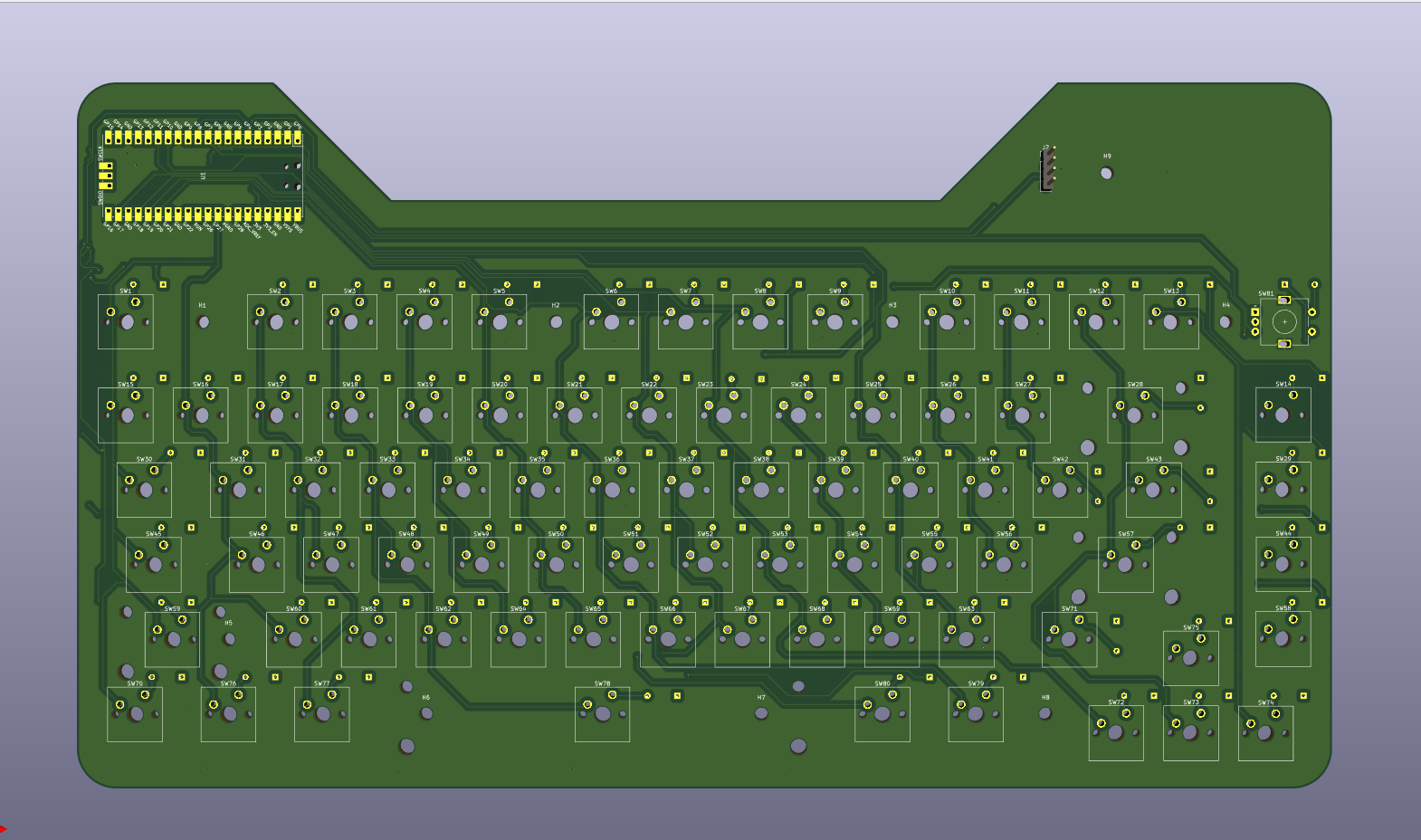
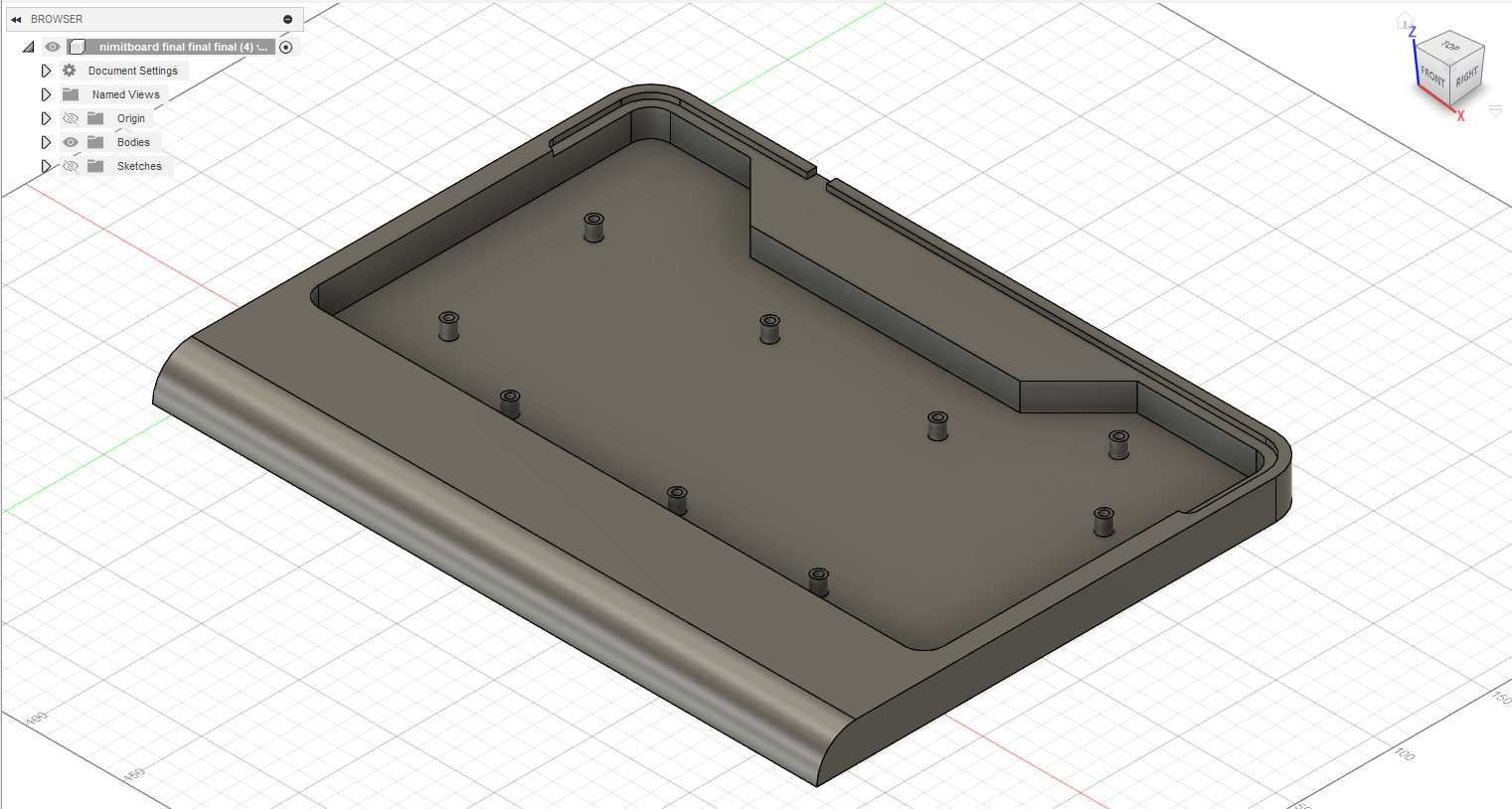
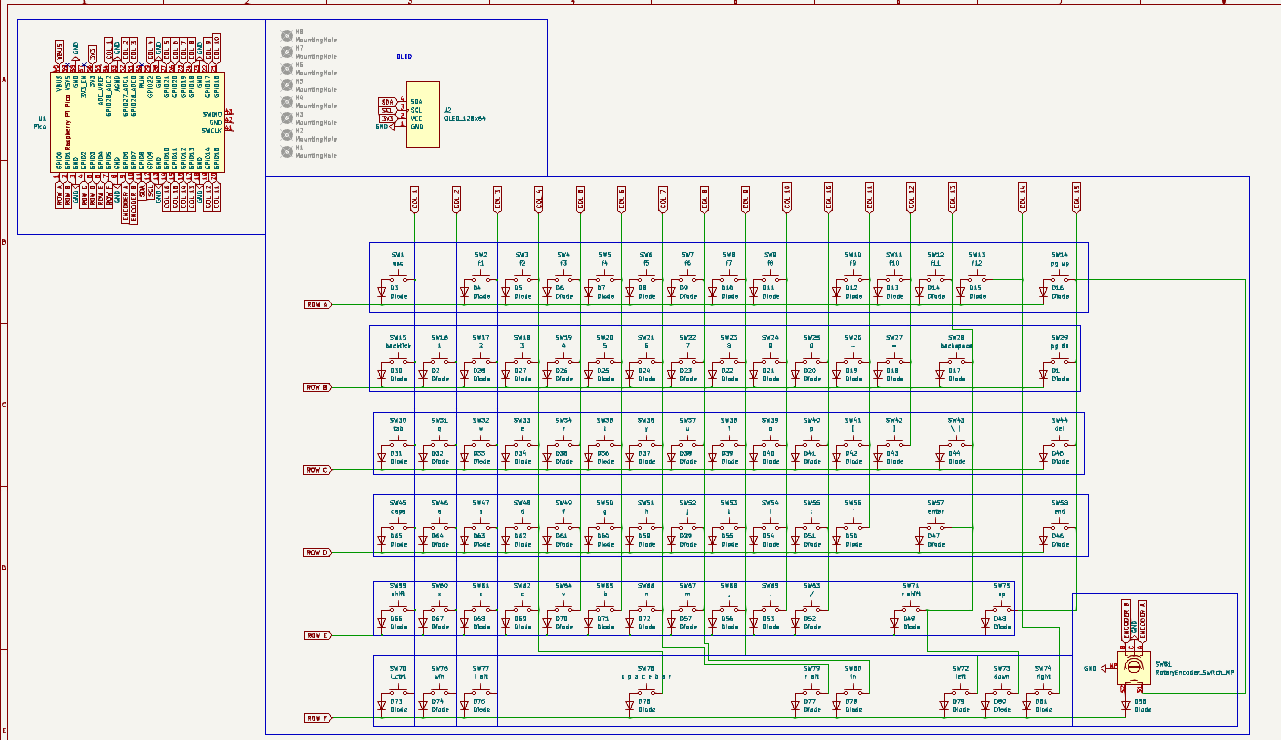
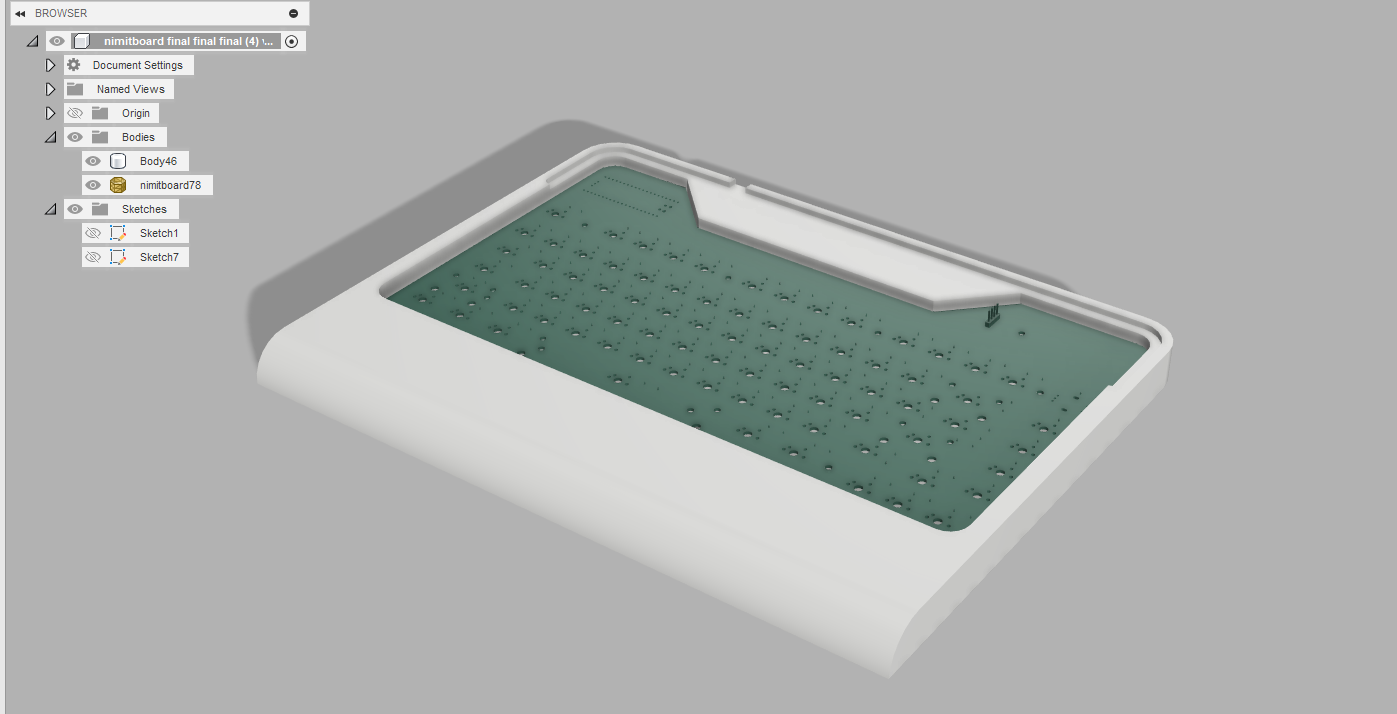
| Qty | Value | Footprint | References |
|---|---|---|---|
| 81 | Diode | Diode_THT:D_DO-35_SOD27_P7.62mm_Horizontal | D1, D2, D10, D11, D12, D13, D14, D15, D16, D17, D18, D19, D20, D21, D22, D23 +65 |
| 9 | MountingHole | MountingHole:MountingHole_3.2mm_M3 | H1, H2, H3, H4, H5, H6, H7, H8, H9 |
| 1 | ' | nimitpad_kb_footprint:SW_Cherry_MX_1.00u_PCB | SW56 |
| 1 | , | nimitpad_kb_footprint:SW_Cherry_MX_1.00u_PCB | SW68 |
| 1 | - | nimitpad_kb_footprint:SW_Cherry_MX_1.00u_PCB | SW26 |
| 1 | . | nimitpad_kb_footprint:SW_Cherry_MX_1.00u_PCB | SW69 |
| 1 | / | nimitpad_kb_footprint:SW_Cherry_MX_1.00u_PCB | SW63 |
| 1 | 0 | nimitpad_kb_footprint:SW_Cherry_MX_1.00u_PCB | SW25 |
| 1 | 1 | nimitpad_kb_footprint:SW_Cherry_MX_1.00u_PCB | SW16 |
| 1 | 2 | nimitpad_kb_footprint:SW_Cherry_MX_1.00u_PCB | SW17 |
| 1 | 3 | nimitpad_kb_footprint:SW_Cherry_MX_1.00u_PCB | SW18 |
| 1 | 4 | nimitpad_kb_footprint:SW_Cherry_MX_1.00u_PCB | SW19 |
| 1 | 5 | nimitpad_kb_footprint:SW_Cherry_MX_1.00u_PCB | SW20 |
| 1 | 6 | nimitpad_kb_footprint:SW_Cherry_MX_1.00u_PCB | SW21 |
| 1 | 7 | nimitpad_kb_footprint:SW_Cherry_MX_1.00u_PCB | SW22 |
| 1 | 8 | nimitpad_kb_footprint:SW_Cherry_MX_1.00u_PCB | SW23 |
| 1 | 9 | nimitpad_kb_footprint:SW_Cherry_MX_1.00u_PCB | SW24 |
| 1 | ; | nimitpad_kb_footprint:SW_Cherry_MX_1.00u_PCB | SW55 |
| 1 | = | nimitpad_kb_footprint:SW_Cherry_MX_1.00u_PCB | SW27 |
| 1 | OLED_128x64 | Connector_PinHeader_2.54mm:PinHeader_1x04_P2.54mm_Vertical | J2 |
| 1 | Pico | MCU_RaspberryPi_and_Boards:RPi_Pico_SMD_TH | U1 |
| 1 | RotaryEncoder_Switch_MP | Rotary_Encoder:RotaryEncoder_Alps_EC11E-Switch_Vertical_H20mm | SW81 |
| 1 | [ | nimitpad_kb_footprint:SW_Cherry_MX_1.00u_PCB | SW41 |
| 1 | \ | | nimitpad_kb_footprint:SW_Cherry_MX_1.50u_PCB | SW43 |
| 1 | ] | nimitpad_kb_footprint:SW_Cherry_MX_1.00u_PCB | SW42 |
| 1 | a | nimitpad_kb_footprint:SW_Cherry_MX_1.00u_PCB | SW46 |
| 1 | b | nimitpad_kb_footprint:SW_Cherry_MX_1.00u_PCB | SW65 |
| 1 | backspace | nimitpad_kb_footprint:SW_Cherry_MX_2.00u_PCB | SW28 |
| 1 | backtick | nimitpad_kb_footprint:SW_Cherry_MX_1.00u_PCB | SW15 |
| 1 | c | nimitpad_kb_footprint:SW_Cherry_MX_1.00u_PCB | SW62 |
| 1 | caps | nimitpad_kb_footprint:SW_Cherry_MX_1.75u_PCB | SW45 |
| 1 | d | nimitpad_kb_footprint:SW_Cherry_MX_1.00u_PCB | SW48 |
| 1 | del | nimitpad_kb_footprint:SW_Cherry_MX_1.00u_PCB | SW44 |
| 1 | down | nimitpad_kb_footprint:SW_Cherry_MX_1.00u_PCB | SW73 |
| 1 | e | nimitpad_kb_footprint:SW_Cherry_MX_1.00u_PCB | SW33 |
| 1 | end | nimitpad_kb_footprint:SW_Cherry_MX_1.00u_PCB | SW58 |
| 1 | enter | nimitpad_kb_footprint:SW_Cherry_MX_2.25u_PCB | SW57 |
| 1 | esc | nimitpad_kb_footprint:SW_Cherry_MX_1.00u_PCB | SW1 |
| 1 | f | nimitpad_kb_footprint:SW_Cherry_MX_1.00u_PCB | SW49 |
| 1 | f1 | nimitpad_kb_footprint:SW_Cherry_MX_1.00u_PCB | SW2 |
| 1 | f10 | nimitpad_kb_footprint:SW_Cherry_MX_1.00u_PCB | SW11 |
| 1 | f11 | nimitpad_kb_footprint:SW_Cherry_MX_1.00u_PCB | SW12 |
| 1 | f12 | nimitpad_kb_footprint:SW_Cherry_MX_1.00u_PCB | SW13 |
| 1 | f2 | nimitpad_kb_footprint:SW_Cherry_MX_1.00u_PCB | SW3 |
| 1 | f3 | nimitpad_kb_footprint:SW_Cherry_MX_1.00u_PCB | SW4 |
| 1 | f4 | nimitpad_kb_footprint:SW_Cherry_MX_1.00u_PCB | SW5 |
| 1 | f5 | nimitpad_kb_footprint:SW_Cherry_MX_1.00u_PCB | SW6 |
| 1 | f6 | nimitpad_kb_footprint:SW_Cherry_MX_1.00u_PCB | SW7 |
| 1 | f7 | nimitpad_kb_footprint:SW_Cherry_MX_1.00u_PCB | SW8 |
| 1 | f8 | nimitpad_kb_footprint:SW_Cherry_MX_1.00u_PCB | SW9 |
| 1 | f9 | nimitpad_kb_footprint:SW_Cherry_MX_1.00u_PCB | SW10 |
| 1 | fn | nimitpad_kb_footprint:SW_Cherry_MX_1.25u_PCB | SW80 |
| 1 | g | nimitpad_kb_footprint:SW_Cherry_MX_1.00u_PCB | SW50 |
| 1 | h | nimitpad_kb_footprint:SW_Cherry_MX_1.00u_PCB | SW51 |
| 1 | i | nimitpad_kb_footprint:SW_Cherry_MX_1.00u_PCB | SW38 |
| 1 | j | nimitpad_kb_footprint:SW_Cherry_MX_1.00u_PCB | SW52 |
| 1 | k | nimitpad_kb_footprint:SW_Cherry_MX_1.00u_PCB | SW53 |
| 1 | l | nimitpad_kb_footprint:SW_Cherry_MX_1.00u_PCB | SW54 |
| 1 | l alt | nimitpad_kb_footprint:SW_Cherry_MX_1.25u_PCB | SW77 |
| 1 | l.ctrl | nimitpad_kb_footprint:SW_Cherry_MX_1.25u_PCB | SW70 |
| 1 | left | nimitpad_kb_footprint:SW_Cherry_MX_1.00u_PCB | SW72 |
| 1 | m | nimitpad_kb_footprint:SW_Cherry_MX_1.00u_PCB | SW67 |
| 1 | n | nimitpad_kb_footprint:SW_Cherry_MX_1.00u_PCB | SW66 |
| 1 | o | nimitpad_kb_footprint:SW_Cherry_MX_1.00u_PCB | SW39 |
| 1 | p | nimitpad_kb_footprint:SW_Cherry_MX_1.00u_PCB | SW40 |
| 1 | pg dn | nimitpad_kb_footprint:SW_Cherry_MX_1.00u_PCB | SW29 |
| 1 | pg up | nimitpad_kb_footprint:SW_Cherry_MX_1.00u_PCB | SW14 |
| 1 | q | nimitpad_kb_footprint:SW_Cherry_MX_1.00u_PCB | SW31 |
| 1 | r | nimitpad_kb_footprint:SW_Cherry_MX_1.00u_PCB | SW34 |
| 1 | r alt | nimitpad_kb_footprint:SW_Cherry_MX_1.25u_PCB | SW79 |
| 1 | r shift | nimitpad_kb_footprint:SW_Cherry_MX_1.75u_PCB | SW71 |
| 1 | right | nimitpad_kb_footprint:SW_Cherry_MX_1.00u_PCB | SW74 |
| 1 | s | nimitpad_kb_footprint:SW_Cherry_MX_1.00u_PCB | SW47 |
| 1 | s p a c e b a r | nimitpad_kb_footprint:SW_Cherry_MX_6.25u_PCB | SW78 |
| 1 | shift | nimitpad_kb_footprint:SW_Cherry_MX_2.25u_PCB | SW59 |
| 1 | t | nimitpad_kb_footprint:SW_Cherry_MX_1.00u_PCB | SW35 |
| 1 | tab | nimitpad_kb_footprint:SW_Cherry_MX_1.50u_PCB | SW30 |
| 1 | u | nimitpad_kb_footprint:SW_Cherry_MX_1.00u_PCB | SW37 |
| 1 | up | nimitpad_kb_footprint:SW_Cherry_MX_1.00u_PCB | SW75 |
| 1 | v | nimitpad_kb_footprint:SW_Cherry_MX_1.00u_PCB | SW64 |
The 168 most common of 173 parts.
schlae/comix-35
The COMIX-35 is an improved clone of the COMX-35 1802 home computer

nicolacimmino/PLC-14500
Retro trainer board based on the MC14500 1-bit ICU. The project is OSHW certified and a ready to assemble kit is available on Tindie.

yiancar/gingham_usbc_pcb
A 60% throughole keyboard with USBC. Inspired by the Plaid

schlae/HardDriveInfo
Repair info and schematics for mostly older MFM hard drives

96boards/mezzanine-community
Repository for community designed mezzanine boards for the 96boards specification.


DragonMinded/minidragon
Hardware and software files for the MiniDragon CPU.
It measures 320 × 190 mm and has 2 copper layers, 1.6 mm thick.
173 parts. The full list of its parts is on this page, with links to each part's symbol and footprint where PCBKit's library has them.
From the nimitvijayvargee/keyboardv1 repository on GitHub, at the commit this page was made from: the board is pcb/keyboardv1/keyboardv1.kicad_pcb and its schematic pcb/keyboardv1/keyboardv1.kicad_sch. PCBKit opens the board in the browser, with nothing to install.
Its repository states no licence, so its author keeps all rights: ask nimitvijayvargee before reusing the design.