4 layers100 × 120 mm
Panoptes
jjCSE113NMT/dsp-neutron-spectrometer
A place to keep all our material related to our senior design project.
111 parts3
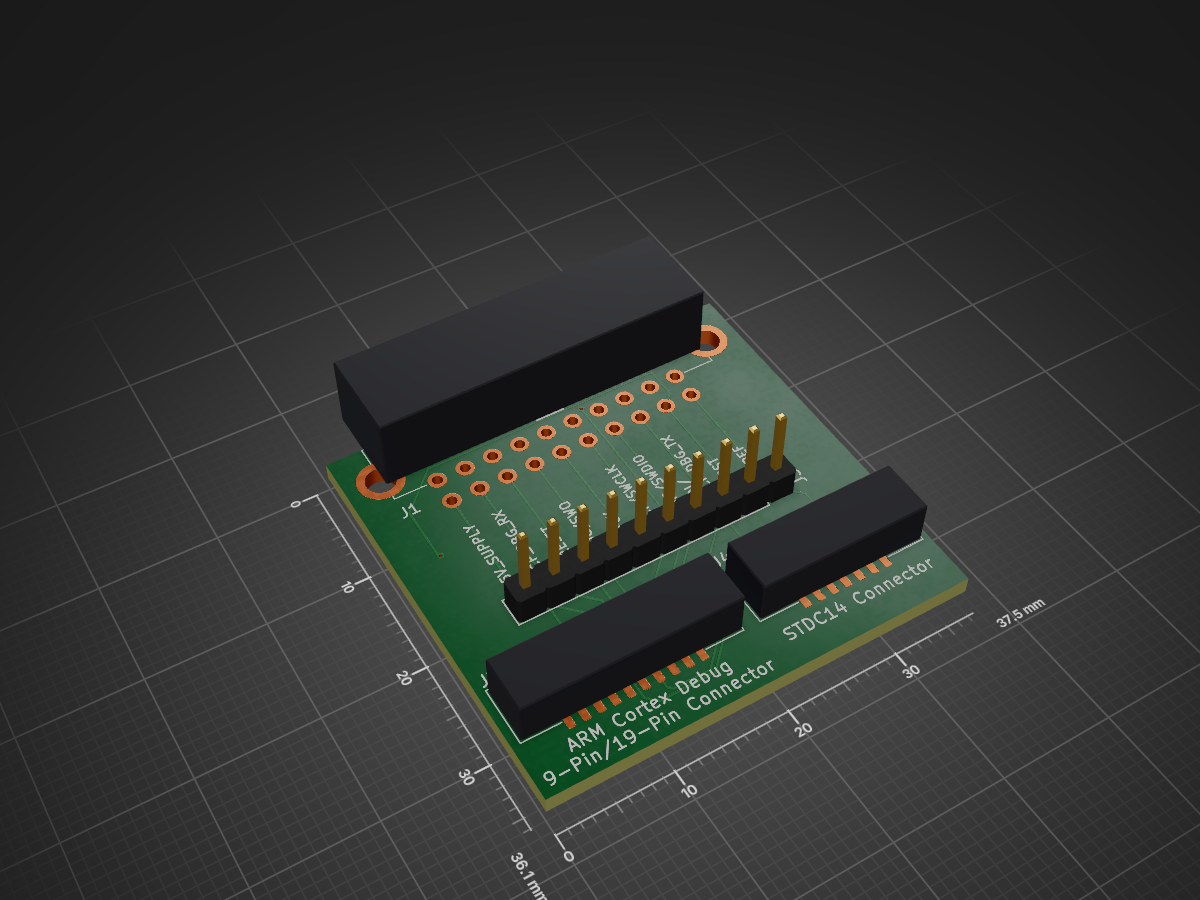
 multiplemonomials/J-Link-Ultra-Cortex-Adapter3
Improved adapter PCB from SEGGER J-Link to Cortex Debug cable
J Link Ultra Cortex Adapter is an open-source printed circuit board by multiplemonomials, from the multiplemonomials/J-Link-Ultra-Cortex-Adapter repository on GitHub. It is a 2-layer board of 37.5 × 36.1 mm with 7 parts on 24 nets, routed with 145 tracks and 13 vias.
It is built around the SFH11-PBPC-D10-RA-BK. It belongs with the interfaces and adapters boards of this library.
J-Links, as debug probes, are amazing. They can talk to just about any processor, ARM or otherwise, in common use in the last decade. The huge breadth of software and hardware compatibility available from one debug probe plus a set of adapters is incredible, and SEGGER deserves credit for getting this right.
Except... one thing. The adapters they sell for connecting a J-Link to a 9-pin or 19-pin Cortex-Debug connector are just... bad. They are bad, in fact, in several ways:
The Ultra Cortex Adapter in this repo tries to fix this badness in several ways.
First of all, this adapter uses proper keyed connectors for each of the ARM Cortex connections. And these aren't just connectors with a little keying tab that can break off -- these are fully shrouded connectors that can take a beating and keep working.
(note: the ARM standard says that the connections should be keyed via a missing pin 7 on the header and a filled pin 7 hole in the cable. However, I've had a hard time sourcing this, so I've gone for the next best thing. Plus, this way if you replace the cable the connector will still be keyed.)
Additionally, with this adapter, you get not one, not two, but three different connection options:
Last but not least, the Ultra Cortex Adapter gives you access to all of the JTAG/SWD/VCP signals via convenient test points! Because you never know when things are just going haywire and you need to be able to hook in a logic analyzer or oscilloscope, and it absolutely sucks to not have a convenient place to do that.
With the large variety of debug connectors available, it can be difficult to determine the one you need for your application. I've put together the below table to summarize which ones possess which features.
| Feature | 9-Pin Cortex Debug | 14-Pin STDC14 | 19-Pin Cortex Debug |
|---|---|---|---|
| JTAG | Yes | Yes | Yes |
| SWD | Yes | Yes | Yes |
| UART / Virtual COM Port | Only via nonstandard mapping. Not supported at the same time as JTAG. | Yes. Not supported at the same time as JTAG with J-Link. | Only via nonstandard mapping. Not supported at the same time as JTAG or with the J-Trace. |
| JTAG RTCK (return clock) | No | Yes | No |
| JTAG TRST | Only with SEGGER nonstandard mapping. Requires changing a solder jumper on this adapter. | Only with SEGGER nonstandard mapping. Requires changing a solder jumper on this adapter. | Only with SEGGER nonstandard mapping. Requires changing a solder jumper on this adapter. |
| GNDDetect (ability for board to detect if a debugger is connected) | Yes (unless TRST is used) | Yes (unless TRST is used) | Yes (unless TRST is used) |
| Target Power | No | No | Yes |
| ETM (Embedded Trace Macrocell) | No | No | Yes |
| Qty | Value | Footprint | References |
|---|---|---|---|
| 2 | 2.6mm | ProjectLibrary:StencilAlignmentHole | H1, H2 |
| 1 | 3221-14-0300-00 | ProjectLibrary:3221-14-0300-00 | J4 |
| 1 | 3221-20-0300-00 | ProjectLibrary:3221-20-0300-00 | J2 |
| 1 | Conn_01x10 | Connector_PinHeader_2.54mm:PinHeader_1x10_P2.54mm_Vertical | J3 |
| 1 | SFH11-PBPC-D10-RA-BK | ProjectLibrary:SFH11-PBPC-D10-RA-BK | J1 |
| 1 | SolderJumper_3_Bridged12 | Jumper:SolderJumper-3_P1.3mm_Bridged2Bar12_Pad1.0x1.5mm_NumberLabels | JP1 |
jjCSE113NMT/dsp-neutron-spectrometer
A place to keep all our material related to our senior design project.


byrantech/laptop
anyon_e, a highly integrated, high end, open source laptop. Attempt the impossible.


AxxAxx/AxxSolder
STM32 Based soldering station for JBC cartridges, 9-24 VDC and USB-PD power
It measures 37.5 × 36.1 mm and has 2 copper layers, 1.6 mm thick.
7 parts, built around the SFH11-PBPC-D10-RA-BK. The full list of its parts is on this page, with links to each part's symbol and footprint where PCBKit's library has them.
From the multiplemonomials/J-Link-Ultra-Cortex-Adapter repository on GitHub, at the commit this page was made from: the board is J-Link Ultra Cortex Adapter/J-Link Ultra Cortex Adapter.kicad_pcb and its schematic J-Link Ultra Cortex Adapter/J-Link Ultra Cortex Adapter.kicad_sch. PCBKit opens the board in the browser, with nothing to install.
Its repository states no licence, so its author keeps all rights: ask multiplemonomials before reusing the design.