Skip to the content
PCBKitNew board
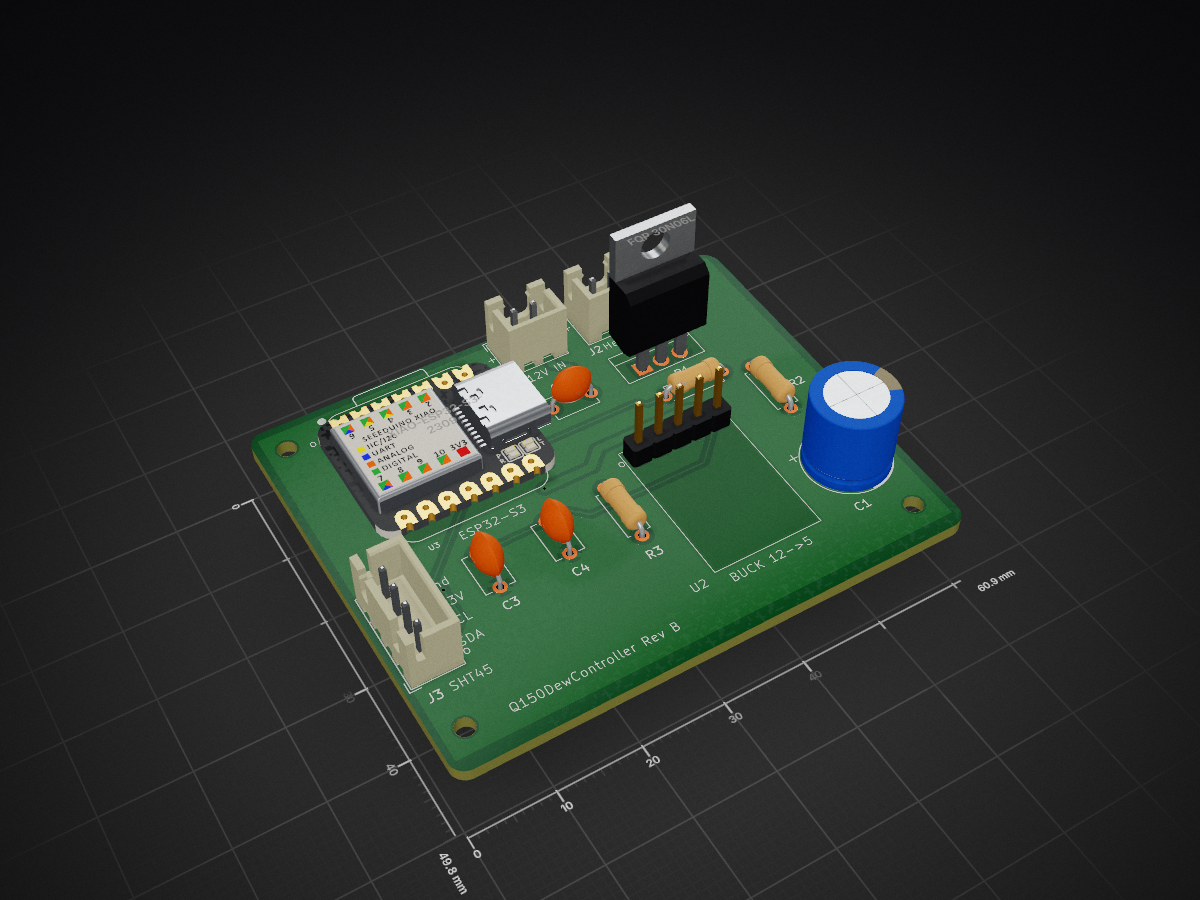
2 layers60.9 × 49.8 mmDewcontrollerQ150, the printed circuit board in 3D

An intelligent dew prevention system for astronomical telescopes and optical equipment, featuring automatic humidity monitoring and adaptive heating control.

Size
60.9 × 49.8 mm
Copper layers
2
Thickness
1.6 mm
Parts
17
Nets
19
Pads
62
Tracks, vias
84, 2
Pours
2
Routed
Yes
KiCad
KiCad 9.0 (file 20241229)
Created
6 Feb 2026
Updated
5 Apr 2026

Overview

DewcontrollerQ150 is an open-source printed circuit board by mpinnuck, from the mpinnuck/dewcontrollerQ150 repository on GitHub. It is a 2-layer board of 60.9 × 49.8 mm with 17 parts on 19 nets, routed with 84 tracks and 2 vias.

Its parts include 4 capacitors, 3 resistors, 3 connectors, 2 ICs and 1 transistor. It belongs with the ESP32 boards of this library.

README

README.md

Q150 Dew Controller

An intelligent dew prevention system for astronomical telescopes and optical equipment, featuring automatic humidity monitoring and adaptive heating control.

Overview

The Q150 Dew Controller uses precise temperature and humidity sensing to calculate dew point and automatically control heater power to prevent condensation on telescope optics. The system features both WiFi web interface and Bluetooth Low Energy (BLE) connectivity for remote monitoring and configuration.

Key Features

Environmental Monitoring

  • SHT45 Sensor: High-precision temperature (±0.1°C) and humidity (±1.5% RH) measurement
  • Real-time Dew Point Calculation: Continuous monitoring of dew point temperature
  • Spread Tracking: Calculates temperature margin above dew point

Intelligent Heating Control

  • Adaptive Power Control: Automatically adjusts heater power based on dew point spread
  • Configurable Power Table: Up to 5 spread→power mapping points for custom response curves
  • Manual Override: Direct power control via slider (0-100%)
  • PWM Output: Smooth, efficient heater control on D8 pin

Connectivity

WiFi Web Interface
  • Responsive Design: Works on desktop, tablet, and mobile devices
  • Real-time Updates: Live sensor readings every 2 seconds
  • Configuration: WiFi credentials, timezone, and heater settings
  • Fast Disconnect Detection: 1-second timeout for quick offline status
  • Automatic Reconnection: Seamless recovery when connection is restored
Bluetooth Low Energy (BLE)
  • Desktop Management App: Python-based configuration tool
  • Auto-connect: Automatically finds and connects to Q150 devices
  • Config Management: Read/write heater settings and spread table
  • Cross-platform: macOS, Windows, Linux support

Time & Logging

  • NTP Time Sync: Automatic time synchronization via internet
  • Timezone Support: 18 worldwide timezones with automatic DST adjustment
  • POSIX Timezones: Full support for complex timezone rules
  • Timestamped Logs: Real date/time stamps when NTP synced, boot time otherwise

Network Modes

  • Station Mode: Connects to existing WiFi network
  • Fallback AP Mode: Creates "Q150Dew" access point if connection fails
  • mDNS: Access via q150dew.local hostname
  • Persistent Settings: WiFi credentials stored in flash

Hardware

Microcontroller

  • Board: Seeed Studio XIAO ESP32-S3
  • CPU: Dual-core Xtensa 32-bit LX7 @ 240MHz
  • Memory: 512KB SRAM, 8MB Flash
  • Connectivity: WiFi 802.11 b/g/n, BLE 5.0

Sensor

  • Model: Sensirion SHT45
  • Interface: I2C (SDA=D4, SCL=D5)
  • Accuracy: ±0.1°C, ±1.5% RH
  • Range: -40°C to 125°C, 0-100% RH

Output

  • PWM Pin: D8 (Pin 9)
  • Frequency: 1 kHz
  • Resolution: 8-bit (0-255)
  • Driver: External MOSFET (FQP30N06) for high-current loads

PCB

  • Custom KiCAD design in hardware/dewcontrollerQ150/
  • Gerber files ready for fabrication in hardware/dewcontrollerQ150/pcbfiles/

Enclosure

  • FreeCAD design in housing/Q150DewController.FCStd
  • STL files for 3D printing in housing/stl/

Firmware

Version: 2.1
File: firmware/dewcontrollerq150/dewcontrollerq150.ino

Dependencies

Install via Arduino Library Manager:

  • ArduinoJson (6.x)
  • Adafruit SHT4x Library
  • ESP32 BLE Arduino

Compilation

  1. Install Arduino IDE or PlatformIO
  2. Install ESP32 board support: https://docs.espressif.com/projects/arduino-esp32/
  3. Select board: XIAO_ESP32S3
  4. Open firmware/dewcontrollerq150/dewcontrollerq150.ino
  5. Set DEBUG to 0 for release build (line 16)
  6. Compile and upload

Configuration

Default WiFi fallback credentials:

  • SSID: Q150Dew
  • Password: tinka

Default timezone: Australia (Sydney/Melbourne) with automatic DST

Desktop Application

File: app/q150dewcontroller.py

Features

  • Auto-discovery and connection to Q150 devices
  • Read device info and current configuration
  • Edit and update:
    • Heater enable/disable
    • Spread→Power table (5 entries)
    • WiFi SSID and password
    • Timezone selection
  • Real-time status monitoring
  • Cross-platform (macOS, Windows, Linux)

Requirements

bash
pip install bleak

Running

bash
cd app
python q150dewcontroller.py

Building Executable

bash
cd app
pyinstaller q150dewcontroller.spec --noconfirm

Built app will be in app/dist/q150dewcontroller.app (macOS) or app/dist/q150dewcontroller.exe (Windows)

Usage

Initial Setup

  1. Power on the Q150 Dew Controller
  2. Connect to WiFi AP "Q150Dew" (password: "tinka")
  3. Open browser to http://192.168.4.1 or http://q150dew.local
  4. Configure your WiFi credentials and timezone
  5. Device will restart and connect to your network

Web Interface

Access via http://q150dew.local or device IP address

Main Panel:

  • Temperature, humidity, dew point, and spread readings
  • Heater status (ON/OFF) and current power level
  • WiFi connection status and signal strength
  • Current time (when NTP synced)

Control Panel:

  • Toggle Heater: Enable/disable automatic control
  • Manual Power Slider: Override automatic control (0-100%)
  • Spread Table: Configure up to 5 spread→power points
  • WiFi Config: Update credentials and timezone

System Log:

  • Real-time event log with timestamps
  • Pause/resume log updates
  • Connection status, sensor readings, configuration changes

BLE Management App

  1. Launch q150dewcontroller application
  2. Click Scan & Connect to find devices
  3. Device info and status display automatically
  4. Edit configuration settings as needed
  5. Click Write Config to save changes to device

Power Table Configuration

Define the relationship between temperature spread (T - Tdew) and heater power:

Example table:

Spread (°C)Power (%)
0.0100
2.075
5.050
10.025
15.00

The controller interpolates between points for smooth power transitions.

Technical Details

API Endpoints

GET /api/status Returns current sensor readings, heater status, WiFi info, and time

POST /api/toggle Toggles heater enabled state

POST /api/power Sets manual power override (0-100)

POST /api/config Updates heater configuration and spread table

POST /api/wifi Updates WiFi credentials and timezone (triggers restart)

GET /api/log Returns system event log

BLE Characteristics

Service UUID: 12345678-1234-1234-1234-123456789abc

  • INFO: Device information (read-only)
  • STATUS: Real-time sensor data (read/notify)
  • CONFIG: Configuration settings (read/write)
  • CMD: Command interface (write)

Dew Point Calculation

Uses Magnus formula:

text
γ(T,RH) = ln(RH/100) + (b×T)/(c+T)
Tdew = (c×γ)/(b-γ)

Where: b = 17.62, c = 243.12°C

Timezone Support

18 timezones with POSIX format including:

  • UTC, UK (GMT/BST)
  • Europe (CET, EET)
  • US (EST, CST, MST, PST, AKST, HST)
  • Australia (AEST, ACST, AWST)
  • New Zealand, Japan, China, India, Middle East

Automatic daylight saving time adjustments.

Development

Repository Structure

text
dewcontrollerQ150/
├── firmware/
│   └── dewcontrollerq150/
│       └── dewcontrollerq150.ino    # ESP32 firmware
├── app/
│   ├── q150dewcontroller.py         # Python BLE app
│   └── q150dewcontroller.spec       # PyInstaller spec
├── hardware/
│   └── dewcontrollerQ150/
│       ├── dewcontrollerQ150.kicad_pcb   # PCB design
│       ├── dewcontrollerQ150.kicad_sch   # Schematic
│       └── pcbfiles/                     # Gerber files
└── housing/
    ├── Q150DewController.FCStd      # FreeCAD model
    └── stl/                         # 3D print files

Version History

  • v2.1: Debounced slider, improved disconnect detection, timezone config in BLE app
  • v2.0: WiFi configuration, NTP time sync, responsive mobile UI
  • v1.3: Enhanced BLE, power table configuration
  • v1.2: PCB revision, housing design
  • v1.0: Initial production version

Troubleshooting

Device won't connect to WiFi

  • Check SSID and password in WiFi Config
  • Ensure 2.4GHz WiFi (5GHz not supported)
  • Device will fall back to AP mode "Q150Dew" if connection fails

Web interface shows "Disconnected"

  • Check device is powered on
  • Verify you're on the same network
  • Try accessing by IP address instead of hostname

NTP time not syncing

  • Requires internet connection
  • Check timezone setting is correct
  • Time will show "Not synced" until successful NTP update

Heater not responding

  • Check heater is enabled (not just power set)
  • Verify MOSFET and heater connections
  • Check spread table has valid entries

License

Copyright © 2026 Mark Pinnuck

Acknowledgments

  • Sensirion for SHT45 sensor library
  • Seeed Studio for XIAO ESP32-S3 platform
  • Arduino and ESP32 communities

Parts

17
QtyValueFootprintReferences
4MountingHole_2.2mm_M2MountingHole:MountingHole_2.2mm_M2mh1, mh2, mh3, mh4
10.1uf CeramicCapacitor_THT:C_Disc_D5.1mm_W3.2mm_P5.00mmC2
10.1uf ceramicCapacitor_THT:C_Disc_D5.1mm_W3.2mm_P5.00mmC4
1100kResistor_THT:R_Axial_DIN0207_L6.3mm_D2.5mm_P7.62mm_HorizontalR3
110kResistor_THT:R_Axial_DIN0207_L6.3mm_D2.5mm_P7.62mm_HorizontalR2
110ufCapacitor_THT:C_Disc_D5.1mm_W3.2mm_P5.00mmC3
112V PowerConnector_JST:JST_XH_B2B-XH-A_1x02_P2.50mm_VerticalJ1
1220Resistor_THT:R_Axial_DIN0207_L6.3mm_D2.5mm_P7.62mm_HorizontalR1
1470uf 25VCapacitor_THT:CP_Radial_D10.0mm_P5.00mmC1
1Buck_12V_5VLibrary:MP_Buck_Tunghey_5Pin_THTU2
1Dew HeaterConnector_JST:JST_XH_B2B-XH-A_1x02_P2.50mm_VerticalJ2
1FQP 30N06LPackage_TO_SOT_THT:TO-220-3_VerticalQ1
1SHT45 SensorConnector_JST:JST_XH_B4B-XH-A_1x04_P2.50mm_VerticalJ3
1XIAO-ESP32-S3-DIPSeeed Studio XIAO Series Library:XIAO-ESP32S3-DIPU3

Questions

How big is the DewcontrollerQ150 PCB?

It measures 60.9 × 49.8 mm and has 2 copper layers, 1.6 mm thick.

What parts does the DewcontrollerQ150 use?

17 parts. The full list of its parts is on this page, with links to each part's symbol and footprint where PCBKit's library has them.

Where can I download the DewcontrollerQ150 KiCad files?

From the mpinnuck/dewcontrollerQ150 repository on GitHub, at the commit this page was made from: the board is hardware/dewcontrollerQ150/dewcontrollerQ150.kicad_pcb and its schematic hardware/dewcontrollerQ150/dewcontrollerQ150.kicad_sch. PCBKit opens the board in the browser, with nothing to install.

Can I use the DewcontrollerQ150 design in my own project?

Its repository states no licence, so its author keeps all rights: ask mpinnuck before reusing the design.

Similar boards

  • 2 layers50 × 35 mmServo power, the printed circuit board in 3D

    Servo power

    earthtojake/text-to-cad

    Design physical products with AI

    17 parts26kMIT
  • 2 layers139.7 × 62.2 mmBreakout 60pin EEC IV, the printed circuit board in 3D

    Breakout 60pin EEC IV

    rusefi/rusefi

    rusefi - GPL internal combustion engine control unit

    17 parts1.2k
  • 2 layers29.2 × 55.9 mmDeniseadapter, the printed circuit board in 3D

    Deniseadapter

    hoglet67/RGBtoHDMI

    Bare-metal Raspberry Pi project that provides pixel-perfect sampling of Retro Computer RGB/YUV video and conversion to HDMI

    17 parts1kGPL-3.0
  • 2 layers24.5 × 36.5 mmCluster, the printed circuit board in 3D

    Cluster

    JesusFreke/lalboard

    A 3D-printed keyboard inspired by the DataHand

    17 parts993
  • 2 layers56.3 × 55.7 mmStarNecklace, the printed circuit board in 3D

    StarNecklace

    hackclub/OnBoard

    💡 Join 1,000 teenagers and make your first PCB with a $100 grant!

    17 parts915
  • 2 layers25 × 25 mmSmallEncoder, the printed circuit board in 3D

    SmallEncoder

    DDeGonge/OS-ARM

    This arm is not industrial and it will not be fast, but that is not my goal. But it will hopefully be a very nice looking arm fully capable of 6dof motion, cheap enough to keep it accessable but capable enough to…

    17 parts498MIT
  • 2 layers38.9 × 16.1 mmAmoeba spc, the printed circuit board in 3D

    Amoeba spc

    mtl/keyboard-pcbs

    Keyboard PCBs

    17 parts485
  • 2 layers36 × 51 mmABSIS ALE, the printed circuit board in 3D

    ABSIS ALE

    jrsteensen/OpenHornet

    OpenHornet 1:1 F/A-18C Simulator Repository

    17 parts431