2 layers158 × 11 mm
Daylight Matchstick
VoronDesign/Voron-Hardware
Cool Hardware designed by the Voron Design group
22 parts1.1kGPL-3.0

 mmiral04/MacroPad
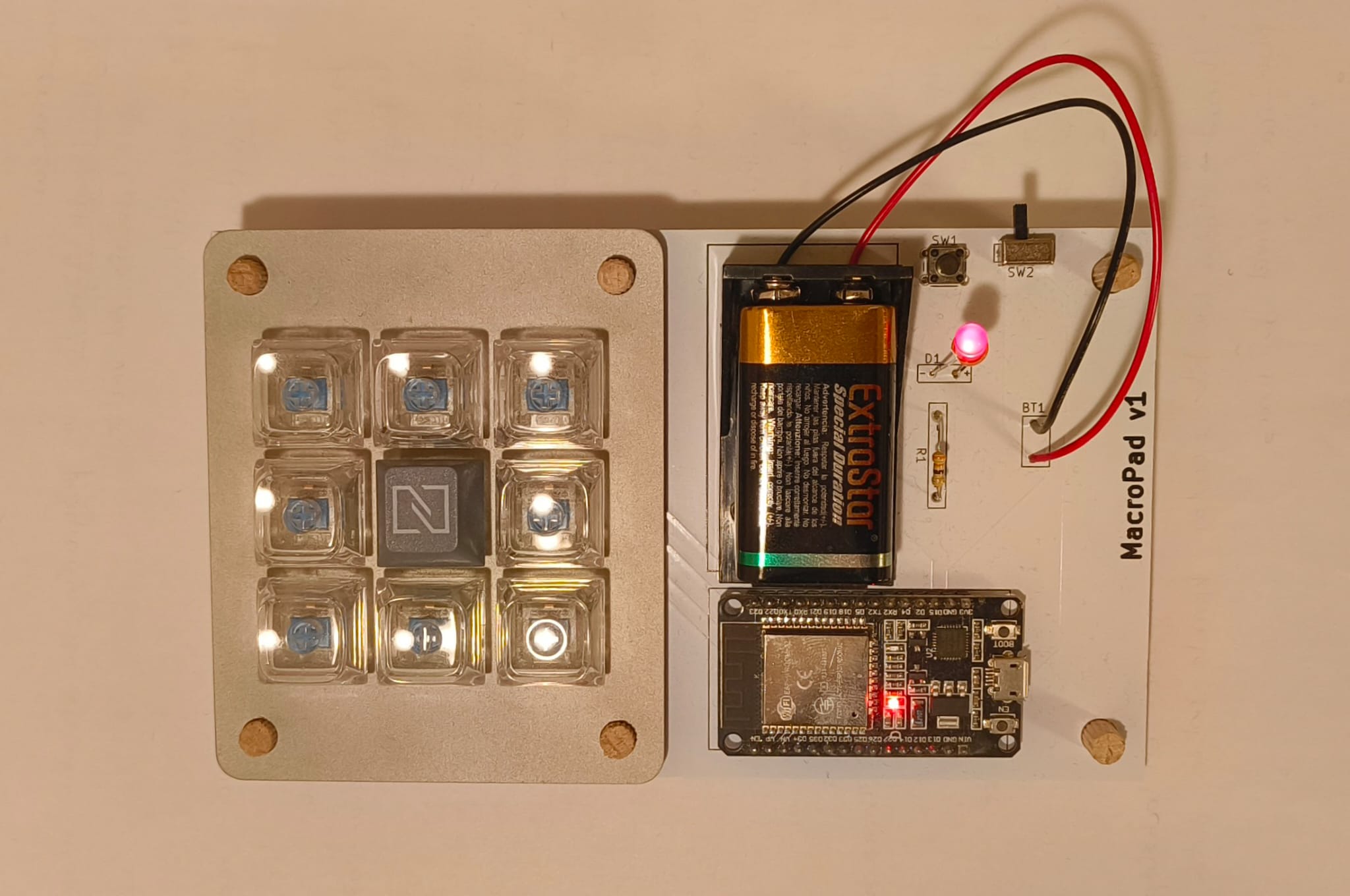
The build is made up of a PCB, a metal frame and 9 MX switches. The electronic components needed are>
MacroPad is an open-source printed circuit board by mmiral04, from the mmiral04/MacroPad repository on GitHub, published under the GPL-3.0 licence. It is a 2-layer board of 160.8 × 95 mm with 22 parts on 32 nets, routed with 89 tracks and 0 vias.
Its parts include 10 ICs, 2 switches, 1 resistor and 1 diode. It belongs with the keyboards and input boards of this library.
Custom 3x3 MacroPad built with an ESP32. The purpose of the project is to experiment with PCB design and ESP32 programming. The hardware connects via bluetooth to a desktop app designed in Python.
The build is made up of a PCB, a metal frame and 9 MX switches. The electronic components needed are>
The python app was built into an executable to execute on Windows startup using pyinstaller with the following command:
pyinstaller -F --noconsole --icon icon.ico Python\\main.pyThe final build should look like:
The desktop app has a GUI to connect to the macro pad via bluetooth and configure the macros. Currently the macros can be of three types:
All of the options can be customized with an icon or name.
The configuration of the macros is stored in the file "Python/config.json". When the application is closed it runs in the background and appears in the icon tray, where it can be fully exited.
The connection to the board via bluetooth has the MAC address of the board hardcoded in the python file "Python/main.py" and must be changed to the actual MAC address of the ESP32.
There are some limitations and bugs in the design:
| Qty | Value | Footprint | References |
|---|---|---|---|
| 9 | ~ | Button_Switch_Keyboard:SW_Cherry_MX_1.00u_PCB | U1, U2, U3, U4, U5, U6, U8, U9, U10 |
| 1 | clipboard:108cbfb9-6861-4f53-83a6-263d15a50d2a | ||
| 1 | Battery | CustomSymbols:Battery holder | BT1 |
| 1 | LED | CustomSymbols:LED_holes | D1 |
| 1 | R | CustomSymbols:Resistor_holes | R1 |
| 1 | SW_Push | Button_Switch_THT:SW_PUSH_6mm_H5mm | SW1 |
| 1 | ~ | ESP32_Footprints:ESP32_30pin | U11 |
| 1 | ~ | CustomSymbols:Switch conmutador | SW2 |
The 16 most common of 22 parts.
It measures 160.8 × 95 mm and has 2 copper layers, 1.6 mm thick.
22 parts. The full list of its parts is on this page, with links to each part's symbol and footprint where PCBKit's library has them.
From the mmiral04/MacroPad repository on GitHub, at the commit this page was made from: the board is KicadFiles/MacroPad.kicad_pcb and its schematic KicadFiles/MacroPad.kicad_sch. PCBKit opens the board in the browser, with nothing to install.
Its repository publishes it under the GPL-3.0 licence: you may reuse it on that licence's terms (keep the author's notice, and for a copyleft licence share your changes alike).
VoronDesign/Voron-Hardware
Cool Hardware designed by the Voron Design group

hoglet67/RGBtoHDMI
Bare-metal Raspberry Pi project that provides pixel-perfect sampling of Retro Computer RGB/YUV video and conversion to HDMI

hackclub/OnBoard
💡 Join 1,000 teenagers and make your first PCB with a $100 grant!

abhishek-kakkar/BeagleLogic
A Software Suite that implements a logic analyzer with the PRU on the BeagleBone / BeagleBone Black.

Chrismettal/flipper-zero-backpacks
Backpack-style addon boards for the Flipper Zero!


CRImier/MyKiCad
My KiCad boards. Can't be bothered uploading individually anymore, so here you go.