2 layers52.6 × 27.9 mm
Nnv2-smd
mikeysklar/cinco-cinco
Chording 5 key with 5 layers - full USB keyboard emulation
4 parts1GPL-3.0

 mikeysklar/cinco-cinco1
Chording 5 key with 5 layers - full USB keyboard emulation
Cinco cinco is an open-source printed circuit board by mikeysklar, from the mikeysklar/cinco-cinco repository on GitHub, published under the GPL-3.0 licence. It is a 2-layer board of 98.1 × 68.1 mm with 12 parts on 18 nets, routed with 75 tracks and 0 vias.
Its parts include 5 switches, 4 resistors, 1 IC and 1 connector. It belongs with the keyboards and input boards of this library.
A 5-Key Wireless Chording Keyboard
Cinco-Cinco is a low-profile chording keyboard that uses just five keys to emulate a full keyboard by combining keypresses into chords and utilizing seven layers.
I’ve spent the last year building pocket keyboards. My BUBBY is a daily carry which I use for todo lists. It made me enjoy typing with one hand to the point that I wanted a desktop version, which is what you see here.
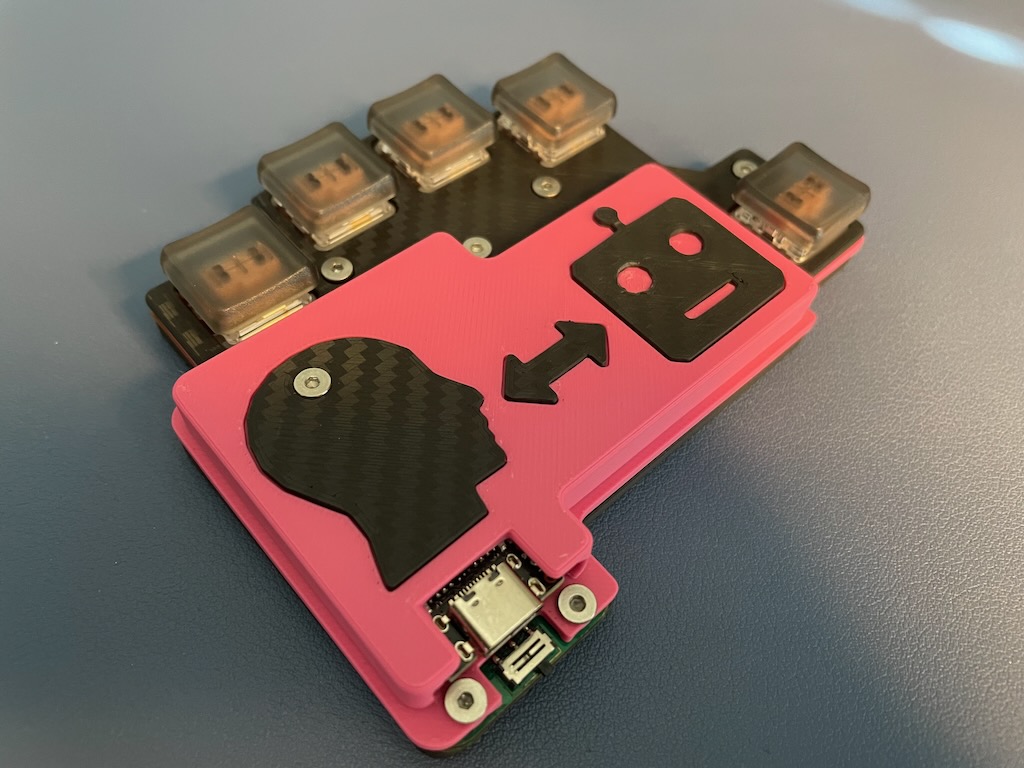
Computing is rapidly changing. We are moving away from sitting at desks and staring at screens. Smart glasses and watches let us consume information on the go. Phones, which have taken too much of our attention, no longer need to be our primary method of communication.
The keys are key
Chording opens up a future of input that is compact, discreet, and mobile. This same keyboard can also enhance desktop productivity, allowing CAD users and creatives to use one hand for keyboard shortcuts while the other handles precise mouse movements.
Cinco-Cinco uses just five keys, but can generate over 107 different key combos, including mouse actions. The thumb button switches between seven layers—alphabets, numbers, punctuation, and more. The layout is based on a modified SAIE layout, optimized so the most common letters require minimal finger effort.
At first, I wasn’t sure cramming so much into the thumb key would work well. But with careful timing and logic in the firmware, it switches layers smoothly without getting in the way.
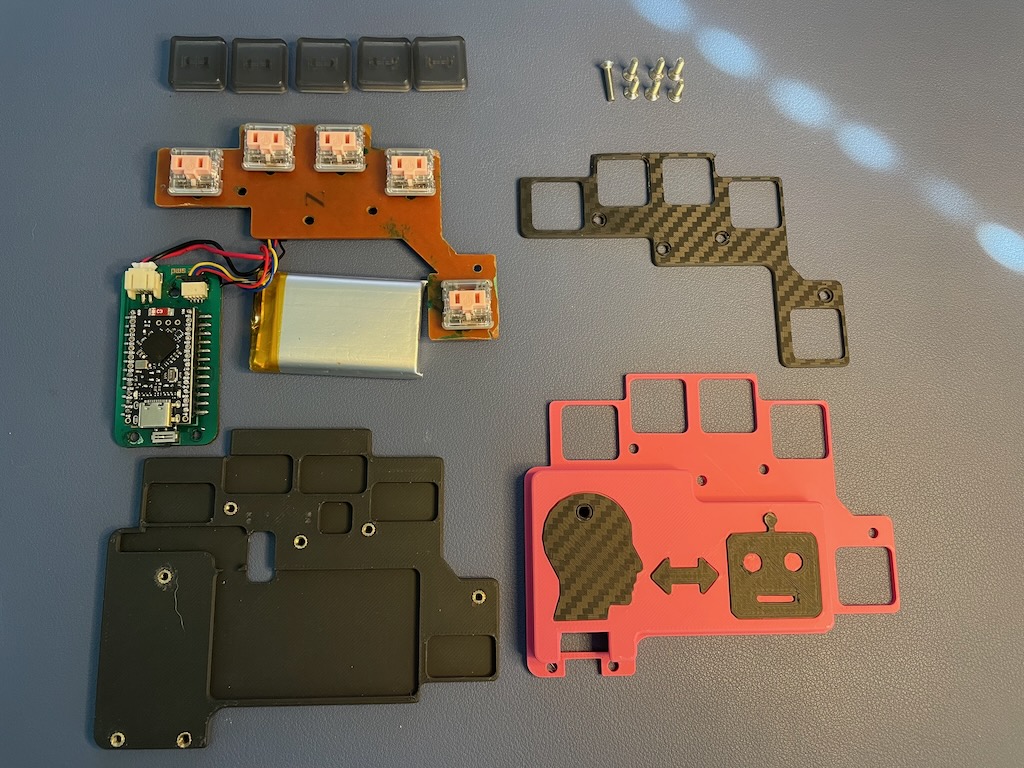
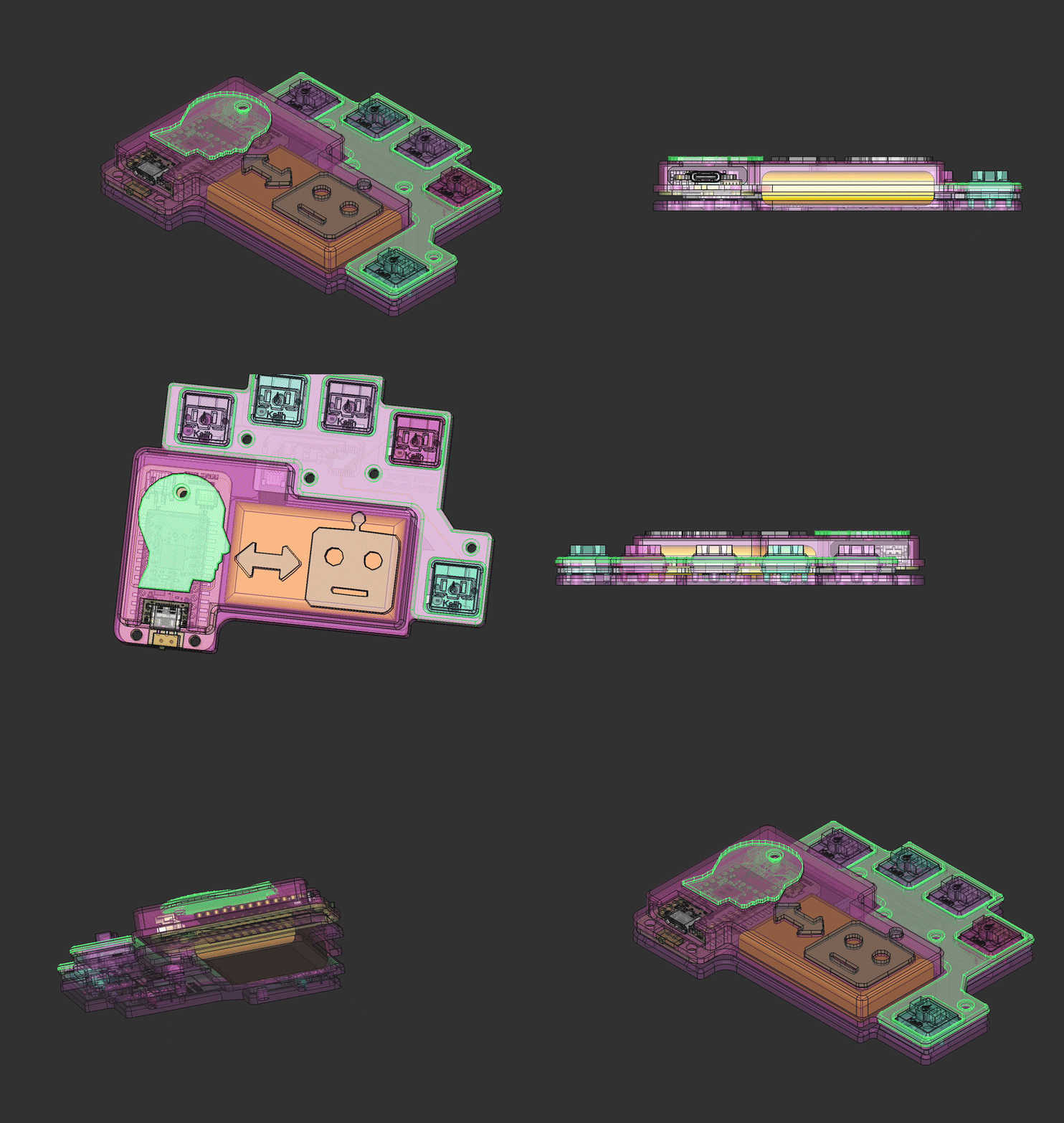
The case is built as a three-layer sandwich. The base has cutouts to keep components low profile and includes heat-set inserts to secure the mid and top layers. The PCBs have matching holes for alignment and locking, ensuring a secure fit.
Flat, countersunk screws keep the top flush. The “Human Machine” inlay was added late to break up the large pink area and has become a distinctive feature.
I chose Kailh PG1350 CHOC switches for their availability and easy installation. Their low-profile design lets all components fit on the PCB’s bottom side, simplifying SMT assembly. I’ve tried pink, red, and robin egg blue switches—the blue ones feel best to type on, despite needing more force, and they look nice too.
The firmware works hard to register chords accurately despite early challenges with false triggers and duplicates. It waits for the first key release before registering a chord, allowing for sloppy or staggered key presses without mistakes. It doesn’t wait for all keys to be released — once a key lifts, the chord buffer clears, letting you move on quickly.
circup install adafruit_ble adafruit_bus_device adafruit_hid
cd /Volumes/CIRCUITPY
find . -type f -name '._*' -delete

circup install adafruit_displayio_ssd1306 adafruit_display_text adafruit_ssd1306 adafruit_mcp230xx

cd /Volumes/CIRCUITPY
find . -type f -name '._*' -deleteCinco-Cinco board (cinco-cinco/ folder):
nnv2-smd board (nnv2-smd/ folder):
cad/ folder)case.FCStdSTL files for 3D printing:
STEP files for 3D viewing:
case-top-cvr.stepcase-mid-cvr.stepcase-lwr-cvr.stepcase-cinco-cinco.stepcase-bat1200.stepcase-nnv2-smd.stepAll hardware design files are open source and located in the pcb/ and cad/ directories of this repository.
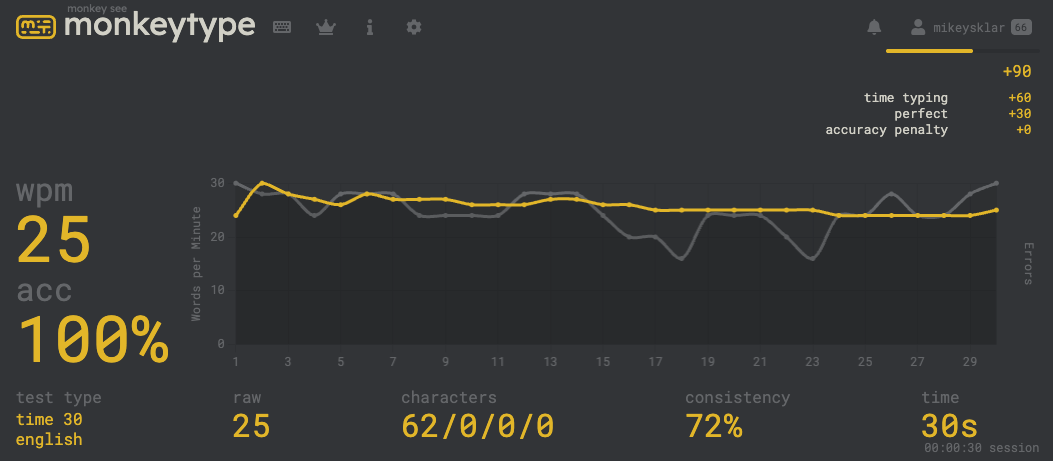
Typing speed on the cinco is ~25 WPM. It is fast enough to not be frustrated. Slow enough to improve on.
That is about the same as my typing speed:
Each layer uses unique key combinations (chords) from the 5 keys (positions 0–4).
| Finger | Key Index |
|---|---|
| Thumb | 4 |
| Pinky | 3 |
| Ring | 2 |
| Middle | 1 |
| Fore | 0 |
| Key | Pky | Rng | Mid | Idx | Thm | Chord |
|---|---|---|---|---|---|---|
| A | x | (2,) | ||||
| B | x | x | (3,4) | |||
| C | x | x | (0,3) | |||
| D | x | x | x | (0,1,2) | ||
| E | x | (0,) | ||||
| F | x | x | x | (1,2,4) | ||
| G | x | x | (1,4) | |||
| H | x | x | (2,4) | |||
| I | x | (1,) | ||||
| J | x | x | x | x | (0,1,2,4) | |
| K | x | x | x | (1,3,4) | ||
| L | x | x | (1,3) | |||
| M | x | x | (0,4) | |||
| N | x | x | (1,2) | |||
| O | x | x | (0,2) | |||
| P | x | x | x | (1,2,3) | ||
| Q | x | x | x | x | x | (0,1,2,3,4) |
| R | x | x | (0,1) | |||
| S | x | (3,) | ||||
| T | x | x | (2,3) | |||
| U | x | x | x | x | (0,1,2,3) | |
| V | x | x | x | (2,3,4) | ||
| W | x | x | x | (0,2,4) | ||
| X | x | x | x | (0,3,4) | ||
| Y | x | x | x | (0,1,4) | ||
| Z | x | x | x | x | (1,2,3,4) | |
| BACKSPACE | x | x | x | (0,1,3) | ||
| SPACE | x | x | x | (0,2,3) |
| Action | Pky | Rng | Mid | Idx | Thm | Chord |
|---|---|---|---|---|---|---|
| ONE | X | (0,) | ||||
| TWO | X | (1,) | ||||
| THREE | X | (2,) | ||||
| FOUR | X | (3,) | ||||
| FIVE | X | X | (0, 1) | |||
| SIX | X | X | (1, 2) | |||
| SEVEN | X | X | (2, 3) | |||
| EIGHT | X | X | (0, 2) | |||
| NINE | X | X | (1, 3) | |||
| ZERO | X | X | X | (0, 1, 2) | ||
| UP_ARROW | X | X | (0, 4) | |||
| DOWN_ARROW | X | X | (1, 4) | |||
| RIGHT_ARROW | X | X | (2, 4) | |||
| LEFT_ARROW | X | X | (3, 4) | |||
| PAGE_UP | X | X | X | (0, 1, 4) | ||
| PAGE_DOWN | X | X | X | (2, 3, 4) | ||
| END | X | X | X | X | (0, 1, 2, 4) | |
| DELETE | X | X | X | (0, 2, 4) | ||
| INSERT | X | X | X | (1, 3, 4) | ||
| HOME | X | X | X | X | (1, 2, 3, 4) |
| Action | Pky | Rng | Mid | Idx | Thm | Chord |
|---|---|---|---|---|---|---|
| ESCAPE | X | (0,) | ||||
| TAB | X | (1,) | ||||
| PERIOD | X | (2,) | ||||
| MINUS | X | (3,) | ||||
| FORWARD_SLASH | X | X | (2, 3) | |||
| ENTER | X | X | (0, 1) | |||
| COMMA | X | X | (0, 2) | |||
| LEFT_BRACKET | X | X | (1, 3) | |||
| RIGHT_BRACKET | X | X | (0, 3) | |||
| BACKSLASH | X | X | X | (1, 2, 3) | ||
| BACKSPACE | X | X | (1, 2) | |||
| QUOTE | X | X | X | (0, 1, 3) | ||
| SEMICOLON | X | X | X | (0, 2, 3) | ||
| GRAVE_ACCENT | X | X | X | X | (0, 1, 2, 3) | |
| DELETE | X | X | X | (0, 1, 2) |
| Action | Pky | Rng | Mid | Idx | Thm | Chord |
|---|---|---|---|---|---|---|
| LEFT_SHIFT | X | (3,) | ||||
| LEFT_CONTROL | X | (2,) | ||||
| LEFT_ALT | X | (1,) | ||||
| LEFT_GUI | X | (0,) | ||||
| RIGHT_ALT (⌥) | X | X | (0, 1) |
| Action | Pky | Rng | Mid | Idx | Thm | Chord |
|---|---|---|---|---|---|---|
| MOVE UP | X | X | (0, 4) | |||
| MOVE DOWN | X | X | (1, 4) | |||
| MOVE RIGHT | X | X | (2, 4) | |||
| MOVE LEFT | X | X | (3, 4) | |||
| SCROLL UP | X | X | X | (0, 1, 4) | ||
| SCROLL DOWN | X | X | X | (2, 3, 4) | ||
| LEFT CLICK | X | X | (3, 2) | |||
| RIGHT CLICK | X | X | (0, 1) | |||
| MIDDLE CLICK | X | (1, 1) | ||||
| FORWARD CLICK | X | X | (0, 3) | |||
| HOLD LEFT | X | X | X | (0, 1, 2) | ||
| RELEASE LEFT | X | X | X | (0, 1, 3) | ||
| ACCELERATE | X | X | X | (1, 2, 3) |
| Action | Pky | Rng | Mid | Idx | Thm | Chord |
|---|---|---|---|---|---|---|
| BRIGHTNESS_DECREMENT | X | (0,) | ||||
| BRIGHTNESS_INCREMENT | X | (1,) | ||||
| VOLUME_DECREMENT | X | (2,) | ||||
| VOLUME_INCREMENT | X | (3,) | ||||
| MUTE | X | X | (0, 1) | |||
| PLAY_PAUSE | X | X | (2, 3) | |||
| SCAN_NEXT_TRACK | X | X | (0, 2) | |||
| SCAN_PREVIOUS_TRACK | X | X | (1, 3) | |||
| FAST_FORWARD | X | X | (0, 3) | |||
| REWIND | X | X | (1, 2) | |||
| STOP | X | X | X | (0, 1, 2) | ||
| EJECT | X | X | X | (0, 1, 3) |
| Action | Pky | Rng | Mid | Idx | Thm | Chord |
|---|---|---|---|---|---|---|
| F1 | X | (0,) | ||||
| F2 | X | (1,) | ||||
| F3 | X | (2,) | ||||
| F4 | X | (3,) | ||||
| F5 | X | X | (0, 1) | |||
| F6 | X | X | (1, 2) | |||
| F7 | X | X | (2, 3) | |||
| F8 | X | X | (0, 2) | |||
| F9 | X | X | (1, 3) | |||
| F10 | X | X | X | (0, 1, 2) | ||
| F11 | X | X | X | (1, 2, 3) | ||
| F12 | X | X | X | (0, 2, 3) |
cinco-cinco keypad
| Designators | Qty | Value | Footprint |
|---|---|---|---|
| R1–R4 | 4 | 10 kΩ | SMD 0805 resistor |
| J1 | 1 | Conn_01x04_Socket | JST-SH 4-pin connector |
| U1 | 1 | MCP23008-xSS | SSOP-20 package |
| SW1–SW5 | 5 | SW_Push | Kailh PG1350 switch socket |
| JP1 | 1 | SolderJumper_2_Open | 2-pin solder jumper |
BLE Controller Breakout nRF52840 Nice Nano v2
| Designators | Qty | Value | Footprint |
|---|---|---|---|
| U1 | 1 | Nice!Nano v2 | SuperMini nRF52840 |
| J2 | 1 | Conn_01x04_Socket | JST-SH 4-pin connector |
| J1 | 1 | Conn_01x02_Socket | JST-PH 2-pin connector |
| SW1 | 1 | SW_SPST | SMD slide switch |
| Qty | Value | Footprint | References |
|---|---|---|---|
| 5 | SW_Push | footprints:Kailh_socket_PG1350 | SW1, SW2, SW3, SW4, SW5 |
| 4 | 10k | Resistor_SMD:R_0805_2012Metric_Pad1.20x1.40mm_HandSolder | R1, R2, R3, R4 |
| 1 | Conn_01x04_Socket | Connector_JST:JST_SH_SM04B-SRSS-TB_1x04-1MP_P1.00mm_Horizontal | J1 |
| 1 | MCP23008-xSS | Package_SO:SSOP-20_5.3x7.2mm_P0.65mm | U1 |
| 1 | SolderJumper_2_Open | Jumper:SolderJumper-2_P1.3mm_Open_TrianglePad1.0x1.5mm | JP1 |
mikeysklar/cinco-cinco
Chording 5 key with 5 layers - full USB keyboard emulation

github-linguist/linguist
Language Savant. If your repository's language is being reported incorrectly, send us a pull request!


google/mozc-devices
Circuit diagrams and firmware source code for Gboard DIY keyboards


hackclub/OnBoard
💡 Join 1,000 teenagers and make your first PCB with a $100 grant!

VoronDesign/Voron-Tap
Tap is a nozzle-based z-probe for the V2 and Trident printer designs. The entire toolhead moves to trigger an optical switch. Tap offers many advantages:

stacksmashing/pico-tpmsniffer
A simple, very experimental TPM sniffer for LPC bus
It measures 98.1 × 68.1 mm and has 2 copper layers, 1.6 mm thick.
12 parts. The full list of its parts is on this page, with links to each part's symbol and footprint where PCBKit's library has them.
From the mikeysklar/cinco-cinco repository on GitHub, at the commit this page was made from: the board is cinco-cinco/cinco-cinco.kicad_pcb and its schematic cinco-cinco/cinco-cinco.kicad_sch. PCBKit opens the board in the browser, with nothing to install.
Its repository publishes it under the GPL-3.0 licence: you may reuse it on that licence's terms (keep the author's notice, and for a copyleft licence share your changes alike).