
2 layers40 × 20.3 mm
Si570 pmod
michael-betz/zed_vvm
RF vector volt-meter: Zedboard, DC1525A daughter board, litex, debian
17 parts4

 michael-betz/zed_vvm4
RF vector volt-meter: Zedboard, DC1525A daughter board, litex, debian
Frontpanel pcb is an open-source printed circuit board by michael-betz, from the michael-betz/zed_vvm repository on GitHub. It is a 2-layer board of 165 × 40 mm with 19 parts on 19 nets, routed with 154 tracks and 23 vias.
It is built around the BSS138. Its parts include 7 resistors, 2 capacitors, 2 ICs, 2 diodes and 1 transistor.
A digital RF vector volt-meter (VVM). Measures amplitude and phase of a sinusoidal signal under test against a reference signal of same frequency. Intended as an instrument to monitor and troubleshoot legacy accelerator RF systems.
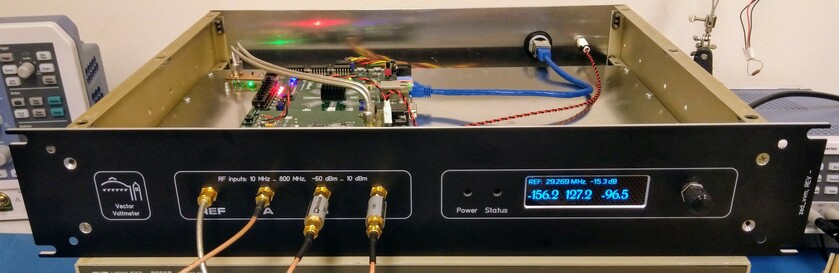
Based on a Digilent Zedboard running Debian with a DC1525A FMC daughter board on top.
Si5xx-PROG_EVB evaluation board running custom firmwarescope_app.py makes use of that)The main reason to choose embedded linux is the convenience for application development:
sudo apt install <whatever_you_need>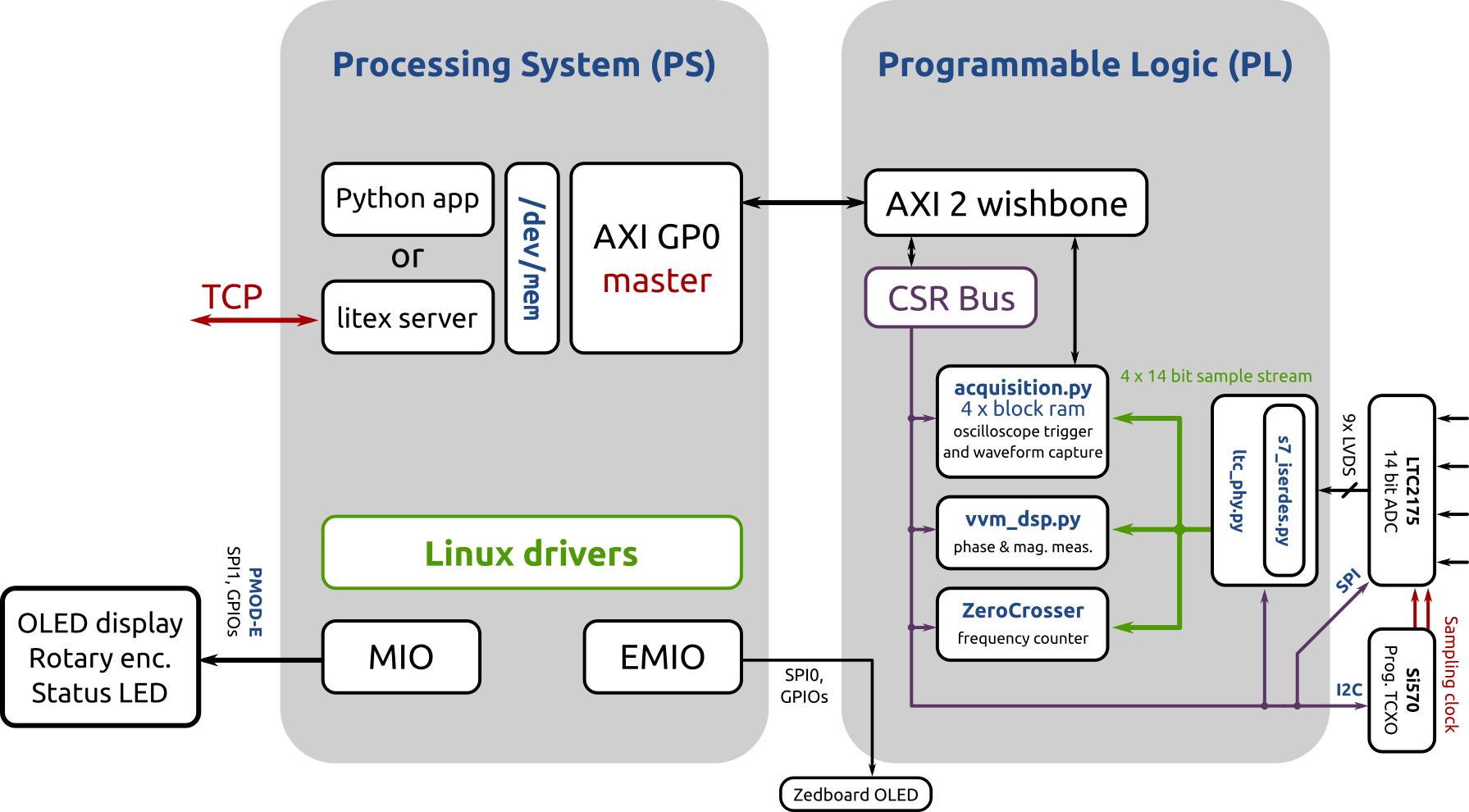
vvm_dsp.py block diagram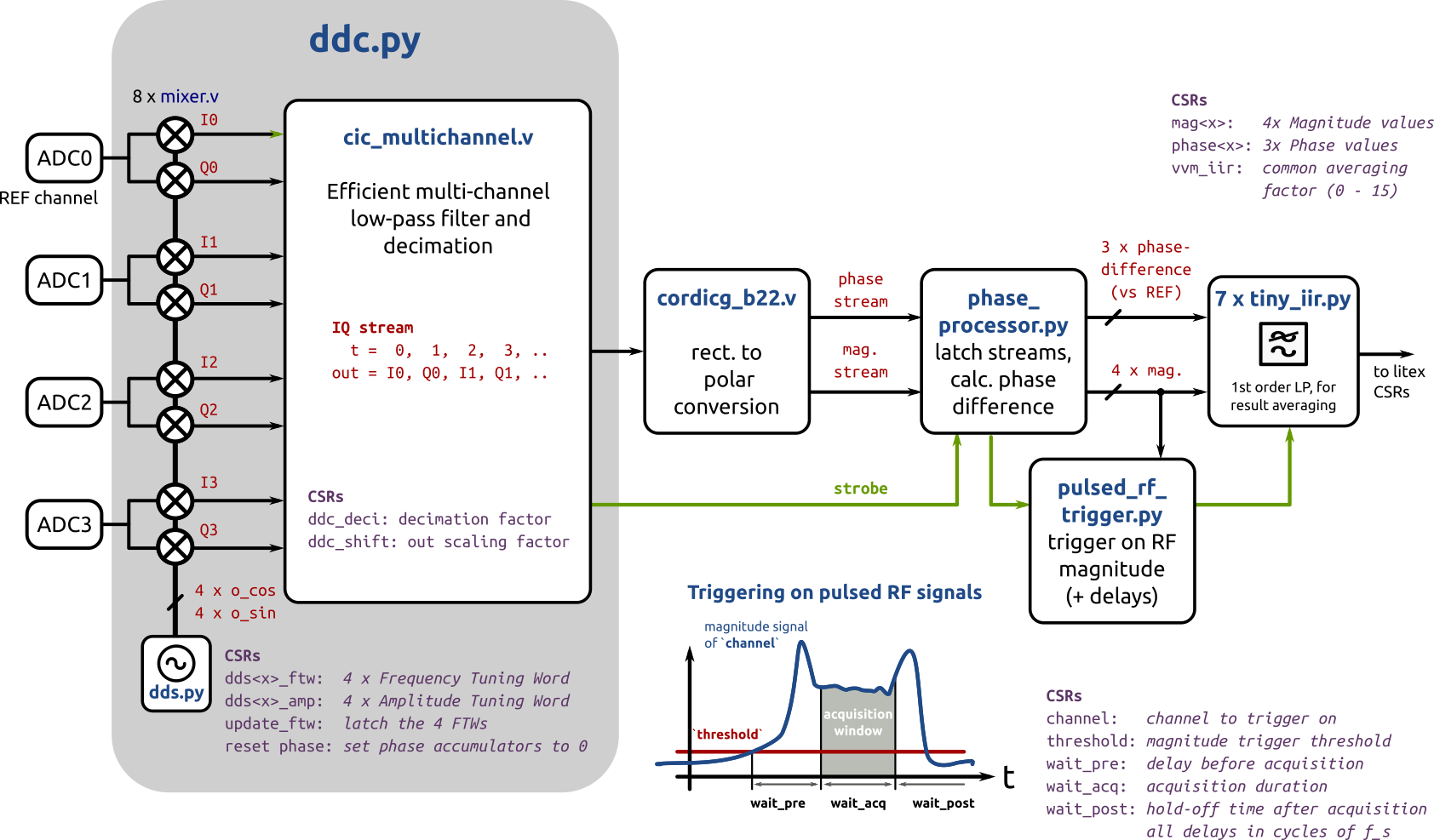
phase_processor.py block diagram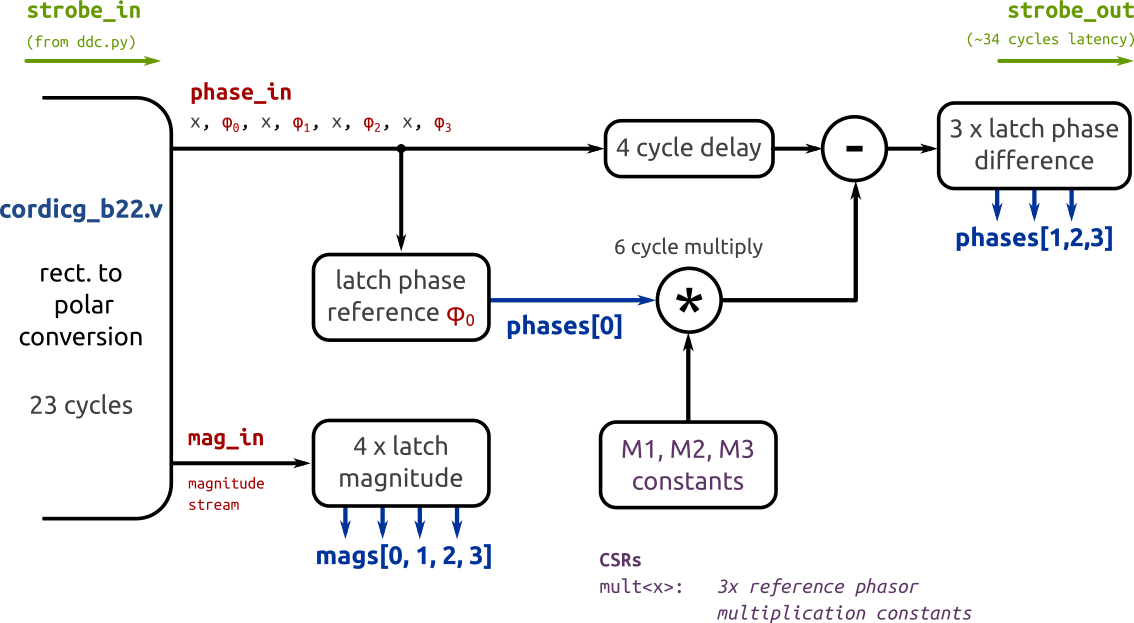
... on debian
$ sudo apt install libevent-dev libjson-c-dev
$ sudo pip3 install virtualenvwrapper
$ mkvirtualenv litex
$ git clone git@github.com:yetifrisstlama/litex.git --recursive
$ cd litex
$ python litex_setup.py init
$ python litex_setup.py install
$ python setup.py developMost of the DSP blocks are from LBLs Bedrock repo, which needs to be cloned
in the same directory as zed_vvm.
Vivado needs to be installed an in the PATH. I use v2019.1.
Setup your zedboard host-name in util/remote_config_fpga.sh and
util/remote_litex_server.sh.
Note that the Zedboard PS will freeze if the FPGA is not loaded / in the process of being loaded and there is a
AXI memory access through litex_server. So make sure to close the python apps before doing make upload.
$ git clone https://github.com/yetifrisstlama/zed_vvm.git
$ git clone https://github.com/BerkeleyLab/Bedrock.git
$ cd zed_vvm/gateware
$ workon litex
$ make
# remote FPGA configuration
$ make upload
# start litex_server on zedboard for remote access to FPGA registers
$ make server
# Keep this terminal open and start a new oneHow to connect Linux to the FPGA or the outside world. WIP ...
Bitfiles are loaded trough the Linux FPGA Manager.
For this to work, the .bit file needs its header removed and its bytes swapped.
This can either be done with the xilinx SDK or alternatively with bitstream_fix.py.
python3 util/bitstream_fix.py <bitfile>.bitcopy the resulting <bitfile>.bit.bin on the zedboard, then
    sudo -i
    cp <bitfile>.bit.bin /lib/firmware/
    echo 0 > /sys/class/fpga_manager/fpga0/flags
    echo <bitfile>.bit.bin > /sys/class/fpga_manager/fpga0/firmware
    dmesg

[ 1667.020520] fpga_manager fpga0: writing <bitfile>.bit.bin to Xilinx Zynq FPGA Manager
cd gateware; make upload tries to automate all these steps.
| Qty | Value | Footprint | References |
|---|---|---|---|
| 7 | 2k2 | Resistor_SMD:R_0805_2012Metric | R1, R2, R3, R4, R5, R6, R7 |
| 2 | 10u | Capacitor_SMD:C_1206_3216Metric | C1, C2 |
| 2 | LED | LED_THT:LED_D5.0mm | D1, D2 |
| 1 | 291V1 | newStuff:291V1 | U1 |
| 1 | BSS138 | Package_TO_SOT_SMD:SOT-23 | Q1 |
| 1 | Conn_02x06_Top_Bottom | pmod-conn_6x2:pmod_pin_array_6x2 | J1 |
| 1 | NHD-2.8-25664 | newStuff:NHD-2.8-25664UCB2 | U2 |
The 15 most common of 19 parts.
michael-betz/zed_vvm
RF vector volt-meter: Zedboard, DC1525A daughter board, litex, debian

StuckAtPrototype/Racer
These are structured into their own files. I could have used submodules, but decided against it.

willem-pennings/balancing-cube
A cube that balances itself in a corner or edge using reaction wheels

abhishek-kakkar/BeagleLogic
A Software Suite that implements a logic analyzer with the PRU on the BeagleBone / BeagleBone Black.


lachlanA/eagle-to-kicad
Eagle SCH/LIB to KiCad SCH/LIB ULP conversion script

No0ne/ps2x2pico
USB keyboard/mouse to PS/2 interface converter using a Raspberry Pi Pico

StuckAtPrototype/AirCube
Works standalone out of the box. Pairs with Home Assistant in minutes. Other platforms are supported through community-contributed extensions.

It measures 165 × 40 mm and has 2 copper layers, 1.6 mm thick.
19 parts, built around the BSS138. The full list of its parts is on this page, with links to each part's symbol and footprint where PCBKit's library has them.
From the michael-betz/zed_vvm repository on GitHub, at the commit this page was made from: the board is hardware/frontpanel_pcb/frontpanel_pcb.kicad_pcb. PCBKit opens the board in the browser, with nothing to install.
Its repository states no licence, so its author keeps all rights: ask michael-betz before reusing the design.