2 layers43 × 35 mm
LYFT CTRL
mgkoenig/lyft
LYFT is a sophisticated remote control for your IKEA BEKANT desk.
43 parts88GPL-3.0

 mgkoenig/lyft88
LYFT is a sophisticated remote control for your IKEA BEKANT desk.
LYFT HMI is an open-source printed circuit board by mgkoenig, from the mgkoenig/lyft repository on GitHub, published under the GPL-3.0 licence. It is a 2-layer board of 129 × 15 mm with 20 parts on 38 nets, routed with 231 tracks and 21 vias.
It is built around the AS1115-BSST, HDSP-433G and 1N4148W. Its parts include 6 diodes, 6 switches, 2 ICs, 2 connectors and 1 capacitor. It belongs with the SAM D and SAM boards of this library.


LYFT is a sophisticated remote control for the famous IKEA BEKANT desk. It replaces the original controller and adds a number of useful features for more options and convenience.
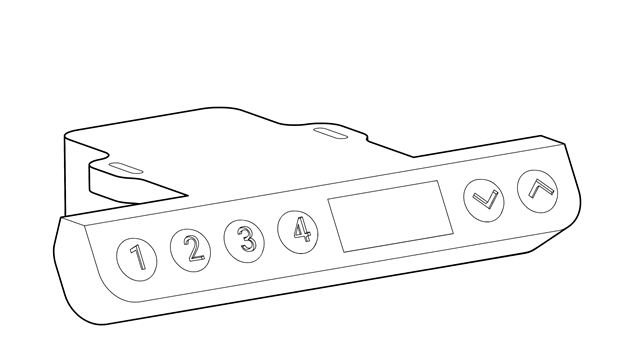
Check tindie to see a fully assembled version of LYFT in action.
If you would like to read a featured article about LYFT you can find some on ikeahackers or hackaday respectively.
The controller can store up to four different desk positions. These positions are easily accessable using the four memory buttons.
The controller is equipped with a 3-digit 7-segment display which allows you to read the current desk height either in centimeters or inch. Furthermore, you can adjust the display brigtness as well as the display-on time. If the shown desk height is not accurate you can adjust the value using the 'level correction' feature by plus/minus 9 centimeters.
In order to give some acoustic feedback the controller has a build-in audio transducer. The volume of the audio signals can be set in the settings menu but also be disabled.
One of the most useful features is the automatic driving mode which allows you to move the desk to a saved position without holding a button all the time.
On the basis of the original controller LYFT also supports a safety pin. The pin is needed to move the desk and to unlock the settings menu for changes. It is fully compatible with the original IKEA safety pin which is provided with the BEKANT desk.
Further details and how to use these features are described in the manual.
| Qty | Value | Footprint | References |
|---|---|---|---|
| 6 | 1N4148W | Diode_SMD:D_SOD-123 | D1, D2, D3, D4, D5, D6 |
| 6 | TL1105 | LYFT:SW_TH_Tactile_Omron_B3F-10xx_Center | SW1, SW2, SW3, SW4, SW5, SW6 |
| 1 | 10u | Capacitor_SMD:C_0805_2012Metric_Pad1.18x1.45mm_HandSolder | C1 |
| 1 | 13k | Resistor_SMD:R_0805_2012Metric_Pad1.20x1.40mm_HandSolder | R1 |
| 1 | AS1115-BSST | Package_SO:QSOP-24_3.9x8.7mm_P0.635mm | U1 |
| 1 | Conn_Power | Connector_PinSocket_2.54mm:PinSocket_1x02_P2.54mm_Vertical | J1 |
| 1 | Conn_Signal | Connector_PinSocket_2.54mm:PinSocket_1x03_P2.54mm_Vertical | J2 |
| 1 | HDSP-433G | LYFT:HDSP-433 | U2 |
| 1 | Logo | LYFT:LYFT-Logo_10x4 | G1 |
The 19 most common of 20 parts.
mgkoenig/lyft
LYFT is a sophisticated remote control for your IKEA BEKANT desk.

bbokser/persuasive_waker
An open source hardware alarm clock that can't be snoozed or turned off.

mickdassive/usbc_car_module
This project is a USB 3.1x1 hub designed with KiCad 8.0 and developed with PlatformIO. It features two USB-C ports (one downstream and one upstream) capable of delivering up to 100W power, along with four regular…


Diegolox/MOUNTAIN_IN_THE_POCKET
Un dispositivo que va ayudar a muchos montañeros en sus expediciones.


samcwitte/PCB-Design-Battle
This is a repository containing my PCB designs for a 2-hour PCB battle I participated in with Predictable Designs on YouTube.

sarahemm/cern-mimic-panel
LED display showing the current status of the CERN accelerator complex
It measures 129 × 15 mm and has 2 copper layers, 1.6 mm thick.
20 parts, built around the AS1115-BSST, HDSP-433G and 1N4148W. The full list of its parts is on this page, with links to each part's symbol and footprint where PCBKit's library has them.
From the mgkoenig/lyft repository on GitHub, at the commit this page was made from: the board is hardware/HMI Board/Rev A/LYFT_HMI.kicad_pcb. PCBKit opens the board in the browser, with nothing to install.
Its repository publishes it under the GPL-3.0 licence: you may reuse it on that licence's terms (keep the author's notice, and for a copyleft licence share your changes alike).