2 layers98 × 27 mm

 mbrugman67/FlockOff9
Wardriving WiFi/Bluetooth LE device detection
FlockOff is an open-source printed circuit board by mbrugman67, from the mbrugman67/FlockOff repository on GitHub, published under the MIT licence. It is a 2-layer board of 73.5 × 34.5 mm with 5 parts on 18 nets, routed with 28 tracks and 0 vias.
Its parts include 3 diodes and 2 ICs. It belongs with the radio and wireless boards and the ESP32 boards of this library.
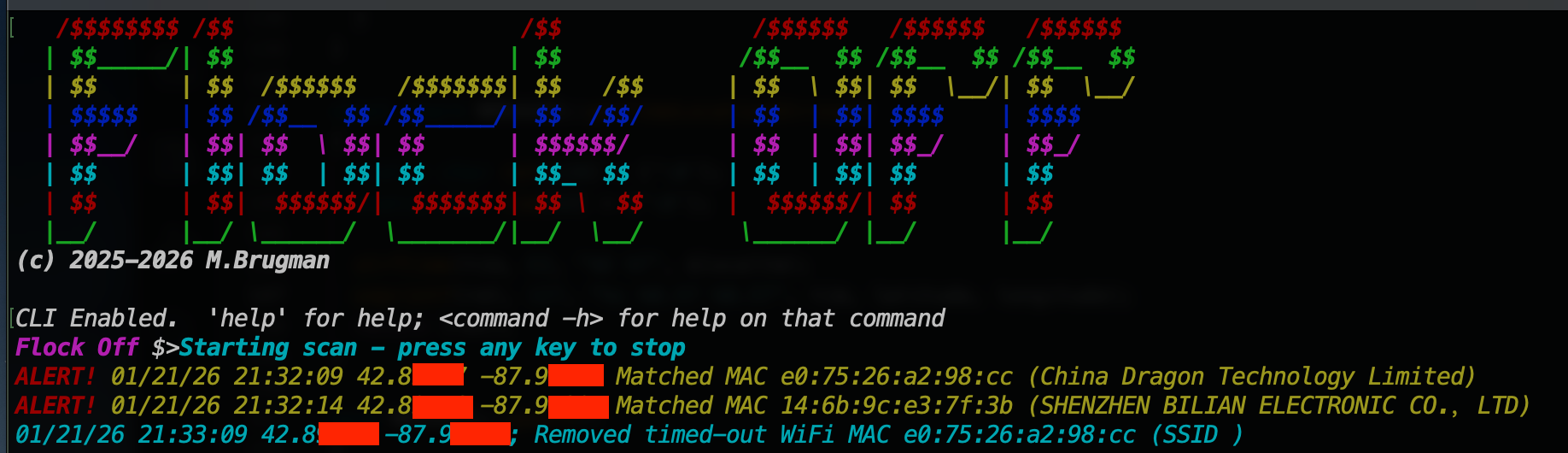
This project started as a device specifically to detect Flock security ALPR devices, but has grown into a more generic WiFi/Bluetooth LE scanner/alert wardriving tool.
This started of strictly as a Flock detector, but grew into more. In general, it is a device to monitor WiFi and BTLE networks, setting an indicator whenever a broadcaster is found that meets preset parameters. For WiFi networks, those parameters can be a MAC OID or network name (SSID). For Bluetooth, the matching criteria can be name, MAC, or by specific 16-bit UUIDs.
The hardware device consists of an ESP32-S3 dev board, a serial GPS module, and two LEDs for alerts and status.
There is a serial interface to the hardware device with a rich CLI (command-line interface). The device can also be used stand-alone (results are stored to internal file system) or by scripting.
The files contained in the project:
./hardware - contains a KiCad project for the board./img - images used in this README./py - simply python3 script to interact with the flocker (notes below)./src - source code (arduino project) for the ESP32 (notes below)./case - sample 3D printer .stl and openSCAD files for a case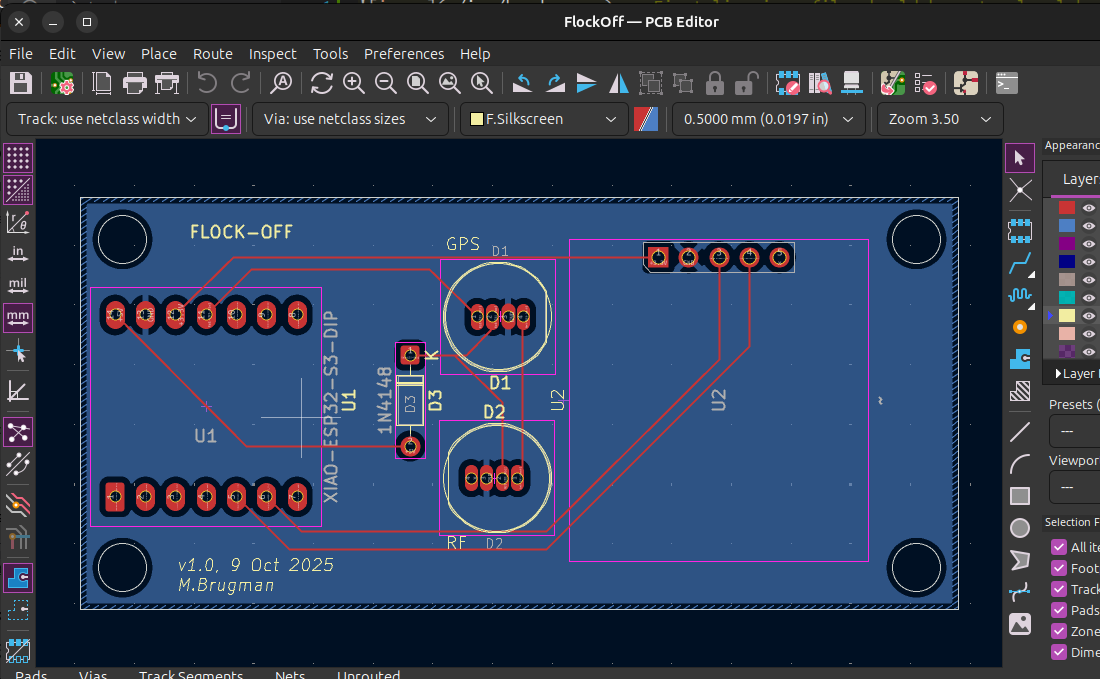
The hardware is dead simple - two dev modules, two through-hole 8mm WS2812 LEDs, and a small signal diode:
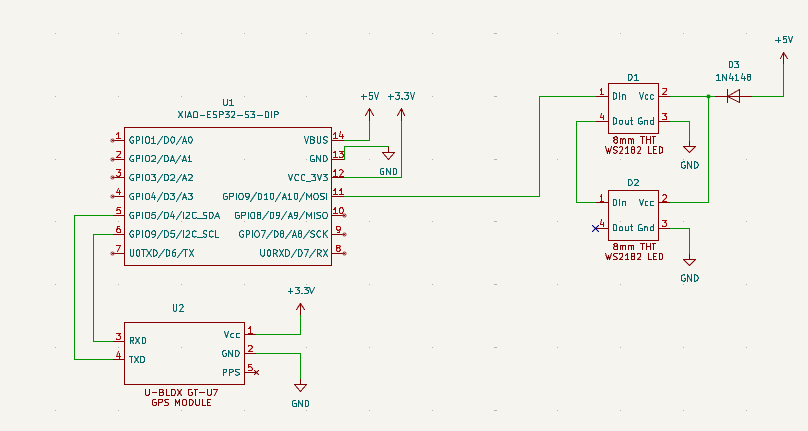
Like pretty much all WS2812 LEDs, these need 5VDC to operate; 5VDC power, 5VDC data line. The ESP32 is a 3.3 microcontroller, so what to do?
The USB connection supplies 5V which is regulated down to 3.3V for the microcontroller and associated stuff. In the schematic above, D3 is shown between the 5V USB power and the LED power in pin; that drops the voltage to about 4.3VDC. That's just within spec for the LED, and it is still plenty bright.
The 3.3V signal data line from the ESP32 would be too low if the LED was powered by 5V, but is within spec for the LED when it is running at 4.3-ish volts. It's a cheat to get away without having to use level converters; not something I'd do for a "real" production project, but good enough for here.
The firmware is written using the Arduino IDE. In the past, I've always avoided that and used VS Code with my own Makefile or CMAKE, PlatformIO, or whatever. I decided to go with Arduino in this case because I'm very unhappy with the integration of Copilot into VS Code (and really, the push to shove AI into everything). For now, Ardiuno is just code.
For more specific information, see the DEVELOPING.md file.
There is a CLI available at the USB port at 115200/8N1. The CLI uses ANSII escape codes for color, has tab-completion, up-arrow recall, and help:
Flock Off $>help
Use 'command -h' for detailed help on each command
        help - Print list of commands
        version - Display firmware version
        survey - Perform WiFi survey
        scan - Start continuous scan
        clear - Clear the console
        reset - Reboot the device
        ls - List files
        rm - Delete file
        write - Write test file
        mv - Rename file
        cp - Copy file
        cat - Cat file
        status - Get system status
        config - Get/Set config values
        criteria - Get/Set target matching criteria
Passing a -h to any command will show help for that command, for example:
Flock Off $>survey -h
survey [OPTION]
Perform a WiFi and/or Bluetooth survey.  Displays all results, not just those that match scan criteria.

  -i <INTERVAL>   interval in milliseconds to scan each WiFi channel
  -f <FILENAME>   save results to FILENAME in JSON format
  -n <NOTES>      add NOTES added for reference

If the -f parameter is not passed, JSON results will be displayed in the terminal.
There is a flat filesystem included (flat, meaning no directories; all files are in a single directory). Basic Linux-type file management commands are available, but note that there is no 'globbing'; all filenames must be directly entered. Examples:
      371  01/22/26  18:25:46  autoscan.1.log
      163  01/22/26  18:42:01  autoscan.log
      208  12/31/69  18:02:32  config.json
    11300  01/22/26  18:26:04  system.1.log
    11107  01/22/26  18:25:30  system.2.log
    11347  01/22/26  18:43:37  system.log
Flock Off $>cat config.json
{"deviceName":"Super Secret Sniffer","timeZone":"CST6CDT,M3.2.0,M11.1.0","LEDBrightness":100,"debugEnabled":true,"debugLogRollCount":3,}
Flock Off $>
Configuration is menu-driven:
Flock Off $>config
1) Set device name (Super Secret Sniffer)
2) Set timezone (CST6CDT,M3.2.0,M11.1.0)
3) Set max LED brightness (100)
4) Set debug logging (enabled)
5) Set scan logging (enabled)
6) Set debug file rolling count (3)
7) Set scan file rolling count (10)
8) Set minimum RSSI (-90)
9) Set minimum alert time (60)
Select number of item to change or 'x' to exit with no changes: What do the LEDs do?
| color | description |
|---|---|
| Green blink | GPS Fix good, communication good |
| Purple blink | GPS no fix, communication good |
| Red blink | No comms to GPS module |
| color | description |
|---|---|
| Blue fade alert | Survey in progress |
| Steady blue | Continuous scan in progress |
| Alternating blue/purple | Continuous scan detecting target |
The default action for the device is to continuously scan for targets in the area. There are two ways to start a scan:
scan command to start continuous scanningPress any key will connected to the serial port to stop the scan
The RF LED will glow continuously blue when a scan is running. If a target is seen, the LED will alternate blue/purple. As targets are seen and "disappear" they will be listed in the serial terminal. If enabled in configuration, the data will also be saved in rolling files in the filesystem - this allows "headless" operation with the ability to look at the results later.
Sample output in the serial terminal:
Flock Off $>Starting scan - press any key to stop
ALERT! 01/23/26 01:03:13 42.8XXXX -87.9XXXX Matched MAC 14:6b:9c:e3:7f:3b (SHENZHEN BILIAN ELECTRONIC CO.,LTD)
Sample scan log:
Flock Off $>ls
      267  01/22/26  19:02:59  autoscan.1.log
      163  01/22/26  18:42:01  autoscan.2.log
      371  01/22/26  18:25:46  autoscan.3.log
      267  01/22/26  19:04:01  autoscan.log
      208  12/31/69  18:02:32  config.json
     4557  01/22/26  18:50:13  survey.example.json
    12384  01/22/26  19:03:01  system.1.log
    11300  01/22/26  18:26:04  system.2.log
    11215  01/22/26  19:04:01  system.log
Flock Off $>cat autoscan.log
[00007907] 01/22/26 19:03:13 LOGGER::Started logger
[00007950] 01/22/26 19:03:13 WIFI::01/23/26 01:03:13 42.8XXXX -87.9XXXX; Matched mac 14:6b:9c:e3:7f:3b
[00055504] 01/22/26 19:04:01 SCAN::Ending scan, closing log.
[00055516] 01/22/26 19:04:01 LOG::Closing log!A survey will report all WiFi and BTLE broadcasters in range. Why perform a survey? Maybe there's a known device that isn't triggering alerts, and we want to characterize it (find MAC address, if BT, see if there are any service UUIDs it's broadcasting).
Basic steps:
status command to be sure GPS has gotten a fix and that the data looks correct (GPS coordinates masked by me for privacy):Flock Off $>status
->Hardware:
Chip model ESP32-S3
Chip frequency 240 MHz
Core count 2 cores
->GPS:
GPS current coordinates are 42.8XXXX, -87.9XXXX
GPS current time/date (gmt) is 00:47:52 1/23/2026
Number of satellites currently tracked: 9
->Filesystem:
Total capacity 4194304bytes, 53248 used (4044 KiB free)
->Memories:
Internal total heap 324436 bytes, 88536 used (230 KiB free)
PSRAM total heap 8388608 bytes, 58280 used (8192 KiB free)
->Wall clock:
Current wall clock time is Thu, 22 Jan 2026 18:47:51 -0600
Timezone is set to CST6CDT,M3.2.0,M11.1.0survey command to start the survey. Parameters are:
-i INTERVAL defines how much time (milliseconds) to spend on each WiFi channel-n NOTES to save the results in a JSON file, with survey notes set to NOTES-f FILENAME to save resultsFlock Off $>survey -i 2000 -n 'Example survey' -f survey.example.json
Survey starting
Survey done, found 16 WiFi devices, 13 Bluetooth devices.
Saving survey results to survey.example.json
Wrote 4557 bytes to fileThis example survey found 16 WiFi devices and 13 BTLE devices. The data in the JSON file looks like this:
Flock Off $>cat survey.example.json
{"SurveyNotes":"'Example survey","Device":"Super Secret Sniffer","LocationLongLat":[-87.9XXXX,42.8XXXX],"SatelliteCount":9,"DateTime":"2026-01-22 18:50:13","Timezone":"CST6CDT,M3.2.0,M11.1.0","DataVersion":2,"WiFiDevices":[{"Method":"WiFi","Type":"Data","Subtype":"ND (null no data)","SSID":"","SourceAddr":"4a:43:76:15:87:dd","DestAddr":"a0:36:bc:db:ca:a4","Channel":10,"RSSI":-20},{"Method":"WiFi","Type":"Management","Subtype":"beacon","SSID":"Open Wheel","SourceAddr":"08:36:c9:ed:b8:65","DestAddr":"ff:ff:ff:ff:ff:ff","Channel":4,"RSSI":-87},{"Method":"WiFi","Type":"Management","Subtype":"beacon","SSID":"NETGEAR05-Guest","SourceAddr":"c2:18:65:d2:d2:b2","DestAddr":"ff:ff:ff:ff:ff:ff","Channel":2,"RSSI":-87},{"Method":"WiFi","Type":"Data","Subtype":"Data","SSID":"","SourceAddr":"b2:28:aa:1c:0a:2a","DestAddr":"01:80:c2:00:00:00","Channel":1,"RSSI":-63},{"Method":"WiFi","Type":"Management","Subtype":"beacon","SSID":"flu","SourceAddr":"b2:28:aa:1c:0a:29","DestAddr":"ff:ff:ff:ff:ff:ff","Channel":1,"RSSI":-63},{"Method":"WiFi","Type":"Data","Subtype":"Data","SSID":"","SourceAddr":"a0:36:bc:db:ca:a0","DestAddr":"01:80:c2:00:00:00","Channel":6,"RSSI":-45},{"Method":"WiFi","Type":"Management","Subtype":"beacon","SSID":"virus","SourceAddr":"a0:36:bc:db:ca:a0","DestAddr":"ff:ff:ff:ff:ff:ff","Channel":6,"RSSI":-45},{"Method":"WiFi","Type":"Management","Subtype":"beacon","SSID":"flu_IoT","SourceAddr":"b2:28:aa:1c:0a:2a","DestAddr":"ff:ff:ff:ff:ff:ff","Channel":1,"RSSI":-64},{"Method":"WiFi","Type":"Data","Subtype":"QoS Data","SSID":"","SourceAddr":"b2:28:aa:1c:0a:29","DestAddr":"e0:75:26:a2:98:cc","Channel":1,"RSSI":-63},{"Method":"WiFi","Type":"Data","Subtype":"QoS Data","SSID":"","SourceAddr":"14:6b:9c:e3:7f:3b","DestAddr":"b2:28:aa:1c:0a:29","Channel":1,"RSSI":-54},{"Method":"WiFi","Type":"Data","Subtype":"QoS Data","SSID":"","SourceAddr":"cc:db:a7:93:ec:2c","DestAddr":"a0:36:bc:db:ca:a0","Channel":7,"RSSI":-71},{"Method":"WiFi","Type":"Management","Subtype":"beacon","SSID":"<HIDDEN>","SourceAddr":"cc:28:aa:1c:0a:28","DestAddr":"ff:ff:ff:ff:ff:ff","Channel":1,"RSSI":-63},{"Method":"WiFi","Type":"Data","Subtype":"Data","SSID":"","SourceAddr":"a0:8a:06:6f:ec:fa","DestAddr":"01:00:5e:00:00:07","Channel":6,"RSSI":-84},{"Method":"WiFi","Type":"Data","Subtype":"Data","SSID":"","SourceAddr":"cc:28:aa:1c:0a:28","DestAddr":"01:80:c2:00:00:00","Channel":1,"RSSI":-64},{"Method":"WiFi","Type":"Data","Subtype":"ND (null no data)","SSID":"","SourceAddr":"e0:75:26:a2:98:cc","DestAddr":"b2:28:aa:1c:0a:29","Channel":1,"RSSI":-76},{"Method":"WiFi","Type":"Management","Subtype":"beacon","SSID":"NETGEAR05","SourceAddr":"94:18:65:d2:d2:b1","DestAddr":"ff:ff:ff:ff:ff:ff","Channel":2,"RSSI":-90}],"BLEDevices":[{"Method":"BTLE","Name":"N00DM","MAC":"c7:06:90:c0:c4:6c","RSSI":-84,"UUID16bit":[65199],"UUID128bit":[],"DataUUID16bit":[65199],"DataUUID128bit":[]},{"Method":"BTLE","Name":"OfficeJet 5200 series","MAC":"86:a9:3e:bc:5c:c9","RSSI":-86,"UUID16bit":[65144],"UUID128bit":[],"DataUUID16bit":[],"DataUUID128bit":[]},{"Method":"BTLE","Name":"","MAC":"47:d1:13:3a:79:de","RSSI":-70,"UUID16bit":[],"UUID128bit":[],"DataUUID16bit":[],"DataUUID128bit":[]},{"Method":"BTLE","Name":"","MAC":"6b:7a:e6:9b:f5:d2","RSSI":-65,"UUID16bit":[],"UUID128bit":[],"DataUUID16bit":[],"DataUUID128bit":[]},{"Method":"BTLE","Name":"","MAC":"66:95:29:56:70:e9","RSSI":-69,"UUID16bit":[],"UUID128bit":[],"DataUUID16bit":[],"DataUUID128bit":[]},{"Method":"BTLE","Name":"","MAC":"d4:0a:5d:22:d4:e9","RSSI":-61,"UUID16bit":[],"UUID128bit":[],"DataUUID16bit":[],"DataUUID128bit":[]},{"Method":"BTLE","Name":"","MAC":"63:13:27:3d:4d:22","RSSI":-62,"UUID16bit":[],"UUID128bit":[],"DataUUID16bit":[],"DataUUID128bit":[]},{"Method":"BTLE","Name":"","MAC":"1d:2a:e8:54:5e:f4","RSSI":-69,"UUID16bit":[],"UUID128bit":[],"DataUUID16bit":[65267],"DataUUID128bit":[]},{"Method":"BTLE","Name":"","MAC":"a8:51:ab:c6:11:25","RSSI":-75,"UUID16bit":[],"UUID128bit":[],"DataUUID16bit":[],"DataUUID128bit":[]},{"Method":"BTLE","Name":"","MAC":"3c:5c:ae:fd:ff:0d","RSSI":-53,"UUID16bit":[],"UUID128bit":[],"DataUUID16bit":[64753],"DataUUID128bit":[]},{"Method":"BTLE","Name":"","MAC":"79:d2:f7:d7:5d:22","RSSI":-75,"UUID16bit":[],"UUID128bit":[],"DataUUID16bit":[],"DataUUID128bit":[]},{"Method":"BTLE","Name":"","MAC":"32:2b:12:15:81:9a","RSSI":-51,"UUID16bit":[],"UUID128bit":[],"DataUUID16bit":[64753],"DataUUID128bit":[]},{"Method":"BTLE","Name":"[TV] Samsung 8 Series (65)","MAC":"8c:ea:48:a7:2c:03","RSSI":-72,"UUID16bit":[],"UUID128bit":[],"DataUUID16bit":[],"DataUUID128bit":[]}]}The included python scripts can pull the survey data from the device and populate some database tables (sqlite3) for analysis.
To do this, start by going to the ./py directory and running the script. There are some Python modules needed; they can be installed with the included requirements file (pip3 install -r requirements.txt)
Note - it is always recommended to use a virtual environment with python scripts that require different modules. See python documentation on how to create and use a virtual environment if necessary.
Start by listing the files on the device (make sure you are no longer connected to it by serial terminal):
┌──(venv)─(matty💊s76)-[~/data/projects/FlockOff/py]
└─$ python3 ./flock.py --dbfile example.db --port /dev/ttyACM0 --dir
config.bak
config.json
survey.00.json
survey.01.json
survey.example.json
system.log
The parameters to the flock.py script are:
--port PORT - the serial port of the connected device--dbfile FILE - name of the database file to use (it will be created if it does not exist). This is only required if the load command is issued.--dir - list the files on the device--cat FILE - list the contents of the specified file--load FILE - load the specified JSON file into database tables'--download FILE - download the specified FILE from the device to the local filesystem. The local copy will have the same name as the file on the device.The above --dir command showed our survey.example.json from the survey. Let's load it into the database tables:
┌──(venv)─(matty💊s76)-[~/data/projects/FlockOff/py]
└─$ python3 ./flock.py --dbfile example.db --port /dev/ttyACM0 --load survey.example.json
Loaded 12 WiFi devices, 21 BTLE devices from survey "'Example" at 2025-12-15 15:56:52
Note that if the database file didn't exist before this command, the script will also populate the data tables with the YAML and JSON files for known manufacturer OID and UUID data.
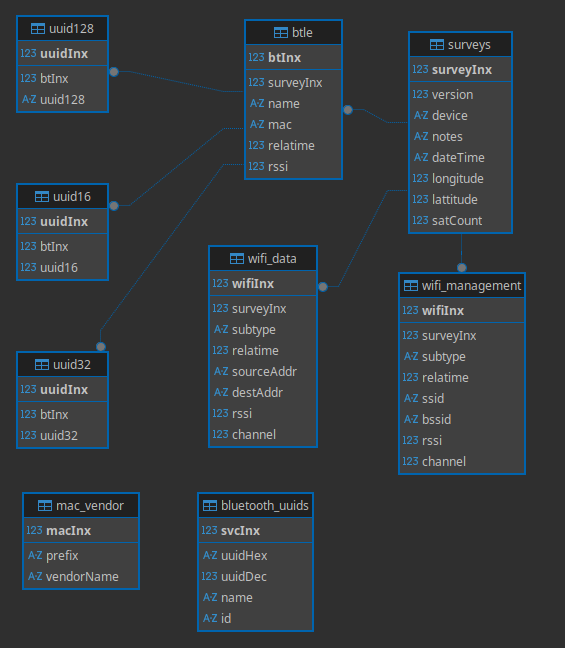 The database schema can be seen in
./src/py/survey.db.schema
The sqlite3 database can be explored with a gui tool or the command line. The surveys table shows basic information about the a survey json file (using sqlite3 command line tool):
sqlite> .mode box
sqlite> .headers on
sqlite> select * from surveys;
┌───────────┬──────────┬─────────────────────┬───────────┬───────────┬──────────┐
│ surveyInx │  notes   │      dateTime       │ longitude │ lattitude │ satCount │
├───────────┼──────────┼─────────────────────┼───────────┼───────────┼──────────┤
│ 1         │ 'Example │ 2025-12-15 15:56:52 │ 42.0001   │ -87.0001  │ 8        │
└───────────┴──────────┴─────────────────────┴───────────┴───────────┴──────────┘
The surveyInx field is a foreign key into the wifi_data, wifi_management and btle tables. This allows multiple surveys to be loaded into a single database file
notes is the value from the -j NOTES parameter of the survey command. dateTime, longitude, lattitude, and satCount are populated by the GPS module.
wifi_data contains all captured WiFi Data packets; wifi_management contains all captured WiFi Management packets (think access point beacons, probe responses, etc.). They can be joined to find all devices and the access points to which they are connected:
select distinct sta.subtype "station data subtype",
		ap.ssid "AP SSID",
		ap.bssid "AP BSSID",
		sta.sourceAddr "station MAC",
		sta.channel "CH",
		mv.vendorName "station vendor"
from wifi_data sta
join wifi_management ap on ap.bssid = sta.destAddr and ap.channel = sta.channel and ap.surveyInx = sta.surveyInx
left join mac_vendor mv on mv.prefix like substr(sta.sourceAddr, 1, 8)
where sta.surveyInx = 2
order by ap.bssid;

┌──────────────────────┬────────────────────┬───────────────────┬───────────────────┬────┬────────────────────────────────────────┐
│ station data subtype │      AP SSID       │     AP BSSID      │    station MAC    │ CH │             station vendor             │
├──────────────────────┼────────────────────┼───────────────────┼───────────────────┼────┼────────────────────────────────────────┤
│ ND (null no data)    │ virus              │ a0:36:bc:db:ca:a0 │ cc:db:a7:93:ec:2c │ 6  │ Espressif Inc.                         │
│ QoS Data             │ virus              │ a0:36:bc:db:ca:a0 │ cc:db:a7:93:ec:2c │ 6  │ Espressif Inc.                         │
│ ND (null no data)    │ SpectrumSetup-ECFD │ a0:8a:06:6f:ec:fa │ bc:35:1e:77:8a:9f │ 6  │ Tuya Smart Inc.                        │
│ ND (null no data)    │ SpectrumSetup-ECFD │ a0:8a:06:6f:ec:fa │ 30:fc:eb:84:38:ce │ 7  │ LG Electronics (Mobile Communications) │
│ ND (null no data)    │ SpectrumSetup-ECFD │ a0:8a:06:6f:ec:fa │ 30:fc:eb:84:38:ce │ 6  │ LG Electronics (Mobile Communications) │
│ QoS Data             │ flu                │ b2:28:aa:1c:0a:29 │ e0:75:26:a2:98:cc │ 1  │ China Dragon Technology Limited        │
│ ND QoS               │ flu                │ b2:28:aa:1c:0a:29 │ 14:6b:9c:e3:7f:3b │ 2  │ SHENZHEN BILIAN ELECTRONIC CO.,LTD    │
│ QoS Data             │ flu                │ b2:28:aa:1c:0a:29 │ 14:6b:9c:e3:7f:3b │ 1  │ SHENZHEN BILIAN ELECTRONIC CO.,LTD    │
│ QoS Data             │ flu                │ b2:28:aa:1c:0a:29 │ 18:b4:30:a0:24:fa │ 1  │ Nest Labs Inc.                         │
└──────────────────────┴────────────────────┴───────────────────┴───────────────────┴────┴────────────────────────────────────────┘
The btle table contains bluetooth broadcasters:
sqlite> select b.name, b.mac, b.rssi from btle as b join surveys s on b.surveyInx = s.surveyInx order by b.mac;
┌───────────────────────┬───────────────────┬──────┐
│         name          │        mac        │ rssi │
├───────────────────────┼───────────────────┼──────┤
│                       │ 01:c5:61:6d:2c:b4 │ -53  │
│                       │ 04:a0:29:10:68:e4 │ -78  │
│                       │ 08:66:98:f2:a3:ba │ -84  │
│                       │ 34:fe:3e:a1:f5:e2 │ -63  │
│                       │ 56:f6:b3:ad:60:5f │ -82  │
│                       │ 66:7f:66:1d:ec:ce │ -68  │
│                       │ 6d:67:db:fd:9e:67 │ -84  │
│                       │ 6e:d3:64:c3:af:77 │ -79  │
│                       │ 77:50:8c:84:fa:72 │ -45  │
│                       │ 78:90:0b:c0:26:1b │ -69  │
│                       │ 7e:91:43:7c:ff:bf │ -75  │
│ OfficeJet 5200 series │ 86:a9:3e:bc:5c:c9 │ -76  │
│                       │ 8c:ea:48:a7:2c:03 │ -73  │
│                       │ a8:51:ab:c6:11:25 │ -82  │
│                       │ c0:c9:9b:f2:d7:43 │ -75  │
│                       │ c1:cf:e2:c9:64:5f │ -85  │
│                       │ ca:ba:59:12:f6:0d │ -66  │
│ N00DM                 │ ce:a3:ad:95:04:29 │ -80  │
│                       │ d5:93:9d:03:9f:f5 │ -80  │
│                       │ ea:a8:d0:6f:67:89 │ -84  │
│                       │ ec:9d:4d:3c:28:2b │ -68  │
└───────────────────────┴───────────────────┴──────┘
There are quite a few BTLE devices found. To narrow it down to those that are broadcasting a UUID:
sqlite> select b.name, b.mac, u.uuid16 from btle b join uuid16 u on b.btInx = u.btInx where b.surveyInx = 1 order by b.mac;
┌───────────────────────┬───────────────────┬────────┐
│         name          │        mac        │ uuid16 │
├───────────────────────┼───────────────────┼────────┤
│ OfficeJet 5200 series │ 86:a9:3e:bc:5c:c9 │ 65144  │
│ N00DM                 │ ce:a3:ad:95:04:29 │ 65199  │
└───────────────────────┴───────────────────┴────────┘
More SQL examples can be found in ./example.sql
| Qty | Value | Footprint | References |
|---|---|---|---|
| 2 | ~ | flock:LED_D8.0mm_WS2812 | D1, D2 |
| 1 | 1N4148 | Diode_THT:D_DO-35_SOD27_P7.62mm_Horizontal | D3 |
| 1 | XIAO-ESP32-S3-DIP | flock:XIAO_ESP32S3 | U1 |
| 1 | ~ | flock:GPS_Module | U2 |
It measures 73.5 × 34.5 mm and has 2 copper layers, 1.6 mm thick.
5 parts. The full list of its parts is on this page, with links to each part's symbol and footprint where PCBKit's library has them.
From the mbrugman67/FlockOff repository on GitHub, at the commit this page was made from: the board is hardware/FlockOff/FlockOff.kicad_pcb and its schematic hardware/FlockOff/FlockOff.kicad_sch. PCBKit opens the board in the browser, with nothing to install.
Its repository publishes it under the MIT licence: you may reuse it on that licence's terms (keep the author's notice, and for a copyleft licence share your changes alike).

joypad-ai/joypad-os
Universal controller firmware for building adapters, dongles, and custom controllers.

OLIMEX/OLINUXINO
OLINUXINO is Open Source / Open Hardware, low cost from EUR 24 Linux Industrial grade Single Board Computer capable to operate -25+85C

jamro/tiny-engineer
A small desktop robot that brings an AI coding assistant to life, physically acting out when it reads files, thinks, writes code, and finishes work.

hackclub/OnBoard
💡 Join 1,000 teenagers and make your first PCB with a $100 grant!


Luos-io/luos_engine
Open-source and real-time orchestrator for cyber-physical-systems, to easily design, test and deploy embedded applications and digital twins.