2 layers20.5 × 24.8 mm

 makeristic/Adafruit_Feather_USB-C1
KiCad 5 template for USB-C Adafruit Feather-compatible boards with JST PH battery connector, headers, and mounting holes.
Adafruit Feather USB C is an open-source printed circuit board by makeristic, from the makeristic/Adafruit_Feather_USB-C repository on GitHub. It is a 2-layer board of 52.5 × 22.9 mm with 8 parts on 36 nets.
It belongs with the microcontroller boards and power boards of this library.
A KiCad project template for designing USB-C boards around the Adafruit Feather specification. It includes the board outline, mounting holes, 12-pin and 16-pin headers, a USB-C receptacle, and a two-pin JST PH battery connector.
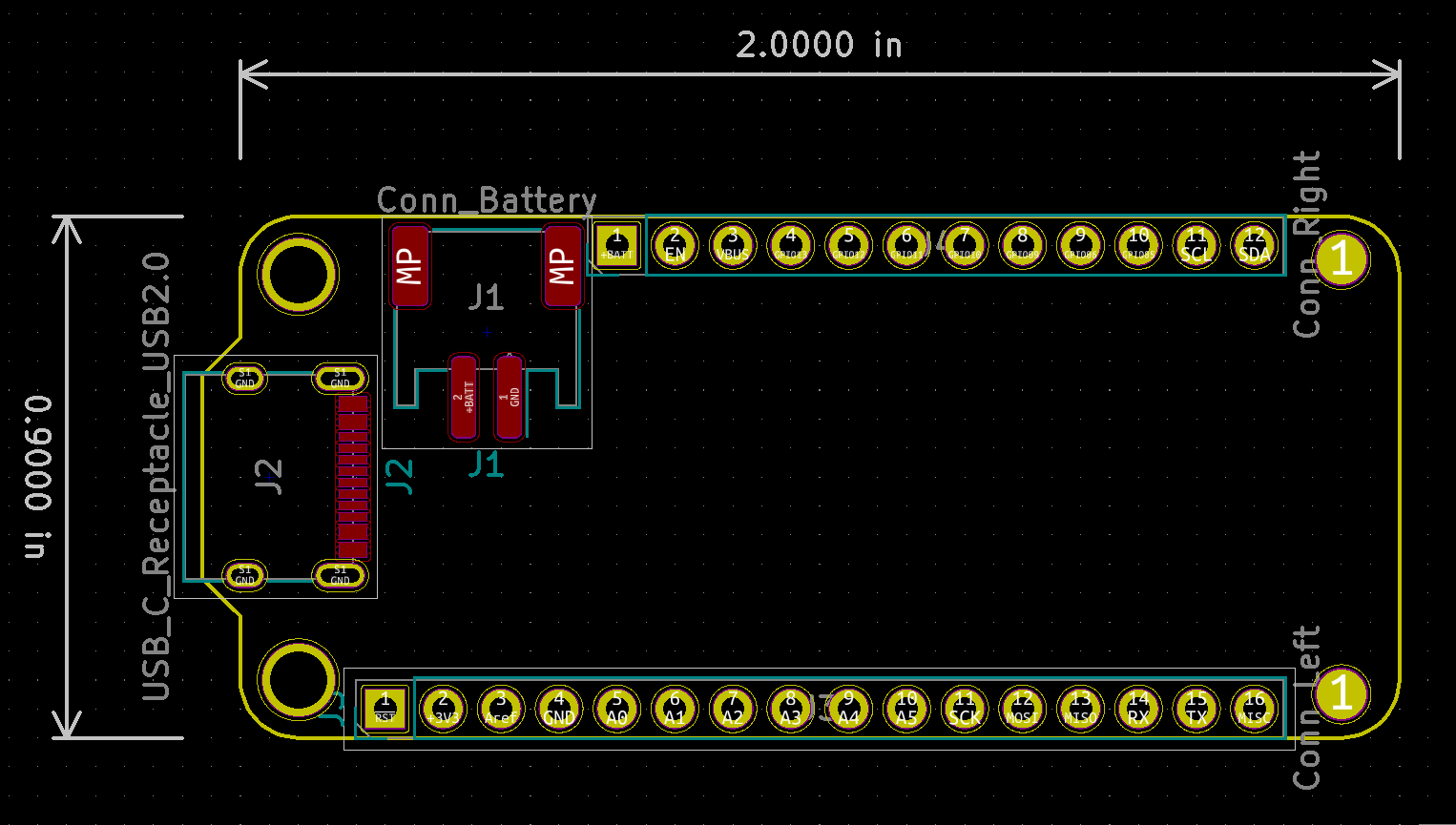
This is a starting layout, with no routed PCB tracks. USB-C VBUS and ground are assigned in the schematic, while USB data and CC connections remain unconnected. Add the required USB-C termination, power circuitry, controller, and application circuit before fabrication. The checked-in PCB was saved by KiCad 5.1.6; its legacy schematic and project formats are retained. The correctness audit confirms schematic/PCB connector-net agreement and records remaining ERC, DRC, and mounting-hole concerns. It does not establish electrical or manufacturing validation.
git clone https://github.com/makeristic/Adafruit_Feather_USB-C.gitAdafruit_Feather_USB-C directory, including meta/, into your KiCad user templates directory. The archived KiCad 5.1 template-location documentation describes the directory layout.Connector, Connector_Generic, and power symbols and connector footprints. Retain the supplied -cache.lib: it contains the original USB_C_Receptacle_USB2.0 symbol, which is absent under that name in current libraries. Models reference ${KISYS3DMOD}; when using a newer release, check that this legacy path variable points to your installed 3D-model directory and resolve any changed model filenames.The schematic identifies USB-C connector U262-161N-4BVC11 (LCSC C319148) and battery connector S2B-PH-SM4-TB(LF)(SN) (LCSC C295747). Verify the selected parts against their current datasheets before ordering.
No firmware, BOM export, or Gerber fabrication package is included.
Use Adafruit_Feather for the original Micro-USB variant. Feather_STM32WB55 is a separate STM32WB55 board design; Makeristic-KiCad-Library contains additional parts and a USB-C connector model.
Report problems through GitHub issues, including your KiCad version and any missing-library messages. For layout changes, include schematic or board screenshots and explain any change to Feather compatibility.
Original template copyright © 2019 arturo182, from KiCad/kicad-templates pull request #23. Michael Cutler adapted the template for USB-C in 2020; the original attribution remains in the template metadata.
The upstream licence at the source revision is Creative Commons Attribution-ShareAlike 4.0 with the KiCad library exception. A copy is included in LICENSE.md. The derived template has not been relicensed to MIT; consult the licence for the distinction between using library data in a design and redistributing the template collection.
| Qty | Value | Footprint | References |
|---|---|---|---|
| 1 | Conn_Battery | Connector_JST:JST_PH_S2B-PH-SM4-TB_1x02-1MP_P2.00mm_Horizontal | J1 |
| 1 | Conn_Left | Connector_PinHeader_2.54mm:PinHeader_1x16_P2.54mm_Vertical | J3 |
| 1 | Conn_Right | Connector_PinHeader_2.54mm:PinHeader_1x12_P2.54mm_Vertical | J4 |
| 1 | USB_C_Receptacle_USB2.0 | Connector_USB:USB_C_Receptacle_XKB_U262-16XN-4BVC11 | J2 |
The 4 most common of 8 parts.

joeycastillo/Sensor-Watch
A board replacement for the classic Casio F-91W wristwatch

rusefi/rusefi
rusefi - GPL internal combustion engine control unit

hoglet67/RGBtoHDMI
Bare-metal Raspberry Pi project that provides pixel-perfect sampling of Retro Computer RGB/YUV video and conversion to HDMI

shanteacontrols/OpenDeck
A platform for building interactive control and sensing devices using MIDI and OSC built with Zephyr RTOS.

hackclub/OnBoard
💡 Join 1,000 teenagers and make your first PCB with a $100 grant!

dangiu/PicoMemcard
Emulating PSX Memory Card (or controller) using a Raspberry Pi Pico

OLIMEX/DIY-LAPTOP
Do It Yourself Open Source Hardware and Software Modular Hacker's Friendly Laptop
It measures 52.5 × 22.9 mm and has 2 copper layers, 1.6 mm thick.
8 parts. The full list of its parts is on this page, with links to each part's symbol and footprint where PCBKit's library has them.
From the makeristic/Adafruit_Feather_USB-C repository on GitHub, at the commit this page was made from: the board is Adafruit_Feather_USB-C.kicad_pcb. PCBKit opens the board in the browser, with nothing to install.
Its repository states no licence, so its author keeps all rights: ask makeristic before reusing the design.