2 layers65 × 30 mm
Golden rp2040 usb hid
mrcha033/hw-codesign
Agentic hardware co-design: brief to KiCad, firmware, 3D review, and explicit fabrication blockers.
35 parts2Apache-2.0
 MainRam1/KeyShare
KeyShare
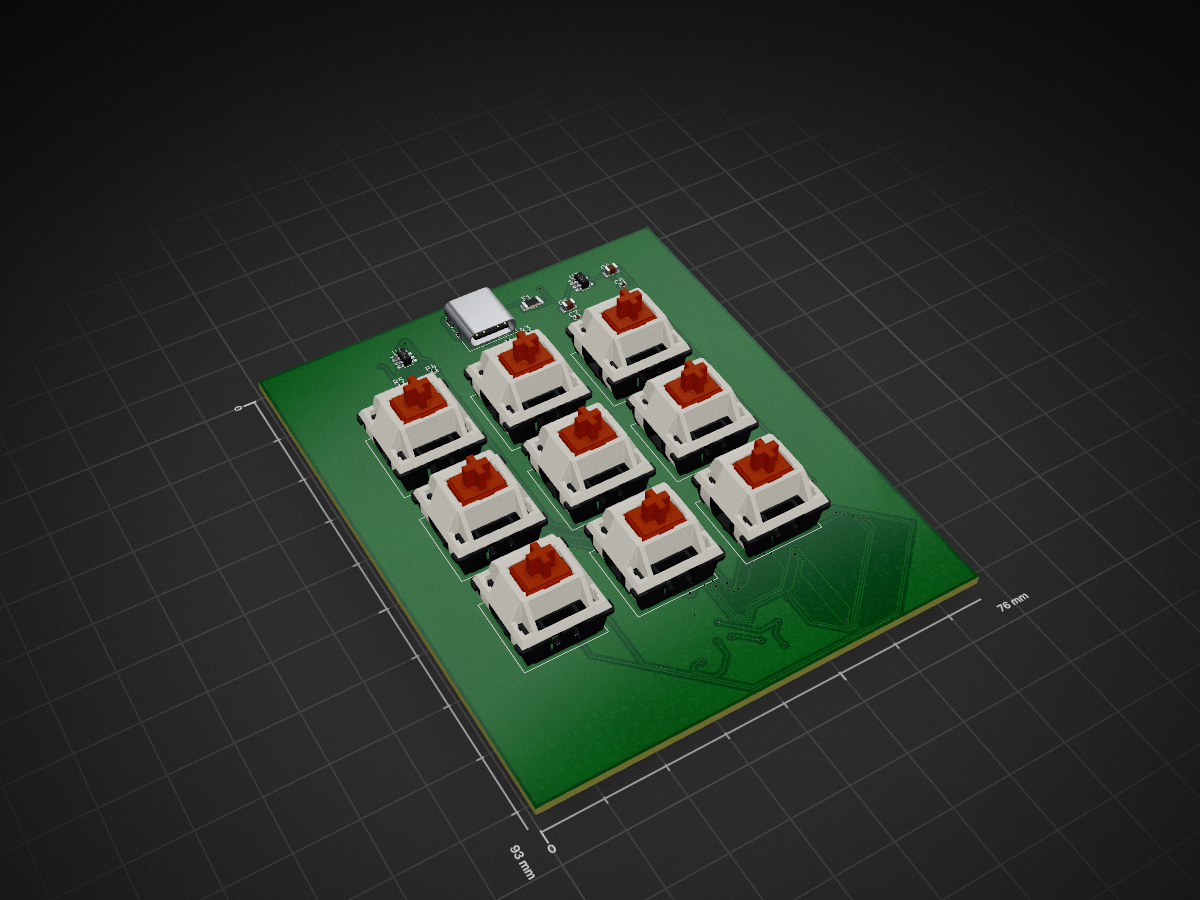
MacroPad is an open-source printed circuit board by MainRam1, from the MainRam1/KeyShare repository on GitHub, published under the MIT licence. It is a 2-layer board of 76 × 93 mm with 37 parts on 55 nets, routed with 598 tracks and 48 vias.
It is built around the SC0914(13), W25Q16JVSSIQ and AP2112K-3.3TRG1, with the USBLC6-2SC6, RC0402FR-0710KL and CL21A106KAYNNNE among its other parts. Its parts include 13 capacitors, 11 switches, 6 resistors, 4 ICs and 1 connector. It belongs with the keyboards and input boards and the RP2040 boards of this library.


An open-source 9-key programmable macropad built from the ground up — custom PCB designed in KiCad, CircuitPython firmware running on the RP2040, and a native macOS companion app written in Swift. Assign keyboard shortcuts, launch apps, type text, switch desktops, control media, open URLs, trigger app menu actions, or chain actions into multi-step macros — all from a compact 3x3 mechanical key grid that auto-switches profiles based on your active application or website.
Press a Cherry MX key on the macropad → the RP2040 firmware sends a JSON message over USB serial → the macOS menu bar app receives it and executes the configured action. The app monitors your active application and browser tab, automatically switching profiles so your keys always match what you're working in. A bidirectional serial protocol handles device detection, hot-plug recovery, and sleep/wake reconnection.
| Component | Minimum |
|---|---|
| macOS | 13.0 (Ventura) |
| Microcontroller | Raspberry Pi Pico (RP2040) |
| Switches | 9 x Cherry MX compatible |
| Firmware runtime | CircuitPython 9.x |
The Hardware/ directory contains the complete KiCad project for a custom 2-layer PCB:
Hardware/Gerbers/Hardware/MacroPad.csv with all components listedKey components: RP2040 microcontroller, W25Q16 16Mbit SPI flash, USB-C connector with ESD protection, AP2112K-3.3 voltage regulator, and 9 Cherry MX compatible switch footprints.
firmware/code.py and firmware/boot.py to the CIRCUITPY drive..zip from GitHub Releases, unzip, and move KeyShare.app to /Applications.# Install xcodegen (once)
brew install xcodegen
# Generate the Xcode project
cd MacroApp
xcodegen generate
# Build
xcodebuild -project KeyShare.xcodeproj -scheme KeyShare -configuration Release buildThe built .app bundle is ad-hoc signed -- no Apple Developer ID required.
.uf2 file to the RPI-RP2 drive.cp firmware/code.py /Volumes/CIRCUITPY/
cp firmware/boot.py /Volumes/CIRCUITPY/The Pico will reboot and begin communicating over USB serial.
The app stores its config at:
~/Library/Application Support/KeyShare/config.jsonYou can edit profiles and key bindings through the preferences window or by editing the JSON file directly. Changes are picked up automatically.
| Qty | Value | Footprint | References |
|---|---|---|---|
| 9 | SW_Push | Button_Switch_Keyboard:SW_Cherry_MX_1.00u_PCB | SW1, SW2, SW3, SW4, SW5, SW6, SW7, SW8, SW9 |
| 7 | 100nF | Capacitor_SMD:C_0402_1005Metric | C3, C5, C7, C10, C11, C12, C13 |
| 2 | 10K | Resistor_SMD:R_0402_1005Metric | R1, R6 |
| 2 | 10uF | Capacitor_SMD:C_0805_2012Metric | C4, C6 |
| 2 | 15pF | Capacitor_SMD:C_0402_1005Metric | C1, C2 |
| 2 | 1uF | Capacitor_SMD:C_0402_1005Metric | C8, C9 |
| 2 | 27R | Resistor_SMD:R_0402_1005Metric | R4, R5 |
| 2 | 5.1k | Resistor_SMD:R_0402_1005Metric | R2, R3 |
| 2 | SW_Push | Button_Switch_SMD:SW_SPST_PTS810 | SW10, SW11 |
| 1 | 12Mhz | Crystal:Crystal_SMD_3225-4Pin_3.2x2.5mm | Y1 |
| 1 | 500mA | Fuse:Fuse_1206_3216Metric | F1 |
| 1 | AP2112K-3.3 | Package_TO_SOT_SMD:SOT-23-5 | U3 |
| 1 | RP2040 | Package_DFN_QFN:QFN-56-1EP_7x7mm_P0.4mm_EP3.2x3.2mm | U1 |
| 1 | USBLC6-2SC6 | Package_TO_SOT_SMD:SOT-23-6 | U4 |
| 1 | USB_C_Receptacle_USB2.0_16P | Connector_USB:USB_C_Receptacle_GCT_USB4085 | J1 |
| 1 | W25Q16JVSS | Package_SO:SOIC-8_5.3x5.3mm_P1.27mm | U2 |
It measures 76 × 93 mm and has 2 copper layers, 1.6 mm thick.
37 parts, built around the SC0914(13), W25Q16JVSSIQ, AP2112K-3.3TRG1 and USBLC6-2SC6. The full list of its parts is on this page, with links to each part's symbol and footprint where PCBKit's library has them.
From the MainRam1/KeyShare repository on GitHub, at the commit this page was made from: the board is Hardware/MacroPad.kicad_pcb and its schematic Hardware/MacroPad.kicad_sch. PCBKit opens the board in the browser, with nothing to install.
Its repository publishes it under the MIT licence: you may reuse it on that licence's terms (keep the author's notice, and for a copyleft licence share your changes alike).
mrcha033/hw-codesign
Agentic hardware co-design: brief to KiCad, firmware, 3D review, and explicit fabrication blockers.

chinawrj/FarmMesh-Node
Developing an integrated hardware and software solution for farm-wide Mesh networking: RP2350B/ESP32-C5 nodes, firmware, network protocols, and Wi-Fi/BLE sensor access.


jgrano/Nx-PCBA
Install all of these before opening the project:

UC-Aerospace/Electrical-Tut-26
2026 Avionics tutorial example boards for UC Aerospace

Tropaion/Manafish_Mainboard
The Manafish Mainboard is the main electronics board of the Manafish ROV. It replaces the Raspberry Pi 3B, the USB-connected Raspberry Pi Pico and the wiring between them with one board:

dcuccia/digital-handbell
A software and hardware project to create a digital handbell using microcontrollers and speakers and gesture recognition

ratmuds/spark
The PCB files for this project. The gerber and other PCBA files are in the production folder.