

2 layers144.8 × 204.5 mm

 lusmdl/MySimRacingButtonBox
manage a button matrix tailored for sim racing setups. The system uses I2C communication, where the Arduino Micro acts as the master and the ATmega328P functions as the slave
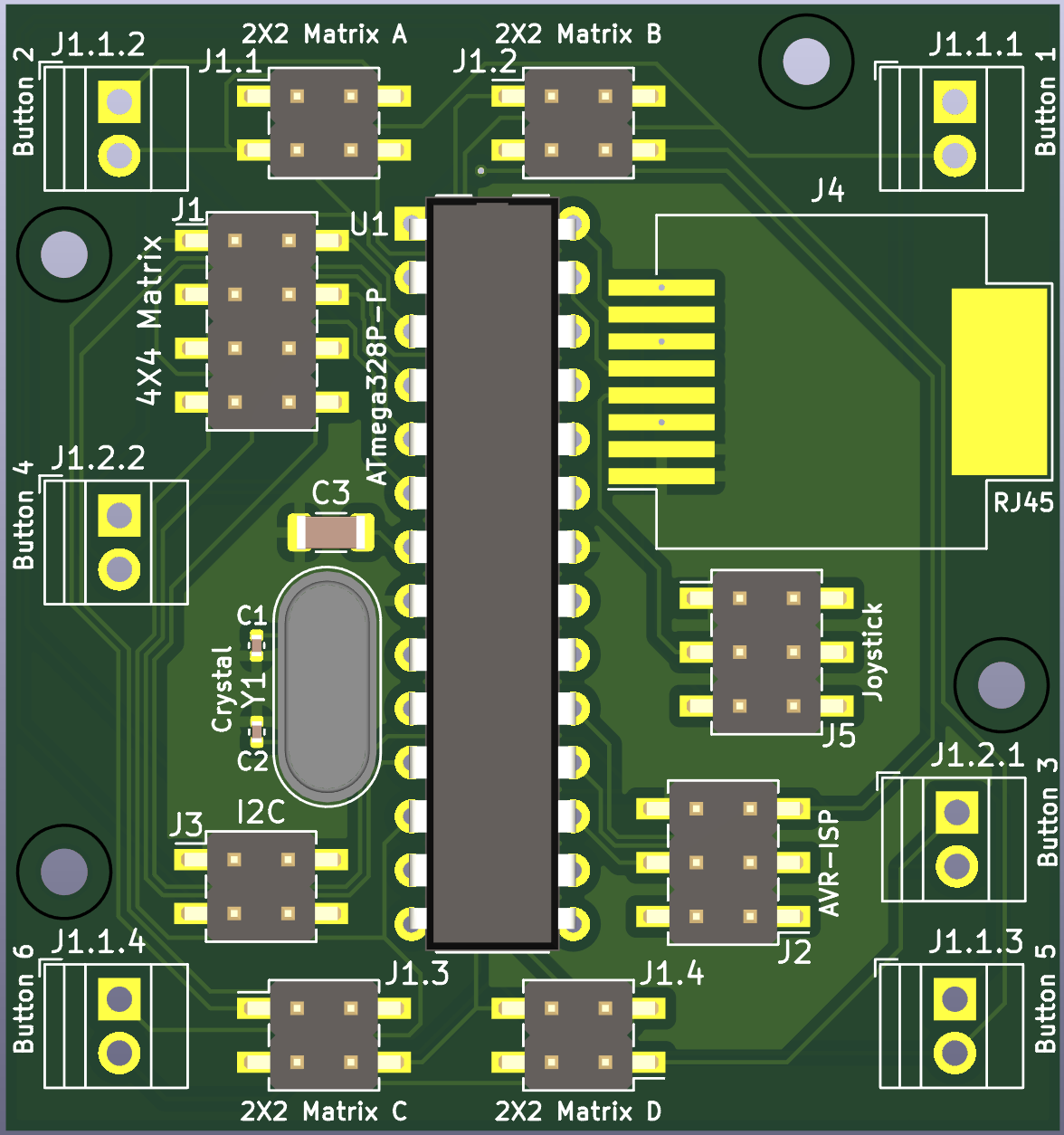
MySimRacingButtonBox is an open-source printed circuit board by lusmdl, from the lusmdl/MySimRacingButtonBox repository on GitHub, published under the MIT licence. It is a 2-layer board of 49.7 × 53.1 mm with 24 parts on 29 nets, routed with 306 tracks and 12 vias.
It is built around the ATMEGA328P-PU and RJ45. Its parts include 15 connectors, 3 capacitors, 1 IC and 1 crystal. It belongs with the AVR (ATmega, ATtiny) boards of this library.
Welcome to the Sim Racing Button Controller repository!
This project is built around an ATmega328P microcontroller, which is configured to manage a button matrix tailored for sim racing setups. The system uses I2C communication, where the Arduino Micro acts as the master and the ATmega328P functions as the slave (Address standard 8). This ensures precise control and synchronization between the components.
The ATmega328P transmits a 16-bit signal representing the states of up to 16 buttons only when requested by the Arduino Micro. This on-demand communication minimizes latency and ensures efficient data transfer. Additionally, the PCB includes support for a joystick connection, expanding its versatility.
This project complements MySimRacingCore, which serves as the brain of the entire sim racing system. Together, they deliver a modular and high-performance solution for sim racing enthusiasts.
Example PCB for this project
You can either use the precompiled HEX file or compile the firmware yourself.
Install PlatformIO
Clone the Repository
git clone https://github.com/lusmdl/MySimRacingButtonBox.git3. Open the Project
#define I2C_ADDR 8 in ProjectConfig.hpp to match your I²C master device configuration.The default address is 8. If you intend to connect this device twice, use addresses 8 and 9. The master will handle the rest.
Build and Upload
pio run --target uploadHardware Connection
Running the Firmware
We welcome contributions from the community!
First, read the general contributing conventions for projects from me.
git checkout -b feature-branch).git commit -am 'Add new feature').git push origin feature-branch).This project is licensed under the MIT License - see the LICENSE file for details.
| Qty | Value | Footprint | References |
|---|---|---|---|
| 2 | 12..22 pF | Capacitor_SMD:C_0402_1005Metric | C1, C2 |
| 1 | 10 µF | Capacitor_SMD:C_1206_3216Metric | C3 |
| 1 | 2X2 Matrix A | Connector_PinHeader_2.54mm:PinHeader_2x02_P2.54mm_Vertical_SMD | J1.1 |
| 1 | 2X2 Matrix B | Connector_PinHeader_2.54mm:PinHeader_2x02_P2.54mm_Vertical_SMD | J1.2 |
| 1 | 2X2 Matrix C | Connector_PinHeader_2.54mm:PinHeader_2x02_P2.54mm_Vertical_SMD | J1.3 |
| 1 | 2X2 Matrix D | Connector_PinHeader_2.54mm:PinHeader_2x02_P2.54mm_Vertical_SMD | J1.4 |
| 1 | 4X4 Matrix | Connector_PinHeader_2.54mm:PinHeader_2x04_P2.54mm_Vertical_SMD | J1 |
| 1 | ATmega328P-P | Package_DIP:DIP-28_W7.62mm | U1 |
| 1 | AVR-ISP | Connector_PinHeader_2.54mm:PinHeader_2x03_P2.54mm_Vertical_SMD | J2 |
| 1 | Button 1 | TerminalBlock:TerminalBlock_Xinya_XY308-2.54-2P_1x02_P2.54mm_Horizontal | J1.1.1 |
| 1 | Button 2 | TerminalBlock:TerminalBlock_Xinya_XY308-2.54-2P_1x02_P2.54mm_Horizontal | J1.1.2 |
| 1 | Button 3 | TerminalBlock:TerminalBlock_Xinya_XY308-2.54-2P_1x02_P2.54mm_Horizontal | J1.2.1 |
| 1 | Button 4 | TerminalBlock:TerminalBlock_Xinya_XY308-2.54-2P_1x02_P2.54mm_Horizontal | J1.2.2 |
| 1 | Button 5 | TerminalBlock:TerminalBlock_Xinya_XY308-2.54-2P_1x02_P2.54mm_Horizontal | J1.1.3 |
| 1 | Button 6 | TerminalBlock:TerminalBlock_Xinya_XY308-2.54-2P_1x02_P2.54mm_Horizontal | J1.1.4 |
| 1 | Crystal | Crystal:Crystal_HC18-U_Vertical | Y1 |
| 1 | I2C | Connector_PinHeader_2.54mm:PinHeader_2x02_P2.54mm_Vertical_SMD | J3 |
| 1 | Joystick | Connector_PinHeader_2.54mm:PinHeader_2x03_P2.54mm_Vertical_SMD | J5 |
| 1 | RJ45 | Connector_RJ:RJ45_Molex_0855135013_Vertical | J4 |
The 20 most common of 24 parts.
It measures 49.7 × 53.1 mm and has 2 copper layers, 1.6 mm thick.
24 parts, built around the ATMEGA328P-PU and RJ45. The full list of its parts is on this page, with links to each part's symbol and footprint where PCBKit's library has them.
From the lusmdl/MySimRacingButtonBox repository on GitHub, at the commit this page was made from: the board is kicad/circuit/circuit.kicad_pcb and its schematic kicad/Arduino Uno Rev3 reference/UNO-TH_Rev3e.kicad_sch. PCBKit opens the board in the browser, with nothing to install.
Its repository publishes it under the MIT licence: you may reuse it on that licence's terms (keep the author's notice, and for a copyleft licence share your changes alike).


ZeniteSolar/MIC19
Módulo de Interface do Controle da embarcação solar Guarapuvu II (Zênite Solar)
