

2 layers
PortablePi v82
lucahttp/PortablePi
Make your Raspberry Pi portable to edit your code anywhere
73 parts2
 lucahttp/PortablePi2
Make your Raspberry Pi portable to edit your code anywhere
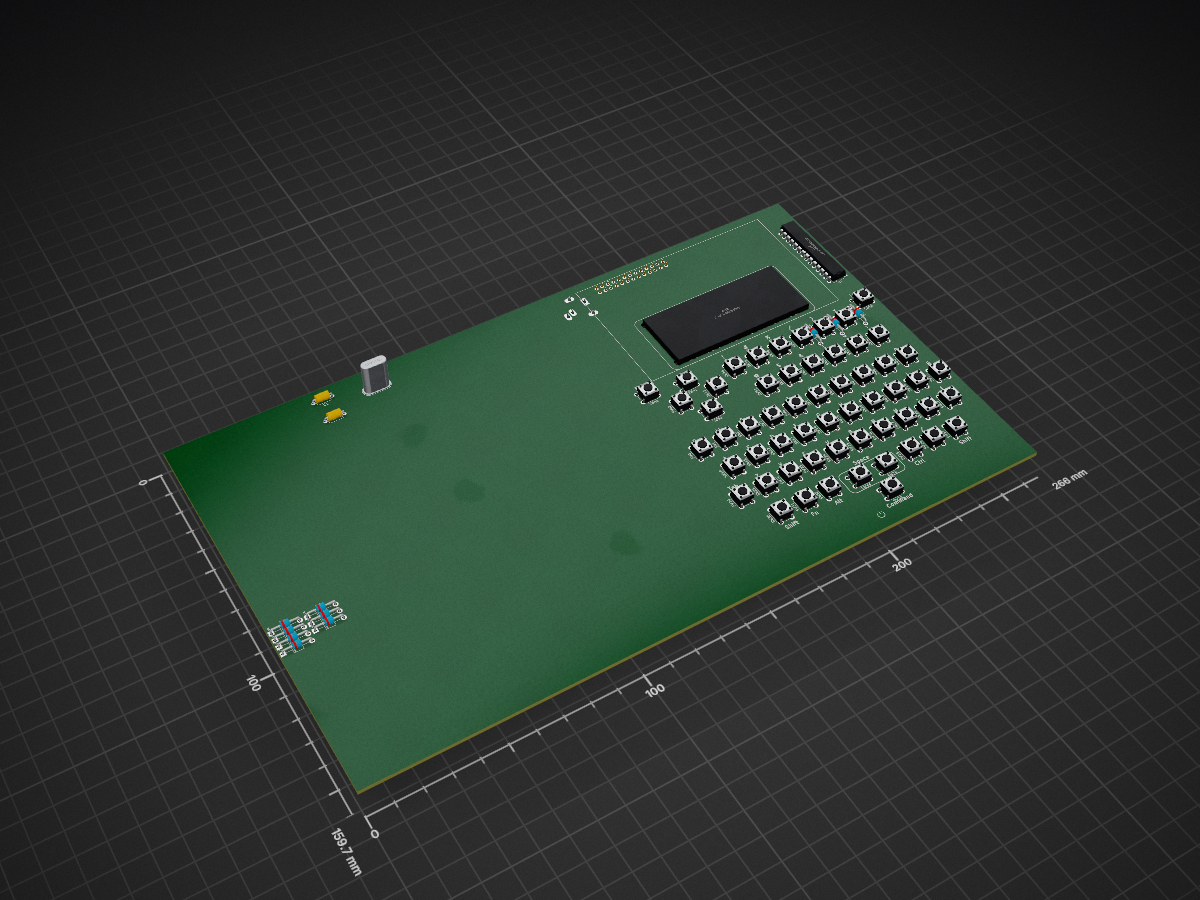
PortablePi v83 is an open-source printed circuit board by lucahttp, from the lucahttp/PortablePi repository on GitHub. It is a 2-layer board with 74 parts on 83 nets, routed with 197 tracks and 0 vias.
It is built around the ATMEGA328P-PU. Its parts include 57 switches, 10 diodes, 2 capacitors, 2 ICs and 1 connector. It belongs with the AVR (ATmega, ATtiny) and Raspberry Pi (Linux) boards of this library.
Is a Father Board witch can connect to the raspberry pi (currently compatible to this gpio configuration, orange pi thinkercard, an anothers) this aport an Screen and keyboard (on one board) then i will add more things like audio jack, ethernet port, hub USB and everything you can imagine and put in your pockets.
 render of prototype ver 8.8

it started when i wanted to buy the newly released Pocket Chip (https://imgur.com/l437LvK 50 USD + taxes + shipping, something of 120 USD)the chip is a competitor of the raspberry pi but offered for 9 USD and for 40 USD more could you make this pocket.
everything looked like fine until the company that makes CHIP, declared bankrupt.
the first option I thought (my father told me) was a bluetooth keyboard (is very cheaply opcion for those dont like the hardware) but i think isnt practical

the second opcion is a Xbox Chatpad but is missing keys like >< ,Ctrl , Alt, Command and others. if you not need this keys is a good opcion for this project
the way to connect to the raspberry is a reprogram the Microchip PIC inside the keyboard, BenHacksShow show how do it here and others examples with raspberry, an brazilian and this
it also can use directly like TX/RX but have to run aprogram to convert this signals in keyboard inputs and it slow down the limited resources of the computer. here in reddit

the third opcion that came my way that i was found are a Arduino Pro Micro as a USB keyboard like teensy Thumb Keyboard but in this opcion i would have to conect via USB to the raspberry and this is not a good idea because isnt practical
but i dont discard the idea of adapt this opcion for use via GPIO


RC2014 keyboard
The RC2014 page shown a project but i dont have any idea of how to
adapt this to PortablePi


Uinput: The New Hope [blocked]
This opcion is better for those do not have a way to get electronic components but the layout and matrix config is not prepared to direct access in the keyboard but could be config these features via software

design of cheaply USB Keyboard opcion
I found that they use the other projects like PocketChip or qwertyPi and others better keyboards for raspberry pi (and others microcomputers) more professionals. the problem is that component isnt easyly to found in my country and is a smaller than otrer solutions (hard to solder to the board).
a good news is that the documentation in the manufacturer page
https://e2e.ti.com/support/interface/f/138/t/202938
Malti is a similar project but that dont have the idea of easy plug and play.
qwertyPi is the more similar project but that dont have the easy plug of the raspberry
Ben Heck’s DIY Calculator is a similar project for other destiny
other font of information [blocked] that guy have an project to make this way (the page is writed in german)
pwav robot is other guy that make something with TCA8418
repeat, the problem is the shipping from US or China is very expensive and it takes a long time to get here. i found an options to buy in Aliexpress relatively cheap, Mouser, TI store and others sellers the shipping cost is more than aliexpress but more quickly (about 40 usd the shipping cost).
I found this, previusly i had trouble undertand about the UINPUT python library for use with PCF8574 http://blog.thestateofme.com/2012/08/10/raspberry-pi-gpio-joystick/
I'm still looking for better options for now i use the cheapest display quality/price, and that is


the raspberry comunicate to the display via SPI, i dont think abaout others ways to gotcha it. i know that the raspberry pi 2/3/other SBC have a DSI conector but i dont know how to use this
in the followind video show the problem abaout the latency of our display https://www.youtube.com/watch?v=SGMC0t33C50
the framerate is very poor
the other day i seen this post, is a post abaout the driver configuration for increase the display quality but now i dont have the display for testing this code
https://github.com/juj/fbcp-ili9341
https://www.adafruit.com/product/3932
in the next video, i have seen the review of a display that to be the best display for gaming
https://www.youtube.com/watch?v=9fgWt42FThU
the general idea is offer make portable the raspberry pi without discard the posibility of extract it, the purpose of this is debug projects anywhere without a desktop computer or notebook

to make conceptual maps is a good tool Cmap
is currently unavailable
the page not found in the internet neither the documentation to make other similar
https://www.newmuseumstore.org/next-thing-co-pocket-chip
i was surfing the red when appear savage news i found an IC wich can use for the keyboard matrix and there yet was coding by usb and by I2C
http://www.ti.com/lit/ug/tidu521/tidu521.pdf
i will research abaout how to use this in the project
i thinking about use uinput library of python, before dont considereded because CPU consumition but it would be minimal than the
normal use, unless we care a lot about the performance issue would be a good option.
and matrix can be via atmega328 or some IC to do convert multiple inputs on less than, like pcf8574 or other I2C to parallel
http://www.ti.com/lit/ds/symlink/pcf8574.pdf
could also make atmega328 code to compatible for existing TCA8418 driver CODE or such any other similar
https://github.com/tuomasjjrasanen/python-uinput
https://pypi.org/project/python-uinput/
http://tjjr.fi/sw/python-uinput/
https://launchpad.net/python-uinput
this option is used for retro pi and other similar projects
there is a thread on reddit: https://www.reddit.com/r/ChipCommunity/comments/amldpz/trying_to_recreate_a_pocketchip_with_a_raspberry/
my raspberry pi zero does not have a strip of pins welded in the GPIO, I will buy a strip of male pins to put on the gpio to be able to take measurements
of course im going to have buy a pcf8574 in DIP format
i bought a pcf8574 on module format, i got a LCD HD44780 LCD I2C controller for other purposes because i can get to use it for this project, the inconvinient is that one of the pins is used for the transistor of backlight (or i believe that). the pin that is already used is P3. I bought this module and not the only IC because in my country is more cheaply :) and in the future i think going to desoldering the ic and soldering it in the final board


http://ict-bits.blogspot.com/2015/03/modding-lcd1602-i2ciic-adapter-board-to.html
https://www.instructables.com/id/Arduino-I2C-LCD-Driver-Library-and-PackMan/
https://github.com/Nilhcem/lcd-pcf8574-androidthings
searching a good display
this is a better option for a cheap build, have a good refresh frequency
too late, someone already make an opensource project more little and powerfull design
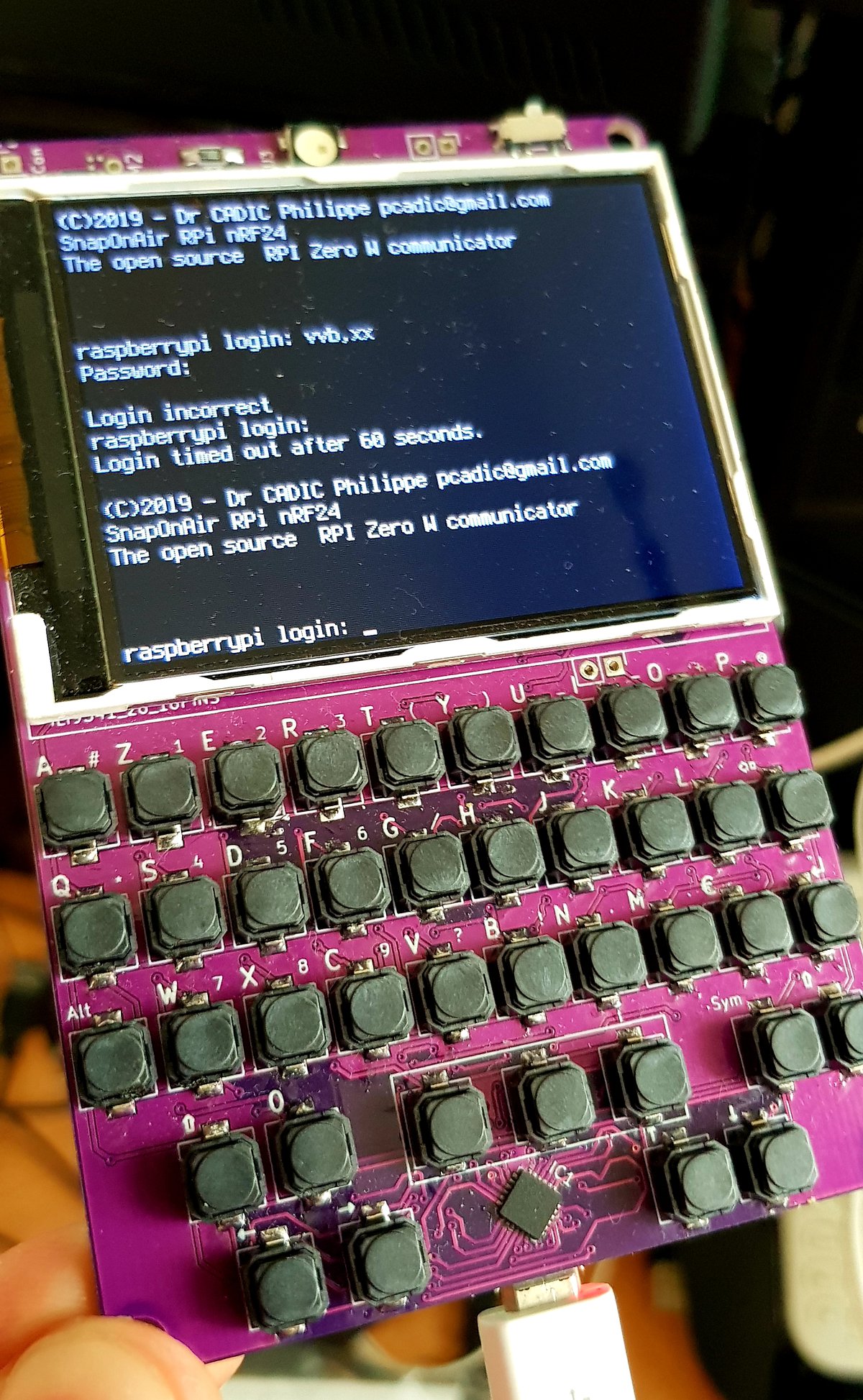
I will continue to develop it because these components are not available in my country :( macri intensifies
########################################################################################################################### ########################################################################################################################### ###########################################################################################################################
Es una "Placa Padre" la cual se conecta a la Raspberry (y compatible con otras placas) esta le brinda una pantalla y un teclado (en una sola placa) luego la voy a poner mas cosas como un jack de audio, un puerto ethernet, un hub usb y todo lo que puedas imaginar o poner en tus bolsillos.
esta era una competidora de la raspberry pi pero de un
todo comenzo cuando queria comprarme la Pocket Chip (https://imgur.com/l437LvK 65 USD +-, es una computadora portable basada en ARM), como vivo en argentina comprarla me iba a salir alrededor de 6000 ars o 150 USD por lo que preferi intentar construirme una parecida basada en la conocida raspberry Pi , no estoy seguro si en la Pi3 o Pi Zero por un tema de ergonomia en la mano y consumo energetico.
el diseño al estar basado en la pocket chip la raspberry pi seria insertada con sus GPIOs machos desde atras del PortablePi (todavia nose si esta al estar solamente sujeta con los gpios va a quedar bien agarrada, pero como la idea es que la raspberry sea de facil acceso para poder sacarla del "Expansion Board" y usarla como cualquier Raspberry pi)
Este diseño tambien se podria adaptar a las otras placas como a Orange Pi, Pine64, LattePanda , y otras placas, hasta las que no tiene salida de video ya que esta pantalla es via SPI.
seria tanto como hacer espacio en el diseño del PortablePi para que entre el conector para otra placa en caso de que no comparta la distribucion de pines con la raspberry
//para ver los pines y sus valores dejo una pagina que te los muestra y explica que hace cada uno
el proyecto esta pensado para que funcione en una raspberry pi zero con raspbian o alguna distribucion que soporte tan poca RAM pero la verdad no conozco la forma de comunicar el display via SPI a otros sistemas operativos o a otras arquitecturas de procesadores ya que los drivers del fabricante solo estan pensados para la raspberry pi con raspbian o alguna distro parecida.
El teclado de la Pocket pi inicialmente lo iba a hacer via USB reutilizando la placa logica de un teclado comun que sale alrededor de 2 USD o uno roto que podramos conseguir, pero me puse a pensar que no seria comodo para sacar la raspberry de y otros proyectos parecidos como la qwertyPi hacen uso del TC8418 pero esto es dificil de conseguir en donde me ubico, quizas lo podria conseguir via aliexpress que me saldria algo de 10 USD pero anda a saber cuando va a llegar
hace varios años me compre la raspberry pi zero w por lo que actualmente el diseño esta pensado en esta pero en un futuro no muy lejano (si llego a conseguir una raspberry pi 3 o 2 del modelo B) pienso adaptarla a esta ya que posee 4 USB nativos, ethernet y un hdmi completo (un problema en esto es que pensaba poner la parte de los USB y el ethernet que sobresalga un poco por la parte superior pero si esta centrada en la parte superior el HDMI, Jack de video y el pin de carga quedan dentro del diseño y sin un facil acceso desde el costado del dispositivo por lo que una opcion seria poner esta en un costado, el izquierdo para tener el acceso a los puertos pero quedaria desentrado)
is currently unavailable https://www.pcworld.com/article/3094364/hardware/inside-the-pocketchip-a-49-portable-linux-computer.html
https://www.newmuseumstore.org/next-thing-co-pocket-chip
estaba boludeando por internet cuando noticia salvaje aparece xdxd encontre que hay un IC que se puede usar para la matris del keyboard y que ya esta desarrollado el codigo y los drivers tanto por usb como por I2C
http://www.ti.com/lit/ug/tidu521/tidu521.pdf
i thinking about use uinput library of python, before dont considereded because CPU consumition but it would be minimal than the
normal use, unless we care a lot about the performance issue would be a good option.
and matrix can be via atmega328 or some IC to do convert multiple inputs on less than, like pcf8574 or other I2C to parallel
http://www.ti.com/lit/ds/symlink/pcf8574.pdf
could also make atmega328 code to compatible for existing TCA8418 driver CODE or such any other similar
https://github.com/tuomasjjrasanen/python-uinput
https://pypi.org/project/python-uinput/
http://tjjr.fi/sw/python-uinput/
https://launchpad.net/python-uinput
this option is used for retro pi and other similar projects
voy a investigar sobre como emplearlo en este proyecto
there is a thread on reddit: https://www.reddit.com/r/ChipCommunity/comments/amldpz/trying_to_recreate_a_pocketchip_with_a_raspberry/
| Qty | Value | Footprint | References |
|---|---|---|---|
| 57 | SW_Push | Button_Switch_THT:SW_PUSH_6mm | SW0, SW1, SW2, SW10, SW11, SW12, SW13, SW14, SW15, SW16, SW17, SW18, SW19, SW20, SW21, SW22 +41 |
| 10 | D | Diode_THT:D_T-1_P10.16mm_Horizontal | D1, D2, D3, D4, D5, D6, D7, D8, D9, D10 |
| 2 | C_Small | Capacitor_THT:C_Axial_L5.1mm_D3.1mm_P7.50mm_Horizontal | C1, C2 |
| 1 | 3.5_Inch_RPI | 35 display:3.5 inch RPi LCD | DS1 |
| 1 | ATmega328P-PU | Package_DIP:DIP-28_W7.62mm | U1 |
| 1 | AudioJack3 | Connector_Audio:Jack_3.5mm_Ledino_KB3SPRS_Horizontal | J1 |
| 1 | Crystal | Crystal:Crystal_HC18-U_Vertical | Y1 |
| 1 | Raspberry_Pi_Zero_W_(v1.3) | pi zero:RASPBERRY_PI_ZERO_W | IC1 |
lucahttp/PortablePi
Make your Raspberry Pi portable to edit your code anywhere

lucahttp/PortablePi
Make your Raspberry Pi portable to edit your code anywhere


lucahttp/PortablePi
Make your Raspberry Pi portable to edit your code anywhere


lucahttp/PortablePi
Make your Raspberry Pi portable to edit your code anywhere

zmaker/arduino_cookbook
gli sketch del nuovo progetto Arduino Cookbook e dei video di YouTube

coseyfannitutti/discipad
17-key numpad assembled with only through hole components, including usb type-c

matthewcieplak/super-sixteen
Code and schematics for the Super Sixteen Eurorack sequencer

coseyfannitutti/romeo
Staggered 40% keyboard pcb that can be assembled with only through hole components, including USB Type-C

mattybrad/drumkid
Version 4 was the first successful working design, with full code, schematics, Gerbers, etc available on GitHub.


leomil72/LM80C
A Z80-based homebrew computer withTMS9918, AY-3-8910, Z80 CTC, Z80 PIO, and Z80 SIO

74 parts, built around the ATMEGA328P-PU. The full list of its parts is on this page, with links to each part's symbol and footprint where PCBKit's library has them.
From the lucahttp/PortablePi repository on GitHub, at the commit this page was made from: the board is piportable v7.2/portablePi v83.kicad_pcb. PCBKit opens the board in the browser, with nothing to install.
Its repository states no licence, so its author keeps all rights: ask lucahttp before reusing the design.