

2 layers18.5 × 26 mm
24g2usb rp2350zero
joypad-ai/joypad-os
Universal controller firmware for building adapters, dongles, and custom controllers.
4 parts1.7kApache-2.0

 lachlanchen/IdeasGlass
IdeasGlass is an AI-first wearable + PWA that captures and streams your ideas in real time.
XIAO Plus Base2 V1.0 is an open-source printed circuit board by lachlanchen, from the lachlanchen/IdeasGlass repository on GitHub. It is a 2-layer board of 42 × 35.6 mm with 4 parts on 23 nets, routed with 61 tracks and 43 vias.
Its parts include 2 connectors and 1 IC. It belongs with the wearables boards and the ESP32 boards of this library.
English · العربية · Español · Français · 日本語 · 한국어 · Tiếng Việt · 中文 (简体) · 中文(繁體) · Deutsch · Русский
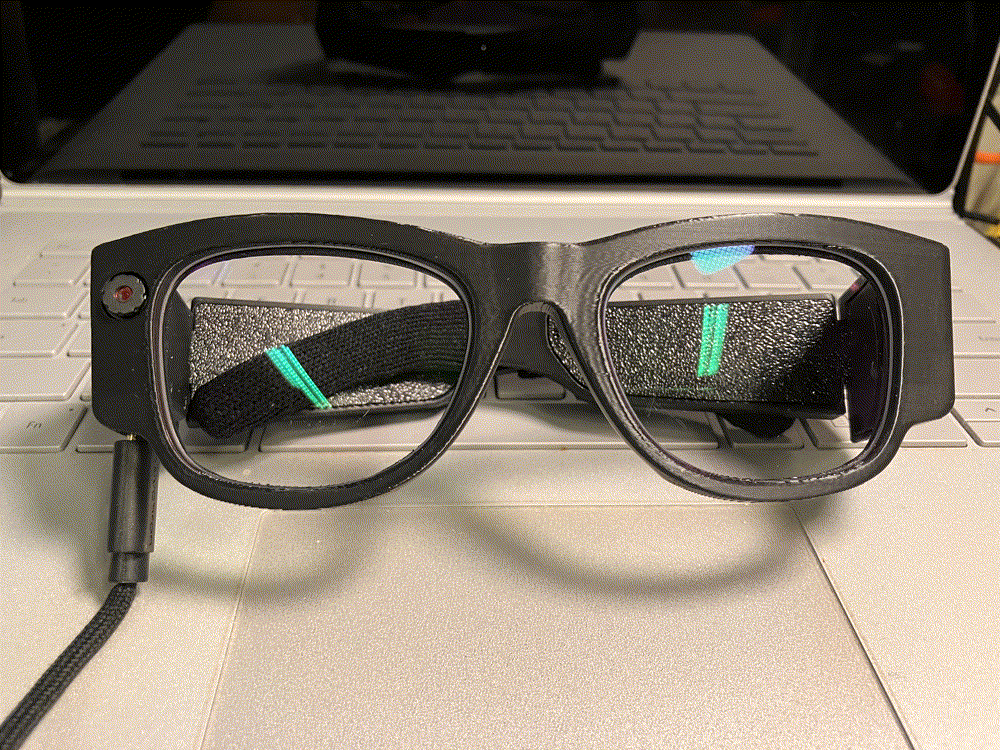
A wearable AI glass that turns ideas into actions, income, and creative momentum.
Voice-first wearable AI pipeline: capture from ESP32 glasses, process in FastAPI, and monitor/control via a live PWA dashboard.





| Lane | Purpose |
|---|---|
| 🎙️ Wearable capture | ESP32 glasses send audio, photos, and telemetry in near-real-time |
| 🧠 Backend intelligence | FastAPI ingests streams, transcribes, segments, and persists metadata |
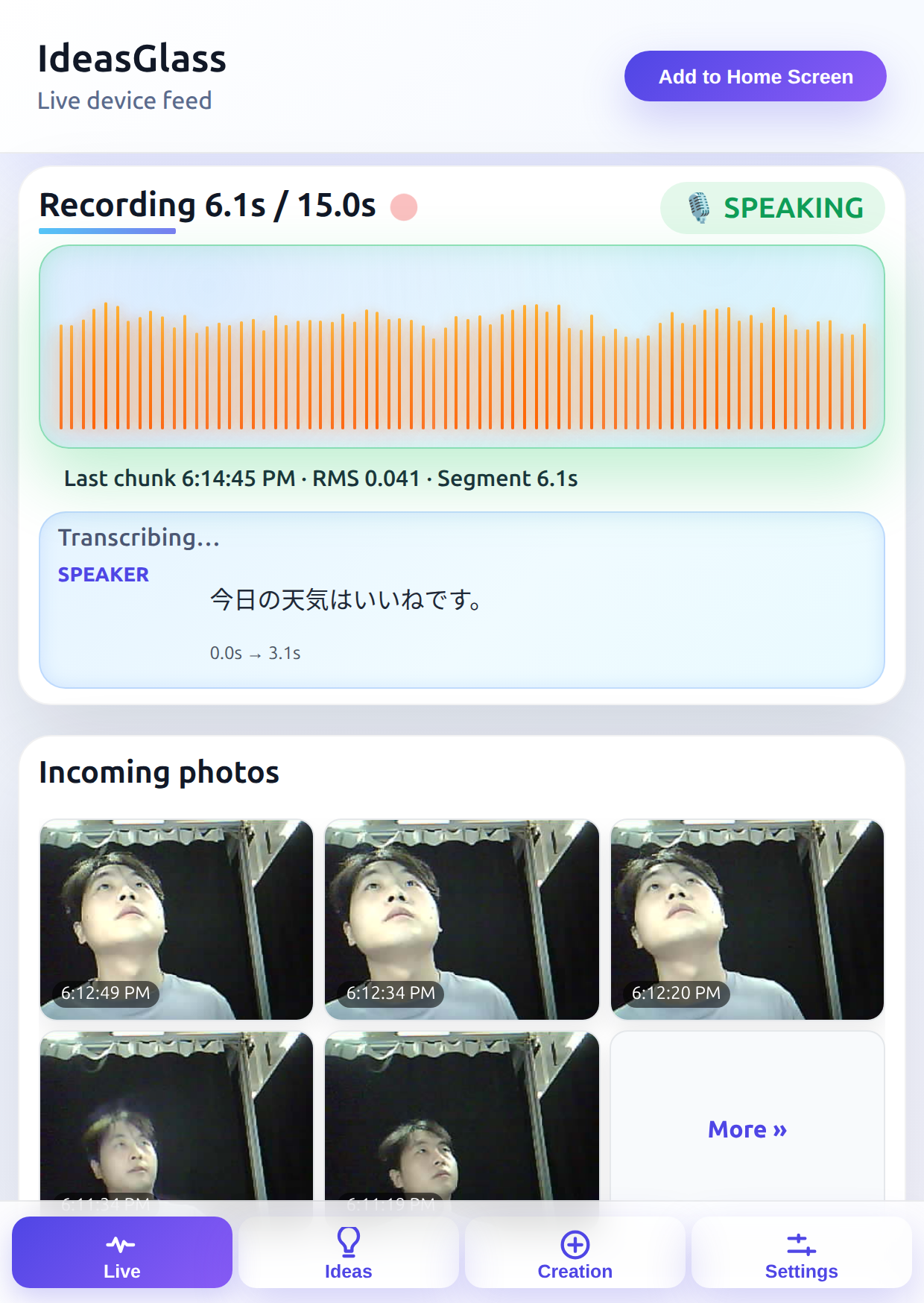
| 🖥️ Dashboard | PWA shows live waveform, transcripts, and device/account status |
Explore community experiments at onlyideas.art.
IdeasGlass is an AI-first wearable system for voice-first idea capture and execution. In this repository, the primary runtime path is:
backend/glass/ for FastAPI APIs, WebSocket ingest, Whisper-based transcription, and the installable PWA dashboard.IdeaGlass/firmware/ideasglass_arduino/IdeasGlassClient/ for XIAO ESP32S3 firmware streaming telemetry/audio/photos.If you are new to this repo, start there first.
| Area | Primary location | What it does |
|---|---|---|
| Backend API + PWA | backend/glass/ | FastAPI endpoints, WebSocket ingest/fanout, transcription, dashboard |
| Firmware | IdeaGlass/firmware/ideasglass_arduino/IdeasGlassClient/ | ESP32 capture/streaming client |
| Bridge notes | references/ideasglass_bridge.md | TLS/WAN reliability notes and deployment field tips |
| README translations | i18n/ | Multilingual docs synced from the canonical README |
IdeasGlass is an AI-first wearable built for people who live in streams of ideas. It captures, translates, organizes, and executes on creativity the moment inspiration strikes, whether you are narrating a concept in motion or hosting a live session.
chat.lazying.art for brainstorming, script drafting, and multilingual content coaching./api/v1/audio, /ws/audio-ingest) and live stream fanout (/ws/stream).backend/glass/audio_segments/.DATABASE_URL) for messages, photos, chunks, segments, transcripts.coin.lazying.art) and payouts sync with your preferred wallets.IdeasGlass/
├── README.md
├── i18n/ # README translations
├── backend/
│ ├── glass/ # Primary FastAPI + PWA backend
│ │ ├── app.py
│ │ ├── serve.py
│ │ ├── requirements.txt
│ │ ├── static/
│ │ ├── tools/
│ │ └── audio_segments/
│ ├── tornado_app/ # Secondary/parallel ingest backend path
│ ├── memo/
│ ├── memo_legacy/
│ └── ngrok_bridge/
├── IdeaGlass/firmware/ideasglass_arduino/
│ ├── IdeasGlassClient/
│ ├── config.h
│ ├── WifiTest/WifiTest.ino
│ ├── wifi_credentials.example.h
│ └── README.md
├── references/ideasglass_bridge.md # Bridge + deployment notes
├── docs/ # Additional site/docs assets
├── development_plan/pip (or conda environment with compatible Python)arduino-cli, Seeed XIAO ESP32S3 Sense, PSRAM enabled| Component | Requirement | Notes |
|---|---|---|
| Backend runtime | Python 3.10+, pip | Use venv or conda (glass) |
| GPU acceleration (optional) | NVIDIA + CUDA/cuDNN | Improves Whisper latency |
| Persistence (optional) | PostgreSQL | Enabled via DATABASE_URL |
| Firmware toolchain | Arduino IDE / arduino-cli | Use XIAO ESP32S3 profile with PSRAM |
cd backend/glass
python -m venv .venv
source .venv/bin/activate
pip install -r requirements.txtIdeaGlass/firmware/ideasglass_arduino/wifi_credentials.example.h to wifi_credentials.h (recommended) and set SSID/password.ESP32 -> XIAO_ESP32S3 with PSRAM: OPI PSRAM.Default with spiffs (3MB APP/1.5MB SPIFFS) or Maximum APP when filesystem is not needed.IDEASGLASS_WHISPER_MODEL=base IDEASGLASS_WHISPER_DEVICE=cuda \
uvicorn backend.glass.app:app \
--host 0.0.0.0 \
--port 8765 \
--proxy-headers \
--forwarded-allow-ips="*" \
--reloadpython backend/glass/serve.py --whisper-model base --whisper-device cuda --reloadhttp://localhost:8765/http://localhost:8765/healthz| Endpoint | Purpose |
|---|---|
/ | Main dashboard (PWA-capable UI) |
/healthz | Backend liveness check |
/ws/audio-ingest | Device ingest WebSocket |
/ws/stream | Live stream fanout to dashboard clients |
Bind device field.Generate a device ID + QR image:
python backend/glass/tools/generate_device_id.py --out logs/device-id.pngBind through API (cookie session required):
curl -X POST http://localhost:8765/api/v1/devices/bind \
  -H 'Content-Type: application/json' \
  -d '{"device_id":"<your-device-id>"}' \
  -b cookies.txt -c cookies.txt
Verify current account and bound devices:
curl -s http://localhost:8765/api/v1/auth/me -b cookies.txt -c cookies.txt | jqOptional migration (rename historical data to a new device ID):
curl -X POST http://localhost:8765/api/v1/devices/rename \
  -H 'Content-Type: application/json' \
  -d '{"from_id":"old-id","to_id":"<your-device-id>"}' \
-b cookies.txt -c cookies.txtFQBN='esp32:esp32:XIAO_ESP32S3:PartitionScheme=default_8MB,PSRAM=opi'
SKETCH='IdeaGlass/firmware/ideasglass_arduino/IdeasGlassClient'
PORT='/dev/ttyACM0'
bin/arduino-cli compile --fqbn "$FQBN" "$SKETCH"
bin/arduino-cli upload -p "$PORT" --fqbn "$FQBN" "$SKETCH"If port is busy: fuser -k /dev/ttyACM0.
If permission denied: sudo usermod -aG dialout $USER then re-login (or temporary sudo chmod a+rw /dev/ttyACM0).
DATABASE_URL: optional Postgres DSN for persistent storage.IDEASGLASS_WHISPER_MODEL: base (default), small, medium, large-v3, large-v3-turbo.IDEASGLASS_WHISPER_DEVICE: cuda or cpu.IDEASGLASS_WHISPER_FP16: 1 for GPU mixed precision, 0 for CPU.IDEASGLASS_TRANSCRIBE: 1 (default) to enable transcription, 0 to disable.IDEASGLASS_TRANSCRIPT_INTERVAL_MS: rolling transcript interval.IDEASGLASS_TRANSCRIPT_THRESHOLDS_MS: comma-separated thresholds (default 3000,6000,15000).| Variable | Default / options | Effect |
|---|---|---|
DATABASE_URL | unset by default | Enables Postgres persistence for account/device data |
IDEASGLASS_WHISPER_MODEL | base (small, medium, large-v3, large-v3-turbo) | Controls accuracy vs latency |
IDEASGLASS_WHISPER_DEVICE | cuda or cpu | Inference backend |
IDEASGLASS_WHISPER_FP16 | 1 GPU, 0 CPU-safe | Mixed precision control |
IDEASGLASS_TRANSCRIBE | 1 | Toggle transcription pipeline |
IDEASGLASS_TRANSCRIPT_INTERVAL_MS | runtime configured | Rolling transcript push interval |
IDEASGLASS_TRANSCRIPT_THRESHOLDS_MS | 3000,6000,15000 | Progressive transcript emission thresholds |
Safe DATABASE_URL examples:
export DATABASE_URL="postgresql://<db_user>@localhost/ideasglass_db" (peer/local auth)export DATABASE_URL="postgresql://<db_user>:<db_password>@localhost/ideasglass_db" (password auth)IDEASGLASS_GAIN_TARGET (default 0.032)IDEASGLASS_GAIN_MAX (default 1.8)IDEASGLASS_GAIN_MIN_RMS (default 0.008)IDEASGLASS_SPEECH_RMS (default 0.03)IDEASGLASS_SPEECH_MARGIN (default 0.005)IDEASGLASS_SEGMENT_TARGET_MS (default 15000)IDEASGLASS_SEGMENT_OVERLAP_MS (default 2000)IDEASGLASS_SEGMENT_GAIN_TARGET (defaults to chunk gain target)| Audio knob | Default | Purpose |
|---|---|---|
IDEASGLASS_GAIN_TARGET | 0.032 | Target RMS normalization |
IDEASGLASS_GAIN_MAX | 1.8 | Upper clamp for gain amplification |
IDEASGLASS_GAIN_MIN_RMS | 0.008 | Floor to avoid amplifying near-silence |
IDEASGLASS_SPEECH_RMS | 0.03 | Speech activity RMS baseline |
IDEASGLASS_SPEECH_MARGIN | 0.005 | Margin around speech threshold |
IDEASGLASS_SEGMENT_TARGET_MS | 15000 | Segment length target |
IDEASGLASS_SEGMENT_OVERLAP_MS | 2000 | Segment overlap for continuity |
IDEASGLASS_SEGMENT_GAIN_TARGET | inherits chunk gain | Segment-level normalization target |
python backend/glass/tools/prefetch_whisper_models.py \
  --models tiny,base,small,medium,large-v3 \
  --device cuda \
--fp16 1python backend/glass/tools/generate_device_id.py --out logs/device-id.pngThen set kDeviceId in:
IdeaGlass/firmware/ideasglass_arduino/IdeasGlassClient/IdeasGlassClient.inoDashboard flow:
curl -X POST http://localhost:8765/api/v1/messages \
  -H 'Content-Type: application/json' \
-d '{"device_id":"dev-001","message":"hello from curl"}'curl -X POST http://localhost:8765/api/v1/messages \
-H 'Content-Type: application/json' \
-d '{
"device_id":"dev-001",
"message":"photo demo",
"photo_base64":"'"$(base64 -w0 sample.jpg)'"',
"photo_mime":"image/jpeg"
}'rec --bits 16 --channels 1 --rate 16000 -c 1 -b 16 -e signed-integer temp.raw trim 0 0.25
curl -X POST http://localhost:8765/api/v1/audio \
-H 'Content-Type: application/json' \
-d '{
"device_id":"dev-001",
"sample_rate":16000,
"bits_per_sample":16,
"duration_ms":250,
"rms":0.05,
"audio_base64":"'"$(base64 -w0 temp.raw)'"'
}'curl http://localhost:8765/api/v1/audio/segments | jq '.[0]'
curl -o latest.wav http://localhost:8765/api/v1/audio/segments/<segment-id>This repo contains multiple backend tracks. Current contributor guidance and runtime focus is backend/glass/ unless otherwise requested.
python -m compileall backend/glass/app.pyNote: In the current repository snapshot, some historical links above appear to have moved (for example, bridge notes now exist at
references/ideasglass_bridge.md). The original links are preserved as canonical README content.
glass): python backend/glass/tools/generate_device_id.pyIdeaGlass/firmware/ideasglass_arduino/IdeasGlassClient/IdeasGlassClient.ino (kDeviceId)http://localhost:8765, register/login, then bind the device ID in the Account panelfuser -k /dev/ttyACM0.sudo usermod -aG dialout $USER and re-login.DATABASE_URL and restart.base/small) or disable transcription via IDEASGLASS_TRANSCRIBE=0.references/ideasglass_bridge.md for detailed field notes.[IdeasGlass][wave] traces and confirm /ws/stream connectivity.| Brand | Purpose | Link |
|---|---|---|
| 🧠 EchoMind | Multilingual AI companion for learning and creation | chat.lazying.art |
| 🌱 OnlyIdeas | Research-to-product community for bold concepts | onlyideas.art |
| 💸 LazyEarn | Automations to turn small wins into income | earn.lazying.art |
| 📚 LazyLearn | Physics & chemistry tracks and notebooks | learn.lazying.art |
| 🤖 IdeasRobot | Agent that turns ideas into drafts, tasks, and posts | robot.lazying.art |
| 👓 IdeasGlass | Capture, translate, and auto-produce highlight reels | glass.lazying.art |
| 🪙 LazyingArt Coin | Rewards and payouts bridging contributions and on-chain value | coin.lazying.art |
| 🧪 IDEAS | Notebook of research notes and essays | ideas.onlyideas.art |
| 🎨 LazyingArt | Studio behind OnlyIdeas, EchoMind, LazyEdit, and IdeasGlass | lazying.art |
We stand on the shoulders of great open projects — thank you to:
Referral Program — Use coupon LazyingArt to save 10% (30% commission unlocks after 10 sales).
tornado_app, memo, memo_legacy, ngrok_bridge) with the primary backend/glass path.i18n/.Contributions are welcome. For repository-specific workflow guidance, follow AGENTS.md.
Recommended local validation before opening a PR:
python -m compileall backend/glass/app.pyWhen submitting changes:
IDEASGLASS_TRANSCRIPT_THRESHOLDS_MS) in PR notes when behavior depends on them.DATABASE_URL, API tokens, credentials files).


No top-level LICENSE file was detected in this repository snapshot. Until an explicit license file is added, treat usage and redistribution as requiring maintainer approval.
| Qty | Value | Footprint | References |
|---|---|---|---|
| 2 | Header 1x13 2.54mm | Connector:H11-2.54-35 | J1, J2 |
| 1 | LOGO | Logo:LOGO-SEEED-NEW-2_1X19.1MM | G*** |
| 1 | XIAO-ESP32-S3-Plus-SMD | Seeed_Studio_XIAO_Series:XIAO-ESP32-S3-Plus-SMD | U1 |
joypad-ai/joypad-os
Universal controller firmware for building adapters, dongles, and custom controllers.


hackclub/OnBoard
💡 Join 1,000 teenagers and make your first PCB with a $100 grant!

tardate/LittleArduinoProjects
a collection of "Little Electronic & Arduino Projects", most involving electronics or an Arduino in one way or another!

drandyhaas/KiCadRoutingTools
A set of Python/Rust tools to aid routing in KiCad

osy/XG_Mobile_Station
Open source eGPU dock for ROG Ally and ROG Flow

Luos-io/luos_engine
Open-source and real-time orchestrator for cyber-physical-systems, to easily design, test and deploy embedded applications and digital twins.

NVNTLabs/switch2-SDEX2M2
Micro SD Express to M.2 NVME Adapter for Nintendo Switch 2
It measures 42 × 35.6 mm and has 2 copper layers, 1.6 mm thick.
4 parts. The full list of its parts is on this page, with links to each part's symbol and footprint where PCBKit's library has them.
From the lachlanchen/IdeasGlass repository on GitHub, at the commit this page was made from: the board is seeed_studio_xiao_esp32s3_dev/hardware/base_boards/plus_base_without_pad/XIAO Plus Base2 V1.0/XIAO Plus Base2 V1.0.kicad_pcb and its schematic seeed_studio_xiao_esp32s3_dev/hardware/base_boards/plus_base_with_pad/XIAO Plus Base V1.0/XIAO Plus Base V1.0.kicad_sch. PCBKit opens the board in the browser, with nothing to install.
Its repository states no licence, so its author keeps all rights: ask lachlanchen before reusing the design.