
2 layers50 × 35 mm

 kstopa/bikepixel14
Set of awesome fully customizable bicycle lights.
Bikepixel rear is an open-source printed circuit board by kstopa, from the kstopa/bikepixel repository on GitHub. It is a 2-layer board of 80 × 20.1 mm with 17 parts on 11 nets, routed with 79 tracks and 0 vias.
Its parts include 6 resistors, 4 switches, 3 connectors and 1 capacitor. It belongs with the lEDs and displays boards of this library.
Open Source Hardware project to build a set of highly customizable bycicle lights based on Arduino and Neo Pixel RGB matrixes. Currently all models can present different images in different colors with custom effects (blinking, bitting) and with adjustable brightness.
Check Bike Pixel Official site to the more details and recent news.
All required applications to edit and design the different Bike Pixel models are open source. Bellow you can find all the tools that were used to design Bike Pixels:
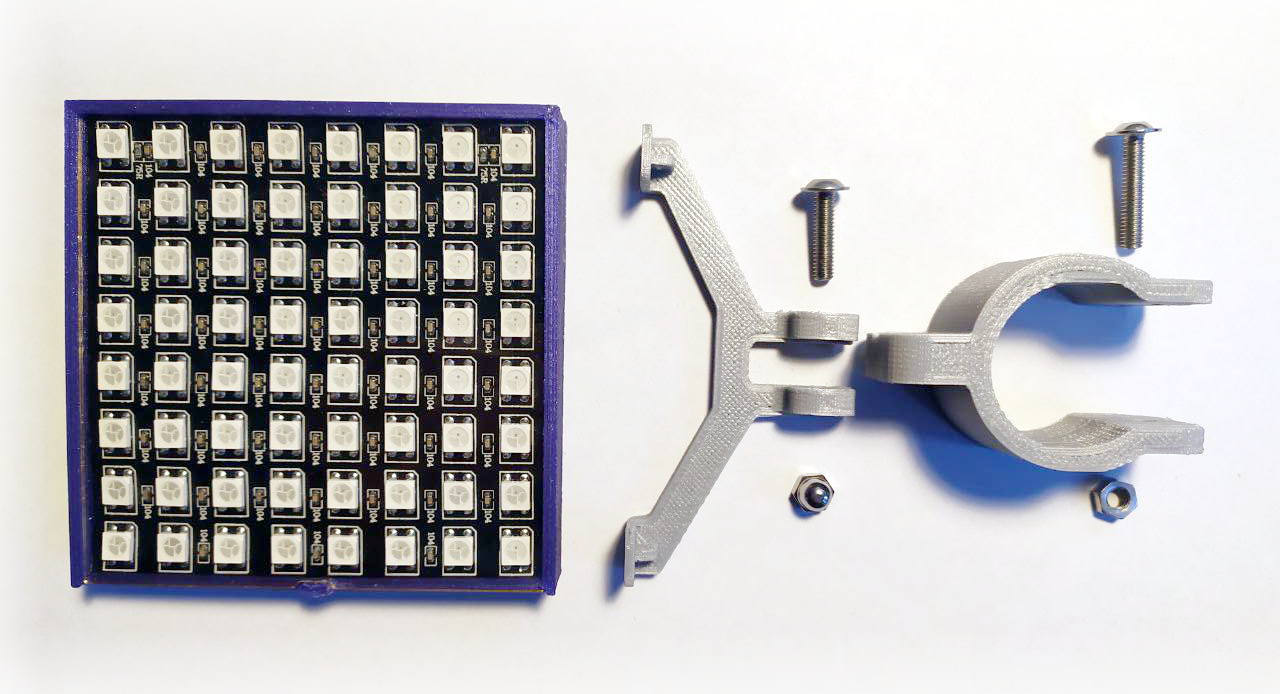
This model it is intended to be installed in the back part of the bike like the saddle or over bike structure. Main properties and parts:
To build your own Bike Pixel L you should have all the elements listed on this bill of materials:
More details on each part are commented on following points. Links to different proviedars and prices can be found on this blog entry.
The case is divided in multiple parts designed to be 3D printed. Current designs include body and holder models.
The body is composed the main body and a cover. You can print them using PLA altought for the cover a 1 mm thick piece of plexi is recommended.
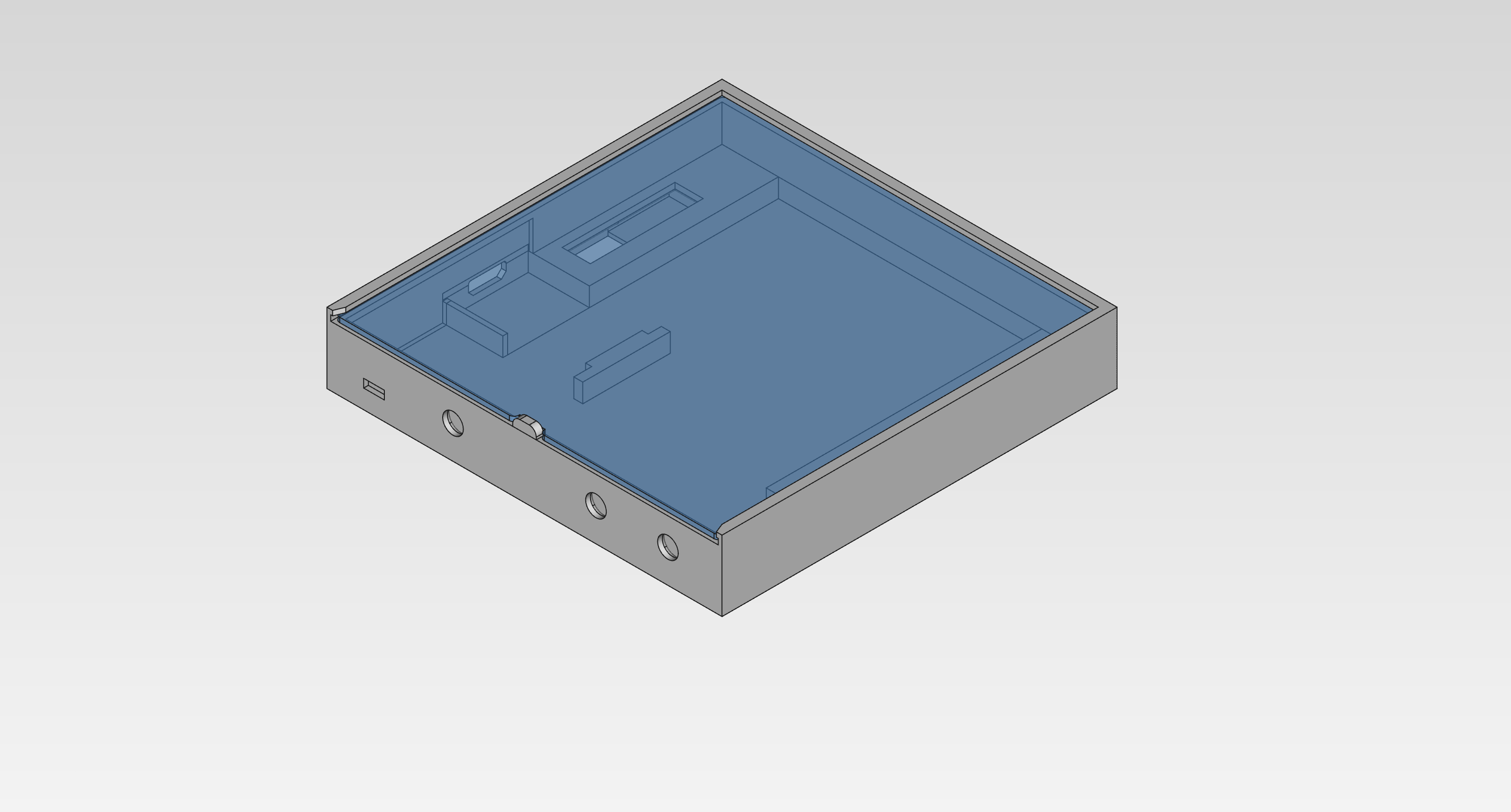
You can get production files bellow.
Current holder design is divided into two pieces. An attachment and a hook. To mount them on a bycicle you will need 2 x M3 nuts and 2 x M3 bolts of 30 and 20mm in lenght.
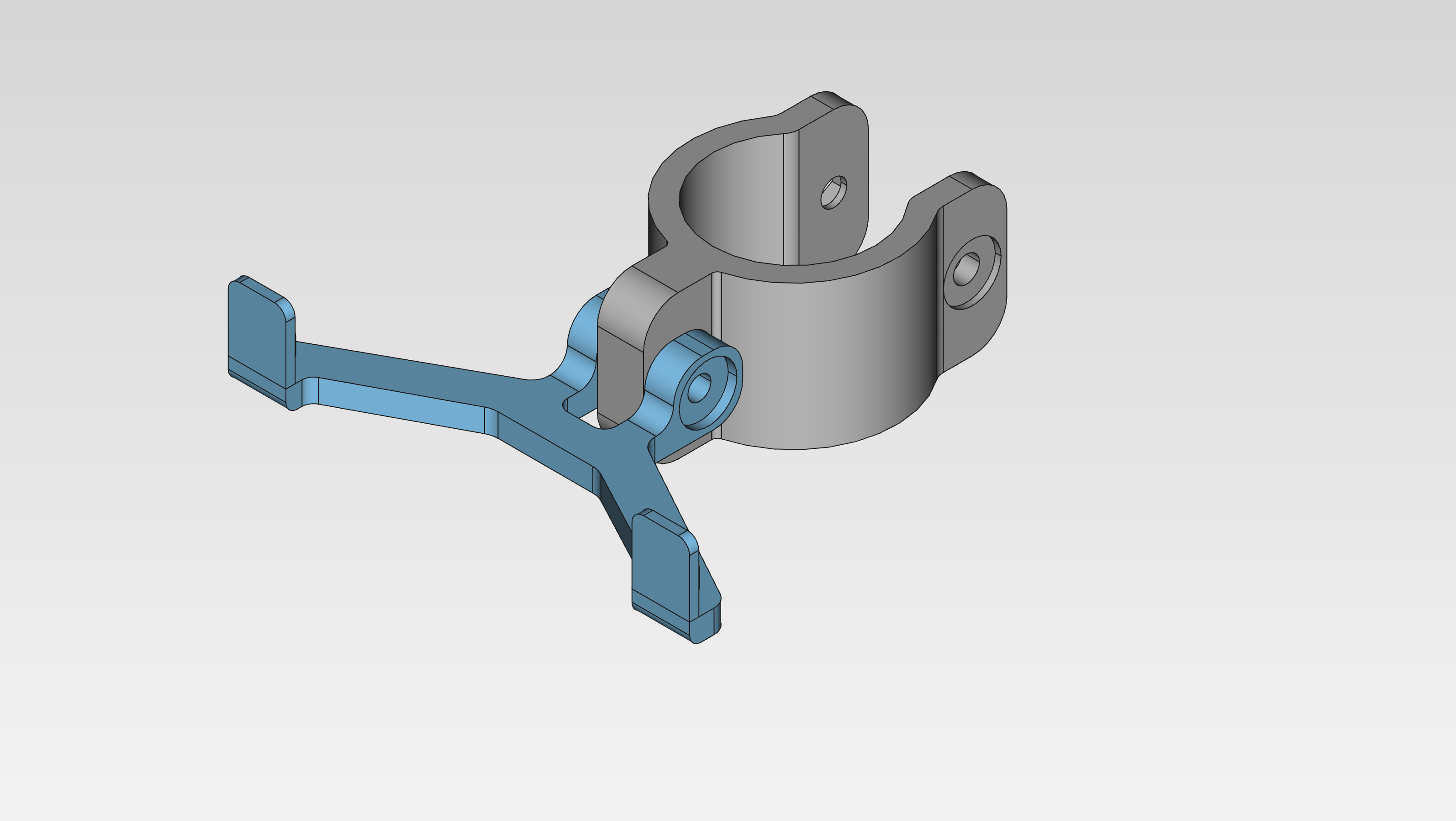
You can get production files bellow.
To build your L model you will need all the electronic parts listed bellow along with some additional requirements.
| Part | Comment |
|---|---|
| Arduino Nano or Pro Mini | Clone or original |
| USB C TP4056 charging module | More information on this blog entry |
| 5V Step-up module | Any module designed for LiPo batteries |
| NeoPixel 8x8 RGB matrix | Flexible 80x80x2mm model |
| >2000 LiPo battery | Max. 4 mm thicknes |
The PCB encapsulates the switches and manage connections between the Arduino board, the step-up module and the RGB matrix. All the design have been created with KiCAD. All the source files including schematinc, netlist and PCB board are availble [here](./rear/electronics/bikepixel rear/).
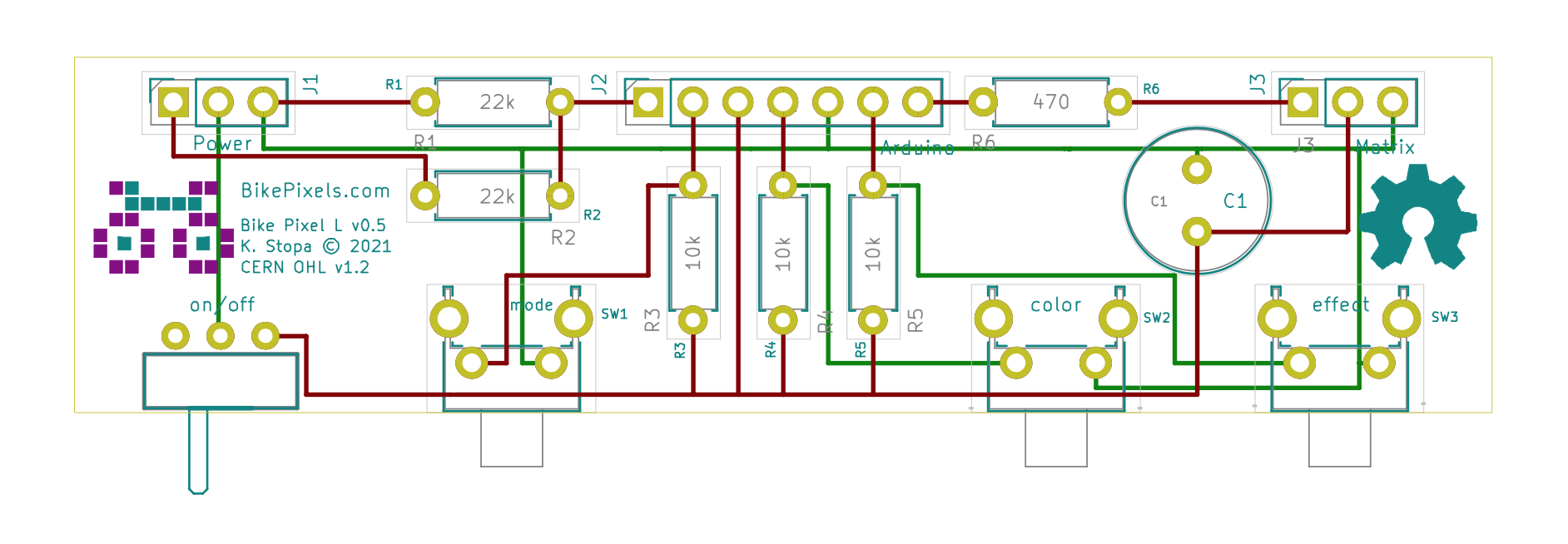
Production files are available in different formats and are linked bellow:
| Format |
|---|
| [gerber](rear/electronics/production files/gerber) |
| [pdf](rear/electronics/production files/pdf) |
| [svg](rear/electronics/production files/svg) |
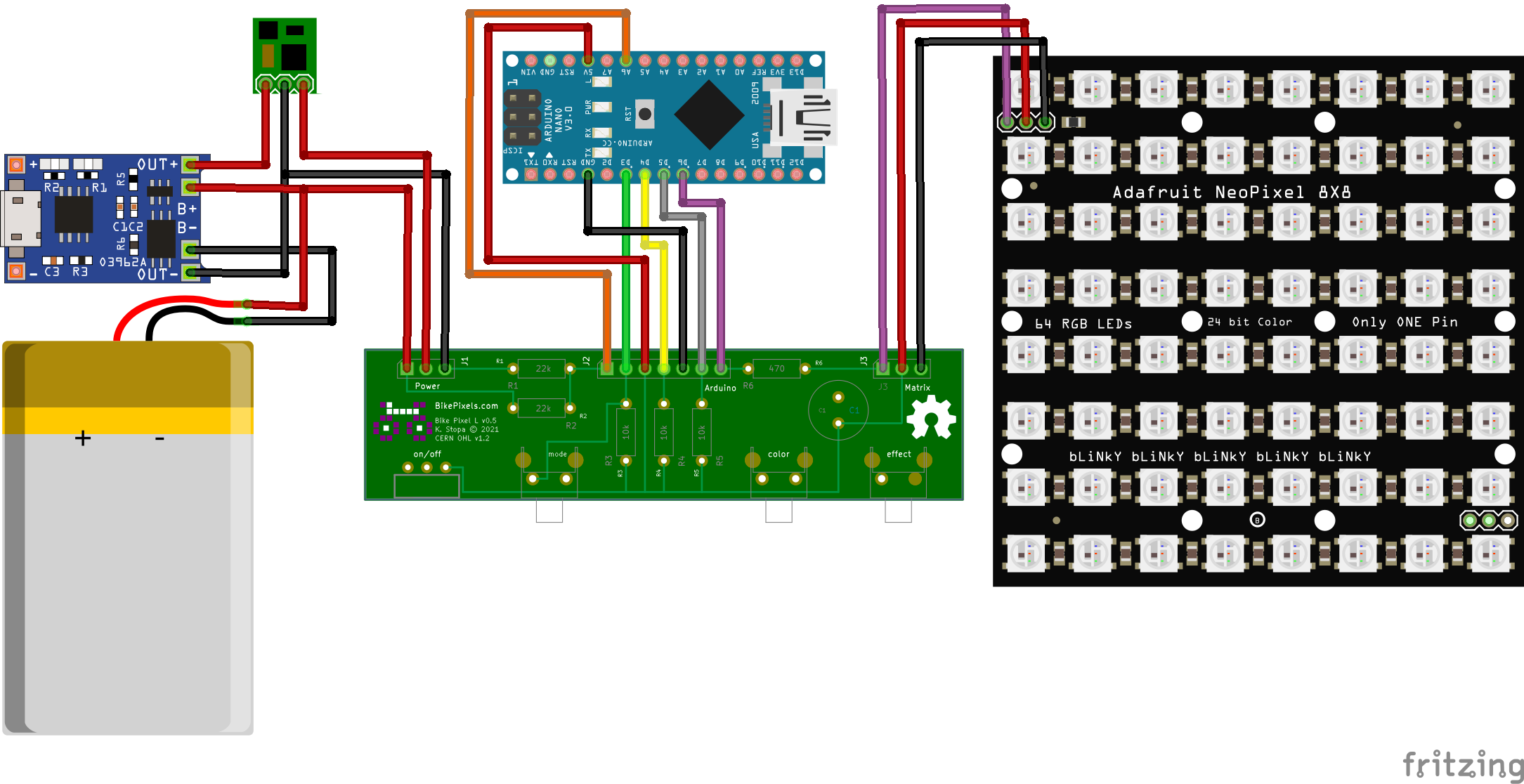
To connect evrything together please follow schema bellow. After soldering everthing you can proceed to upload the code to Arduino.
To compile the BikePixel code for Arduino, you'll need some extra libraries:
Note that you can install these libraries directly from Arduino Studio (Sketch menu, > Include Library > Manage Libraries) or by placing it after download into the Arduino Library folder (usally in your home).
Bike Pixel is certified by the Open Source Hardware Association (OSHWA). OSWHA is a non-profit organization that advocates for open-source hardware focusing on promotion, education and comertialization of open products. OSHWA also manages certification program for open-source hardware that indicate that given product meet standard criteria for open-source compliance. Current Bike Pixel version has certificate number PL000007.

As the project is compond by software, hardware and documentation each of these parts are licensed under the terms of specific license.
Copyright © 2021 by BikePixels.com and contributors:
Bike Pixels contains free software: you can redistribute it and/or modify it under the terms of the GNU General Public License as published by the Free Software Foundation, either version 3 of the License, or any later version.
Bike Pixels is distributed in the hope that it will be useful, but WITHOUT ANY WARRANTY; without even the implied warranty of MERCHANTABILITY or FITNESS FOR A PARTICULAR PURPOSE. See the GNU Lesser General Public License for more details.
You should have received a copy of the GNU Lesser General Public License along with CAMS tools. If not, see http://www.gnu.org/licenses/.
Copyright © 2021 by BikePixels.com and contributors:
Hardware elements is licensed under the CERN OHL v. 1.2.
You may redistribute and modify this documentation under the terms of the CERN OHL v.1.2. (http://ohwr.org/cernohl). This documentation is distributed WITHOUT ANY EXPRESS OR IMPLIED WARRANTY, INCLUDING OF MERCHANTABILITY, SATISFACTORY QUALITY AND FITNESS FOR A PARTICULAR PURPOSE. Please see the CERN OHL v.1.2 for applicable conditions.
Copyright © 2021 by BikePixels.com and contributors:
Documentation and image files are distributed under the Attribution-ShareAlike 4.0 International (CC BY-SA 4.0) lisence. The full text of the license can be found at the CC BY-SA 4.0 page.
| Qty | Value | Footprint | References |
|---|---|---|---|
| 3 | 10k | Resistor_THT:R_Axial_DIN0207_L6.3mm_D2.5mm_P7.62mm_Horizontal | R3, R4, R5 |
| 2 | 22k | Resistor_THT:R_Axial_DIN0207_L6.3mm_D2.5mm_P7.62mm_Horizontal | R1, R2 |
| 1 | 470 | Resistor_THT:R_Axial_DIN0207_L6.3mm_D2.5mm_P7.62mm_Horizontal | R6 |
| 1 | 470uF, 6.3V | Capacitor_THT:C_Radial_D8.0mm_H7.0mm_P3.50mm | C1 |
| 1 | Arduino | Connector_PinSocket_2.54mm:PinSocket_1x07_P2.54mm_Vertical | J2 |
| 1 | Bike Pixel L v0.5 | Logo:bikepixels_logo_black_part_silk_05mm | CERN OHL v1.2 |
| 1 | BikePixels.com | Logo:bikepixels_logo_red_part_solder_05mm | K. Stopa © 2021 |
| 1 | Matrix | Connector_PinSocket_2.54mm:PinSocket_1x03_P2.54mm_Vertical | J3 |
| 1 | OSHW | Symbol:OSHW-Symbol_6.7x6mm_SilkScreen | OSHW |
| 1 | Power | Connector_PinSocket_2.54mm:PinSocket_1x03_P2.54mm_Vertical | J1 |
| 1 | color | Button_Switch_THT:SW_Tactile_SPST_Angled_PTS645Vx58-2LFS | SW2 |
| 1 | effect | Button_Switch_THT:SW_Tactile_SPST_Angled_PTS645Vx58-2LFS | SW3 |
| 1 | mode | Button_Switch_THT:SW_Tactile_SPST_Angled_PTS645Vx58-2LFS | SW1 |
| 1 | on/off | bikepixel rear:SW-SPDT-SS12D00-Angled | SW0 |
It measures 80 × 20.1 mm and has 2 copper layers, 1.6 mm thick.
17 parts. The full list of its parts is on this page, with links to each part's symbol and footprint where PCBKit's library has them.
From the kstopa/bikepixel repository on GitHub, at the commit this page was made from: the board is rear/electronics/bikepixel rear/bikepixel rear.kicad_pcb. PCBKit opens the board in the browser, with nothing to install.
Its repository states no licence, so its author keeps all rights: ask kstopa before reusing the design.


hoglet67/RGBtoHDMI
Bare-metal Raspberry Pi project that provides pixel-perfect sampling of Retro Computer RGB/YUV video and conversion to HDMI


hackclub/OnBoard
💡 Join 1,000 teenagers and make your first PCB with a $100 grant!

DDeGonge/OS-ARM
This arm is not industrial and it will not be fast, but that is not my goal. But it will hopefully be a very nice looking arm fully capable of 6dof motion, cheap enough to keep it accessable but capable enough to…

