Skip to the content
2 layers181.4 × 148.9 mmPinkyPi, the printed circuit board in 3D

Ortholinear ergo split keyboard using Raspberry Pi Pico

Size
181.4 × 148.9 mm
Copper layers
2
Thickness
1.6 mm
Parts
25
Nets
38
Pads
166
Tracks, vias
393, 5
Routed
Yes
KiCad
KiCad 8.0 (file 20240108)
Created
3 May 2024
Updated
26 Jul 2024

Overview

PinkyPi is an open-source printed circuit board by kraemerlukas314, from the kraemerlukas314/PinkyPi repository on GitHub. It is a 2-layer board of 181.4 × 148.9 mm with 25 parts on 38 nets, routed with 393 tracks and 5 vias.

It is built around the STBR3008WY. Its parts include 24 ICs and 1 diode. It belongs with the keyboards and input boards and the RP2040 boards of this library.

Main components

1

README

README.md

PinkyPi

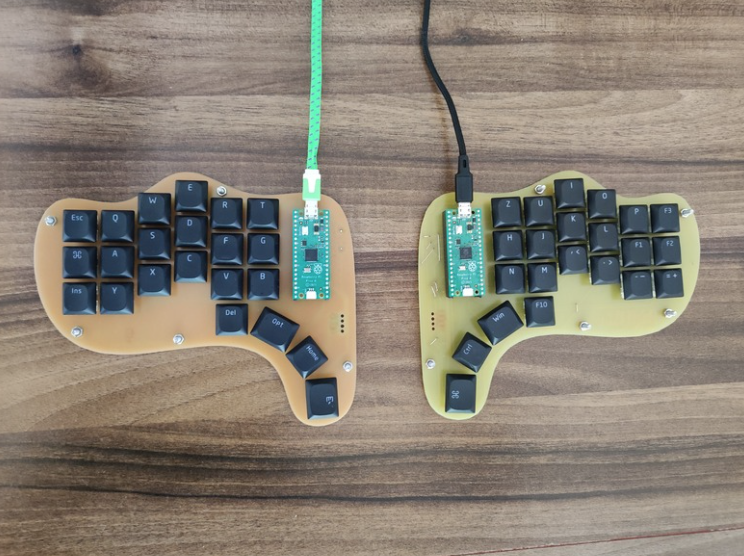
Ortho Staggered ergo split keyboard using Raspberry Pi Pico

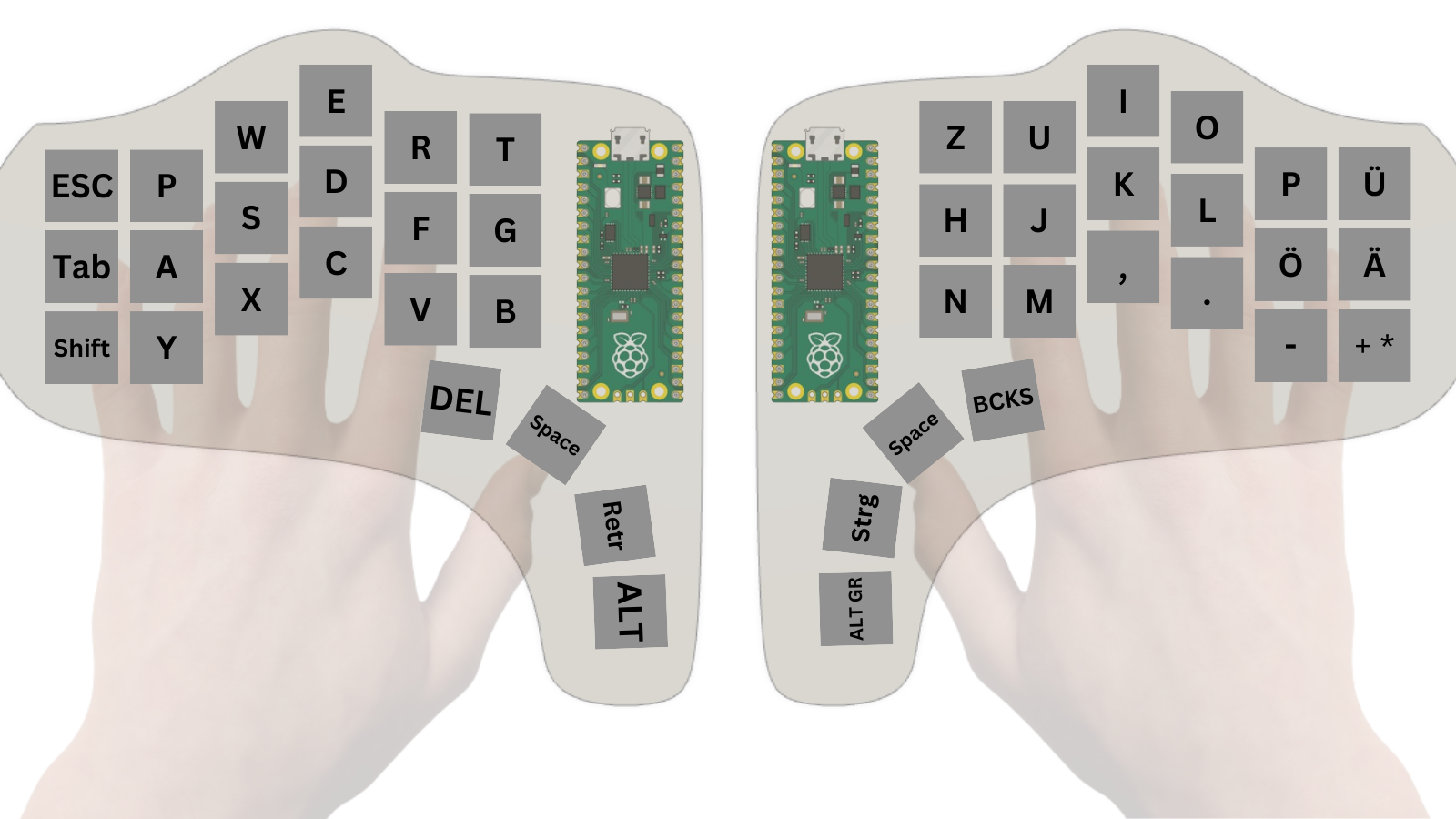
PinkyPi Concept

PinkyPi Keyboard

Flash CircuitPython firmware:

  1. Connect Pico to PC while holding down the "Bootsel" button
  2. Open Thonny
  3. Go to: Tools -> Options -> Interpreter
  4. Choose CircuitPython (RP2040)
  5. Click on "Install or update CircuitPython"
  6. Rest is self-explanatory, firmware version 9.0.5 is recommended (code is only tested on this version)

Run the keyboard code:

  1. Flash CircuitPython firmware
  2. copy "lib" folder of this repo to the Picos internal storage
  3. Open Thonny
  4. Execute the actual .py code file
  5. (rename file to main if it should run automatically on Pico startup)

Parts

25
QtyValueFootprintReferences
22~1:Gateron Switch FootprintU1, U2, U10, U11, U12, U13, U14, U15, U16, U17, U18, U19, U20, U21, U22, U24 +6
1PicoMCU_RaspberryPi_and_Boards:RPi_Pico_SMD_THU5
1STBR3008WYDiode_THT:D_DO-247_VerticalD1
1~AAA:Communication PortU23

More from kraemerlukas314/PinkyPi

1
  • 2 layers181.5 × 148.9 mmPinkyPi, the printed circuit board in 3D

    PinkyPi

    kraemerlukas314/PinkyPi

    Ortholinear ergo split keyboard using Raspberry Pi Pico
    24 parts1

Similar boards

  • 2 layers159.5 × 30 mmType f, the printed circuit board in 3D

    Type f

    google/mozc-devices

    Circuit diagrams and firmware source code for Gboard DIY keyboards

    25 parts3kApache-2.0
  • 2 layers113.5 × 95.1 mmSweep high, the printed circuit board in 3D

    Sweep high

    davidphilipbarr/Sweep

    Sweep - a small promicro based keyboard inspired by the Ferris.

    25 parts2.1k
  • 2 layers58.4 × 114.3 mmPicoPedal, the printed circuit board in 3D

    PicoPedal

    hackclub/OnBoard

    💡 Join 1,000 teenagers and make your first PCB with a $100 grant!

    25 parts915
  • 2 layers54 × 15 mmXyp gpib, the printed circuit board in 3D

    Xyp gpib

    xyphro/UsbGpib

    Versatile, cheap and portable USB to GPIB converter (USBTMC class based)

    25 parts690MIT
  • 2 layers50 × 76 mmVoron 0, the printed circuit board in 3D

    Voron 0

    dennisss/dacha

    Monorepo for awesome tools/projects/libraries

    25 parts397Apache-2.0
  • 2 layers237.5 × 102.9 mmStorage, the printed circuit board in 3D

    Storage

    jes/scamp-cpu

    A homebrew 16-bit CPU with a homebrew Unix-like-ish operating system.

    25 parts301Unlicense
  • 2 layers43.3 × 21 mmNanoS3 Carrier, the printed circuit board in 3D

    NanoS3 Carrier

    UnexpectedMaker/esp32s3

    Assorted files for my ESP32-S3 development boards

    25 parts296

Questions

How big is the PinkyPi PCB?

It measures 181.4 × 148.9 mm and has 2 copper layers, 1.6 mm thick.

What parts does the PinkyPi use?

25 parts, built around the STBR3008WY. The full list of its parts is on this page, with links to each part's symbol and footprint where PCBKit's library has them.

Where can I download the PinkyPi KiCad files?

From the kraemerlukas314/PinkyPi repository on GitHub, at the commit this page was made from: the board is PCB/left side/PinkyPi.kicad_pcb and its schematic PCB/left side/PinkyPi.kicad_sch. PCBKit opens the board in the browser, with nothing to install.

Can I use the PinkyPi design in my own project?

Its repository states no licence, so its author keeps all rights: ask kraemerlukas314 before reusing the design.