
2 layers357.8 × 124.5 mm
Vic2020mainboard
danwerner21/vic2020
A Vic-20 clone created with [almost] all readily available parts
142 parts78

 kazushinjo/Shonan_Lite-android
DATV Tranceiver Shonan_Lite for Android Tablet+ Pluto v0.32-dirty
LangStonePower is an open-source printed circuit board by kazushinjo, from the kazushinjo/Shonan_Lite-android repository on GitHub, published under the GPL-3.0 licence. It is a 2-layer board of 60 × 60 mm with 29 parts on 18 nets, routed with 139 tracks and 0 vias.
It is built around the 2SC1815. Its parts include 7 resistors, 4 capacitors, 4 connectors, 3 transistors and 2 diodes.
Pluto直結DVB-S2トランシーバー「Shonan」のAndroid版(android/、パッケージ名com.shinjo.shonanandroid)。詳細な構成・アーキテクチャはandroid/README.mdを参照。
Android port of "Shonan", a DVB-S2 transceiver directly connected to a Pluto (android/, package com.shinjo.shonanandroid). See android/README.md for the detailed architecture and implementation.
このリポジトリはPrivateなので匿名のcurl | bashは使えない。gh auth login済みの
マシンであれば、bootstrap.shだけ先に取得してから実行することでclone不要で始められる:
gh api repos/kazushinjo/Shonan_Lite-android/contents/bootstrap.sh \
  --jq '.content' | base64 -d > bootstrap.sh
chmod +x bootstrap.sh
./bootstrap.sh                       # $HOME/Shonan_Lite-android へclone
./bootstrap.sh ~/path/to/dir         # clone先を指定する場合
./bootstrap.sh ~/path/to/dir --build-only # install.shへの追加引数も渡せるgit-lfsが未インストールなら自動でbrew install git-lfsを試みる。既に~/Shonan_Lite-android
等にcloneが存在する場合はgit pull --ff-onlyで更新してから続行する。
./install.shandroid/local.propertiesの自動生成、assembleDebugビルド、接続中の端末へのadb installまでを自動で行うandroid/app/build/outputs/apk/debug/app-debug.apk)を手動で端末へ転送してインストールしてくださいadb installコマンド例を表示するので、それに従ってください./install.sh --build-only # ビルドのみ行い、adb installはしない
./install.sh --clean # ビルド前に ./gradlew clean を実行する
./install.sh --release # assembleReleaseでビルド(署名未設定のため未署名APK。動作確認用)--releaseで生成されるAPKは署名されていないため、配布・実機インストールには別途署名設定が必要です。
Android Studioをインストールしていない場合でも、cli-install.shを使えばコマンドラインのみで
ソースコードからビルド・インストールできます。Android SDK Command-line Toolsの取得、
必要なplatform/NDKのセットアップまで自動で行い、最後にinstall.shへ処理を引き継ぎます。
brew install openjdk@17   # Javaが未インストールの場合のみ
./cli-install.shinstall.shと同じオプション(--build-only、--clean、--release)がそのまま渡せます。
./cli-install.sh --build-onlyThis repository is private, so an anonymous curl | bash won't work. On a machine
already signed in with gh auth login, you can fetch just bootstrap.sh first and
run it to get started without cloning by hand:
gh api repos/kazushinjo/Shonan_Lite-android/contents/bootstrap.sh \
  --jq '.content' | base64 -d > bootstrap.sh
chmod +x bootstrap.sh
./bootstrap.sh                       # clones to $HOME/Shonan_Lite-android
./bootstrap.sh ~/path/to/dir         # clone to a specific directory
./bootstrap.sh ~/path/to/dir --build-only  # extra args are passed through to install.sh
If git-lfs isn't installed, it automatically tries brew install git-lfs. If a clone
already exists (e.g. under ~/Shonan_Lite-android), it updates it with git pull --ff-only
before continuing.
./install.shandroid/local.properties, runs an assembleDebug build, and runs adb install on any connected deviceandroid/app/build/outputs/apk/debug/app-debug.apk) to your device and install itadb install command for each device — follow the printed instructions to pick one./install.sh --build-only # build only, skip adb install
./install.sh --clean # run ./gradlew clean before building
./install.sh --release # build with assembleRelease (unsigned APK, since no signing config exists; for verification only)The APK produced by --release is unsigned, so distributing it or installing it on a device requires a separate signing setup.
If you don't have Android Studio installed, cli-install.sh lets you build and install
from source using only the command line. It automatically downloads the Android SDK
Command-line Tools, sets up the required platform/NDK, and then hands off to install.sh.
brew install openjdk@17   # only if Java isn't installed yet
./cli-install.sh
It accepts the same options as install.sh (--build-only, --clean, --release).
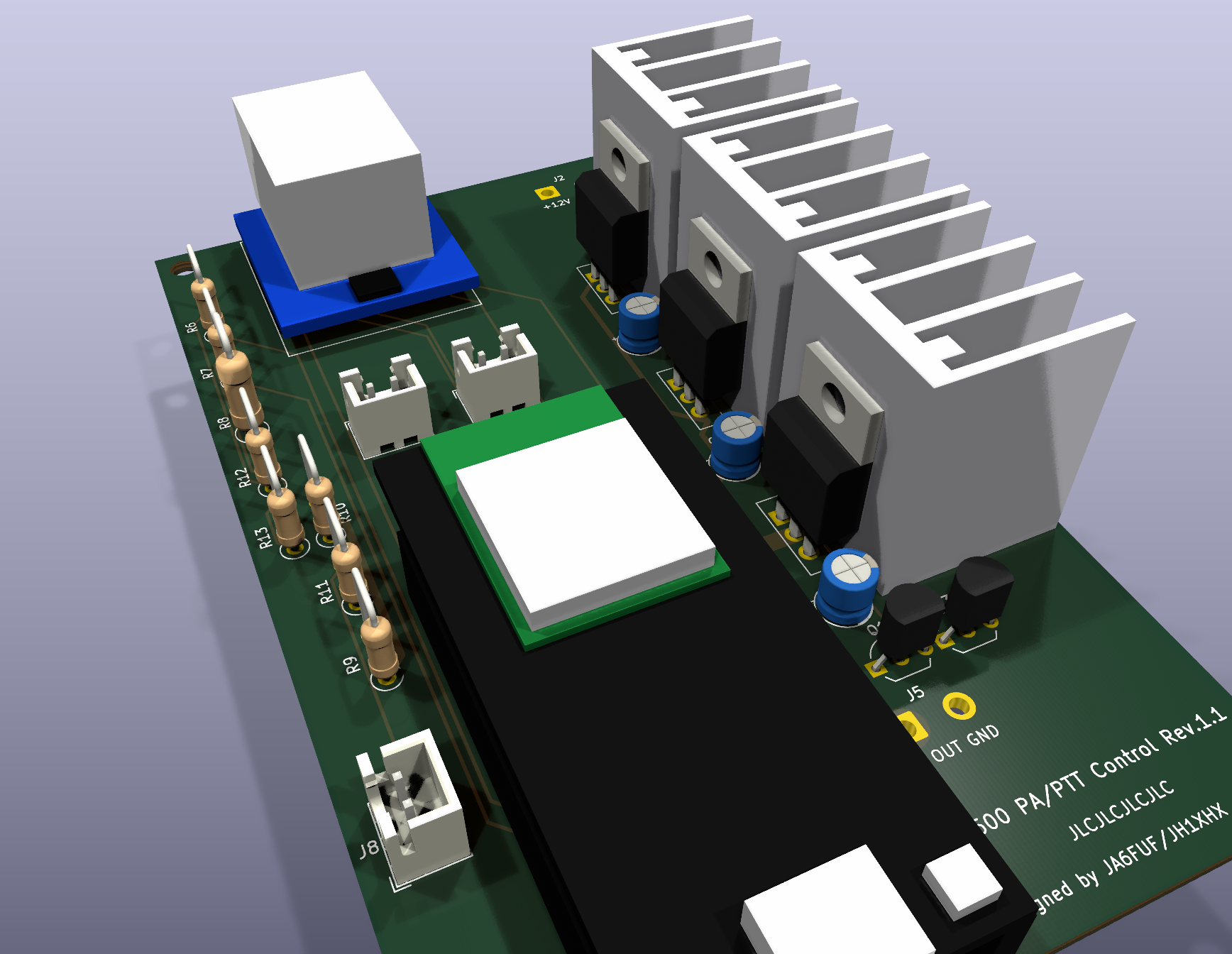
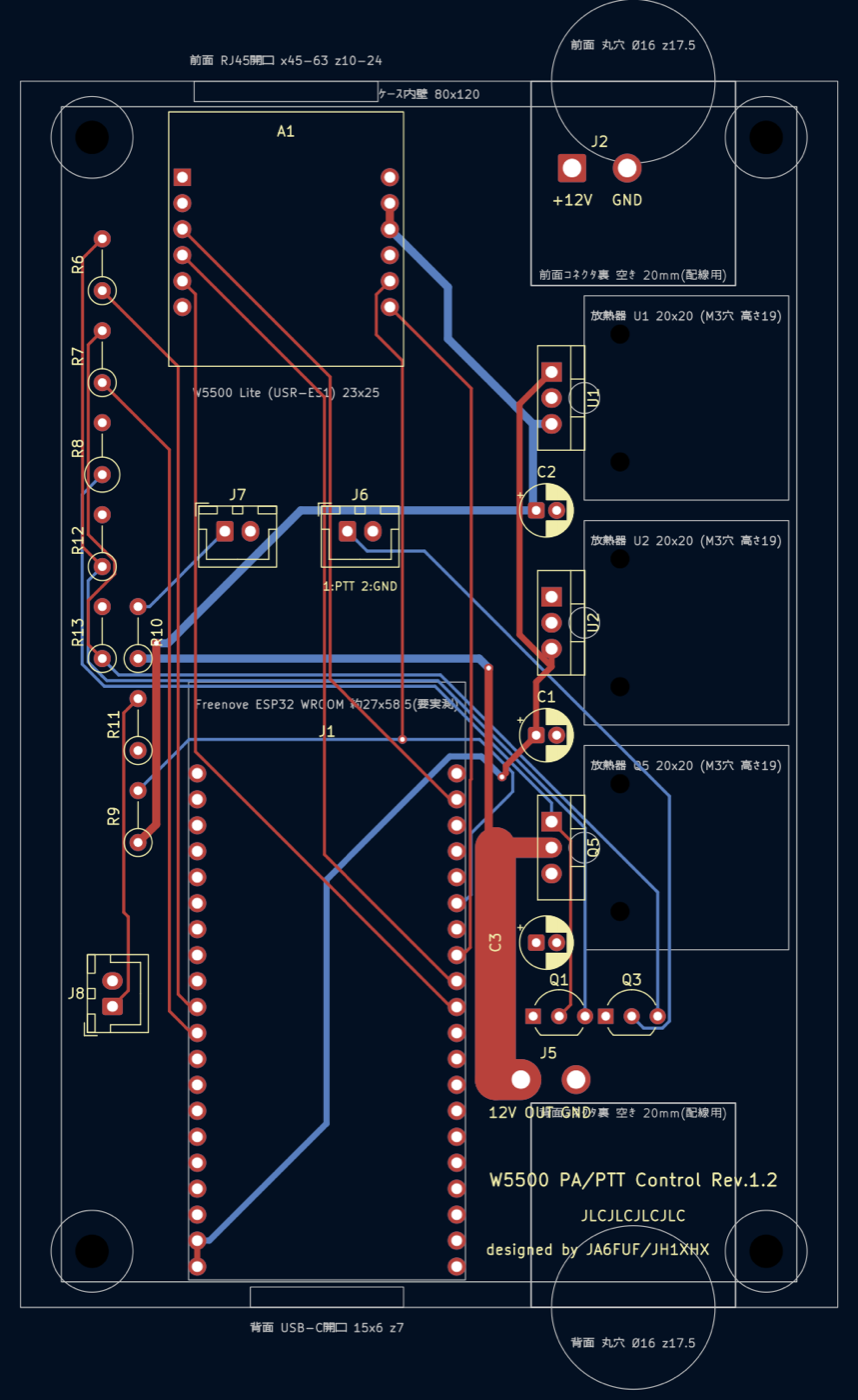
./cli-install.sh --build-onlyESP32とW5500(有線LAN)で、PA等の12 V電源とPTTをLAN経由でON/OFFするオプションの制御基板。
使わなくてもShonan_Liteは動作する。
ファームウェアはhardware/W5500_PA_PTT_Control/W5500_PA_PTT_Control.ino、
基板はhardware/W5500_PA_PTT_Control/kicad/(KiCad、Rev.1.0)。基板とファームウェアはShonan_Lite-RasPI5版と共通。
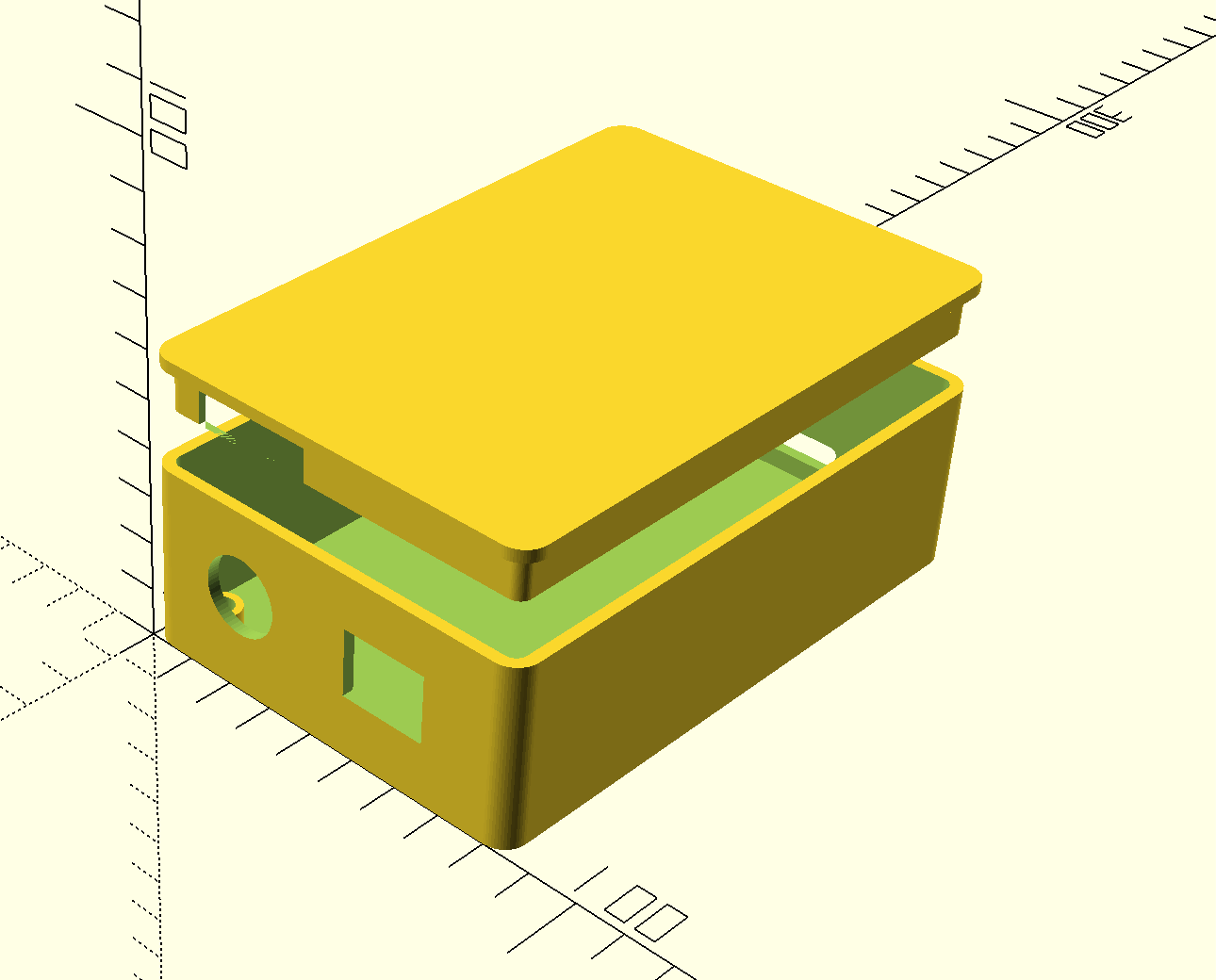
| 基板の3D表示 / 3D view of the board | 基板レイアウト(KiCad) / PCB layout (KiCad) | ケース(OpenSCAD) / Case (OpenSCAD) |
|---|---|---|
 |  |  |
| 項目 Item | 内容 Details |
|---|---|
| 構成 Configuration | Freenove ESP32-WROOM-32E DevKitC(ソケットに差し込み)+W5500 Lite(SPI接続) Freenove ESP32-WROOM-32E DevKitC (plugged into a socket) + W5500 Lite (SPI) |
| 12 V電源 12 V power | 2SJ334(Pチャネル MOSFET)のハイサイドスイッチでJ5の12 V出力をON/OFF。放熱器付きで目安は約7 Aまで J5's 12 V output is switched by a 2SJ334 (P-channel MOSFET) high-side switch; with its heatsink, up to about 7 A |
| PTT PTT | 2SC1815で無線機のPTT端子をGNDへ落とす(J6) A 2SC1815 pulls the radio's PTT line to GND (J6) |
| 電源入力 Power input | +12 V(13.8 V系)をJ2へ。L7805で5 V(ESP32)、TA48033Sで3.3 V(W5500)を作る +12 V (13.8 V class) to J2; an L7805 makes 5 V (ESP32) and a TA48033S makes 3.3 V (W5500) |
| 表示LED Indicator LEDs | 外付け。J7=12 V出力(赤)、J8=12 V入力(緑)(JST XH) External; J7 = 12 V output (red), J8 = 12 V input (green) (JST XH) |
| ネットワーク Network | 固定IP(初期値192.168.0.100)。ブラウザでhttp://<IP>/を開くと手動でON/OFFでき、http://<IP>/configでIPや遅延時間を変更できるStatic IP (default 192.168.0.100); open http://<IP>/ in a browser to switch ON/OFF manually, and http://<IP>/config to change the IP and delays |
| 基板 Board | 72×115 mm、4層(内層はGNDと+12Vのベタ)、部品はすべてスルーホール。JLCPCBの発注データはfabrication/jlcpcb/72×115 mm, 4 layers (inner layers are GND and +12 V planes), all through-hole parts. JLCPCB order data is in fabrication/jlcpcb/ |
| ケース Case | OpenSCAD(LAN_PTT.scad)、内寸80×120×35 mm。前面にRJ45の角穴と+12V入力の丸型コネクタ、背面にUSBの穴と12 V出力・PTTの丸型コネクタ OpenSCAD (LAN_PTT.scad), inside 80×120×35 mm. RJ45 opening and +12 V input circular connector on the front; USB opening and 12 V output/PTT circular connector on the back |
Shonan_Lite-androidでの使い方:
192.168.0.100)を入力する。「使用する」の初期値はOFF。GET /tx?state=on|off)、アプリ起動の5秒後に12 V電源(Pluto含む)を(GET /ch?idx=0&state=on)自動でONにする。詳しくは仕様書と
接続一覧を参照(どちらも日英併記。Word版・PDF版も同じフォルダにある)。
回路図: w5500-esp32.pdf、
実装図: w5500-esp32_実装図_部品番号.pdf。
[!NOTE] ESP32への書き込みと起動は確認済み。12 V電源・PTTの駆動回路と無線機をつないだ実地試験はまだ行っていない。
An optional control board that uses an ESP32 and a W5500 (wired LAN) to switch the 12 V power for the PA etc.
and the PTT ON/OFF over the LAN. Shonan_Lite works without it.
The firmware is hardware/W5500_PA_PTT_Control/W5500_PA_PTT_Control.ino
and the board is in hardware/W5500_PA_PTT_Control/kicad/ (KiCad, Rev.1.0). The board and firmware are shared with the
Shonan_Lite-RasPI5 edition.
How to use it with Shonan_Lite-android:
192.168.0.100). "Use" is off by default.GET /tx?state=on|off), and the 12 V power (including the Pluto) is turned ON 5 seconds after app start (GET /ch?idx=0&state=on).For details, see the specification and the
connection list (both in Japanese and English;
Word and PDF versions are in the same folder).
Schematic: w5500-esp32.pdf;
assembly drawing: w5500-esp32_実装図_部品番号.pdf.
[!NOTE] Flashing and booting the ESP32 have been confirmed. A field test with the 12 V power/PTT drive circuits connected to a radio has not been done yet.
rpi-dvbs2-receiver-guiの設計に基づく本プログラムはフリーソフトウェアです。GNU General Public License v3(またはそれ以降のバージョン)の下で 再配布・改変することができます。 同梱している第三者ソフトウェアのライセンスはTHIRD_PARTY_NOTICES.mdを参照してください。
Copyright (C) 2026  Kazuichi Shinjo
Copyright of `rpi-dvbs2-receiver-gui` is held by Shinji Yamazaki.

This program is free software: you can redistribute it and/or modify
it under the terms of the GNU General Public License as published by
the Free Software Foundation, either version 3 of the License, or
(at your option) any later version.

This program is distributed in the hope that it will be useful,
but WITHOUT ANY WARRANTY; without even the implied warranty of
MERCHANTABILITY or FITNESS FOR A PARTICULAR PURPOSE.  See the
GNU General Public License for more details.

You should have received a copy of the GNU General Public License
along with this program. If not, see <https://www.gnu.org/licenses/>.ライセンス全文はLICENSEを参照してください(https://www.gnu.org/licenses/gpl-3.0.htmlにも掲載されています)。
rpi-dvbs2-receiver-guiThis program is free software: you can redistribute it and/or modify it under the terms of the GNU General Public License v3 (or any later version). For the licenses of the bundled third-party software, see THIRD_PARTY_NOTICES.md.
Copyright (C) 2026  Kazuichi Shinjo
Copyright of `rpi-dvbs2-receiver-gui` is held by Shinji Yamazaki.

This program is free software: you can redistribute it and/or modify
it under the terms of the GNU General Public License as published by
the Free Software Foundation, either version 3 of the License, or
(at your option) any later version.

This program is distributed in the hope that it will be useful,
but WITHOUT ANY WARRANTY; without even the implied warranty of
MERCHANTABILITY or FITNESS FOR A PARTICULAR PURPOSE.  See the
GNU General Public License for more details.

You should have received a copy of the GNU General Public License
along with this program.  If not, see <https://www.gnu.org/licenses/>.
See LICENSE for the full license text (also available at https://www.gnu.org/licenses/gpl-3.0.html).
| Qty | Value | Footprint | References |
|---|---|---|---|
| 4 | MountingHole | MountingHole:MountingHole_3.2mm_M3 | H1, H5, H6, H7 |
| 3 | 2SC1815 | Package_TO_SOT_THT:TO-92_Inline_Wide | Q1, Q2, Q3 |
| 3 | 510 | Resistor_THT:R_Axial_DIN0207_L6.3mm_D2.5mm_P5.08mm_Vertical | R5, R6, R7 |
| 3 | MountingHole_Pad | MountingHole:MountingHole_2.2mm_M2_DIN965_Pad_TopBottom | H2, H3, H4 |
| 2 | 0.1 | Capacitor_THT:C_Disc_D4.3mm_W1.9mm_P5.00mm | C2, C4 |
| 2 | 10K | Resistor_THT:R_Axial_DIN0207_L6.3mm_D2.5mm_P5.08mm_Vertical | R3, R4 |
| 2 | 1N4448 | Diode_THT:D_DO-35_SOD27_P7.62mm_Horizontal | D1, D2 |
| 2 | 220 | Capacitor_THT:CP_Radial_D6.3mm_P2.50mm | C1, C3 |
| 2 | USB_A | Connector_USB:USB_A_Molex_67643_Horizontal | J3, J4 |
| 1 | 1.8K | Resistor_THT:R_Axial_DIN0207_L6.3mm_D2.5mm_P5.08mm_Vertical | R2 |
| 1 | 3.9K | Resistor_THT:R_Axial_DIN0207_L6.3mm_D2.5mm_P5.08mm_Vertical | R1 |
| 1 | Conn_01x02_Socket | Connector_Molex:Molex_KK-254_AE-6410-02A_1x02_P2.54mm_Vertical | J1 |
| 1 | Conn_01x05_Female | Connector_Molex:Molex_KK-254_AE-6410-05A_1x05_P2.54mm_Vertical | J2 |
| 1 | FINDER-30.22 | Relay_THT:Relay_DPDT_Finder_30.22 | K1 |
| 1 | Jumper_2_Bridged | Connector_PinSocket_2.54mm:PinSocket_1x02_P2.54mm_Vertical | JP1 |
danwerner21/vic2020
A Vic-20 clone created with [almost] all readily available parts

GuitarML/GuitarPedalPCBs
Collection of KiCad circuit board designs for guitar pedals you can build yourself.


IdahoLabResearch/AcCCS
A collection of tools and scripts used to communicate and emulate Electric Vehicle Communication Controllers (EVCC) and Supply Equipment Communication Controllers (SECC).

StudioKAT/Toolbox
主な機能: - オーディオ/CVミキサー(加算・減算) - CVへのオフセット追加(5V/10V)・極性反転 - 1:3 バッファード・マルチプル - 2:2 ユニティミキサー - 3:1 アベレージミキサー(各チャンネルのゲイン = 1/3) - SIGNセクション:インバーター / 半波整流 / 全波整流 - LOGICセクション:アナログOR / アナログAND - S&Hセクション:サンプル&ホールド / ホワイトノイズ出力…


It measures 60 × 60 mm and has 2 copper layers, 1.6 mm thick.
29 parts, built around the 2SC1815. The full list of its parts is on this page, with links to each part's symbol and footprint where PCBKit's library has them.
From the kazushinjo/Shonan_Lite-android repository on GitHub, at the commit this page was made from: the board is hardware/LangStonePower/LangStonePower.kicad_pcb and its schematic hardware/LangStonePower/LangStonePower.kicad_sch. PCBKit opens the board in the browser, with nothing to install.
Its repository publishes it under the GPL-3.0 licence: you may reuse it on that licence's terms (keep the author's notice, and for a copyleft licence share your changes alike).