2 layers159.5 × 30 mm
Type f
google/mozc-devices
Circuit diagrams and firmware source code for Gboard DIY keyboards
25 parts3kApache-2.0

 jvahland/HexaLeafs1
Project to realize HexaLeafs built on 37C3 as connectable PCBs
HexaLeafs is an open-source printed circuit board by jvahland, from the jvahland/HexaLeafs repository on GitHub. It is a 2-layer board of 104 × 90 mm with 25 parts on 22 nets, routed with 219 tracks and 20 vias.
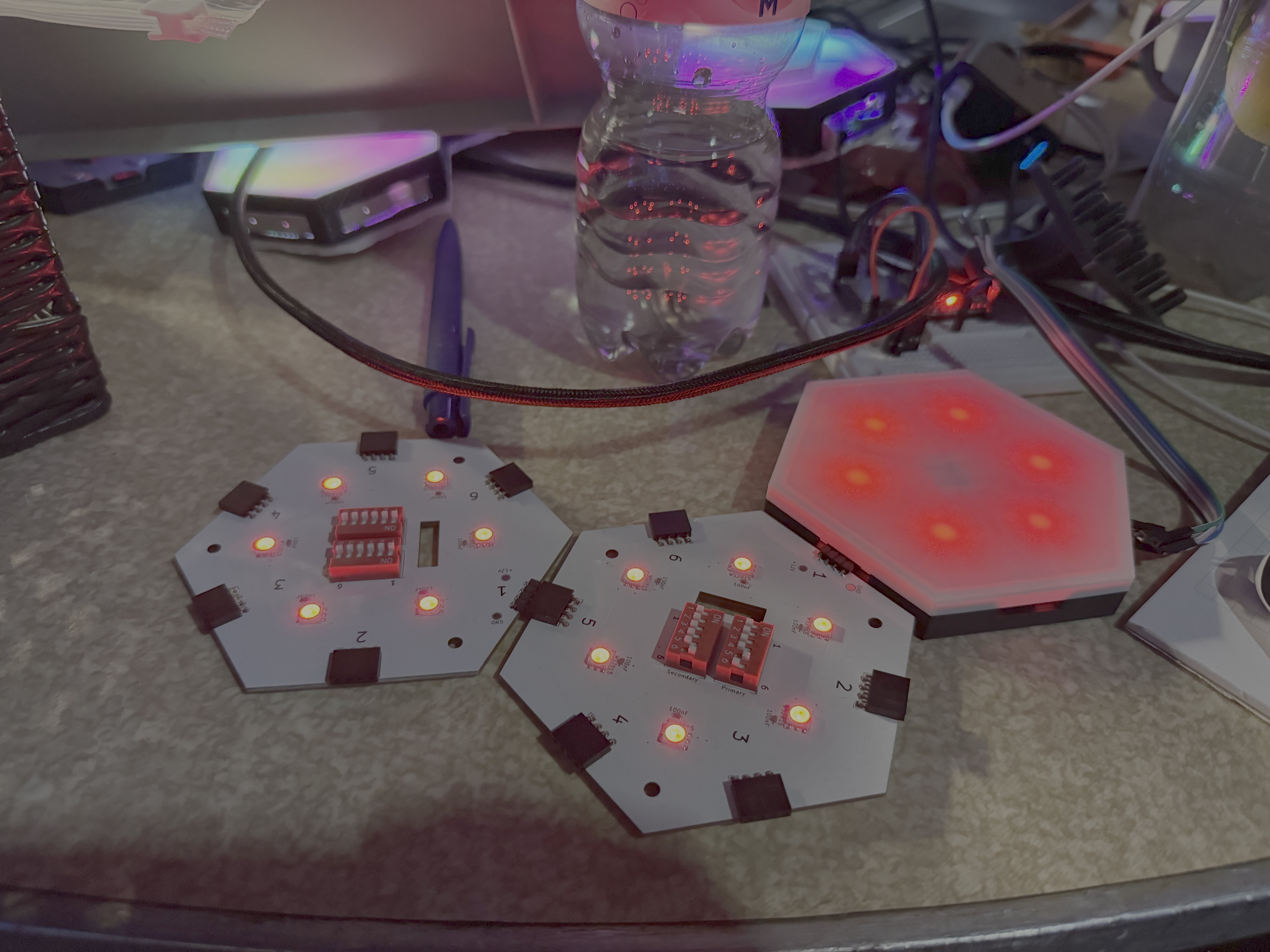
We like hexagons and blinky lights. So we thought, why not combine the two?
So we created a PCB in the shape of a hexagon with 6 LEDs on it. The LEDs are controlled by wled, so you can control them via wifi.
There are many ways to design such a PCB.
We asked ourselves some questions and answered them with the following design decisions:
Hexagons are bestagon ;)
Here we had a lot discussions.
There were many ideas like pogo pins with magnets, spring loaded connectors, or even a custom connector with an extra PCB similar to Nanoleafs.
We asked ourselves what will be the typical use case for this PCB. We came to the conclusion that the typical use case will be to put them on a wall or a ceiling and that the pattern of the connected PCBs will not change very often.
The connection should be easy to use and easy to connect and disconnect.
We also wanted to keep the cost low. So we decided to use a simple 4-pin connector with a pitch of 2.54mm which are SMD soldered to the PCB.
We decided to use a USB-C connector for power. USB-C is a widely used standard and can deliver enough power for the LEDs.
We decided to use WS2815E LEDs. They are similar to the well known WS2812 LEDs but have a higher voltage of 12V instead of 5V which makes them more suitable for longer LED strips. The higher voltage also means that the current is lower which makes it easier to design the PCB.
The edge length of one HexaLeaf is 52mm. The area of one HexaLeaf is 7025.198mm^2 = 0.007025198 m^2 (square meters).
10 Hexaleafs = 60 LEDs, they consume at 12V at full white brightness 0.25A in total. The power consumption of 10 HexaLeafs is 3W.
Power Delivery of USB-C at 12V can be up to 60W.
-> 200 HexaLeafs can be powered by one USB-C port. Which is 1.40504 m^4 (meters to the fourth) of LED area.
Standby is 0.102A, all LEDs off. TODO: Make a relais to switch off the power supply for the LEDs. Nice to have feature! Not mandatory.
| Qty | Value | Footprint | References |
|---|---|---|---|
| 6 | 100n | Capacitor_SMD:C_0603_1608Metric | 100nF, 100nF, 100nF, 100nF, 100nF, 100nF |
| 6 | ~ | LED_SMD:LED_RGB_5050-6 | WS2815, WS2815, WS2815, WS2815, WS2815, WS2815 |
| 5 | Conn_01x04 | Connector_PinSocket_2.54mm:PinSocket_1x04_P2.54mm_Horizontal | J2, J3, J4, J5, J6 |
| 2 | SW_DIP_x06 | Button_Switch_THT:SW_DIP_SPSTx06_Slide_9.78x17.42mm_W7.62mm_P2.54mm | Primary, Secondary |
| 2 | TestPoint_Pad_D2.0mm | TestPoint:TestPoint_Pad_D2.0mm | +12V, GND |
| 1 | Conn_01x04 | Connector_PinHeader_2.54mm:PinHeader_1x04_P2.54mm_Horizontal | J1 |
The 22 most common of 25 parts.
google/mozc-devices
Circuit diagrams and firmware source code for Gboard DIY keyboards

davidphilipbarr/Sweep
Sweep - a small promicro based keyboard inspired by the Ferris.


hackclub/OnBoard
💡 Join 1,000 teenagers and make your first PCB with a $100 grant!

xyphro/UsbGpib
Versatile, cheap and portable USB to GPIB converter (USBTMC class based)


jes/scamp-cpu
A homebrew 16-bit CPU with a homebrew Unix-like-ish operating system.

It measures 104 × 90 mm and has 2 copper layers, 1.6 mm thick.
25 parts. The full list of its parts is on this page, with links to each part's symbol and footprint where PCBKit's library has them.
From the jvahland/HexaLeafs repository on GitHub, at the commit this page was made from: the board is HexaLeafs.kicad_pcb and its schematic HexaLeafs.kicad_sch. PCBKit opens the board in the browser, with nothing to install.
Its repository states no licence, so its author keeps all rights: ask jvahland before reusing the design.