2 layers19 × 76 mm
Sub
google/mozc-devices
Circuit diagrams and firmware source code for Gboard DIY keyboards
15 parts3kApache-2.0
 JP-code33/JP-s-Macropad
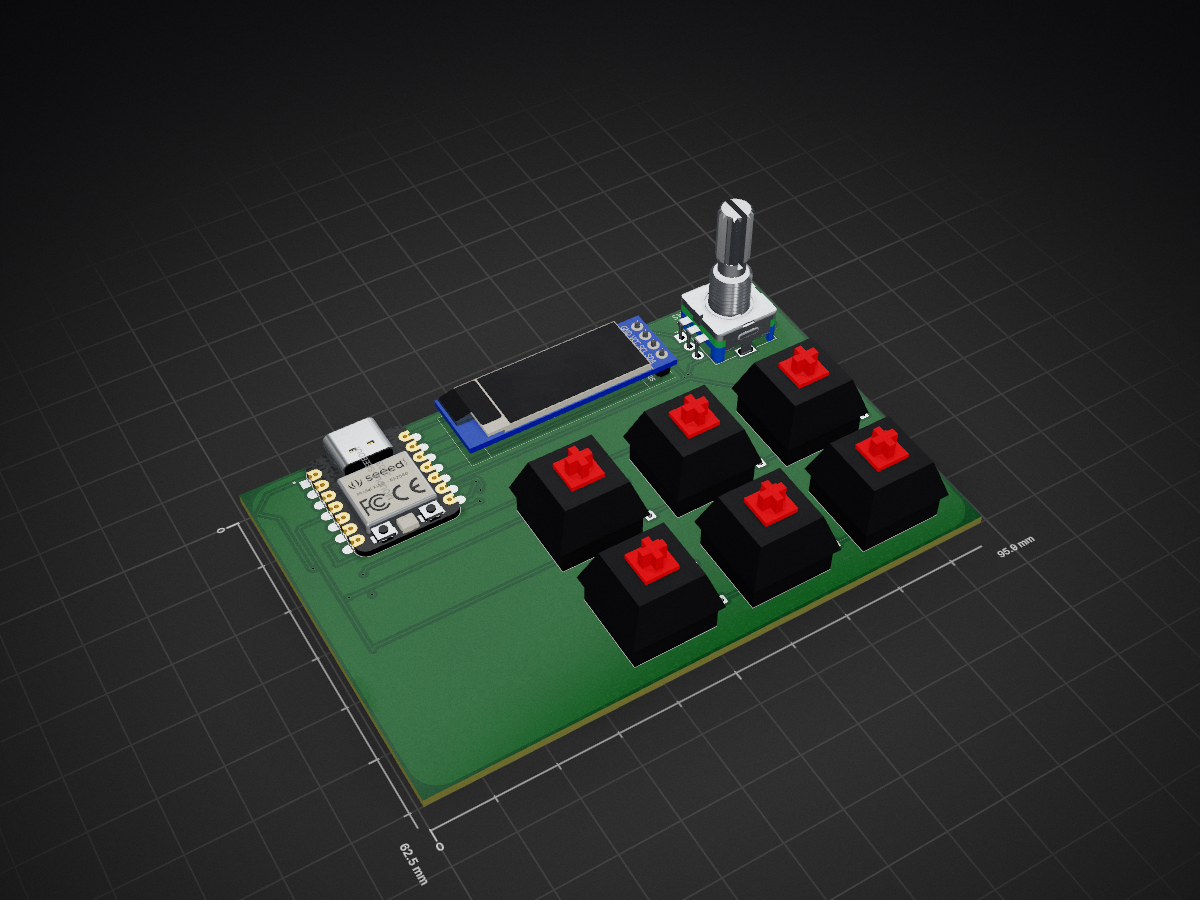
This is my first hardware project, yayyy, anyways I have made a simple 6 key macropad which I will be using it for CAD as love to do CAD and I have used its simple shortcuts in this macropad.
JP s Macropad is an open-source printed circuit board by JP-code33, from the JP-code33/JP-s-Macropad repository on GitHub, published under the MIT licence. It is a 2-layer board of 95.9 × 62.5 mm with 15 parts on 20 nets, routed with 105 tracks and 12 vias.
Its parts include 7 switches, 6 diodes, 1 IC and 1 connector. It belongs with the keyboards and input boards of this library.
This is my first hardware project, yayyy, anyways I have made a simple 6 key macropad which I will be using it for CAD as love to do CAD and I have used its simple shortcuts in this macropad. I have also added a rotary encoder and an OLED Screen.
This was my first time making a schematic but it was fairly quick to make. It was because I saw tons of amazing examples on Stardance and took inspiration from many of them which made the process super simple.
Working with PCB design. It was easy because the schematic was right. As I was routing it I showed me where each pin should connect. There was overlapping in between but I used Via to have utilized both sides like the top and bottom to have no overlapping in between.
CAD was fairly easy as I mentioned it is made for CAD so I had prior experience in making it so easy for me to make a box. I added some triangles to add some design and added my name on it as a design.
What I have found the easiest way is to use QMK Toolbox, what I will do is connect the macropad to the computer and then load up the toolbox and load the files in toolbox. Then I will just use the inbuilt flash button to flash it to my macropad
I don't have the necessary parts yet but I waiting for them. I will be soldering the diodes and will do the wiring to connect everything up. I will then put it in the case and use the screws to tighten everything up.
I was wanted to buy a steamdeck which as I found those fascinating because you can program them and you could use it as whatever key you want but didn't really get a chance to buy and saw an opportunity to make my own so I decided to make one for CAD shortcuts!
6x Cherry MX Switches
6x Keycaps
1x EC11 Rotary Encoder
1x Seeed XIAO RP20404
4x M3x16mm screws
6x Diodes
1 case (2 parts)
1 PCB (JLCPCB only gives 5 so will have to buy the 5 pack)
1 soldering iron
| Qty | Value | Footprint | References |
|---|---|---|---|
| 6 | 1N4148 | Diode_THT:D_DO-35_SOD27_P7.62mm_Horizontal | D1, D2, D3, D4, D5, D6 |
| 6 | SW_Push | Button_Switch_Keyboard:SW_Cherry_MX_1.00u_PCB | SW1, SW2, SW3, SW4, SW5, SW6 |
| 1 | Conn_01x04 | SSD1306-0.91-OLED-4pin-128x32:SSD1306-0.91-OLED-4pin-128x32 | J1 |
| 1 | MOUDLE-SEEEDUINO-XIAO | footprints:XIAO-Generic-Hybrid-14P-2.54-21X17.8MM | U1 |
| 1 | RotaryEncoder_Switch | Rotary_Encoder:RotaryEncoder_Alps_EC11E-Switch_Vertical_H20mm | SW7 |
It measures 95.9 × 62.5 mm and has 2 copper layers, 1.6 mm thick.
15 parts. The full list of its parts is on this page, with links to each part's symbol and footprint where PCBKit's library has them.
From the JP-code33/JP-s-Macropad repository on GitHub, at the commit this page was made from: the board is PCB/Jp's macropad.kicad_pcb and its schematic PCB/Jp's macropad.kicad_sch. PCBKit opens the board in the browser, with nothing to install.
Its repository publishes it under the MIT licence: you may reuse it on that licence's terms (keep the author's notice, and for a copyleft licence share your changes alike).
google/mozc-devices
Circuit diagrams and firmware source code for Gboard DIY keyboards

hoglet67/RGBtoHDMI
Bare-metal Raspberry Pi project that provides pixel-perfect sampling of Retro Computer RGB/YUV video and conversion to HDMI

mntmn/amiga2000-gfxcard
MNT VA2000, an Open Source Amiga 2/3/4000 Graphics Card (Zorro II/III), written in Verilog

hackclub/OnBoard
💡 Join 1,000 teenagers and make your first PCB with a $100 grant!

kenp-io/not-for-airpods-repairs
The content of this repository is licensed under the WTFPL License. Please have a close look at the terms before using this material.

Luos-io/luos_engine
Open-source and real-time orchestrator for cyber-physical-systems, to easily design, test and deploy embedded applications and digital twins.

Chrismettal/EleLab_v2
Cheap DIY lab system for hobbyists and the tinkering folk
