

4 layers21 × 51 mm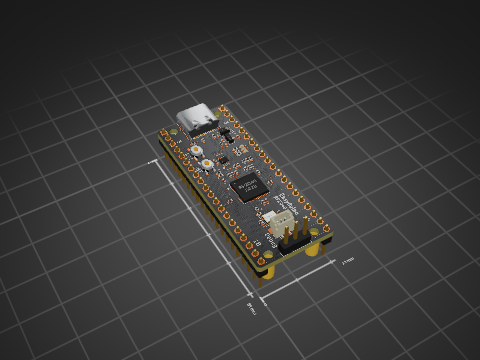
Easyduino RP2040
Hanqaqa/Easyduino
Easily dive into different PCB KiCad designs of the most popular microcontroller devboards
65 parts755CERN-OHL-P-2.0

 josem1942/psx-adapter
A simple DualShock 1 controller adapter
Psx hid is an open-source printed circuit board by josem1942, from the josem1942/psx-adapter repository on GitHub. It is a 2-layer board of 42 × 36 mm with 40 parts on 60 nets, routed with 327 tracks and 46 vias.
It is built around the RP2040 and W25Q16JVUXIQ. Its parts include 17 capacitors, 10 resistors, 3 ICs, 3 diodes and 2 connectors. It belongs with the RP2040 boards of this library.
This is both a hardware and software project that allows you to connect a DualShock 1 or DualShock 2 (untested) controller to a PC. This works by reading the signals from the controller and converting them to USB HID commands, so in theory it should support any device that supports USB HID GamePads.
The main microcontroller used is the RP2040. The board is designed with heavy inspiration from the Raspberry Pi Pico, as such many of the parts are similar if not identical to the Pico. As for the the header, you can typically find some on AliExpress to order. The whole project is designed using KiCad, so as long as you have that installed, you should be able to open it.
The firmware is built with the pico-sdk and TinyUSB.
This was built on macOS, but I'm pretty sure you can build it on Windows and Linux if you get the same dependencies.
Dependencies:
Install the required dependencies using brew:
brew install --cask gcc-arm-embedded
brew install cmake ninja python git picotool
Clone the repository:
git clone --recurse-submodules=firmware/pico-sdk https://github.com/josem1942/psx-adapter.git
cd psx-adapter
git -C firmware/pico-sdk submodule update --init lib/tinyusb
Then finally, you can build the firmware:
mkdir firmware/build
cd firmware/build
cmake ..
make
Then, to flash, hold down SW1 (the only button) on the board while plugging in the USB, then drag firmware/build/psxc.uf2 to the drive that appears when you plugged in the board.
| Qty | Value | Footprint | References |
|---|---|---|---|
| 10 | 100n | Capacitor_SMD:C_0603_1608Metric | C1, C2, C3, C4, C5, C6, C8, C9, C10, C15 |
| 4 | 5k1 | Resistor_SMD:R_0402_1005Metric | R2, R5, R6, R9 |
| 3 | 1u | Capacitor_SMD:C_0603_1608Metric | C7, C11, C18 |
| 2 | 15p | Capacitor_SMD:C_0603_1608Metric | C13, C14 |
| 2 | 1k | Resistor_SMD:R_0603_1608Metric | R1, R7 |
| 2 | 220 | Resistor_SMD:R_0402_1005Metric | R8, R10 |
| 2 | 27 | Resistor_SMD:R_0402_1005Metric | R3, R4 |
| 2 | MountingHole | MountingHole:MountingHole_3.2mm_M3 | H1, H2 |
| 1 | 12Mhz | Crystal:Crystal_SMD_Abracon_ABM8G-4Pin_3.2x2.5mm | Y1 |
| 1 | 2u2 | Capacitor_SMD:C_0805_2012Metric | C16 |
| 1 | 4.7u | Capacitor_SMD:C_0603_1608Metric | C17 |
| 1 | BOOTSEL | Button_Switch_SMD:SW_Push_1P1T_NO_CK_KMR2 | SW1 |
| 1 | D_Schottky | Diode_SMD:D_SOD-123F | D1 |
| 1 | GPIO | LED_SMD:LED_0805_2012Metric | D3 |
| 1 | Header | psx:PSX_Interface | J1 |
| 1 | LDL1117-3.3 | Package_TO_SOT_SMD:SOT-223-3_TabPin2 | U3 |
| 1 | Motor | Jumper:SolderJumper-2_P1.3mm_Open_Pad1.0x1.5mm | JP1 |
| 1 | POWER | LED_SMD:LED_0805_2012Metric | D2 |
| 1 | RP2040 | Package_DFN_QFN:QFN-56-1EP_7x7mm_P0.4mm_EP3.2x3.2mm | U1 |
| 1 | USB_C_Receptacle_USB2.0_16P | Connector_USB:USB_C_Receptacle_GCT_USB4105-xx-A_16P_TopMnt_Horizontal | J2 |
| 1 | W25Q16JVUXIQ | Package_SON:Winbond_USON-8-1EP_3x2mm_P0.5mm_EP0.2x1.6mm | U2 |
Hanqaqa/Easyduino
Easily dive into different PCB KiCad designs of the most popular microcontroller devboards


FrameworkComputer/InputModules
Reference designs and documentation for the Input Module system in the Framework Laptop 16


16n-faderbank/16nx
16nx is a controller for musical instruments. Sixteen faders,MIDI over USB and jack, CV out, and I2C out. Based around RP2040.

Nuclear-Squid/Quacken
Libre, ergonomic, polymorphic: a single PCB for many possible layouts.

cscott/X1CarbonGen10
Keyboard with Trackpoint for Framework 16 laptop: hardware design

RetroScaler/RP2040-PICO-BOOT
Raspberry PI RP2040 PICOBOOT for the Game cube console
It measures 42 × 36 mm and has 2 copper layers, 1.6 mm thick.
40 parts, built around the RP2040 and W25Q16JVUXIQ. The full list of its parts is on this page, with links to each part's symbol and footprint where PCBKit's library has them.
From the josem1942/psx-adapter repository on GitHub, at the commit this page was made from: the board is hardware/psx-hid.kicad_pcb and its schematic hardware/psx-hid.kicad_sch. PCBKit opens the board in the browser, with nothing to install.
Its repository states no licence, so its author keeps all rights: ask josem1942 before reusing the design.