2 layers

 jhbruhn/butns5
a small grid 64 clone
Butns is an open-source printed circuit board by jhbruhn, from the jhbruhn/butns repository on GitHub, published under the MIT licence. It is a 2-layer board of 99 × 99 mm with 265 parts on 169 nets, routed with 1,389 tracks and 372 vias.
It is built around the 74LVC1G17Z, 1N4148WS and SK6812-EC20. Its parts include 128 diodes, 65 capacitors, 64 switches, 2 ICs and 1 connector. It belongs with the RP2040 boards of this library.


small grid 64 clone heavily based on previous work by hugelton/btns.
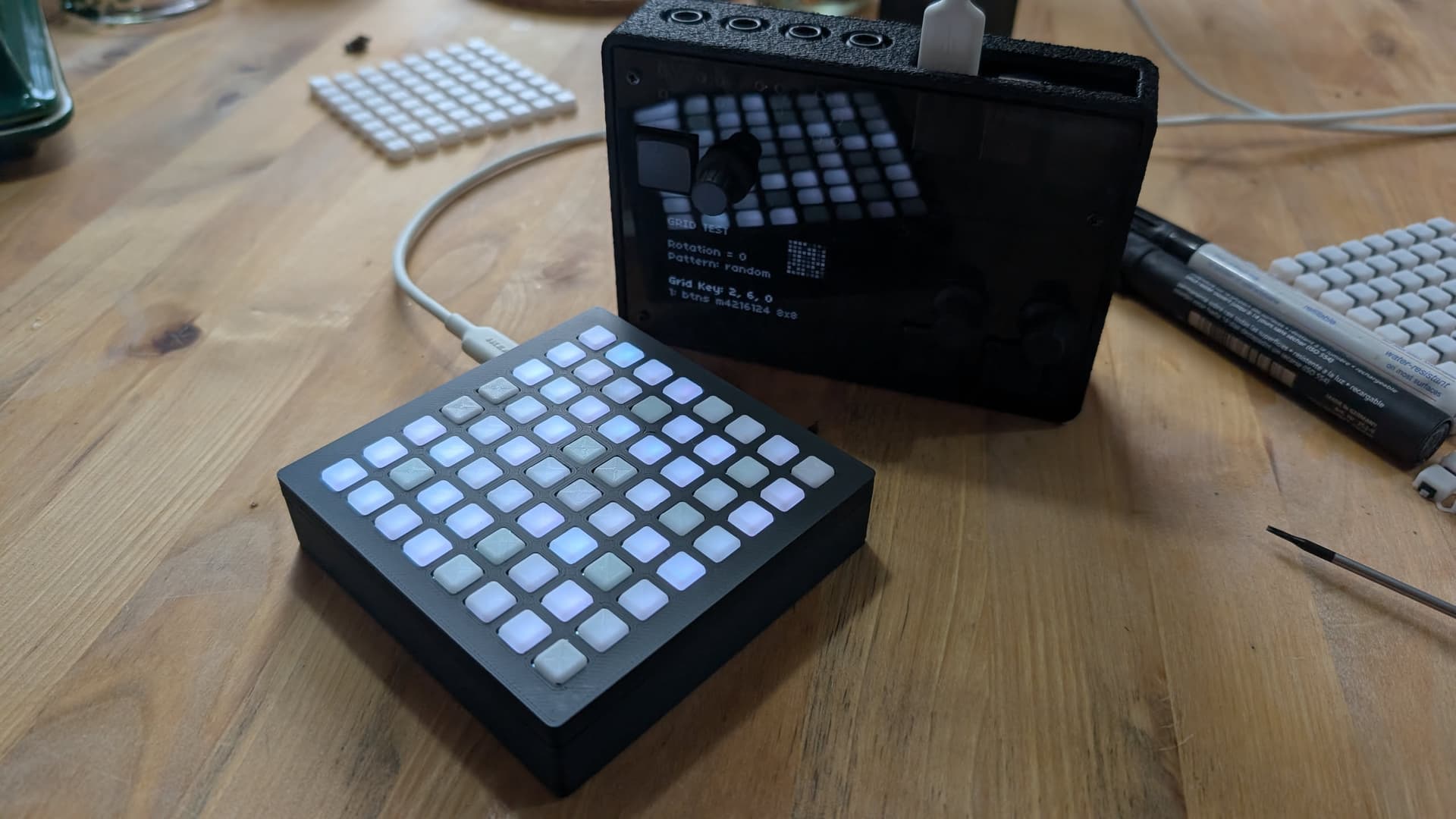
Uses a Rasperry Pi Pico Microcontroller, NeoPixel RGB LEDs (SK6812), cheap buttons and a 3d-printed case and button-overlay. Includes hardware and firmware support for an optional tilt-sensor.
It is highly recommended to order the PCB assembled from JLCPCB. That assembly will include everything other than the parts in the BOM.
| Part | Quantity | Source | Required |
|---|---|---|---|
| PCB with components | 1 | JLCPCB, ordered with Gerber and Assembly files from latest release. Gerber: butns-JLCPCB.zip, BOM: butns_bom_jlc.csv, CPL: butns_cpl_jlc.csv. | yes |
| Raspberry Pi Pico | 1 | Original Raspberry Pi Pico, or USB-C Variant | yes |
| M2.5x6 Button Head Screws | 5 | M2.5x6 | yes |
| Case | 1 | 3d-printed (FDM). case.stl contains the top and bottom half. In the image, it is printed in black PLA, 0.2mm layerheight. | yes |
| Button Matrix | 1 | 3d-printed (FDM). Print buttons.stl with white PLA and 0.12mm layerheight and no infill, 2 wall lines, concentric top infill. These should guide the LEDs light well. Optional: Add buttons-black-blockers.stl while importing as a multi-material print and print those in black to block light from neighboring buttons | yes (black blockers optional) |
| Button TPU Case Inlay | 1 | 3d-printed (FDM). Print with TPU, perhaps in black. Will help against rattling of the buttons in the case. | no |
| SMD 2.54" Pin Header 1x8 Type A | 1 | 1x8 Type A | no, for tilt |
| MPU6050 module | 1 | MPU6050 Module | no, for tilt |
Flash microcontroller with firmware.uf2. Solder MCU and Pin-Header to PCB. Screw everything into the case. Done!
Hint: The cases Top half has one specific orientation where it fits nicely: The top-screw-posts of the top-half with the larger cutoaways go to the side opposite of the USB Connector.
| Qty | Value | Footprint | References |
|---|---|---|---|
| 65 | 100nF | Capacitor_SMD:C_0603_1608Metric | C1, C2, C10, C11, C12, C13, C14, C15, C16, C17, C18, C19, C20, C21, C22, C23 +49 |
| 64 | 1N4148WS | Diode_SMD:D_SOD-323 | D2, D10, D11, D12, D13, D14, D15, D16, D17, D18, D19, D20, D21, D22, D23, D24 +48 |
| 64 | SK6812-EC20 | SK6812-EC20:SK6812-EC20 | D1, D100, D101, D102, D103, D104, D105, D106, D107, D108, D109, D110, D111, D112, D113, D114 +48 |
| 64 | SW_Push | switch:SW_Push_1P1T_XKB_TS-1187A | SW1, SW2, SW10, SW11, SW12, SW13, SW14, SW15, SW16, SW17, SW18, SW19, SW20, SW21, SW22, SW23 +48 |
| 5 | MountingHole | MountingHole:MountingHole_2.7mm_M2.5 | H1, H2, H3, H4, H5 |
| 1 | 74LVC1G17 | Package_TO_SOT_SMD:SOT-23-5_HandSoldering | U2 |
| 1 | Conn_01x08 | Connector_PinHeader_2.54mm:PinHeader_1x08_P2.54mm_Vertical_SMD_Pin1Left | J1 |
| 1 | Pico | MCU_RaspberryPi_and_Boards:RPi_Pico_SMD_TH | U1 |


MarkWestbroek/MusicBrain
A central brain running on teensy or a lighter MCU to process any control signals (MIDI, CV, our own) into the same but adding logic, ADSRs, DCOs, CV matrices etc. to it


theohg/PD240W
PD240W is a complete hardware and firmware project converting USB-C Power Delivery into a programmable 240W (48V 5A) bench power supply, featuring C++ code for Raspberry Pi Pico, custom PCB Gerbers, and a 3D-printable…

ageppert/Brushless-Motor-Biz-Card
A brushless motor and driver built in to a business card form-factor for learning and experimenting!

mizma/ergoSHIFT
11 button leverless controller with shifted home position
It measures 99 × 99 mm and has 2 copper layers, 1.6 mm thick.
265 parts, built around the 74LVC1G17Z, 1N4148WS and SK6812-EC20. The full list of its parts is on this page, with links to each part's symbol and footprint where PCBKit's library has them.
From the jhbruhn/butns repository on GitHub, at the commit this page was made from: the board is hardware/board/butns.kicad_pcb and its schematic hardware/board/butns-backend.kicad_sch. PCBKit opens the board in the browser, with nothing to install.
Its repository publishes it under the MIT licence: you may reuse it on that licence's terms (keep the author's notice, and for a copyleft licence share your changes alike).