
2 layers26 × 30 mm
Microcontroller
FrameworkComputer/ExpansionCards
Reference designs and documentation to create Expansion Cards for the Framework Laptop
34 parts1.1kCC-BY-4.0

 jgazeley/n64cartreader6
N64 only version of the sanni OSCR
Board pcb is an open-source printed circuit board by jgazeley, from the jgazeley/n64cartreader repository on GitHub. It is a 2-layer board of 123 × 66.6 mm with 16 parts on 50 nets, routed with 367 tracks and 239 vias.
It is built around the AP2112K-3.3. Its parts include 5 capacitors, 2 resistors, 2 connectors, 1 IC and 1 diode. It belongs with the RP2040 boards of this library.
A simple, open-source N64 cartridge reader powered by a Raspberry Pi Pico. Plug it in via USB to dump ROMs and back up saves directly to your computer using a web browser or command line.
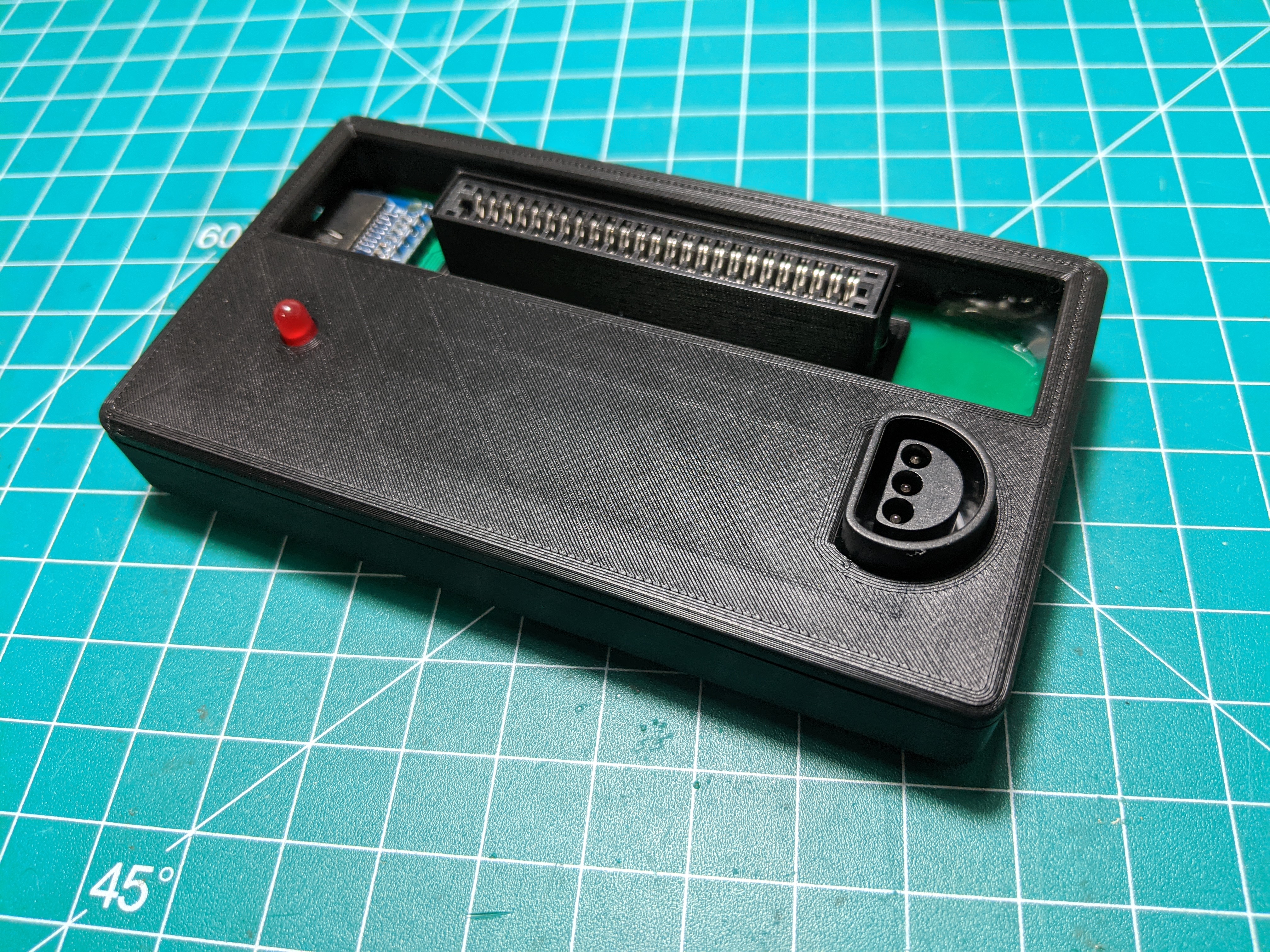
See docs/GETTING_STARTED.md for full setup instructions.
pico_headless_demo.uf2 firmware to your Pico (hold BOOTSEL while plugging in USB, then drag the file onto the drive).Windows (PowerShell):
./host-tools/powershell/N64CartReader.ps1 -Port COM5Windows/macOS/Linux (Python):
# example for windows
python3 host-tools/python/pico_pak_n64_magic_cli.py --port /dev/ttyCOM5 n64-cart-id --rescan
# example for linux
python3 host-tools/python/pico_pak_n64_magic_cli.py --port /dev/ttyACM0 n64-cart-id --rescanfirmware/
rp2040/ C-based firmware for the Raspberry Pi Pico (timing-critical bus logic)
host-tools/
powershell/ Native CLI for Windows (no setup needed); also supports macOS/Linux
python/ Cross-platform CLI for validation, diagnostics, and batch scripts
web/ Easiest, driverless browser-based interface using Web Serial
hardware/
board/ V2 hardware project (KiCad PCB, schematics, and BOM)
enclosure/
board/ 3D-printable protective case (FreeCAD and STL files)
docs/ Technical guides, hardware documentation, and troubleshooting
LICENSES/ Third-party license texts for shared componentsThe browser-based interface is the easiest way to use the reader. It works in Chrome and Edge via the Web Serial API. No drivers or software installation required.
Open host-tools/web/index.html directly in your browser, click Connect, and the UI will detect your cartridge and present options for ROM dumping, save export/import, and GameShark operations.
See docs/WEB_SERIAL_UI.md for details.
The Python CLI provides full access to all device capabilities and is used for bench testing, validation, and scripted workflows.
cd host-tools/python

# Identify the cartridge
python3 pico_pak_n64_magic_cli.py --port /dev/ttyACM0 n64-cart-id --rescan

# Export a save
python3 pico_pak_n64_magic_cli.py --port /dev/ttyACM0 n64-export --out my_save.bin --sha256

# Import a save with verification
python3 pico_pak_n64_magic_cli.py --port /dev/ttyACM0 n64-import --in my_save.bin --verify

# Dump the full ROM
python3 pico_pak_n64_magic_cli.py --port /dev/ttyACM0 n64-rom-dump --out my_rom.z64

# Run the validation matrix
python3 n64_validation_matrix.py --port /dev/ttyACM0A native alternative for Windows users (no installation required). Works with the built-in PowerShell 5.1 or PowerShell 7+ (pwsh) on any platform. See Getting Started for Windows execution policy setup.
# Interactive menu (use COMx on Windows, /dev/ttyACM0 on Linux)
./host-tools/powershell/N64CartReader.ps1 -Port COM5

# Export a save
./host-tools/powershell/Export-Save.ps1 -Port COM5 -Out my_save.bin

# Import a save with verification
./host-tools/powershell/Import-Save.ps1 -Port COM5 -In my_save.bin -Verify

# Dump the full ROM
./host-tools/powershell/Dump-Rom.ps1 -Port COM5 -Out my_rom.z64Requires the Pico SDK and CMake.
cd firmware/rp2040
export PICO_SDK_PATH=/path/to/pico-sdk
cmake -S . -B build
cmake --build build -j4 --target pico_headless_demo
Flash with picotool or drag build/pico_headless_demo.uf2 onto the Pico in BOOTSEL mode.
The V2 board is a single PCB with an integrated N64 cartridge slot and Raspberry Pi Pico footprint. The design is in KiCad under hardware/board/kicad/.
Power is supplied through USB. The RP2040 runs at 3.3V, which matches N64 cartridge logic levels directly.
Pin mapping and board documentation are in docs/HARDWARE.md.
Cartridge not detected or garbled header: Remove the cartridge, clean the edge connector contacts with isopropyl alcohol and a cotton swab, and reseat firmly.
EEPROM save shows type=none after cart swap:
Run n64-cart-id --rescan or retry 3-5 times. The Joybus bus needs a moment to settle after a physical swap.
Controller probe returns IO_ERR:
EEPROM cartridges and controllers share the same Joybus data line. Unplug one to test the other.
Web Serial won't connect: Web Serial requires Chrome or Edge. Firefox and Safari are not supported. Make sure no other application (terminal, serial monitor) has the port open.
The original N64 Cart Reader was built on an Arduino Mega 2560 with an SD card for storage and a serial terminal interface. That design is preserved in the legacy/v1-arduino branch.
See docs/V1_LEGACY.md for details on the original hardware.
N64 Pico Cart Reader V2 was designed and implemented by Jayson Gazeley as an RP2040-based successor to the original Arduino N64 Cart Reader.
The project builds on prior open-source preservation work, especially:
See docs/CREDITS_AND_PRIOR_ART.md for full attribution and docs/LICENSING.md for license details.
| Qty | Value | Footprint | References |
|---|---|---|---|
| 4 | , , , | ||
| 3 | 0.1uF | Capacitor_SMD:C_0805_2012Metric_Pad1.18x1.45mm_HandSolder | C1, C2, C3 |
| 2 | 1k | Resistor_THT:R_Axial_DIN0207_L6.3mm_D2.5mm_P10.16mm_Horizontal | R1, R2 |
| 1 | 10uF | Capacitor_SMD:C_0805_2012Metric_Pad1.18x1.45mm_HandSolder | C5 |
| 1 | 4.7uF | Capacitor_SMD:C_0805_2012Metric_Pad1.18x1.45mm_HandSolder | C6 |
| 1 | AP2112K-3.3 | Package_TO_SOT_SMD:SOT-23-5 | U1 |
| 1 | LED | LED_THT:LED_D3.0mm | D1 |
| 1 | N64_Controller | project_footprints:Controller_Port_3Pin | J2 |
| 1 | N64_Slot | project_footprints:N64_Slot | J1 |
| 1 | RaspberryPi_Pico | Module:RaspberryPi_Pico_SMD | A1 |
It measures 123 × 66.6 mm and has 2 copper layers, 1.6 mm thick.
16 parts, built around the AP2112K-3.3. The full list of its parts is on this page, with links to each part's symbol and footprint where PCBKit's library has them.
From the jgazeley/n64cartreader repository on GitHub, at the commit this page was made from: the board is hardware/board/kicad/board_pcb.kicad_pcb and its schematic hardware/board/kicad/board_pcb.kicad_sch. PCBKit opens the board in the browser, with nothing to install.
Its repository states no licence, so its author keeps all rights: ask jgazeley before reusing the design.
FrameworkComputer/ExpansionCards
Reference designs and documentation to create Expansion Cards for the Framework Laptop


DDeGonge/OS-ARM
This arm is not industrial and it will not be fast, but that is not my goal. But it will hopefully be a very nice looking arm fully capable of 6dof motion, cheap enough to keep it accessable but capable enough to…


