
2 layers35 × 50 mm

Custom ergonomic mechanical keyboard featuring approximately 60° tenting, integrated dual trackpads, custom PCB design, QMK firmware, and a 3D-printed enclosure.
Taco is an open-source printed circuit board by iikochma, from the iikochma/taco-keyboard repository on GitHub. It is a 2-layer board of 100 × 100 mm with 60 parts on 29 nets, routed with 177 tracks and 7 vias.
Its parts include 29 diodes, 29 switches, 1 IC and 1 connector. It belongs with the keyboards and input boards of this library.
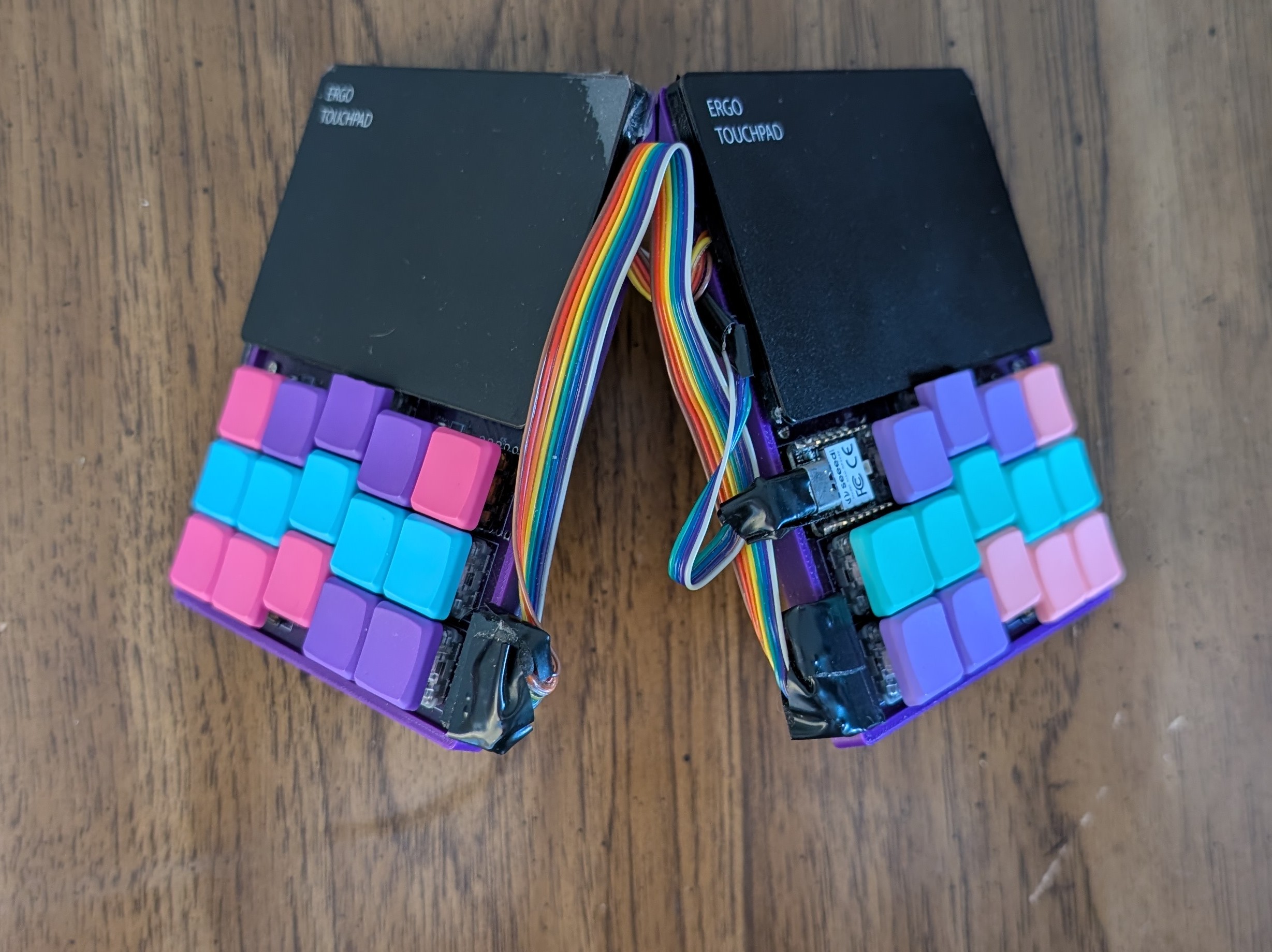
A highly ergonomic custom mechanical keyboard designed using KiCad, QMK, and Shapr3D.
The keyboard uses a single-piece design with approximately 60° tenting, integrated pointing devices for both hands, and a highly optimized keymap inspired by the Hands Down layout and Ben Vallack's 18-key keyboard concepts.
29-key custom layout ("30% keyboard")
Approximately 60° tenting and aggressive inward rotation
Dual integrated trackpads
Custom reversible PCB designed in KiCad
Custom QMK firmware
Custom 3D-printed enclosure designed in Shapr3D
The project was created to explore extreme ergonomic keyboard design while maintaining high typing efficiency.
The keymap is heavily inspired by the Hands Down layout and Ben Vallack's 18-key workflow. While the keyboard contains 29 keys, the majority of daily typing is performed using approximately 20 keys combined with layers and modifiers.
The layout was further optimized for LaTeX-heavy workflows, reducing hand movement for frequently used symbols and commands.
A single reversible PCB design is used for both sides of the keyboard, reducing manufacturing complexity and cost.
cad/ - Shapr3D, STEP, and STL files
firmware/ - QMK firmware
images/ - Photos and renders
pcb/ - KiCad project files
| Qty | Value | Footprint | References |
|---|---|---|---|
| 29 | Diode | ScottoKeebs_Components:Diode_DO-35 | D1, D2, D10, D11, D12, D13, D14, D15, D17, D18, D19, D20, D21, D22, D23, D24 +13 |
| 29 | Keyswitch | ScottoKeebs_Choc:Choc_V1_1.00u | S1, S2, S10, S11, S12, S13, S14, S15, S17, S18, S19, S20, S21, S22, S23, S24 +13 |
| 1 | Conn_01x08_Socket | Connector_PinSocket_2.54mm:PinSocket_1x08_P2.54mm_Vertical | J1 |
| 1 | MOUDLE-SEEEDUINO-XIAO | XIAO_PCB:MOUDLE14P-2.54-21X17.8MM | U1 |


sd2psx/pcb
The PCB must be produced in 0.8mm thickness. Production files are provided under the "Releases" tab. These do not include the through-hole OLED module.


BitDogLab/BitDogLab
Open-source educational hardware for embedded systems, programming, electronics, and physical computing.
It measures 100 × 100 mm and has 2 copper layers, 1.6 mm thick.
60 parts. The full list of its parts is on this page, with links to each part's symbol and footprint where PCBKit's library has them.
From the iikochma/taco-keyboard repository on GitHub, at the commit this page was made from: the board is pcb/taco.kicad_pcb and its schematic pcb/taco.kicad_sch. PCBKit opens the board in the browser, with nothing to install.
Its repository states no licence, so its author keeps all rights: ask iikochma before reusing the design.