
2 layers83.3 × 65.3 mm
SimonShield
github-linguist/linguist
Language Savant. If your repository's language is being reported incorrectly, send us a pull request!
46 parts14kMIT
 haarts/intercom
A serverless home intercom system based on an ESP32 P4
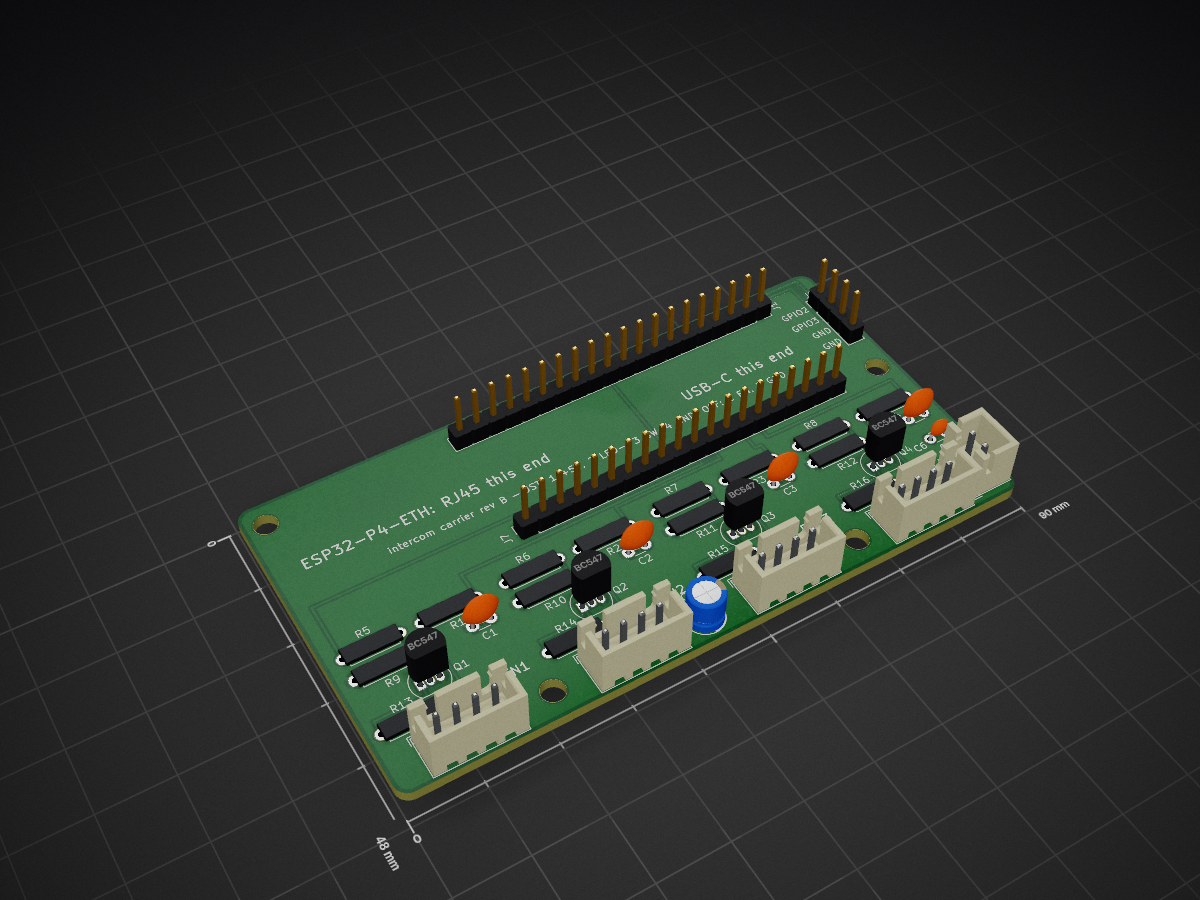
Intercom carrier is an open-source printed circuit board by haarts, from the haarts/intercom repository on GitHub. It is a 2-layer board of 90 × 48 mm with 38 parts on 49 nets, routed with 88 tracks and 1 via.
It is built around the BC547. Its parts include 16 resistors, 8 connectors, 6 capacitors and 4 transistors.
A home intercom built from Waveshare ESP32-P4-WIFI6-POE-ETH wall boxes. There are two routes:
lanicom/): serverless. Boxes find each other on the LAN and talk
directly, with encrypted unicast. No Mumble server, and Home Assistant is optional (it can join as a
peer), so friends can build it too. See lanicom/README.md and the
plan with its design review in lanicom/PLAN.md.| Path | What |
|---|---|
lanicom/ | Serverless intercom: protocol spec, C core, ESPHome component, Python CLI, HA integration |
esp32-mumble/ | dchote/esp32-mumble (git subtree) with ESP32-P4 support and audio fixes. Board config: esp32-mumble/esphome/waveshare-esp32-p4-poe.yaml |
esphome/p4-bringup.yaml | Minimal bring-up config for the board (Ethernet, codec, mic level) |
server/mumble/ | Docker Compose file for the Mumble server (Murmur) |
tools/voicetest/ | End-to-end voice test: play speech near the board, record it from Mumble, score it with Whisper |
PROJECT_NOTES.md | Decisions, measurements and open items |
python3 -m venv .venv && .venv/bin/pip install esphome==2026.7.1
cd esp32-mumble/esphome
../../.venv/bin/esphome run waveshare-esp32-p4-poe.yaml   # first flash over USB-C, later OTA
The Mumble server address is filled in automatically with Home Assistant's IP when the device is adopted, or set it under the device's "1. Server" setting.
tools/voicetest/run.sh local ptt tools/voicetest/berend-nl-pad.wav nlPlays the clip on this machine's default audio output, records what the board sends
to the Mumble server, and prints Whisper's transcript and word error rate. See the
comments in run.sh for the options.
| Qty | Value | Footprint | References |
|---|---|---|---|
| 8 | 1k | Resistor_THT:R_Axial_DIN0207_L6.3mm_D2.5mm_P7.62mm_Horizontal | R1, R2, R3, R4, R5, R6, R7, R8 |
| 5 | 100nF | Capacitor_THT:C_Disc_D3.0mm_W1.6mm_P2.50mm | C1, C2, C3, C4, C6 |
| 4 | 0R | Resistor_THT:R_Axial_DIN0207_L6.3mm_D2.5mm_P7.62mm_Horizontal | R13, R14, R15, R16 |
| 4 | 10k | Resistor_THT:R_Axial_DIN0207_L6.3mm_D2.5mm_P7.62mm_Horizontal | R9, R10, R11, R12 |
| 4 | BC547 | Package_TO_SOT_THT:TO-92_Inline | Q1, Q2, Q3, Q4 |
| 4 | MountingHole_3.2mm_M3 | MountingHole:MountingHole_3.2mm_M3 | H1, H2, H3, H4 |
| 1 | 10uF | Capacitor_THT:CP_Radial_D5.0mm_P2.00mm | C5 |
| 1 | Button 1 (JST-XH) | Connector_JST:JST_XH_B4B-XH-A_1x04_P2.50mm_Vertical | J2 |
| 1 | Button 2 (JST-XH) | Connector_JST:JST_XH_B4B-XH-A_1x04_P2.50mm_Vertical | J3 |
| 1 | Button 3 (JST-XH) | Connector_JST:JST_XH_B4B-XH-A_1x04_P2.50mm_Vertical | J4 |
| 1 | Button 4 (JST-XH) | Connector_JST:JST_XH_B4B-XH-A_1x04_P2.50mm_Vertical | J5 |
| 1 | Off switch (JST-XH) | Connector_JST:JST_XH_B2B-XH-A_1x02_P2.50mm_Vertical | J8 |
| 1 | P4 pins 1-20 | Connector_PinSocket_2.54mm:PinSocket_1x20_P2.54mm_Vertical | J1 |
| 1 | P4 pins 21-40 | Connector_PinSocket_2.54mm:PinSocket_1x20_P2.54mm_Vertical | J7 |
| 1 | Spare GPIO2/3 | Connector_PinHeader_2.54mm:PinHeader_1x04_P2.54mm_Vertical | J6 |
It measures 90 × 48 mm and has 2 copper layers, 1.6 mm thick.
38 parts, built around the BC547. The full list of its parts is on this page, with links to each part's symbol and footprint where PCBKit's library has them.
From the haarts/intercom repository on GitHub, at the commit this page was made from: the board is hardware/carrier/intercom-carrier.kicad_pcb and its schematic hardware/carrier/intercom-carrier.kicad_sch. PCBKit opens the board in the browser, with nothing to install.
Its repository states no licence, so its author keeps all rights: ask haarts before reusing the design.
github-linguist/linguist
Language Savant. If your repository's language is being reported incorrectly, send us a pull request!

dotnet/iot
This repo includes .NET Core implementations for various IoT boards, chips, displays and PCBs.

peterheinrich/InternetOverSpaghetti
Transmitting IP packages over a pair of spaghetti thus demonstrating how media independent IP really is.

tebl/RC6502-Apple-1-Replica
An expandable SBC-version of the Apple 1 computer, easy to get started with and lot of cool stuff that can be added to it!


ZeroPhone/ZeroPhone-PCBs
PCB files for ZeroPhone - for gerbers and schematics, go to "Releases" tab!
