2 layers203 × 26.6 mm

 GG1627/helping-hand1
Smart ASL learning glove with real-time haptic feedback. Built with ESP32, flex sensors, and IMU. Features on-device MLP classifier (TFLite) for static ASL sign recognition (A-Z, 0-9) and a Flutter companion app.
Helping hand is an open-source printed circuit board by GG1627, from the GG1627/helping-hand repository on GitHub. It is a 2-layer board of 61 × 81.3 mm with 54 parts on 38 nets, routed with 106 tracks and 0 vias.
It belongs with the sensors and measurement boards of this library.
Course: CEN4908C
Project: Helping Hand
Target milestone: M5 Release Candidate
Due: October 28, 2026
Last updated: October 28, 2026
Helping Hand is an American Sign Language (ASL) learning glove we are developing for CEN4908C, Computer Engineering Senior Design. The glove measures finger bend and wrist motion. An ESP32 processes the sensor readings and sends them over Bluetooth Low Energy (BLE) to our Android Flutter app, where users can practice signs, see live feedback, record gestures, and save their progress.
This repository contains our firmware, app, model-training code, hardware documentation, and the KiCad files for our PCB design, which is still in progress.
ff6a9abd581d19cce9d38com.example.flutter_apphelping-hand-83137Current development handoff (November 6): Software preparation for the repaired glove is ready for physical calibration and real data collection. Start with the glove/model session handoff for completed changes, current model contracts, verification limits, and the next steps once assembly is done. The milestone dates and historical evidence below remain labeled for their original submissions.
The alpha results below are from commit
cce9d38. Earlier beta work is documented indocs/BETA_BUILD_STATUS.md. The original assignments are inM4-Beta-Build.mdandT2-Beta-Test-Plan.md. Our beta work outline and test plan are available inoutput/pdf/M4_Beta_Build_Work_Outline.pdfandoutput/pdf/T2_Beta_Test_Plan.pdf.
Our alpha build connected the following parts of the system:
Glove sensors → ESP32 static classifier → BLE packets → Flutter feedback → saved local progress → Firestore sync
As of October 27, about two of our flex sensors were broken, they were reading as flexed when they were not. We believe this is due to age. We ordered 5 Adafruit Short Flex Sensor #1070 replacements and an ICM-20948 nine-axis IMU #4554. On November 5, Gael confirmed that all required parts have arrived, including the replacement flex sensors, ICM-20948, and piezo elements. Sensor replacement, installation, and calibration remain unconfirmed. Firmware support for the ICM-20948 and AK09916 magnetometer has now been added, while keeping the older sensor path. The November 5 recording update adds optional magnetic data to BLE and CSV/JSON exports as well as serial diagnostics; see the recording notes. The ICM-20948 integration reference covers wiring, calibration, fusion, current driver limitations, and recognition experiments for the received nine-axis board. Developer Mode now includes a guided calibration workflow for measured flex ranges, stationary gyro bias, axis checks, profile export, and profile-linked raw recordings. Applying calibration to inference remains a separate reviewed model/firmware update. The sequence preprocessing guide documents longer-window and 11/14-feature candidate preparation, strict no-trim checks, and Python/Flutter parity. The deployed word model remains 96 × 11 until a replacement is trained and validated. Orientation fusion and new-board testing are still pending. The BLE word-model inputs remain the existing six motion values. We have also received ten piezo buzzers: one for each finger and five in an X on the back of the hand. The firmware now sets up all ten buzzer pins and can play a timed PWM tone on one buzzer at a time without blocking the main loop. We still need to review the circuit, decide how each cue should work, and test it on the glove. The app and classifier do not trigger the buzzers yet.
Since the October 6 demo, we have continued working on the KiCad schematic, planning the board layout, and looking into ways to improve the TCN. The PCB layout is not finished, and we have not measured an improvement in model accuracy from this work. More details are in the October 27 status notes. We have also begun planning on how to sew in the flex sensors and the 9-axis IMU into the glove using conductive thread and have practiced making small circuits with conductive thread to get a feel for it before adding it to our project. We plan to use multiple layers of fabric (like a PCB) to ensure that we do not short any connections.
The app includes Record Signs and a trained TCN for Hello, Please, and Yes. Users start an attempt, perform the sign, and finish the attempt. The phone runs the model locally and saves completion when the prediction meets the matching and confidence requirements. Recorded replay checks passed on the Android emulator. Fresh glove testing is Not run. See the training notes and integration guide.
The RC keeps the full beta feature set and adds a custom PCB design:
Static recognition: the recorded 34-class model is the default. The original 36-class (A–Z, 0–9) model is kept as a regression baseline, along with the stable-prediction completion rule.
Dynamic word recognition: TCN inference with saved completion for Hello, Please, and Yes.
Custom PCB (new in M5): KiCad schematic work and board-layout planning for the ESP32-S3 and 15 resistors in the flex-sensor and piezo circuits. The board is not yet routed or fabricated.
Process documentation:
| Rubric category | What we have implemented | Testing and remaining work |
|---|---|---|
| Usability: Interface | Account screens, branded Home and learning screens, Alphabet/Numbers/Words selection pages, and saved progress indicators. Each target has its own practice page. | Software layout checks were completed. Accessibility checks on the intended phone and usability testing with people outside the team are Not run. |
| Usability: Navigation | Users can select a target, open practice, return with Back, retry an attempt, and access account and connection controls. Other word pages explain when recognition is unavailable. | Current-phone navigation checks are Not run. A selected static target can still complete after leaving its practice page; we still need to decide how Back should handle an active target. |
| Usability: Perception | Static practice shows prediction, confidence, hold progress, Retry, and BLE connection status. Word practice shows the predicted word and attempt result. Account and save/sync status are also visible. | We still need to check whether users understand the feedback. Buzzer pins and timed tone control are set up, but automatic corrective cues and physical feedback tests are Not run. |
| Usability: Responsiveness | BLE and Firebase work asynchronously, Firebase starts when needed, and word inference runs in a background isolate. Buzzer timing is checked in the main loop without a blocking delay. | Latency on the intended phone and sustained BLE streaming measurements are Not run. |
| Build Quality: Robustness | We kept the original static model for regression checks. Word attempts check packet validity and timing and are canceled on disconnect, Back, or backgrounding. Progress is saved locally before cloud sync. | Earlier word integration passed 42 focused Flutter checks, three native Android recorded replay checks, and a debug APK build. Current repaired-glove regression, stress testing, and full account/offline tests are Not run. |
| Build Quality: Consistency | Static completion requires a matching prediction at 80% confidence or higher for at least 750 ms and five packets. Hello/Please/Yes use Start attempt / Finish sign and require the top predicted word to match at 80% confidence or higher. Progress is saved per account. | Repeatability across wearers and wrist angles, unrelated-motion rejection, and live account-isolation checks are Not run. The word model has no rest/unknown class. |
| Build Quality: Aesthetic Rigor | Login, signup, Home, and learning screens share the Helping Hand text branding, colors, and fonts. Practice pages use matching controls and feedback. We are also planning the PCB layout and how to sew the sensors into the glove. | Software visual/layout checks were completed. The PCB layout and sewn assembly are still in progress; final glove appearance, fit, and comfort tests are Not run. |
| Area | What we added | Testing and remaining work |
|---|---|---|
| Accounts | Firebase email/password signup, sign-in, password reset, and sign-out. Creating an account can link the existing anonymous account to keep its progress. | We reported signup and sign-in working, but did not record the exact build/device or complete all account tests. |
| Learning interface | Matching branding and colors, Alphabet/Numbers/Words selection pages, separate practice pages, and Back navigation. | Targeted code analysis and visual/software checks were completed. Current-phone navigation and usability tests with people outside the team are Not run. |
| Static recognition | A recorded 34-class MLP runs on the ESP32 by default. We kept the original synthetic 36-class model for comparison. | The recorded model excludes J/Z. Held-out recordings were evaluated for A, B, 1, and 3 only, so these results do not show accuracy across all classes or on fresh live attempts. See the static model notes. |
| Word training | We compared TCN, CNN-GRU, and CNN-LSTM on 15 Hello/Please/Yes trials. Each model used the same nine training, three validation, and three test trials, with no trial split between sets. | All three models got 3/3 validation trials correct. TCN was selected because it was smallest and got 3/3 reserved test trials correct. The recordings came from one reported wearer at a neutral wrist angle, so we still need broader testing. |
| Word practice | The app runs the 48,324-byte TCN locally using Start attempt / Finish sign. Completion requires the top prediction to match the selected word at 80% confidence or higher. | 42 focused Flutter checks, three native Android recorded replay checks, and a debug APK build passed. Fresh glove recognition and latency on the intended phone are Not run. |
| Progress | Progress is saved locally for each user and synced to Firestore. Word completion uses the existing completed-exercise field. | We still need full app tests for word sync, restarting, switching accounts, offline recovery, and using another device. |
| Recording and preprocessing | Users can review complete trials, save or discard them, and export CSV/JSON files. Preprocessing resamples using device timestamps and fits standardization on training data only. | Raw recordings are stored separately from Firebase progress. We need more repetitions, wearers, and wrist angles. |
| Hardware feedback | We kept the existing flex/accelerometer/gyroscope BLE connection. Haptics were not integrated in the beta. | The later repair, IMU, buzzer, and PCB work is still in progress; ordering or receiving parts does not mean they have been integrated. |
| Area | Alpha status | Testing and limitations |
|---|---|---|
| ESP32 sensor runtime | Implemented; September build passed | Reads five flex inputs and six accelerometer/gyroscope values and emits structured BLE packets. |
| Static sign classification | Implemented; tested on the earlier glove | The alpha build’s embedded 36-class TFLite MLP predicts A–Z and 0–9 from flex inputs. The team demonstrated glove-to-phone prediction and confidence output at the end of the previous semester. |
| BLE interface | Implemented; tested on the earlier glove | The app scans for HelpingHand-Glove, connects, subscribes to notifications, parses packets, and handles disconnect/reconnect states. Historical videos below show physical glove/sensor data reaching the phone. |
| Learner practice | Implemented; automated checks passed | A tile selects a target. Progress is awarded only after a matching prediction at or above 80% confidence remains stable for at least 750 ms and five packets. |
| Persistent progress | Implemented; automated checks passed | Learned letters, learned numbers, and completed exercises are saved locally first and synchronized to Firestore through anonymous authentication. |
| Record Signs | Implemented; pilot recording collected | The simplified static-sign flow selects a letter/number, counts down for three seconds, records live packets, and saves/exports CSV/JSON. A real-device pilot export is preserved in backend/recorded_data/; it is not model evidence because it has one signer and mostly one trial per label. |
| Word preprocessing | Implemented; automated checks passed | Schema validation, quality reports, fixed-rate resampling, fixed windows, deterministic splits, and train-only standardization are present. |
| Dynamic word models | Architecture foundation only | TCN, CNN-GRU, and CNN-LSTM candidates build and convert in software tests, but no real-data word training had been completed at that alpha snapshot. |
| Glove haptics | Research/design direction only | Research recommends beginning with small LRA actuators and a closed-loop driver. No haptic circuit, firmware command path, or physical validation existed at that alpha snapshot. |
| M4 requirement | What we implemented | What still needs testing or completion |
|---|---|---|
| Usability, interface, and navigation | Matching account and learning screens, target selection, separate practice pages, Back, Retry, and progress indicators. | Current-phone control tests and usability sessions with people outside the team are Not run. |
| Perception | Connection status, predictions, confidence, hold progress, word results, and save/sync status are shown near the relevant controls. | We still need to check whether users understand the feedback. Haptics were not integrated in the beta. |
| Responsiveness | BLE and Firebase work asynchronously, and word inference runs in a background isolate. | Phone latency and sustained streaming measurements are Not run. |
| Robustness and consistency | A shared BLE service, stable static-match rules, word recording/cancellation checks, and software regression checks. | Hardware edge cases, stress tests, rejection of unrelated motion, and static completion after Back still need work or testing. |
| Aesthetic rigor | Consistent branding, bundled fonts, matching learning pages, and software layout checks. | On-device accessibility and glove appearance/comfort tests are Not run. |
| External interface | Account, practice, recording, and progress controls connect to the app services. | Word recognition supports Hello/Please/Yes only. Sign-specific instructional media and haptic feedback are incomplete. |
| Persistent state | Successful practice updates each user's local JSON progress and authenticated Firestore document. | We still need full tests for account separation, offline recovery, restoring progress after restart, and word sync. |
| Internal systems | The ESP32 runs static recognition, Flutter runs the TCN, and the backend handles sequence validation, training, and export. | More wearer/wrist-angle testing, calibration after repairs, and fresh glove-to-phone tests are pending. |
| Submission and effort evidence | Git history, training/integration notes, and beta work-outline/test-plan files record our work. | These files alone do not show that the M4 report, stakeholder defense, or every rubric requirement is complete. |
| Alpha requirement | Helping Hand implementation |
|---|---|
| Usability and user control | Clearly labeled navigation, BLE scan/connect controls, learner target selection, retry/reset controls, and explicit recording save/discard/export actions. |
| Interface and navigation | Five persistent bottom-navigation destinations: Dashboard, Alphabet, Numbers, Record Signs, and BLE Testing. |
| Perception and feedback | Connection, prediction, confidence, hold progress, success/retry, recording quality, local-save, synchronization, offline, and failure states appear near the action they describe. |
| Responsiveness | BLE and Firebase work is asynchronous. Firebase initialization is lazy and cannot block application launch or local progress access. |
| Build quality and robustness | Flutter analysis, Flutter tests, Android APK build, ESP32 build, and the complete backend test suite pass on the validation environment documented below. |
| Vertical feature | The static learner loop connects physical sensor input, embedded inference, BLE transport, mobile feedback, and persistent learner state. |
| Persistent state | Progress is written to app-private local storage first and optionally synchronized to an authenticated, user-owned Firestore document. |
| Internal processing | The ESP32 performs static TFLite inference; Flutter validates stable predictions; the backend validates and prepares dynamic word sequences. |
flowchart LR
    FLEX[Five flex sensors] --> ESP[Adafruit Feather ESP32-S3]
    IMU[IMU accelerometer + gyroscope] --> ESP
    MODEL[Recorded 34-class static MLP] --> ESP
    ESP -->|BLE notifications| BLE[Flutter BLE service]
    BLE --> LIVE[Live telemetry and learner feedback]
    LIVE --> TRACKER[Stable-prediction validator]
    TRACKER --> PROGRESS[Progress repository]
    PROGRESS --> LOCAL[App-private local JSON]
    PROGRESS -->|Firebase email/password Auth| FIRESTORE[Cloud Firestore]
    BLE --> RECORD[Record Signs workflow]
    RECORD --> FILES[App-private CSV + JSON export]
    FILES --> BACKEND[Validation and sequence preprocessing]
    BACKEND --> WORDMODEL[Selected real-recording TCN]
    WORDMODEL --> WORDPRACTICE[Flutter complete word attempts]
    BLE --> WORDPRACTICE
WORDPRACTICE --> PROGRESSThe firmware runs on the Adafruit Feather ESP32-S3 in
ESP32/src/main.cpp. It reads five flex sensors on
A0–A4 and communicates with the IMU over I2C (SDA=3, SCL=4).
imu_sensor.cpp now checks both 0x68 and 0x69 for
supported MPU-style parts or the new ICM-20948. The ICM path uses its own banked
register map, sets +/-2 g and +/-250 degrees/second ranges, and reads the
AK09916 magnetometer through I2C bypass. Compass data is checked for readiness
and overflow and reported in uncalibrated microteslas through serial diagnostics.
A read failure in the motion sensor marks it offline and enables discovery retries.
If the compass is unavailable, acceleration/gyro streaming can still continue.
BLE still sends the existing ax/ay/az in g and gx/gy/gz in degrees/second. The current word model still uses five flex and six motion inputs; the new magnetic readings do not change its input shape. Magnetic calibration, axis alignment, fusion, and recognition on the replacement hardware still need testing. The firmware changes are checked against the TDK datasheet.
The default static model is the recorded 34-class MLP; the original synthetic
36-class model is kept for regression checks. Firmware sends predictions and
confidence over BLE as HelpingHand-Glove and resumes advertising after a
disconnect. The configured stream rate is 40 Hz (adjustable to 25–50 Hz).
Phone-side rate and packet loss still need measurement.
The planned PCB schematic includes the ESP32-S3 and 15 resistors for the flex
and piezo circuits. Placement, routing, fabrication, and board testing are not
complete. The proposed sewn glove uses five fabric layers total: inner liner,
first routing fabric, insulating separator, second routing fabric, and outer
cover. This separates two routing levels; final routing and movement tests must
confirm whether more local insulation is needed. See
M5_Work_Outline.md for the assembly plan and references.
Host-side simulated-I2C regression checks passed; run
python3 ESP32/test/imu_host_test.py with Python 3 and g++.
The full build attempt timed out during installation of the missing
tool-openocd-esp32 package, so board compilation is not confirmed. New IMU
bring-up, compass calibration, and sewn-glove testing are Not run.
The buzzers are outputs. piezo.cpp sets all ten pins LOW
before waiting for the serial connection. startPiezo(output, frequencyHz, durationMs) plays one tone at 50% duty cycle. updatePiezos() stops it from
the main loop when its time is up, and stopPiezos() cancels it early.
The code rejects requests before setup, while another buzzer is active, or with an invalid output, frequency, or duration. It accepts 20–20,000 Hz and 1–5,000 ms; these are code limits, not confirmed ratings for our buzzers. One LEDC channel is used for the selected pin, so only one buzzer can play at a time. We still need to choose a frequency for the actual piezo and driver. The buzzers stay off at startup and are not connected to app/classifier cues yet.
| Buzzer position | Feather pin label | ESP32-S3 GPIO |
|---|---|---|
| Thumb | A5 | 8 |
| Index / pointer | D5 | 5 |
| Middle finger | D6 | 6 |
| Ring finger | D9 | 9 |
| Pinky | D10 | 10 |
| Hand matrix left | SCK | 36 |
| Hand matrix right | MISO | 37 |
| Hand matrix center | D12 | 12 |
| Hand matrix up | D11 | 11 |
| Hand matrix down | MOSI | 35 |
These pins come from the resistor names and board labels in
pcb/pcb.kicad_sch, checked against the Feather pin definitions. Left, right,
center, up, and down describe the buzzer positions; we have not tested them as
directional cues yet. SCK/MISO/MOSI are used as buzzer outputs here, so they
cannot also be used for SPI at the same time. Compile-time checks catch repeated
pins and conflicts with the flex or I2C pins. Physical buzzer output, how the
cues feel/sound, driver suitability, and timing while BLE is running are
Not run.
The Android Flutter app is in flutter_app/.
Progress uses a local-first repository design:
The document contains only:
schema version learned letters learned numbers completed exercise identifiers an update timestamp
Raw glove recordings are never uploaded to Firebase. The UI exposes loading, saved locally, syncing, synced, offline/local-only, and failure states. Malformed local state falls back to a safe empty representation rather than crashing.
Record Signs creates labeled trials using the word-sequence-v1 contract.
The backend can:
Synthetic fixtures are software-test data only and are marked non-reportable. The deployed TCN currently covers Hello, Please, and Yes. It was trained on recordings from a single wearer in a neutral orientation and has no rest/unknown class.
These updated screenshots show our sign-in and account screens, Home, learning pages, and developer tools. Record Signs and BLE Testing show the disconnected state. These images show the interface, not a new glove-recognition test.
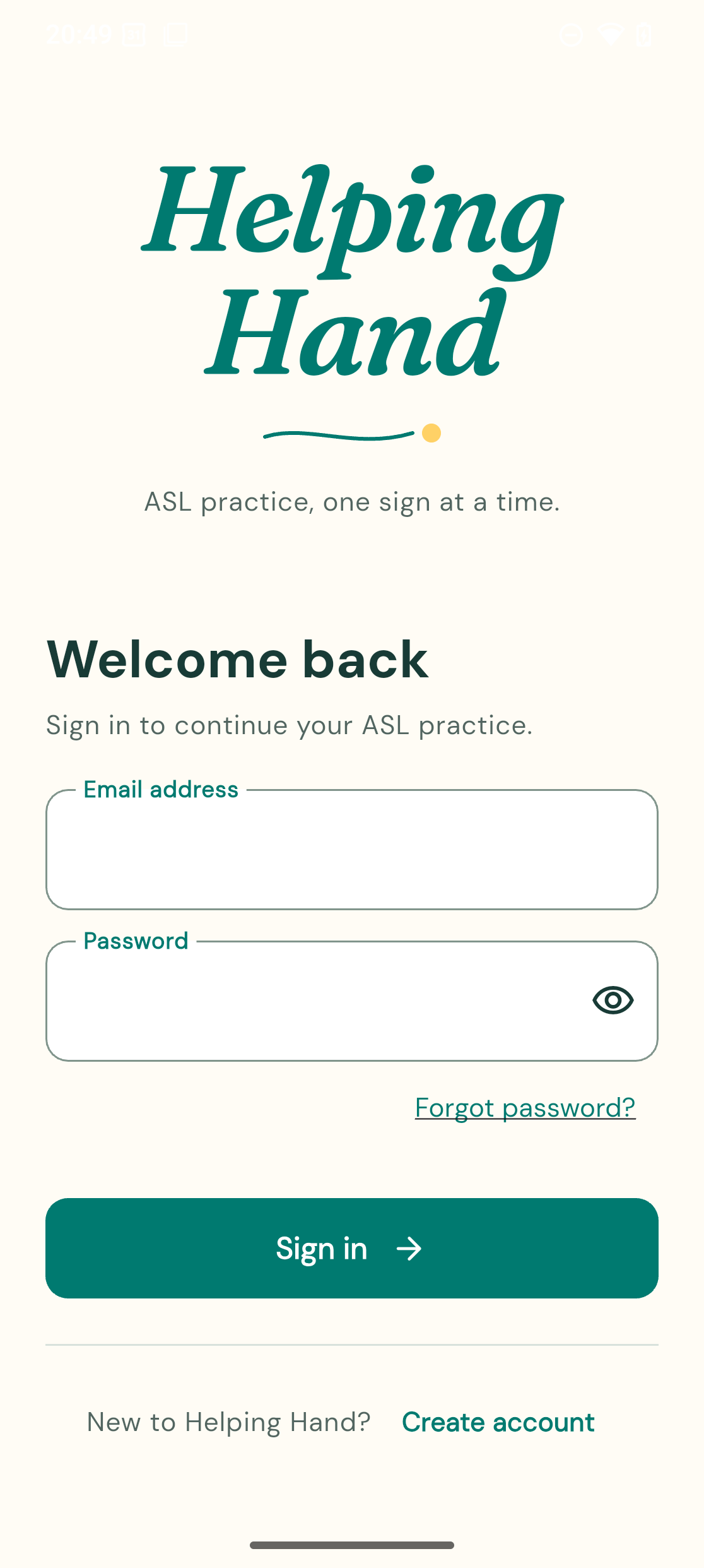 Sign in | 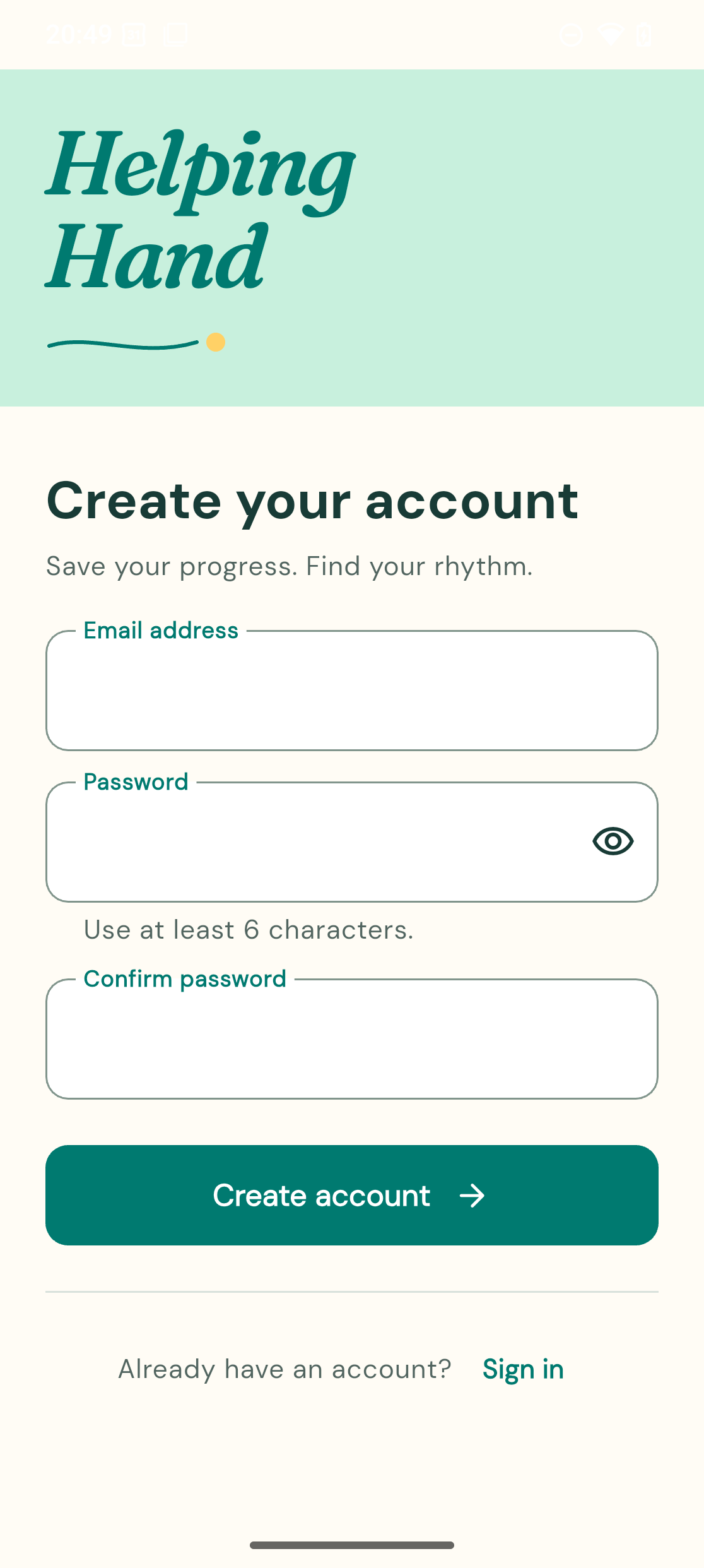 Create account | 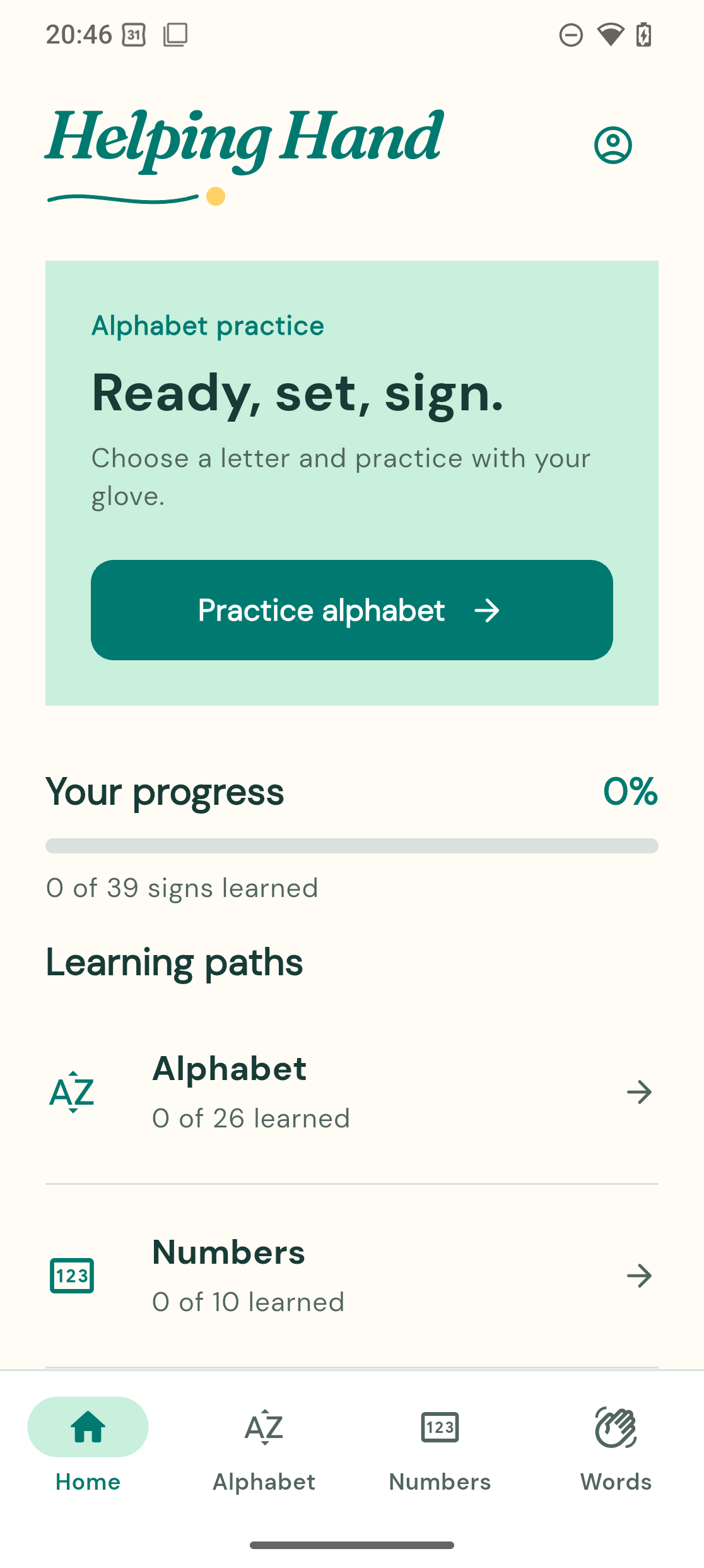 Home |
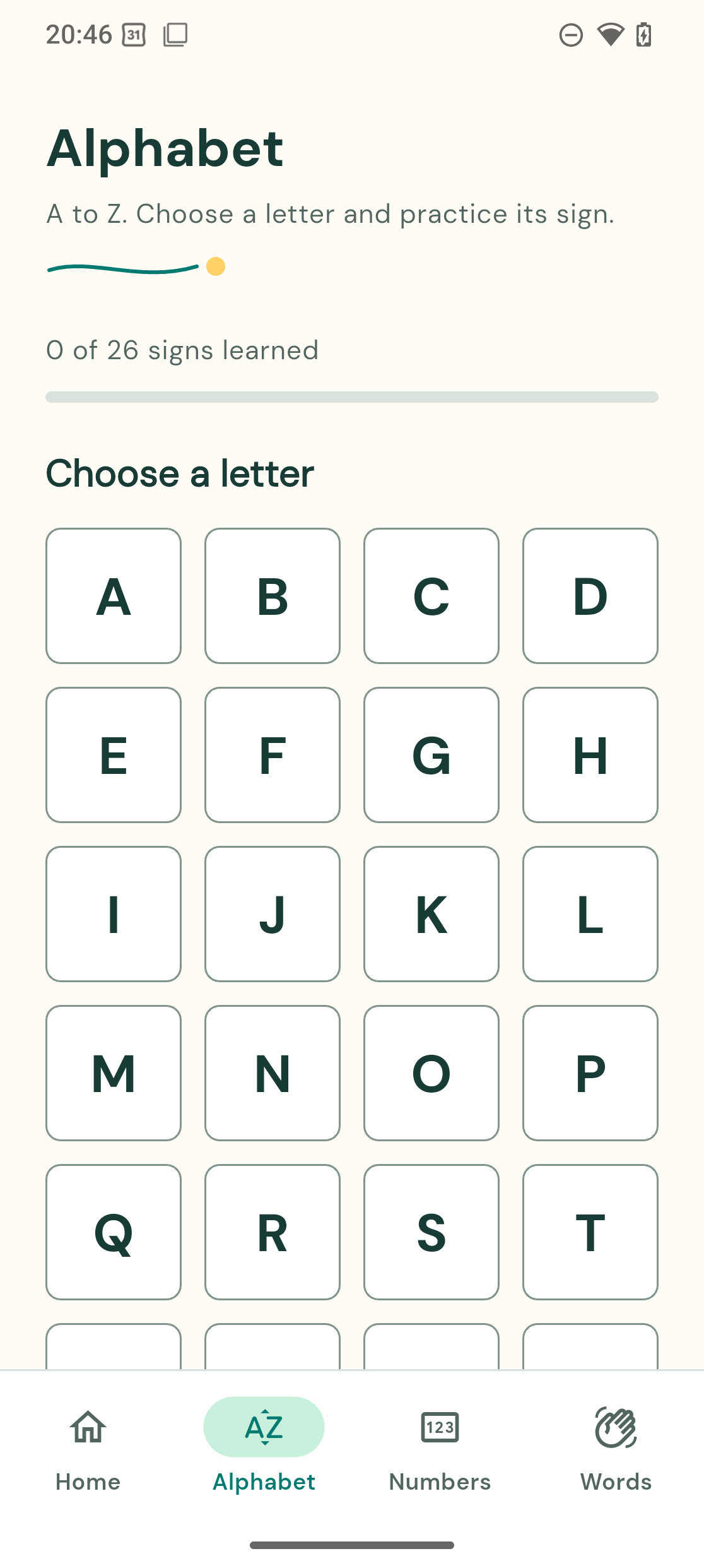 Alphabet | 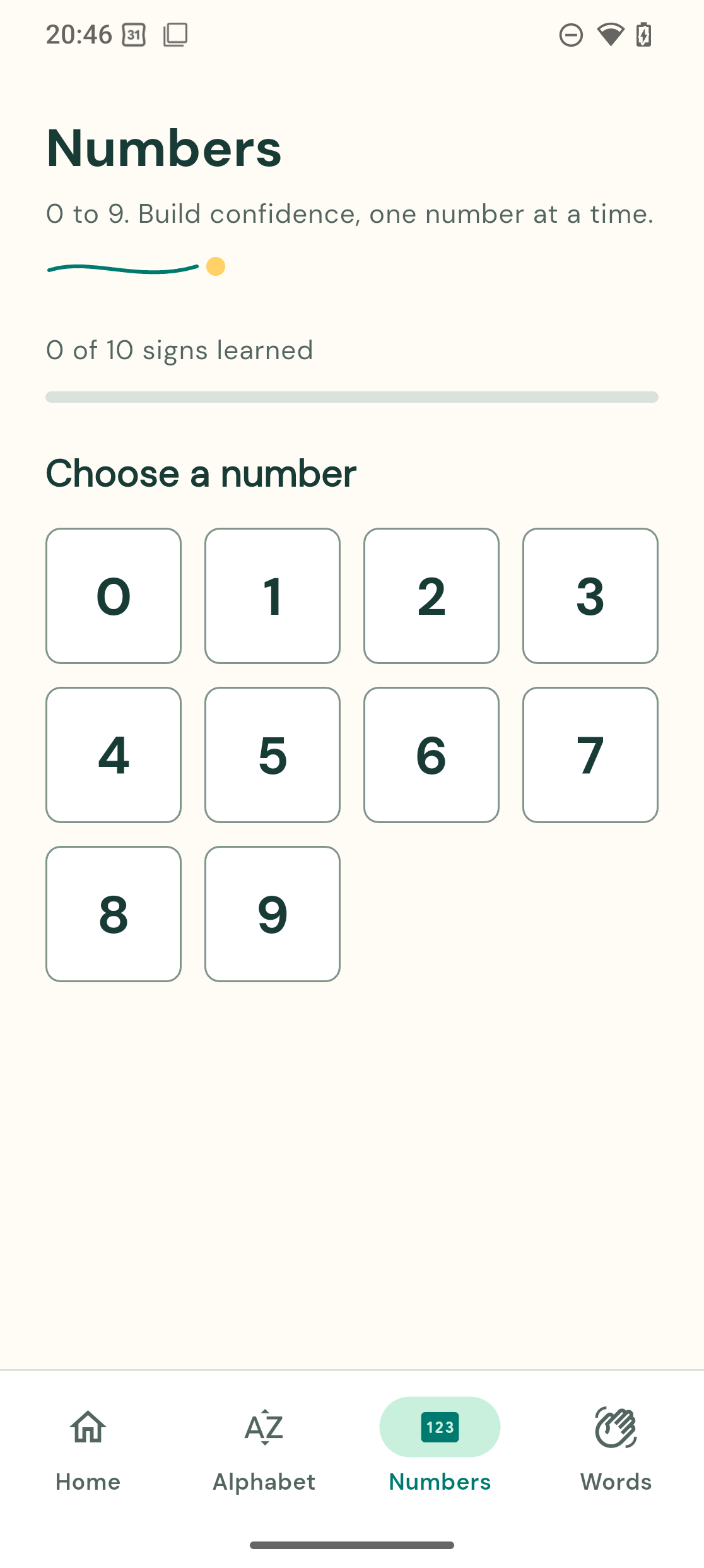 Numbers | 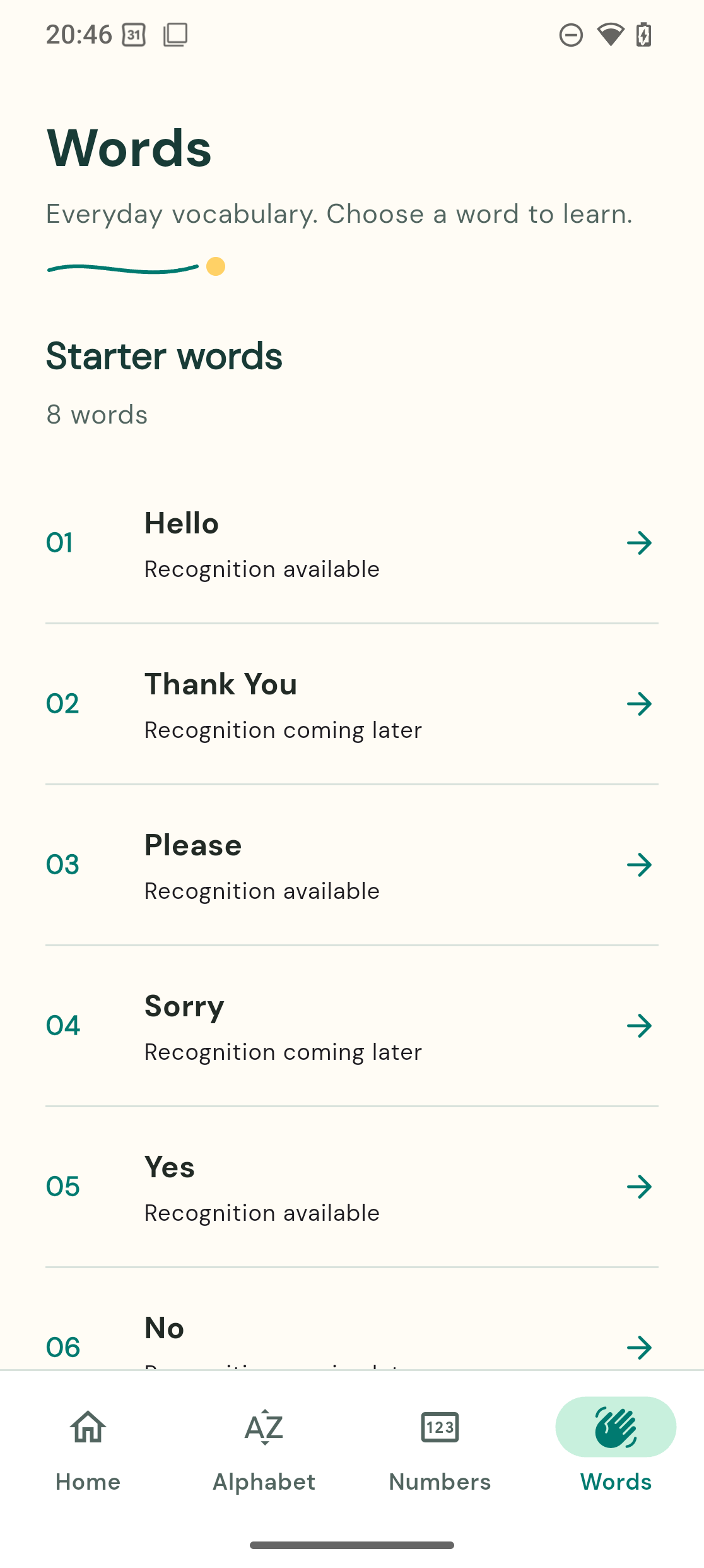 Words |
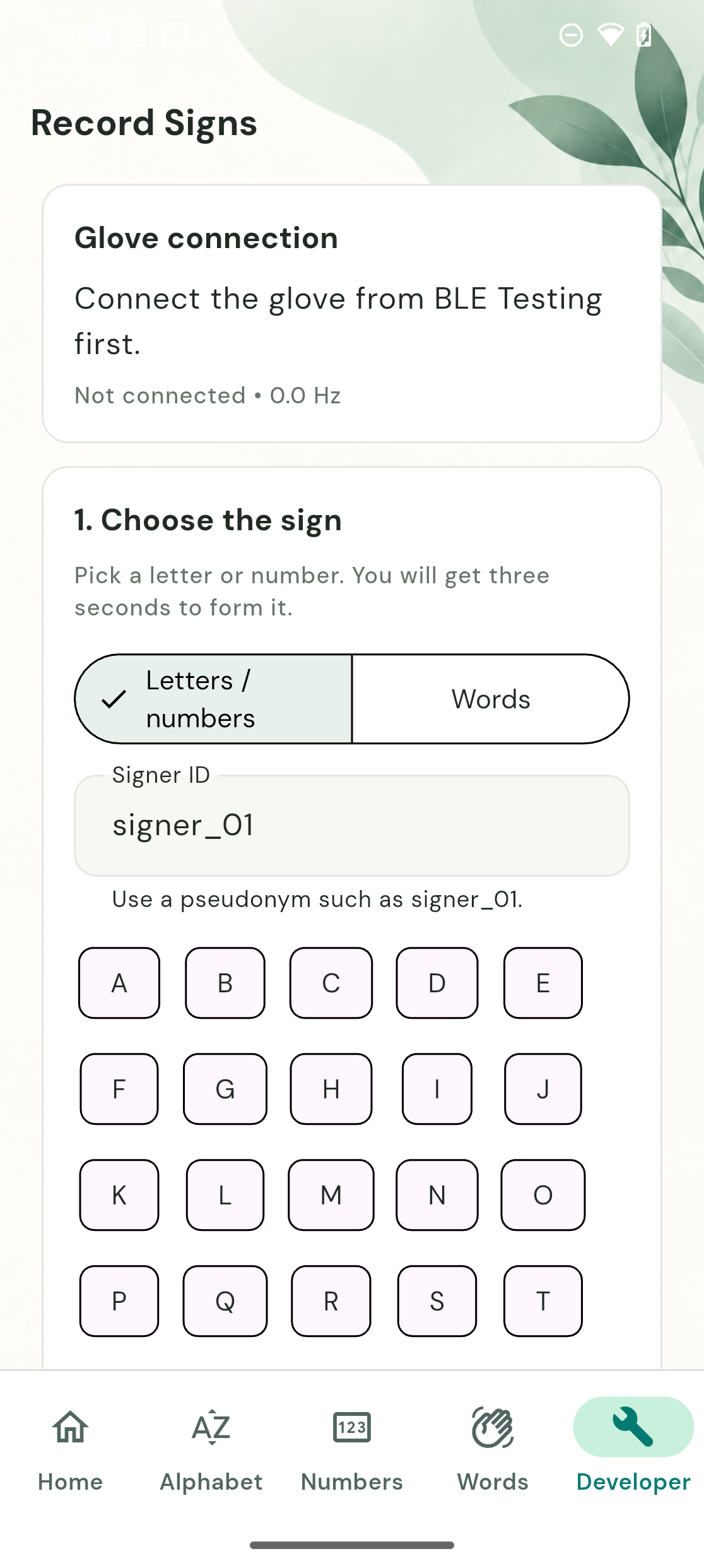 Record Signs | 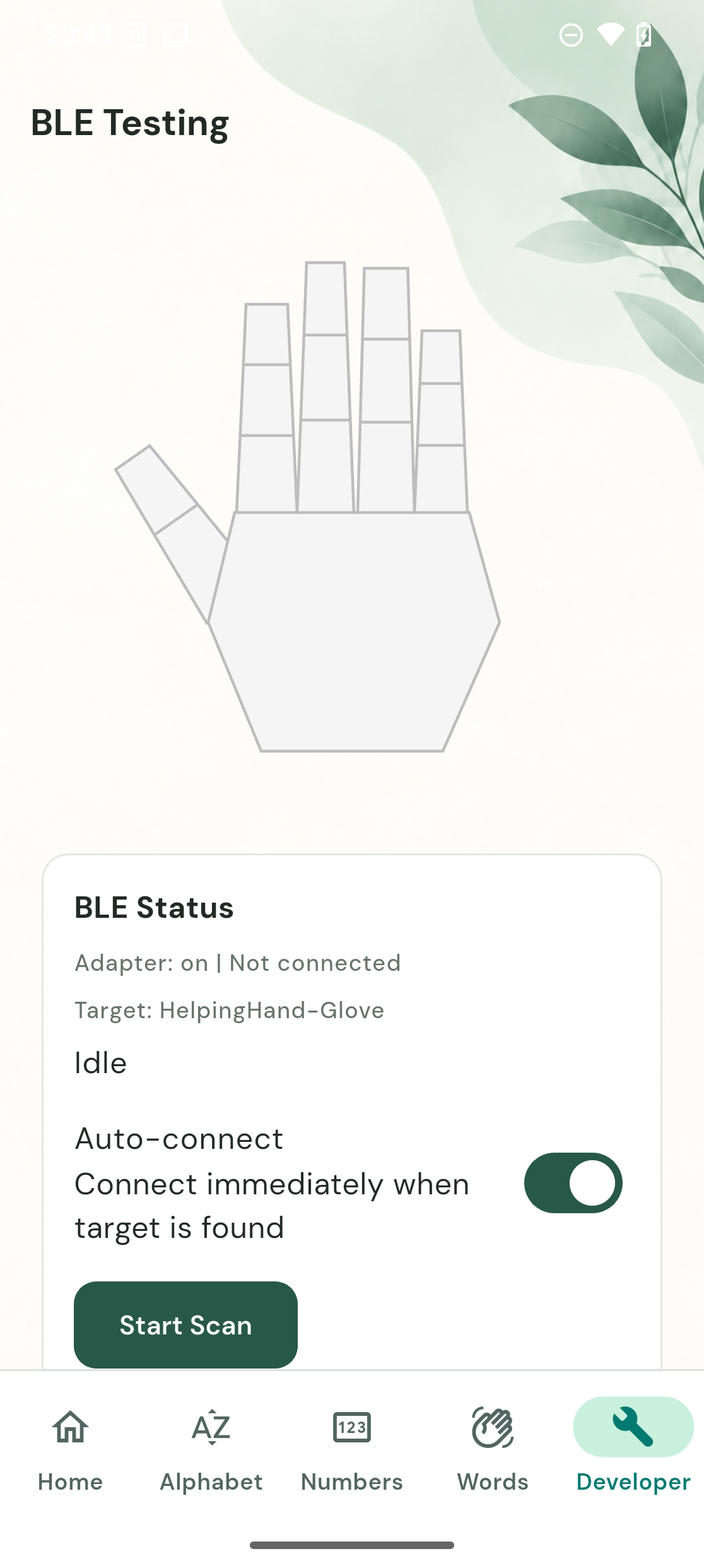 BLE Testing |
Earlier app screenshots
The screenshots below are from the earlier Android emulator build. The glove
was disconnected while we prepared the next hardware iteration. The Dashboard
shows the earlier app reaching its Synced progress-storage state.
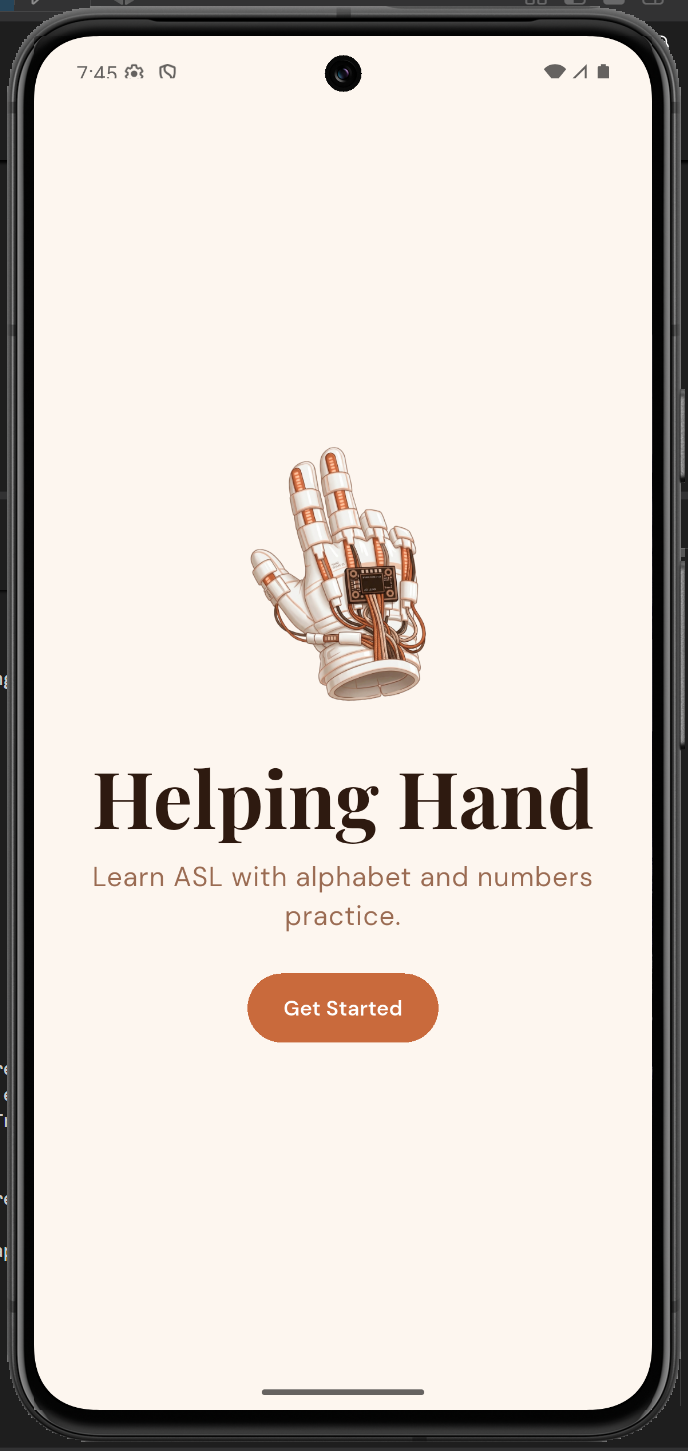 Start | 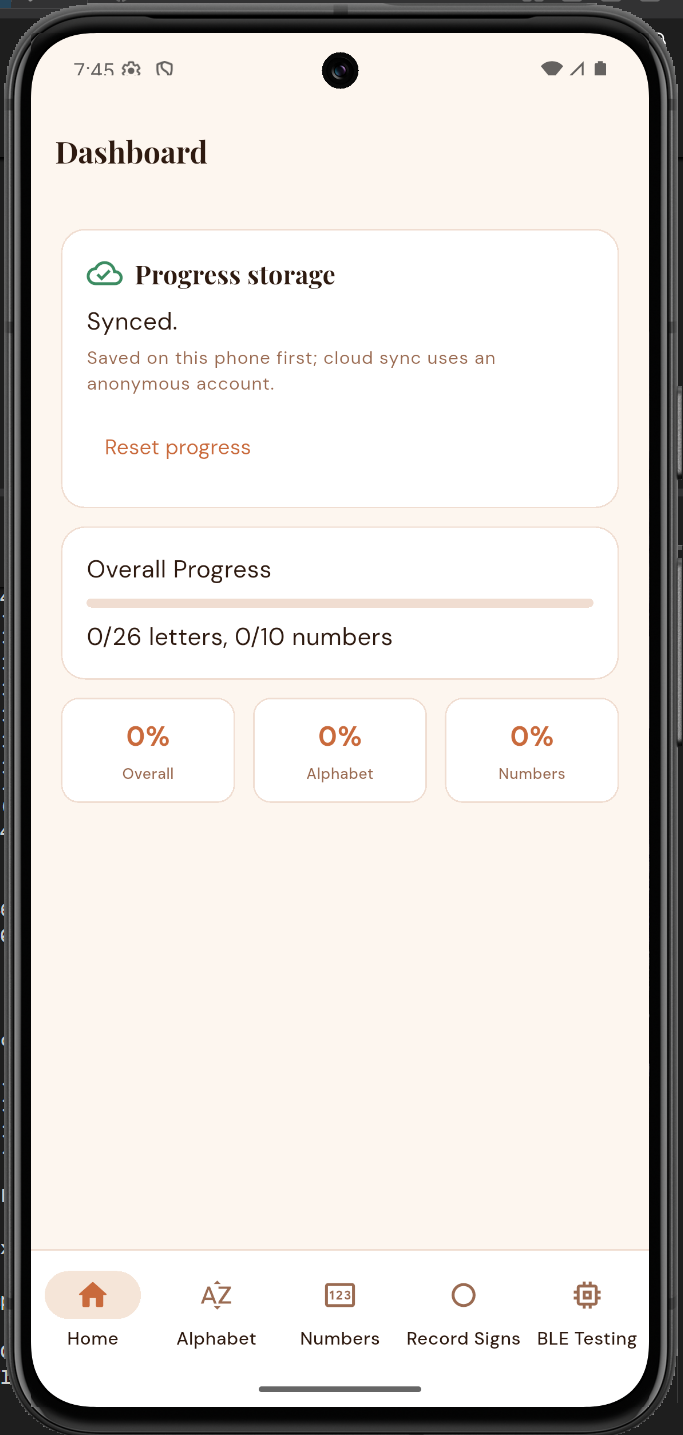 Dashboard and sync | 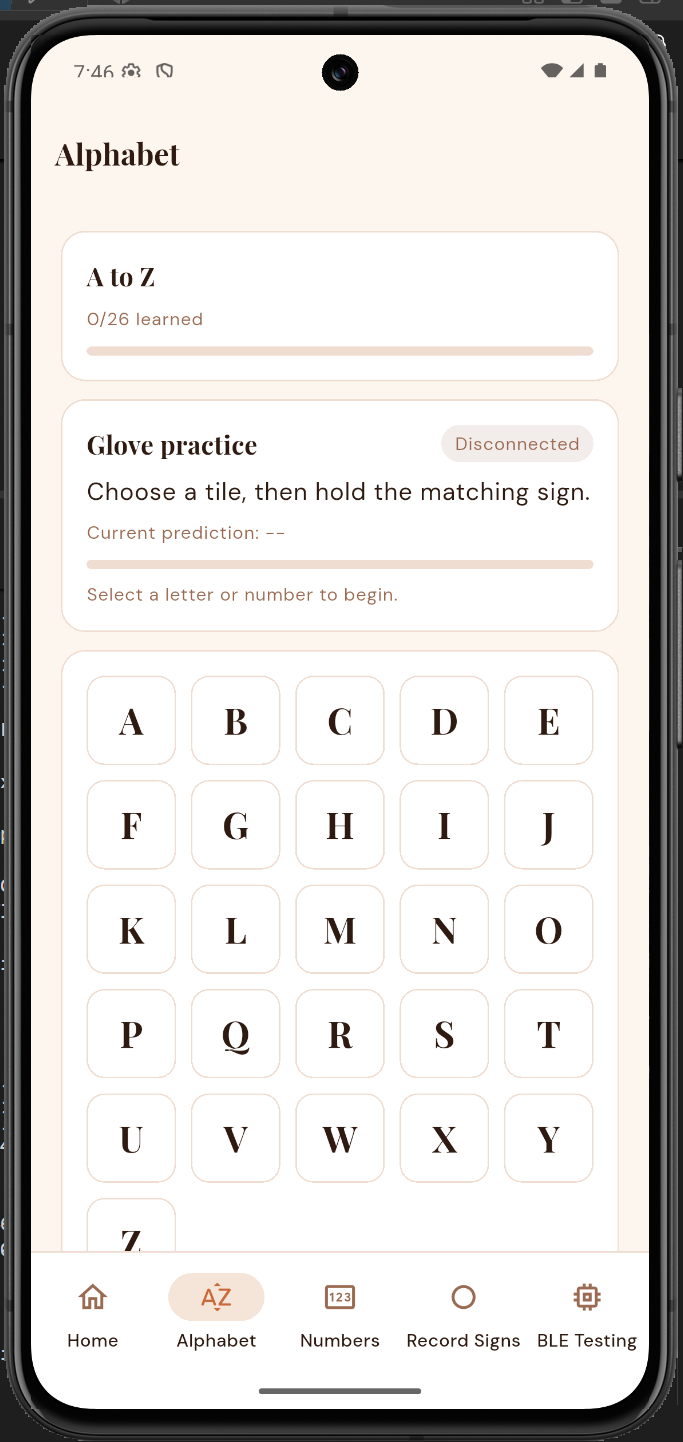 Alphabet practice |
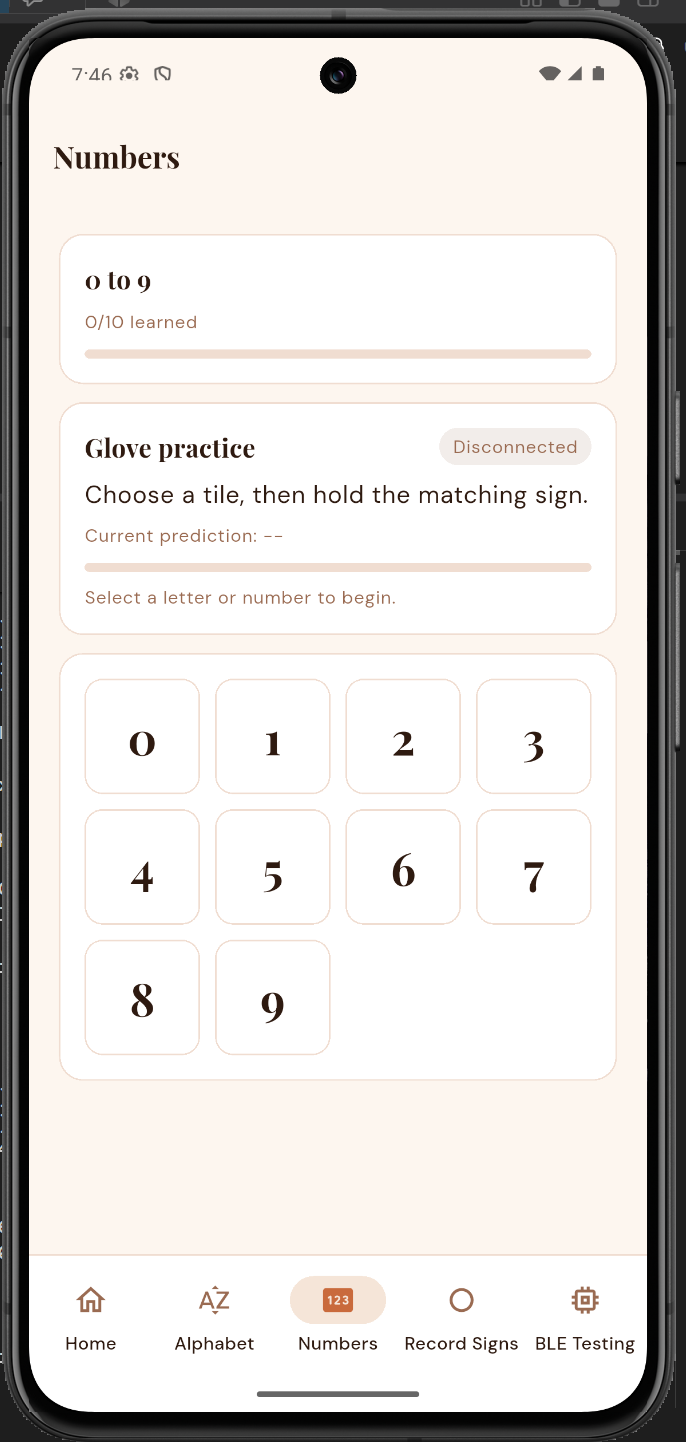 Number practice | 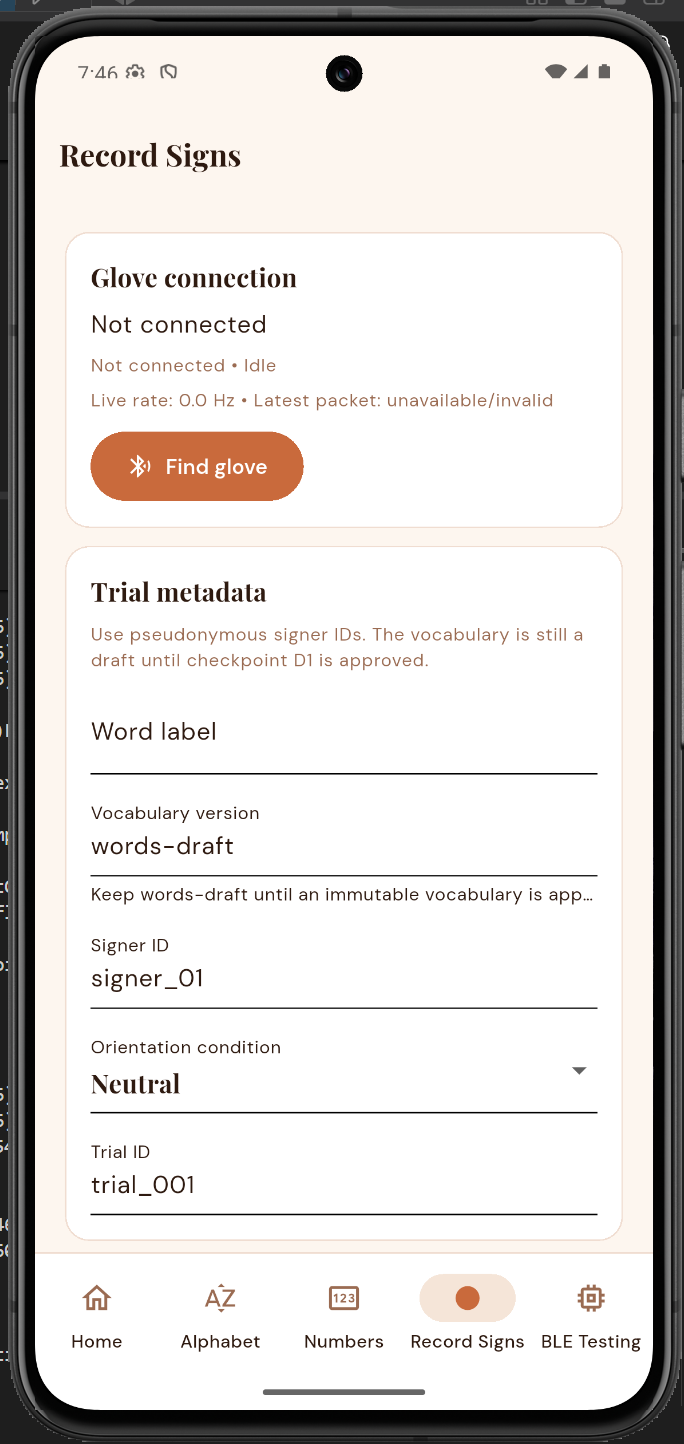 Record Signs | 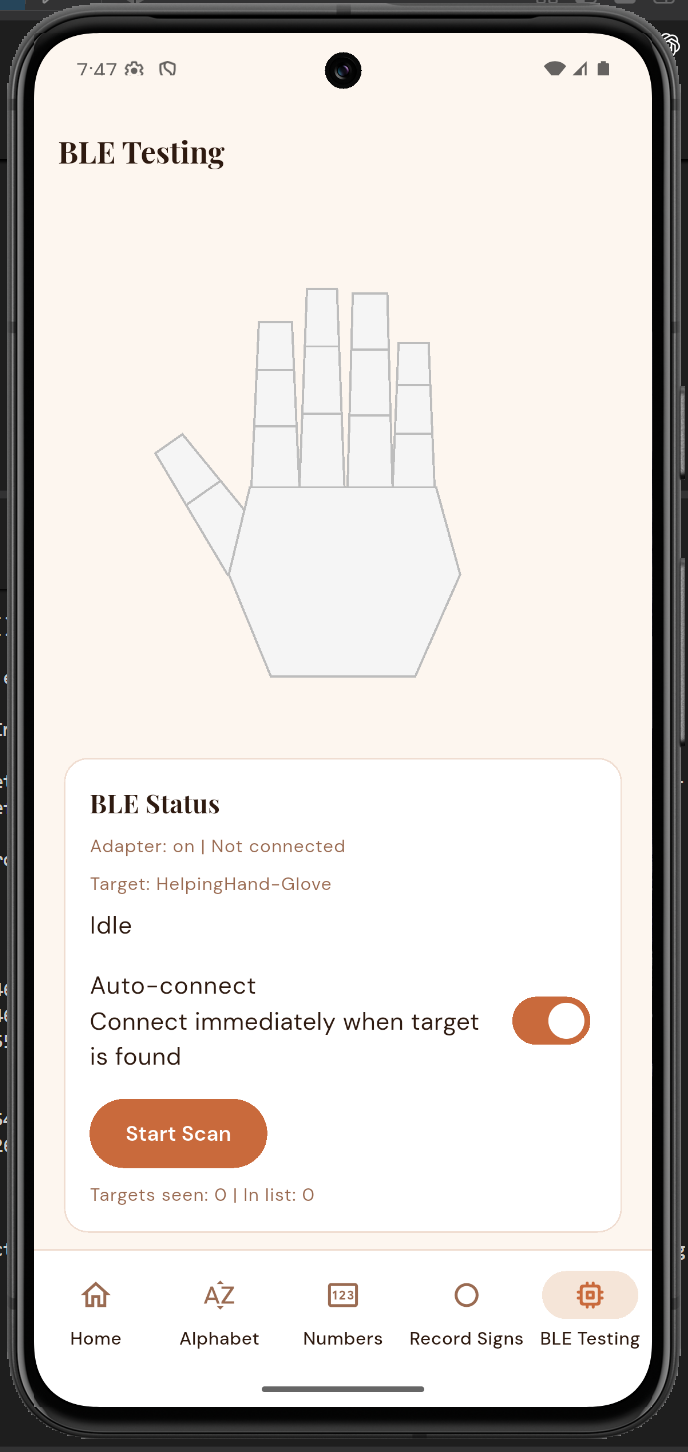 BLE Testing |
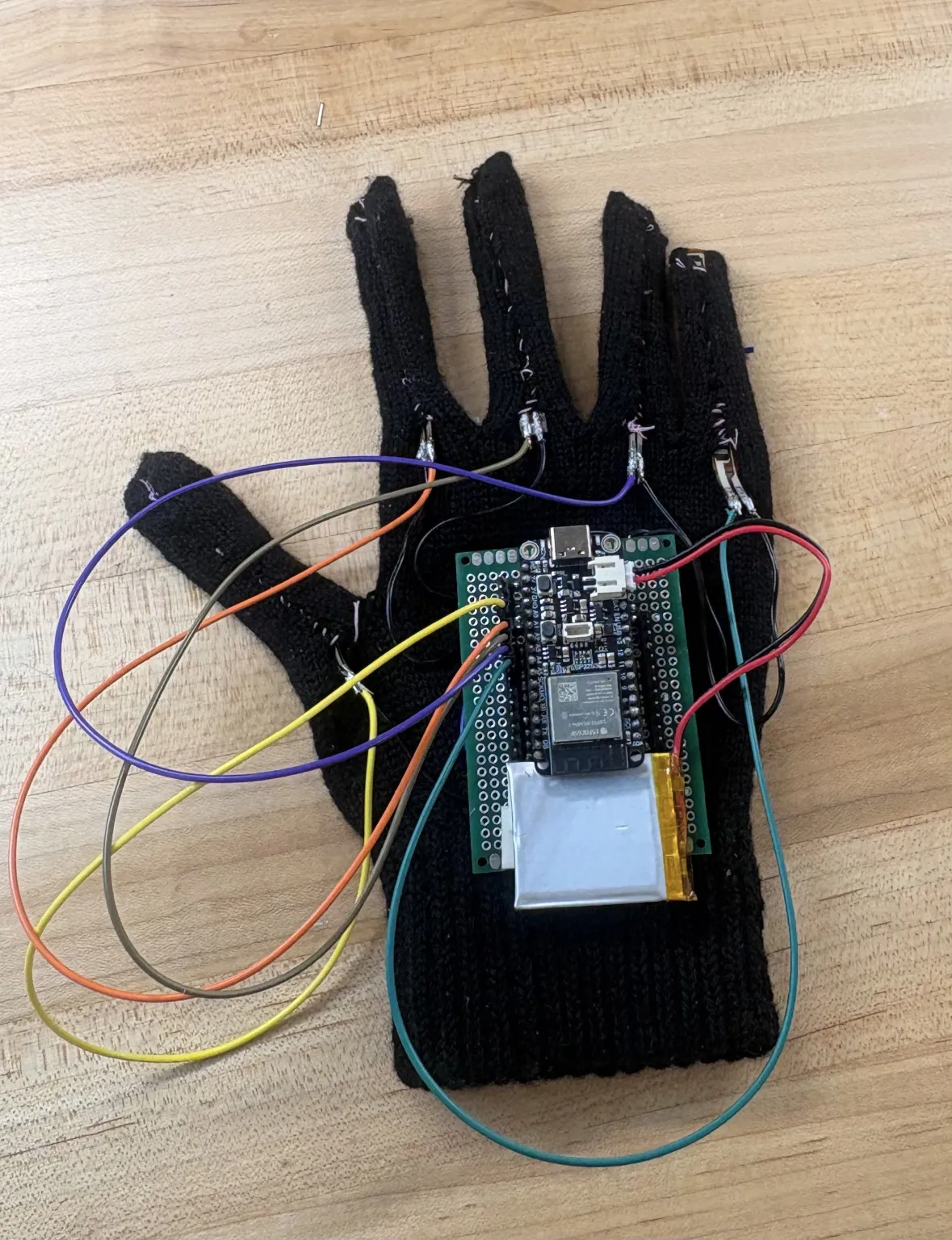
Our updated glove assembly is shown below. The photo documents the hardware arrangement; the planned sewn assembly, nine-axis IMU integration, and ten-piezo feedback system still need completion and testing.
These short videos were recorded at the end of the previous development semester. They establish that real flex-sensor changes reached the physical Android phone over BLE and changed the live hand visualization. The team's end-of-semester integration testing also displayed the static classifier's predicted sign and confidence on the phone.
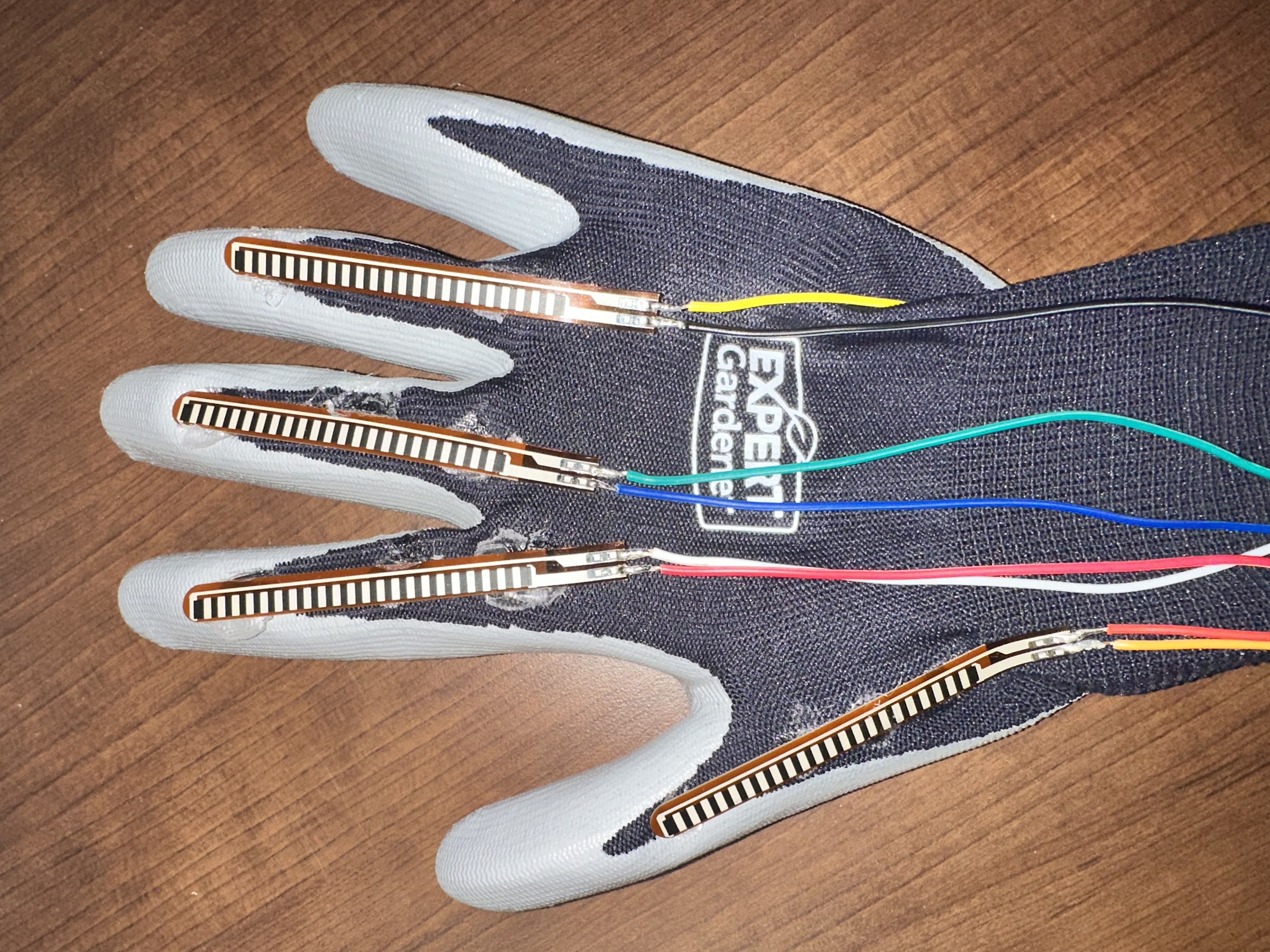
The videos are historical validation of the glove/BLE baseline. The current Firebase persistence, stable-prediction completion logic, and Record Signs workflow were validated through the current automated tests and emulator build; they were not present in exactly this form in the historical video.
HelpingHand-Glove and can auto-connect
when it appears.correct, try again, low-confidence,
and disconnected states near the exercise.To practice an already trained word, open Words > Hello, Please, or Yes, tap Start attempt, perform the complete sign, then Finish sign. A matching result at 80% confidence or above saves completion. See the word demo guide for timing and rehearsal. The steps below collect additional training recordings.
Use pseudonymous IDs such as signer_01. Never enter a participant's name or
email address, upload raw recordings to Firebase, or commit participant
recordings to Git.
The documented alpha validation environment on Windows used:
3.41.6 stable and Dart 3.11.4;3.10.11 for the complete TensorFlow backend suite;2.21.0 and pytest 9.1.1; and6.1.19.A physical Android device is required for meaningful BLE validation. An emulator can validate navigation, local persistence, and Firebase behavior but does not represent real glove discovery or sensor streaming.
git clone https://github.com/GG1627/helping-hand.git
cd helping-hand
If the repository is private, the project owner must grant the instructors access before submission.
cd flutter_app
flutter pub get
flutter analyze
flutter test
flutter build apk --debug
flutter devices
flutter run -d <android-device-id>
The debug APK is generated at:
flutter_app/build/app/outputs/flutter-apk/app-debug.apkThe Android Firebase client configuration targets the project listed above. Running the app does not require a service-account key. Use a team-provided test account; do not put credentials in this repository. The current application provides email/password account creation and sign-in. The older alpha used anonymous authentication; that historical behavior is not the current account flow.
For project maintainers only, Firestore rules are defined in
flutter_app/firestore.rules. Always verify the
selected Firebase project before deployment:
cd flutter_app
npx firebase-tools use helping-hand-83137
npx firebase-tools use
npx firebase-tools deploy --only firestore --project helping-hand-83137
Do not deploy open/test-mode rules, create service-account keys for the mobile app, or select any unrelated Firebase project.
Install PlatformIO if it is not already available:
py -3.10 -m pip install platformioBuild the firmware:
cd ESP32
platformio run
Connect the Feather ESP32-S3, identify its serial port, then upload and monitor:
platformio run --target upload --upload-port <COM-port>
platformio device monitor --baud 115200 --port <COM-port>
Expected output includes BLE advertising status and telemetry beginning with
seq=..., t_ms=..., and sensor fields. Hard-coded ML test mode is disabled in
the submitted source; normal packets use live flex readings.
The target recording rate can be changed at compile time to an integer from 25
through 50 Hz with HH_SENSOR_RATE_HZ. The default is 40 Hz.
Create a clean Python 3.10 environment from the repository root:
py -3.10 -m venv .venv
.\.venv\Scripts\python.exe -m pip install --upgrade pip
.\.venv\Scripts\python.exe -m pip install -r requirements.txt
.\.venv\Scripts\python.exe -m pytest backend/tests -q
Validate a real exported Record Signs session without editing it:
.\.venv\Scripts\python.exe backend/prepare_word_sequences.py path/to/trials.csvThe model-development entry points support further training and evaluation. The three-word demo is already trained; broader recognition requires more real recordings and an evaluation protocol appropriate to the expanded scope:
.\.venv\Scripts\python.exe backend/train_word_models.py --help
.\.venv\Scripts\python.exe backend/evaluate_word_models.py --help
See backend/data/README.md for the schema and
privacy contract and backend/models/README.md for
the model artifact policy.
Optional training-only perturbations for static and word candidates are documented
in training augmentation. They default to disabled
until the repaired glove supplies measured limits.
The firmware and app share Nordic UART-style service and characteristic UUIDs. Each complete notification contains a monotonically increasing sequence ID, device uptime, IMU identity, six motion values, static prediction and confidence, and five raw/normalized flex readings:
seq=...,t_ms=...,who=0xNN,
ax=...,ay=...,az=...,gx=...,gy=...,gz=...,
expected=...,pred=...,pred_conf=...,
flex0_raw=...,flex0_norm=...,...,flex4_raw=...,flex4_norm=...
Malformed notifications are retained by the recording path with their original packet text and are marked invalid rather than silently repaired.
These commands were run on September 10, 2026 against implementation commit
cce9d3887c5e52fafd4e35753f8e0de516051f79:
| Validation | Result |
|---|---|
flutter analyze | Passed — no issues found |
flutter test | Passed — all 16 tests |
flutter build apk --debug | Passed — debug APK produced |
platformio run in ESP32/ | Passed for adafruit_feather_esp32s3 |
| ESP32 memory report | 37.6% RAM and 83.9% of configured application flash |
Complete pytest backend/tests -q with TensorFlow installed | Passed — 23 tests; 3 non-failing TFLite interpreter deprecation warnings |
| Firebase environment | Correct alpha project verified; Anonymous Authentication enabled; Firestore available |
| Firestore rules | Deployed and read back; authenticated owner-only fixed progress document; no open/test-mode access |
| Historical alpha emulator run | Dashboard reached Synced in the September evidence |
| Historical physical run | Glove/flex data reached a physical Android phone over BLE and changed the live visualization; static predictions and confidence were demonstrated by the team |
These results show what passed on the September build. We still need to test the current software on the repaired glove. The older videos show the earlier glove-to-phone connection; that glove was unavailable for another test when the screenshots were taken.
| Path | Purpose |
|---|---|
ESP32/ | Feather ESP32-S3 firmware, static model header, and IMU diagnostics |
flutter_app/ | Android Flutter application, BLE client, learner loop, recording, local persistence, Firebase sync, and tests |
pcb/ | In-progress KiCad schematic and board-design files for the planned glove PCB. |
backend/ | Static artifacts, word-sequence validation/preprocessing, candidate training/selection/export, and tests |
docs/ | Word-data collection and project documentation |
research/ | Word-level IMU recognition and haptic-feedback research |
app_glove_pictures_and_vids/ | Earlier emulator screenshots and historical physical integration evidence |
hardware_pictures/ | Assembly and soldering photographs |
design_draft/ | Original design document, Figma concepts, storyboard, networking diagram, and legacy schematic draft |
PLAN.md | Living dynamic-word implementation plan |
ALPHA_BUILD_PLAN.md | Deadline-oriented alpha planning and acceptance checklist |
BETA_BUILD_PLAN.md | Beta implementation summary, architecture, historical evidence, and known limitations |
The schematic in design_draft/schematic/ is our original ESP32-C3/LSM9DS1
concept, so it does not show the Feather ESP32-S3 glove wiring. Refer to the
firmware pin definitions and hardware photos for the alpha setup. Our current
KiCad schematic is
pcb/pcb.kicad_sch, with board-design files under pcb/.
ESP32 firmware startup - The November 6 update bounds the optional USB Serial wait to approximately 1.5 seconds before continuing to sensor/BLE setup. Firmware compilation and host checks passed; physical battery-only boot is Not run. See startup and demo evaluation tools.
Flutter practice lifecycle - A selected letter or number stays active after leaving its practice page. The app shell keeps accepting matching packets and can record completion while the learner is on the picker.
Issues with the BLE connection + Power.
The flex sensors are bent so the readings are off meaning the ML prediction is incorrect - Purchased new sensors.
We used approved generative AI tools to help with parts of the research,
planning, code, testing, and documentation, following the
course AI-use policy. AI-assisted commits include
GENAI=Yes in the subject and an AI-Assisted trailer. Our team is responsible
for reviewing, understanding, testing, and presenting the submitted work.
| Qty | Value | Footprint | References |
|---|---|---|---|
| 34 | MountingHole_2.2mm_M2_Pad | MountingHole:MountingHole_2.2mm_M2_Pad | 3V3, 3V3, 3V3, 3V3, 3V3, 3V3, A0, A1, A2, A3, A4, A5, D5, D10, D11, D12 +18 |
| 10 | 1k | Resistor_THT:R_Axial_DIN0207_L6.3mm_D2.5mm_P2.54mm_Vertical | RIP, RMD, RML, RMM, RMP, RMR, RMU, RPP, RRP, RTP |
| 5 | 47k | Resistor_THT:R_Axial_DIN0207_L6.3mm_D2.5mm_P2.54mm_Vertical | RIF, RMF, RPF, RRF, RTF |
| 1 | Adafruit_Feather_Generic | Module:Adafruit_Feather | ESP32-S3 |
The 50 most common of 54 parts.


MaltWhiskey/Mega-Cube
16x16x16 PL9823 Cube with Teensy 4.0 and FlexIO driver


brickbots/PiFinder
A plate solving telescope finder based around a Raspberry PI and RPI HQ Camera
It measures 61 × 81.3 mm and has 2 copper layers, 1.6 mm thick.
54 parts. The full list of its parts is on this page, with links to each part's symbol and footprint where PCBKit's library has them.
From the GG1627/helping-hand repository on GitHub, at the commit this page was made from: the board is pcb/pcb.kicad_pcb and its schematic pcb/pcb.kicad_sch. PCBKit opens the board in the browser, with nothing to install.
Its repository states no licence, so its author keeps all rights: ask GG1627 before reusing the design.