
2 layers192.2 × 150.5 mm

 george-norton/procyon100
A small I2C trackpad
Procyon 42x50 is an open-source printed circuit board by george-norton, from the george-norton/procyon repository on GitHub, published under the CERN-OHL-S-2.0 licence. It is a 4-layer board of 42 × 49.6 mm with 34 parts on 63 nets, routed with 691 tracks and 235 vias.
It is built around the AO3401A. Its parts include 12 capacitors, 7 resistors, 2 connectors, 1 IC and 1 transistor. It belongs with the keyboards and input boards of this library.
Procyon is an experimental trackpad similar to, but different from Peacock. The PCBs themselves are small and I intend to add more sizes over time. Unlike Peacock, these are not standalone devices, they are intended to be built into QMK/ZMK keyboards.
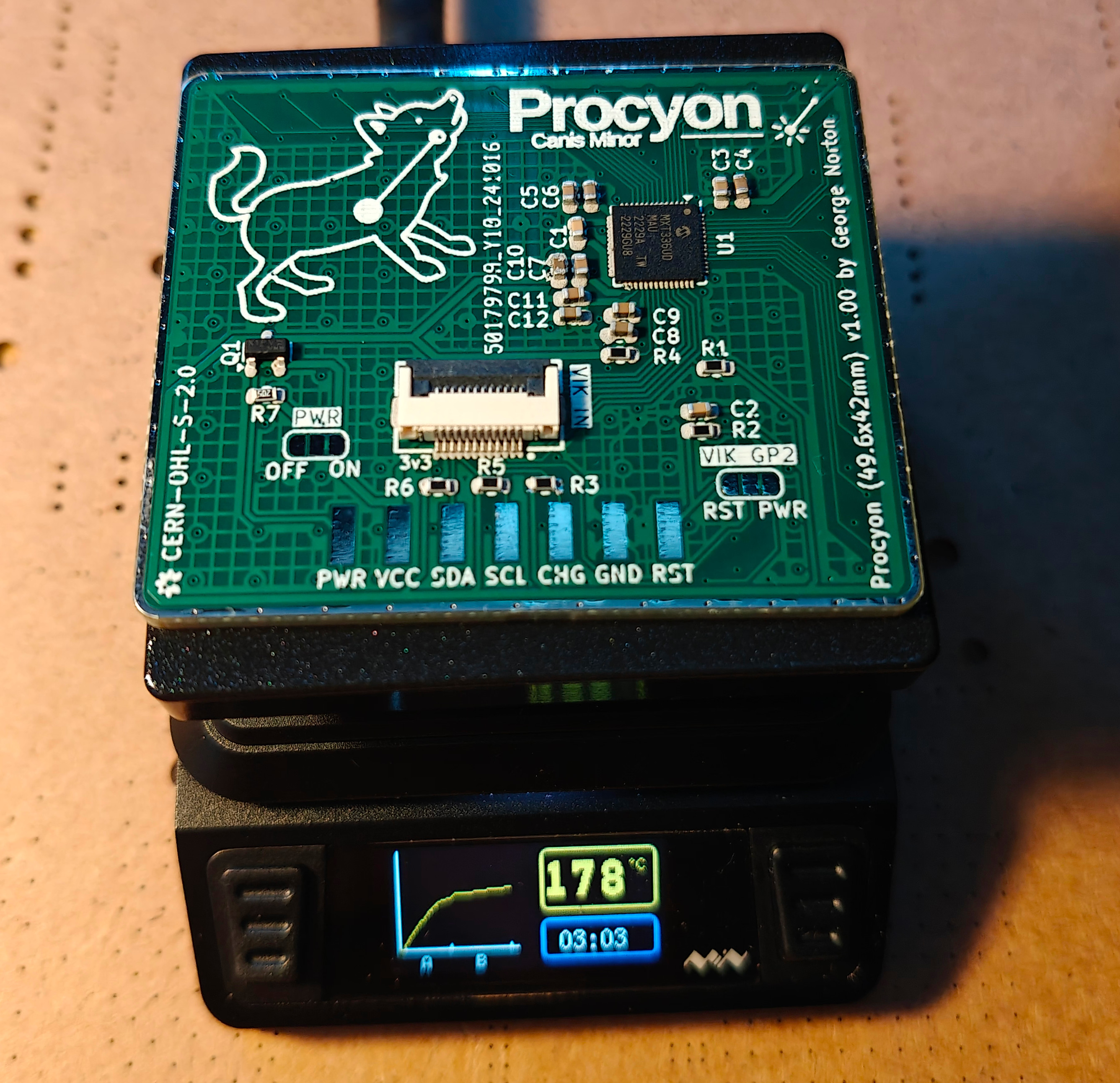
The mXT336UD-MAU002 sensor IC used in this design is in fact a touchscreen controller rather than a trackpad controller. I have chose this controller for Peacock as I wanted something that could support a large trackpad, and I have reused it here so I can reuse the code I wrote for Peacock.
Like Peacock, Procyon is named after a navigational star.
Procyon can be assembled by JLCPCB, or your favorite factory. Alternatively, if you feel brave, the components are not too tiny (0603) so it can be assembled on a small hotplate (such as the MHP50), you will probably need a stencil, and paste suitable for narrow apertures. The component placement (other than the optional button) is common between boards, so the same stencil can be reused.
The 57x80 variant has an optional footprint for a button. This button is wired to a GPIO on the MaxTouch IC and is accessable through the MaxTouch GPIO interface.
A surface is required for the sensor to function. This should be an insulator, it should also feel nice since you will be touching it a lot. It is a good idea to fix the sensor to the board with glue or double sided tape. Good surface materials include:
Currently there are experimental QMK and ZMK branches with Procyon support.
The QMK multitouch_experiment branch exteneds the QMK digitizer feature to implement real trackpad support. On this branch, the MaxTouch driver reports 5 separate finger positions to the host and it detects gestures. You should get all the same gesture support you would expect from a modern trackpad. This branch is a large changeset which will likely take some time to get merged into QMK. There are some pre-built QMK firmware images in my userspace.
The ZMK Maxtouch module builds against Petes feat/pointers-move-scroll-ptp ZMK branch. It is currently missing the ability to fallback to mouse emulation (so no MacOS support).
The sensor sensitivity may require tuning depending on the type of surface you use on your build. This can be done by adjusting the touch threshold, and if required the transmit gain. If your sensor is not detecting touches well, reduce the touch threshold. If your sensor is jittery, or is detecting spurious touches increase the touch threshold, or if there is any ungrounded metal by the sensor, move it. Increasing the transmit gain will require a larger touch threshold, but it should enable you to use thicker overlays and it will give you more room to adjust the touch threshold.
The mouse emulation gestures are implemented in software, they rely on various parameters that can be tuned by defining macros.
If you flash the QMK debug firmware, you can use the Maxtouch debug tool to adjust the sensor tuning in real time and see how it works.
| Category | Classification | Response |
|---|---|---|
| FPC connector | Required | :heavy_check_mark: |
| Breakout pins | Recommended | :x: |
| Uses: SPI | Optional | :heavy_check_mark: |
| SPI used for SPI only | Strongly recommended | :heavy_check_mark: |
| Uses: I2C | Optional | :heavy_check_mark: |
| I2C used for I2C only | Strongly Recommended | :heavy_check_mark: |
| I2C pull ups | Required | 3.3k |
| Uses: RGB | Optional | :x: |
| Uses: Extra GPIO 1 | Optional | :heavy_check_mark: |
| Uses: Extra GPIO 2 | Optional | :heavy_check_mark: |
| Standard PCB Size/Mount | Strongly recommended | :x: |
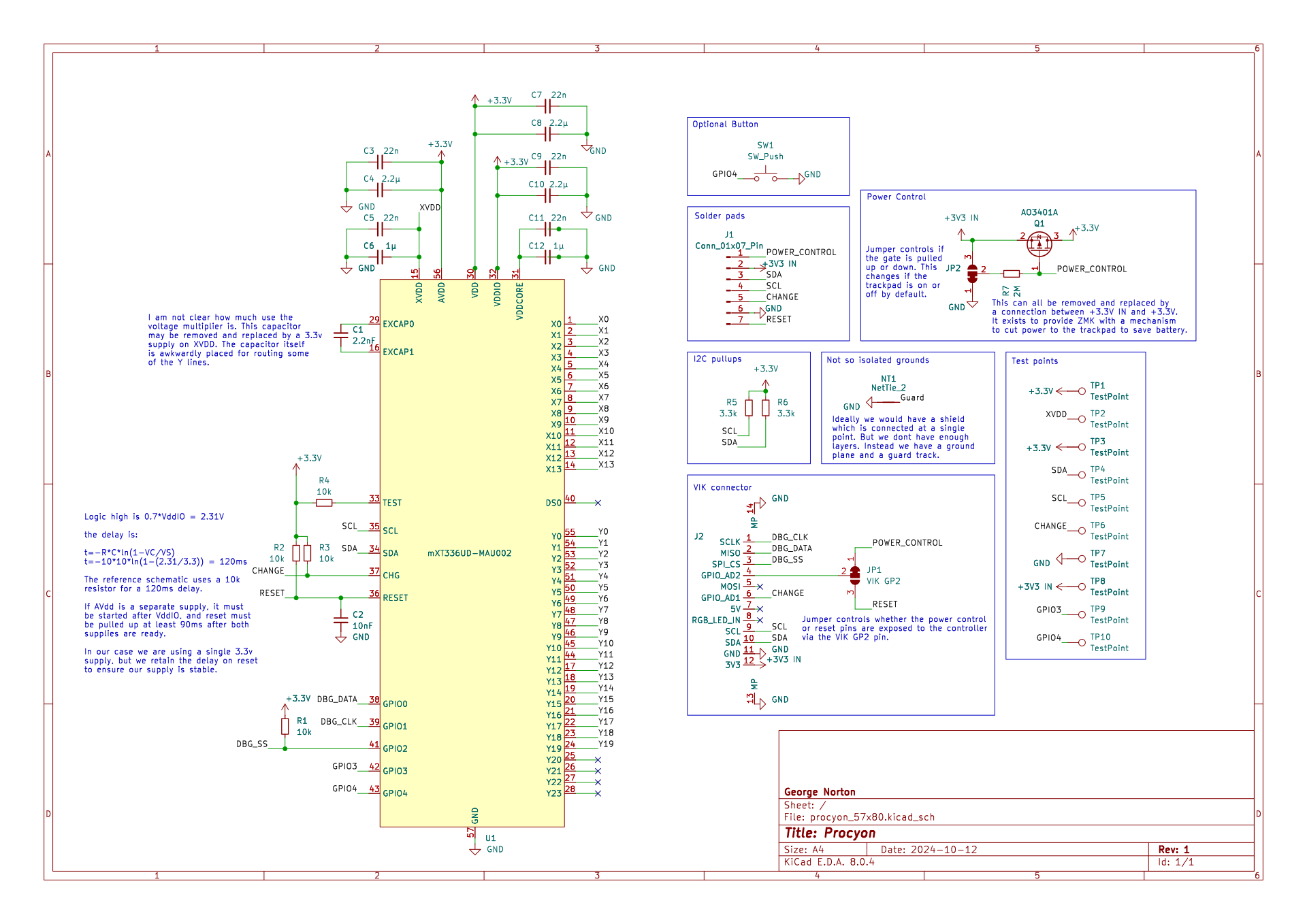
| Qty | Value | Footprint | References |
|---|---|---|---|
| 8 | TestPoint | TestPoint:TestPoint_Pad_D1.0mm | TP1, TP2, TP3, TP4, TP5, TP6, TP7, TP8 |
| 5 | 22n | Capacitor_SMD:C_0603_1608Metric | C3, C5, C7, C9, C11 |
| 4 | 10k | Resistor_SMD:R_0603_1608Metric | R1, R2, R3, R4 |
| 3 | 2.2µ | Capacitor_SMD:C_0603_1608Metric | C4, C8, C10 |
| 2 | 1µ | Capacitor_SMD:C_0603_1608Metric | C6, C12 |
| 2 | 3.3k | Resistor_SMD:R_0603_1608Metric | R5, R6 |
| 1 | 10nF | Capacitor_SMD:C_0603_1608Metric | C2 |
| 1 | 2.2nF | Capacitor_SMD:C_0603_1608Metric | C1 |
| 1 | 2M | Resistor_SMD:R_0603_1608Metric | R7 |
| 1 | AO3401A | Package_TO_SOT_SMD:SOT-23 | Q1 |
| 1 | Conn_01x07_Pin | Test Pads:Test Pads | J1 |
| 1 | NetTie_2 | NetTie:NetTie-2_SMD_Pad0.5mm | NT1 |
| 1 | PWR | Jumper:SolderJumper-3_P1.3mm_Bridged12_RoundedPad1.0x1.5mm_NumberLabels | JP2 |
| 1 | VIK GP2 | Jumper:SolderJumper-3_P1.3mm_Bridged12_RoundedPad1.0x1.5mm_NumberLabels | JP1 |
| 1 | mXT336UD-MAU002 | MaxTouch:QFN-56_EP_6x6_Pitch0.35mm | U1 |
| 1 | ~ | vik:vik-module-connector-horizontal | J2 |

polpo/picogus
Emulation of ISA sound cards and CD-ROM on Raspberry Pi Pico (GUS, SB/Adlib, MPU-401, Tandy, CMS, Panasonic CD-ROM) with USB mouse/joystick support

osy/XG_Mobile_Station
Open source eGPU dock for ROG Ally and ROG Flow

iandchasse/silkscreen-pcb
Silkscreen: open-hardware ESP32-S3 e-paper reader mainboard (KiCad 9). Formerly the de-link hub.

BlueSCSI/BlueSCSI-v2
BlueSCSI v2/Ultra - an open source, open hardware, SCSI emulator using the Pi Pico PR2040 and Pico 2 RP2350

pms67/LittleBrain-STM32F4-Sensorboard
STM32F4-based PCB interfacing with a variety of sensors.


It measures 42 × 49.6 mm and has 4 copper layers, 1.6 mm thick.
34 parts, built around the AO3401A. The full list of its parts is on this page, with links to each part's symbol and footprint where PCBKit's library has them.
From the george-norton/procyon repository on GitHub, at the commit this page was made from: the board is 42x50/procyon_42x50.kicad_pcb and its schematic 42x50/procyon_42x50.kicad_sch. PCBKit opens the board in the browser, with nothing to install.
Its repository publishes it under the CERN-OHL-S-2.0 licence: you may reuse it on that licence's terms (keep the author's notice, and for a copyleft licence share your changes alike).