2 layers20.5 × 24.8 mm

 formless63/wirehub
Cable assemblies as canonical definitions.
Synthetic demo board is an open-source printed circuit board by formless63, from the formless63/wirehub repository on GitHub, published under the AGPL-3.0 licence. It is a 2-layer board of 60 × 40 mm with 8 parts on 4 nets.
Its parts include 2 connectors, 1 capacitor and 1 IC.

Capture the cable assemblies you build as one canonical definition, and get everything else derived from it: schematic, build sheet, BOM, continuity spec and drawing. Self-hosted, free software, deterministic output.

Documentation · Quick start · Config generator · Module store
From a new design to a build sheet, about twenty seconds: the wizard wires what the catalog states unambiguously, the canvas lets you change any joint, and every document follows.
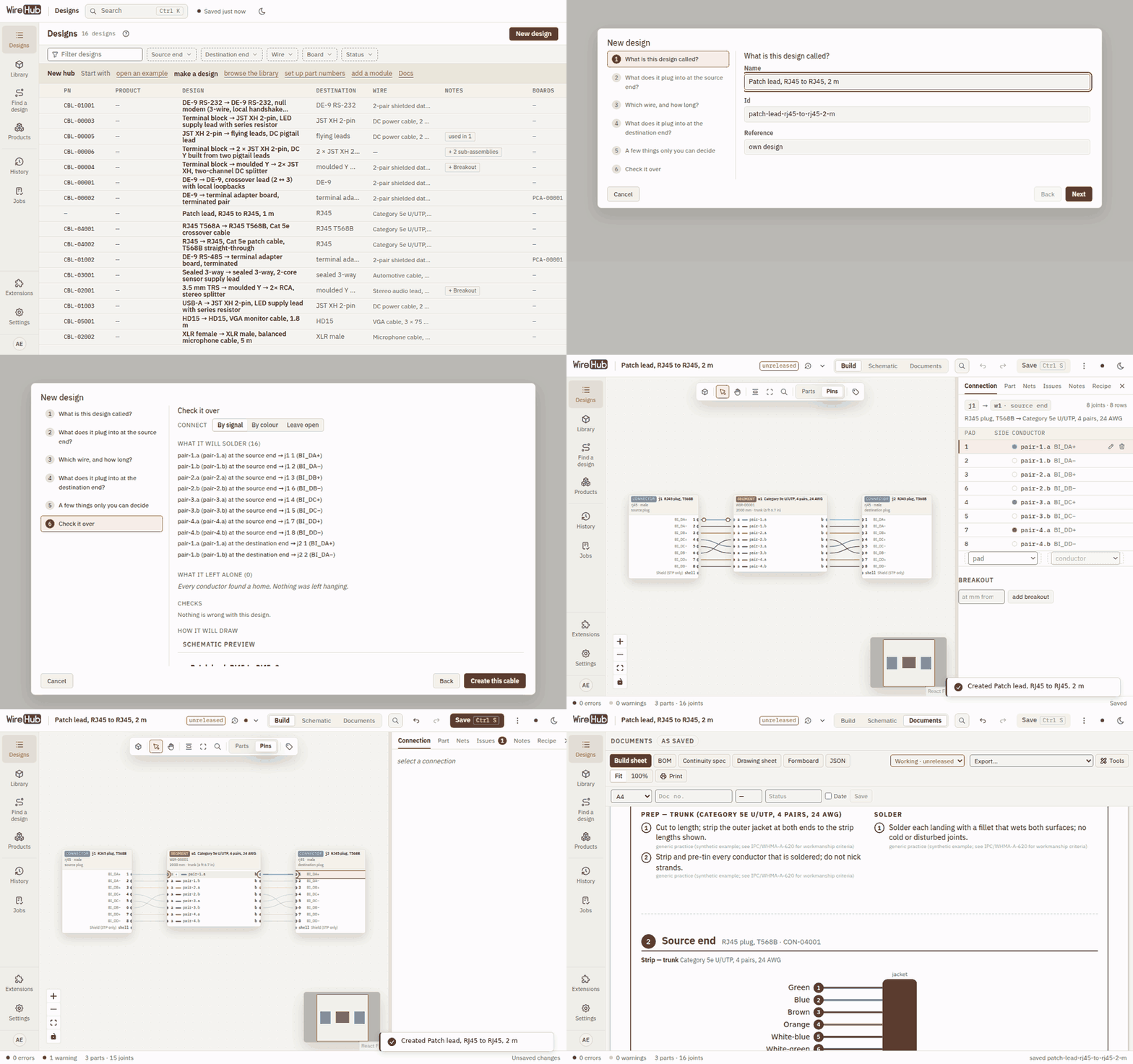
Every document is derived from the one definition, so they always agree.
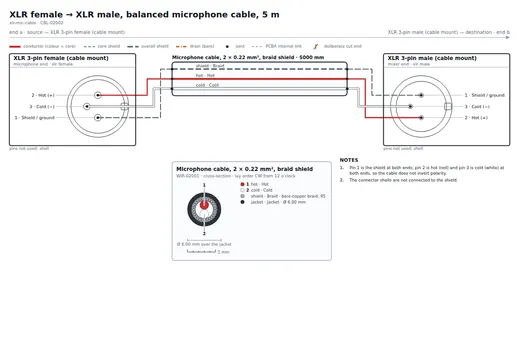 Schematic laid out for you, with a legend and cross-section | 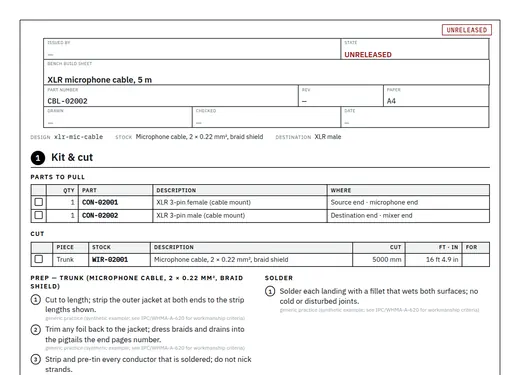 Build sheet the bench flow, one stage per step | 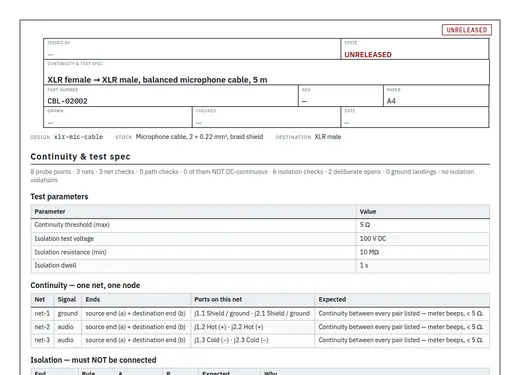 Continuity spec what must connect, what must stay isolated | 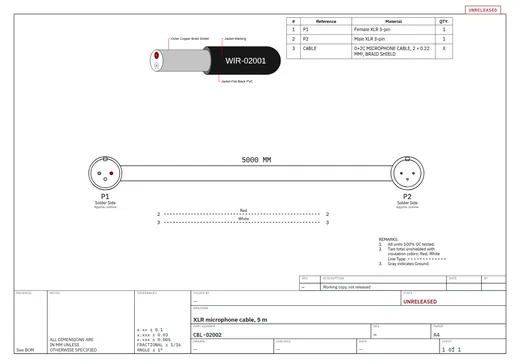 Drawing sheet BOM, outline and title block on a framed sheet |
Plus a BOM, formboard, wire labels, CSV and XLSX exports, and WireViz import and export.
You need Docker and one file — no clone, no .env:
mkdir wirehub && cd wirehub
curl -fsSLO https://raw.githubusercontent.com/formless63/wirehub/main/compose.yaml
docker compose up -d
docker compose logs wirehub        # the first-run setup code
Open http://localhost:5183/setup, enter the setup code and finish the short form; you land on a list of example designs to open. In a Docker UI
(Portainer, Komodo, Dockhand …), paste
compose.yaml
as a stack, deploy, and read the code from the wirehub container's logs.
On first start a one-shot bootstrap service generates every secret the stack
needs into a secrets volume and keeps it there. The few install choices — the
public URL, ports, backups (COMPOSE_PROFILES=backup), your own PostgreSQL or
S3 — go in an optional .env;
.env.example
explains each. Everything else — single sign-on, magic links, allowed emails,
alerts, the git mirror, job settings — is set in the app under Settings and
applies without a redeploy.
Config generator: https://formless63.github.io/wirehub/generator/ — pick your
options and get a ready compose.yaml and .env. It runs entirely in your
browser and sends nothing anywhere.
First-run setup lists the bundled domain modules whose signals, connectors and example cables you can add — PC & serial (RS-232, RS-485, USB), Networking (RJ45, T568A/B), Pro audio (XLR, TRS, RCA), AV / video and Automotive — all unticked unless the deployment suggests some. Nothing is required, and more can be enabled later from the command palette. The base itself stays generic: its starter catalog holds wire stocks, generic connectors (DE-9 by pin number, JST XH, terminal blocks), parts and a few neutral example cables.
The stack is the app, PostgreSQL 18 and Garage
(S3-compatible storage for uploaded files), plus restic backups through
Backrest as an optional profile. docs/self-hosting.md has the details.
From source (Node 24+, pnpm 10 — corepack enable):
git clone https://github.com/formless63/wirehub && cd wirehub
pnpm install
pnpm --filter studio dev        # open the printed URL
The hub opens on the generic starter catalog: a few example cables built from a
small library of generic parts, every value cited to a public standard or marked
as a synthetic example. The catalog is plain JSON under packages/catalog/data,
and saves go straight back to it; domain modules enabled at setup install their
packs into the gitignored data/packs/, so they never land in a commit to the
base.
pnpm build                      # tsc --noEmit, strict, every package
pnpm test                       # vitest, each workspace in turn
pnpm --filter @wirehub/model test -- test/trace.test.ts
bash scripts/privacy-check.sh --tree
pnpm install also enables git hooks that keep home paths, secrets and personal
emails out of commits (CONTRIBUTING.md).
| Package | |
|---|---|
@wirehub/model | the canonical model: types, validation, nets, trace, part-number schemes. Zero dependencies. |
@wirehub/catalog | the file-backed catalog and the starter data. Zero dependencies. |
@wirehub/modules | the module API and build-time registry. Zero dependencies, MIT. |
@wirehub/layout | ELK layout of a design |
@wirehub/render-svg | deterministic SVG schematics and cross-sections |
@wirehub/docs | build sheet, BOM, continuity spec, drawing, wire spec |
@wirehub/editor-react | the editor |
apps/studio | the app: Vite SPA and Hono server; stack/ the compose stack's one-shots |
site | the config generator, published to GitHub Pages |
modules/* | bundled modules: optional domain modules (pc-serial, networking, pro-audio, av-video, automotive) and the always-on interop modules wireviz (WireViz YAML in and out) and csv-library (bulk CSV library import) |
SPEC.md — the model and the plan; the single source of truth.docs/modules.md — extension points, domain modules, and how a private module lives
in its own repository.docs/exports.md — CSV/XLSX exports, the continuity tester export, wire labels, and rendering documents without a browser.docs/interop.md — WireViz YAML import and export, bulk CSV library import, and part costing.docs/catalog-store.md — catalog packs: format, provenance, install and update.docs/store-hosting.md — run your own module store from a GitHub template (or any static host).docs/self-hosting.md — install, the compose stack, secrets, storage, backups, development.specs/postgres-backend.md — the database backend (Phase A built).docs/boundaries.md — what this base was split from, and what it left out.Contributing: CONTRIBUTING.md · Security: SECURITY.md · Conduct: CODE_OF_CONDUCT.md
WireHub is free software under the GNU Affero General Public License v3.0 only
(LICENSE), with one additional permission, the WireHub Module Exception
(MODULE-EXCEPTION.md). In plain language:
@wirehub/modules, the model and catalog types) and the catalog-pack formats may
be MIT, proprietary, or anything else. You can build and distribute a WireHub image that
includes it without the module becoming AGPL, and without publishing its source.@wirehub/modules is MIT, so module authors can depend on it freely.packages/catalog/data) and the
bundled modules' packs are dedicated to the public domain, so the facts in them can
be reused anywhere. Other packs, and records in them, carry their own licence
(docs/catalog-store.md).NOTICE).There are no per-file licence headers: LICENSE, MODULE-EXCEPTION.md and each
package's license field are the record (SPDX: AGPL-3.0-only WITH AdditionRef-WireHub-Module-Exception-1.0, packages/modules: MIT; packages/catalog: AGPL-3.0-only AND CC0-1.0, the code and
its data; bundled modules: MIT, their packs CC0-1.0). This summary is
not legal advice; the licence texts govern.
| Qty | Value | Footprint | References |
|---|---|---|---|
| 4 | MountingHole_3.2mm_M3 | MountingHole:MountingHole_3.2mm_M3 | H1, H2, H3, H4 |
| 1 | 100uF | Capacitor_THT:CP_Radial_D6.3mm_P2.50mm | C1 |
| 1 | DC 5.5/2.1 | Connector_BarrelJack:BarrelJack_Horizontal | J2 |
| 1 | MCU | Package_SO:SOIC-8_3.9x4.9mm_P1.27mm | U1 |
| 1 | USB-C | Connector_USB:USB_C_Receptacle_GCT_USB4105-xx-A_16P_TopMnt_Horizontal | J1 |
It measures 60 × 40 mm and has 2 copper layers, 1.6 mm thick.
8 parts. The full list of its parts is on this page, with links to each part's symbol and footprint where PCBKit's library has them.
From the formless63/wirehub repository on GitHub, at the commit this page was made from: the board is tools/enclosure/examples/synthetic-demo-board.kicad_pcb. PCBKit opens the board in the browser, with nothing to install.
Its repository publishes it under the AGPL-3.0 licence: you may reuse it on that licence's terms (keep the author's notice, and for a copyleft licence share your changes alike).

joeycastillo/Sensor-Watch
A board replacement for the classic Casio F-91W wristwatch

rusefi/rusefi
rusefi - GPL internal combustion engine control unit

hoglet67/RGBtoHDMI
Bare-metal Raspberry Pi project that provides pixel-perfect sampling of Retro Computer RGB/YUV video and conversion to HDMI

shanteacontrols/OpenDeck
A platform for building interactive control and sensing devices using MIDI and OSC built with Zephyr RTOS.

hackclub/OnBoard
💡 Join 1,000 teenagers and make your first PCB with a $100 grant!

dangiu/PicoMemcard
Emulating PSX Memory Card (or controller) using a Raspberry Pi Pico

OLIMEX/DIY-LAPTOP
Do It Yourself Open Source Hardware and Software Modular Hacker's Friendly Laptop