2 layers36 × 20.3 mm

 fm4dd/pmod-eeprom1
1Mbit I2C EEPROM PMOD
Eeprom is an open-source printed circuit board by fm4dd, from the fm4dd/pmod-eeprom repository on GitHub. It is a 2-layer board of 41 × 20.3 mm with 15 parts on 15 nets, routed with 117 tracks and 0 vias.
Its parts include 3 capacitors, 3 resistors, 2 connectors, 1 IC and 1 switch. It belongs with the fPGA and programmable logic boards and the FPGA and CPLD boards of this library.

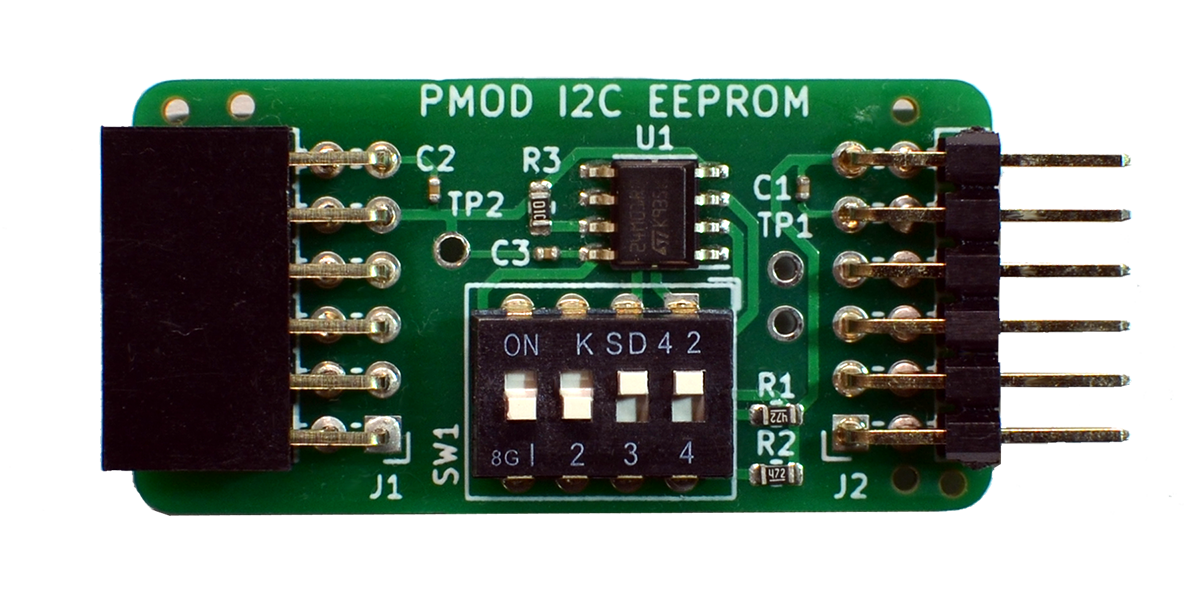
This I2C PMOD provides a 1 Mbit serial EEPROM, using the M24M01 circuit by STMicroelectronics. DIP switches enable I2C pull-up resistors if needed, and change the EEPROM's I2C device address. Up to four modules can be chained for a total capacity of 4 Mbit (512 KBytes). Three Testpoints can be fitted for I2C bus troubleshooting. The PMOD has designs for Type-6 (I2C single row), and for the new Type-6A (I2C extended double row). The picture shows the Type-6A variant (engineering sample).
This is the schema for the PMOD I2C Type-6 (single row) connector variant:

The current EEPROM desin is pulling the "write-protect" pin high for "read-write" operation. A design update may implement a solder pad for setting the EEPROM 'read-only' after programming.
| Type | Version | Gerber | Schema |
|---|---|---|---|
| Type-6 | 1.1 | EEPROM PMOD Type-6 Gerber V1.1 | 20210917-eeprom-t6-schema-v11.pdf |
| Type-6A | 1.1 | EEPROM PMOD Type-6A Gerber V1.1 | 20210814-eeprom-t6a-schema-v11.pdff |
Ensure the I2C bus is enabled, and install prerequisite I2C tools:
# sudo apt-get install git i2c-tools
# raspi-config 2 Interface Options enable I2CCheck the IO expander circuit is visible on the I2C bus under address 0x50..0x56, depending on the address set through the DIP switch. Below example address 0x50/51 is set with SW1-1 = off and SW1-2 = off.
pi@pi-ms05:~ $ i2cdetect -y 1
     0  1  2  3  4  5  6  7  8  9  a  b  c  d  e  f
00:          -- -- -- -- -- -- -- -- -- -- -- -- --
10: -- -- -- -- -- -- -- -- -- -- -- -- -- -- -- --
20: -- -- -- -- -- -- -- -- -- -- -- -- -- -- -- --
30: -- -- -- -- -- -- -- -- -- -- -- -- -- -- -- --
40: -- -- -- -- -- -- -- -- -- -- -- -- -- -- -- --
50: 50 51 -- -- -- -- -- -- -- -- -- -- -- -- -- --
60: -- -- -- -- -- -- -- -- -- -- -- -- -- -- -- --
70: -- -- -- -- -- -- -- --pmod-eeprom code examples for Arduino boards are available in the example folder
On the Raspberry Pi, the PMOD can be easily programmed with the eeprom utility program 'eepflash.sh'. This program writes a manually created byte file (.eep) as content into the I2C eeprom. It can be found as part of the Raspberry Pi foundation 'hats' repository:
pi@pi-ms05:~ $ git clone https://github.com/raspberrypi/hats.git
Cloning into 'hats'...
remote: Enumerating objects: 565, done.
remote: Counting objects: 100% (95/95), done.
remote: Compressing objects: 100% (61/61), done.
remote: Total 565 (delta 59), reused 46 (delta 34), pack-reused 470
Receiving objects: 100% (565/565), 306.34 KiB | 936.00 KiB/s, done.
Resolving deltas: 100% (325/325), done.
Compile the tools located in the eepromutils subdirectory:
pi@pi-ms05:~ $ cd hats/eepromutils/
pi@pi-ms05:~/hats/eepromutils $ make clean; make
rm -f eepmake eepdump
cc -Wall -Wextra eepmake.c -o eepmake
cc -Wall -Wextra eepdump.c -o eepdump
Check the tools:
pi@pi-ms05:~/hats/eepromutils $ ls -l
total 84
-rwxr-xr-x 1 pi pi 12820 Aug 28 22:38 eepdump
-rw-r--r-- 1 pi pi  8112 Aug 28 22:37 eepdump.c
-rwxr-xr-x 1 pi pi  3906 Aug 28 22:37 eepflash.sh
-rwxr-xr-x 1 pi pi 22232 Aug 28 22:38 eepmake
-rw-r--r-- 1 pi pi 15144 Aug 28 22:37 eepmake.c
-rwxr-xr-x 1 pi pi  3122 Aug 28 22:37 eeprom_settings.txt
-rw-r--r-- 1 pi pi  2395 Aug 28 22:37 eeptypes.h
-rw-r--r-- 1 pi pi   677 Aug 28 22:37 Makefile
-rw-r--r-- 1 pi pi  1836 Aug 28 22:37 README.md
Example upload of an .eep file:
pi@pi-ms05:~/hats/eepromutils $ sudo ./eepflash.sh -w -f=rpi2pmod.eep -t=24c32 -d=1 -a=50
This will attempt to talk to an eeprom at i2c address 0x50 on bus 1. Make sure there is an eeprom at this address.
This script comes with ABSOLUTELY no warranty. Continue only if you know what you are doing.
Do you wish to continue? (yes/no): yes
Writing...
0+1 records in
0+1 records out
113 bytes copied, 0.728222 s, 0.2 kB/s
Closing EEPROM Device.
Done.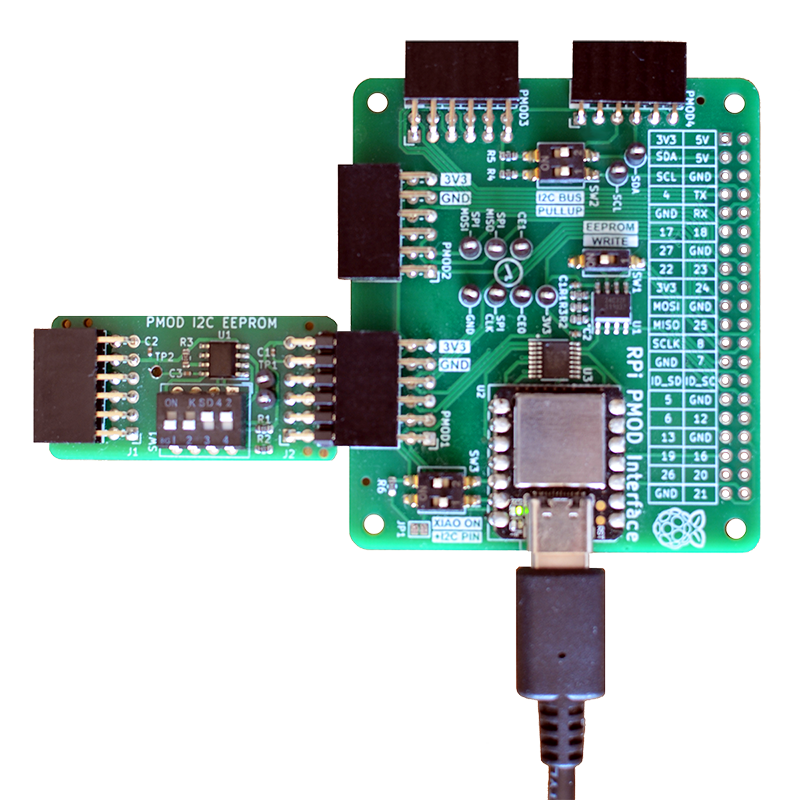
PMOD-EEPROM on a PMOD2RPI interface board, running code from the XIAO Cortex M0+ MCU.
| Qty | Value | Footprint | References |
|---|---|---|---|
| 3 | 0.1uF | Capacitor_SMD:C_0402_1005Metric | C1, C2, C3 |
| 3 | TestPoint | TestPoint:TestPoint_Keystone_5000-5004_Miniature | TP1, TP2, TP3 |
| 2 | 4.7K | Resistor_SMD:R_0603_1608Metric | R1, R2 |
| 1 | 10K | Resistor_SMD:R_0603_1608Metric | R3 |
| 1 | JLCPCB_Order_Number_Placeholder | FM4DD:JLCPCB_Order_Number_Placeholder | Ref** |
| 1 | Logo_KiCad_5mm | FM4DD:KiCad-Logo2_5mm_SilkScreen | L1 |
| 1 | M24M01-R | Package_SO:SOIC-8_3.9x4.9mm_P1.27mm | U1 |
| 1 | PMOD_02x06 | FM4DD:PMODHeader_2x06_P2.54mm_Horizontal | J2 |
| 1 | PMOD_02x06 | FM4DD:PMODPinSocket_2x06_P2.54mm_Horizontal | J1 |
| 1 | SW_DIP_x04 | Button_Switch_THT:SW_DIP_SPSTx04_Slide_6.7x11.72mm_W7.62mm_P2.54mm_LowProfile | SW1 |
It measures 41 × 20.3 mm and has 2 copper layers, 0.8 mm thick.
15 parts. The full list of its parts is on this page, with links to each part's symbol and footprint where PCBKit's library has them.
From the fm4dd/pmod-eeprom repository on GitHub, at the commit this page was made from: the board is kicad-t6a/eeprom.kicad_pcb and its schematic kicad-t6/eeprom.kicad_sch. PCBKit opens the board in the browser, with nothing to install.
Its repository states no licence, so its author keeps all rights: ask fm4dd before reusing the design.

google/mozc-devices
Circuit diagrams and firmware source code for Gboard DIY keyboards

hoglet67/RGBtoHDMI
Bare-metal Raspberry Pi project that provides pixel-perfect sampling of Retro Computer RGB/YUV video and conversion to HDMI

mntmn/amiga2000-gfxcard
MNT VA2000, an Open Source Amiga 2/3/4000 Graphics Card (Zorro II/III), written in Verilog

hackclub/OnBoard
💡 Join 1,000 teenagers and make your first PCB with a $100 grant!

kenp-io/not-for-airpods-repairs
The content of this repository is licensed under the WTFPL License. Please have a close look at the terms before using this material.

Luos-io/luos_engine
Open-source and real-time orchestrator for cyber-physical-systems, to easily design, test and deploy embedded applications and digital twins.

Chrismettal/EleLab_v2
Cheap DIY lab system for hobbyists and the tinkering folk
