4 layers25.8 × 32.9 mm
Lora nodemcu
sudomesh/disaster-radio
A (paused) work-in-progress long-range, low-bandwidth wireless disaster recovery mesh network powered by the sun.
17 parts1.1k

 florolf/apu-m213
M.2 NVMe SSD adapter for PC Engines APU2 boards
Apu m2 is an open-source printed circuit board by florolf, from the florolf/apu-m2 repository on GitHub. It is a 4-layer board of 29.8 × 50.8 mm with 17 parts on 73 nets, routed with 184 tracks and 74 vias.
It is built around the SM3ZS067U410AMR1000. Its parts include 8 capacitors, 7 resistors and 2 connectors. It belongs with the computers and single-board computers and interfaces and adapters boards of this library.
This repo contains the hardware design for an adapter/holder combination that allows installing a 2280 M.2 NVMe SSD into a PC Engines APU2 board.
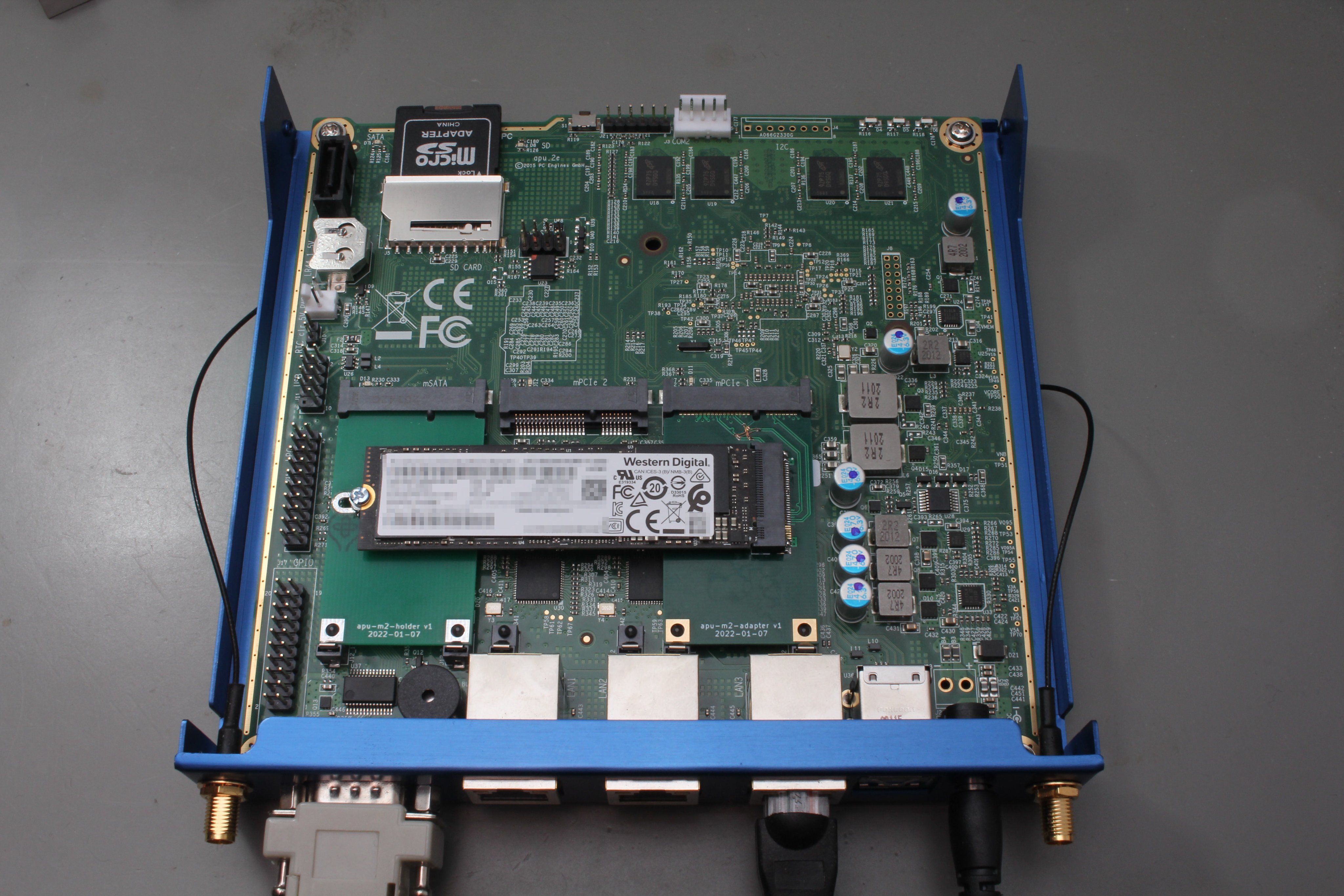
(This picture shows an older version of the design with some bodges applied, the version released here should just work out of the box, see below)
The original apu2 board only allows SD cards/mSATA SSDs for storage. The former is not very performant/durable and the latter is getting rarer/more expensive per GB. There's also a regular SATA connector, but regular SATA SSDs don't fit well into the standard enclosure.
Conversely, M.2 SSDs are a staple piece of hardware nowadays. PCIe/NVMe is also a nicer interface compared to SATA (although raw throughput is approximately the same here, since we are trading SATA 3.0 for 1× PCIe Gen 2).
There's a number of downsides:
The adapter PCB is designed for the 4-layer JLCPCB "JLC7628" stackup, with 1mm thickness:
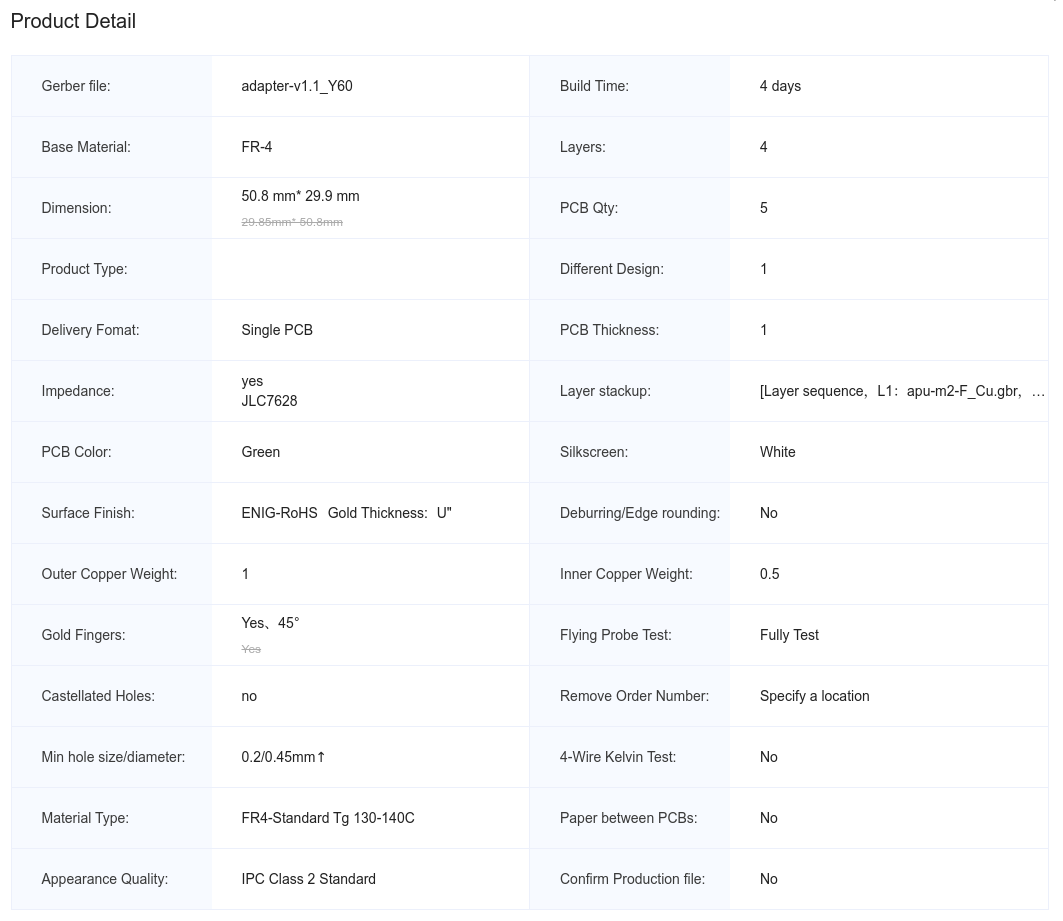
The holder PCB is mainly mechanical, so there are no special requirements other than 1mm thickness.
The respective fab/ directories contain the Gerber files that can be submitted to JLCPCB.
Version 1.0 of the adapter PCB had the RX/TX lanes swapped because the mPCIe spec and the M.2 spec use different perspectives for describing the data transfer direction. Version 1.1, published here, fixes this and also adds some more assembly options for handshaking signals and additional decoupling. None of those are strictly necessary though, so the DNP annotations in the schematic reflect the electrical behavior of v1.0 (except for the RX/TX crossover), which has been working well in practice.
For a minimal configuration, you only need:
If you want to use the NVMe SSD as a boot drive, you'll need a recent version of the APU coreboot firmware (containing SeaBIOS 1.16.0 or newer), since a number of NVMe-related issues were only fixed recently.
At least in my experiments, the M.2 SSD got relatively hot (although I didn't compare this with the original mSATA SSD, so this could just be normal).
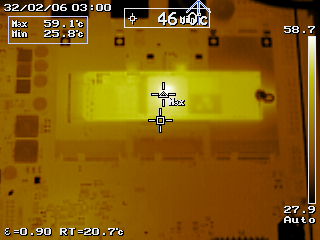
Internal monitoring (via nvme smart-log) showed temperatures exceeding 60 °C at an ambient air temperature of about 20 °C. This was a little too much for my taste, so I added a Würth WE-TGFG gasket (order number 407150015115) to bond the NVMe to the APU enclosure. With this, the temperature never exceeds 50 °C.
| Qty | Value | Footprint | References |
|---|---|---|---|
| 4 | 0R | Resistor_SMD:R_0402_1005Metric | R4, R5, R6, R7 |
| 4 | 100n | Capacitor_SMD:C_0402_1005Metric | C5, C6, C7, C8 |
| 3 | 10k | Resistor_SMD:R_0402_1005Metric | R1, R2, R3 |
| 3 | 10u | Capacitor_SMD:C_0805_2012Metric | C2, C3, C4 |
| 1 | Bus_M.2_Socket_M | local:JAE_SM3ZS067UxxM | J2 |
| 1 | Bus_PCI_Express_Mini | local:mPCIe_Edge | J1 |
| 1 | C_Small | Capacitor_SMD:C_0402_1005Metric | C1 |
It measures 29.8 × 50.8 mm and has 4 copper layers, 1 mm thick.
17 parts, built around the SM3ZS067U410AMR1000. The full list of its parts is on this page, with links to each part's symbol and footprint where PCBKit's library has them.
From the florolf/apu-m2 repository on GitHub, at the commit this page was made from: the board is adapter/apu-m2.kicad_pcb and its schematic adapter/apu-m2.kicad_sch. PCBKit opens the board in the browser, with nothing to install.
Its repository states no licence, so its author keeps all rights: ask florolf before reusing the design.
sudomesh/disaster-radio
A (paused) work-in-progress long-range, low-bandwidth wireless disaster recovery mesh network powered by the sun.

hackclub/OnBoard
💡 Join 1,000 teenagers and make your first PCB with a $100 grant!


brown-studios/minuet
Minuet upgrades your MAXXAIR Maxxfan with a brushless DC motor, home automation features, and accessories.
