2 layers35 × 29 mm
Xiao rp2350-adaptor
flaviut/ceclink
The CECLink is a small device that can be used to allow a Linux computer to control a TV using the CEC protocol over HDMI.
3 parts

 flaviut/ceclink
The CECLink is a small device that can be used to allow a Linux computer to control a TV using the CEC protocol over HDMI.
Hdmi breakout is an open-source printed circuit board by flaviut, from the flaviut/ceclink repository on GitHub. It is a 4-layer board of 35 × 29 mm with 6 parts on 31 nets, routed with 200 tracks and 28 vias.
Its parts include 4 connectors and 2 resistors. It belongs with the interfaces and adapters boards of this library.
The CECLink is a small device that can be used to allow a Linux computer to control a TV using the CEC protocol over HDMI. This is particularly helpful for HTPCs, which often do not have the required hardware to do so built-in.
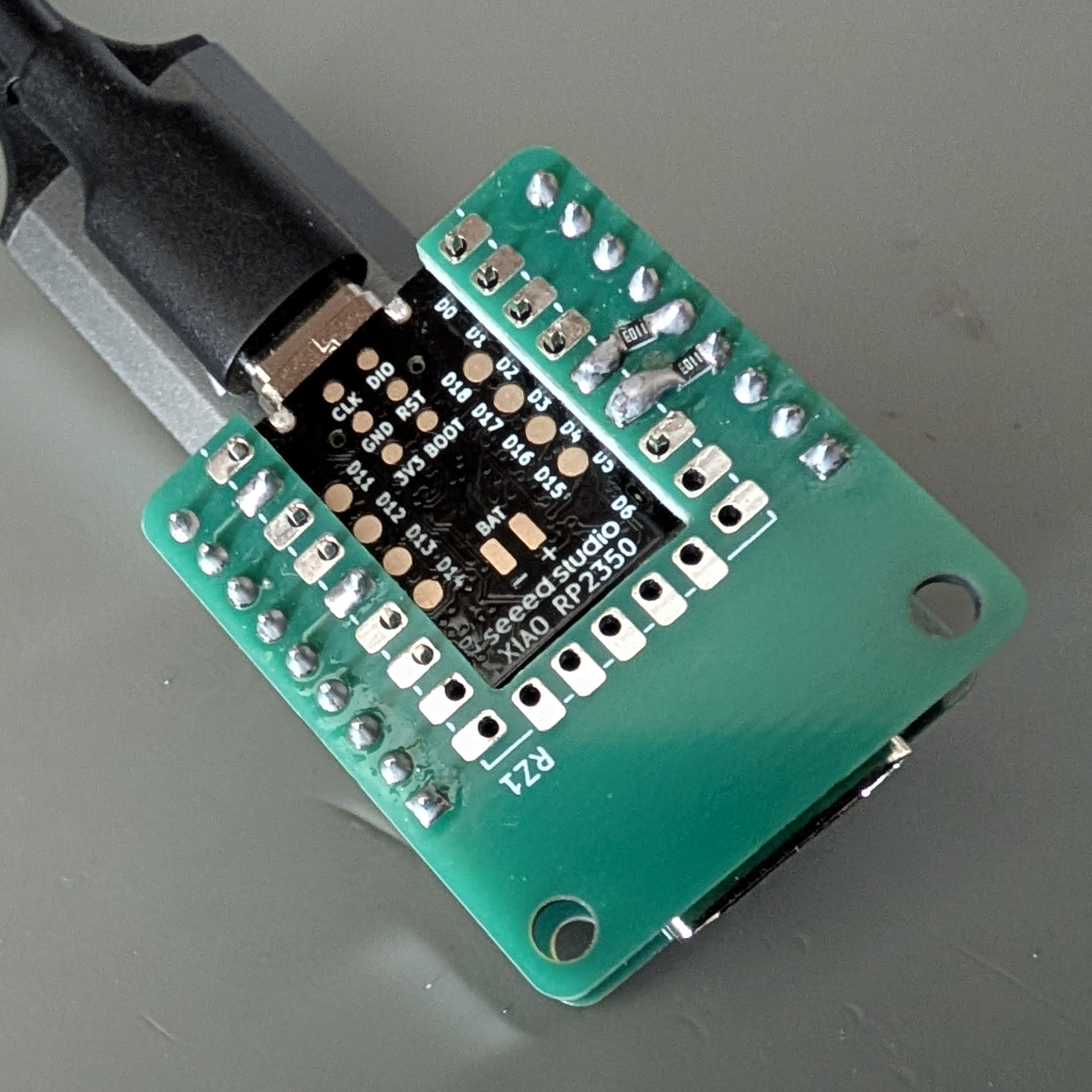
What's unique about this device is that it supports higher HDMI bandwidths. It is designed to work with and tested on a 4k, 10-bit HDR, 60FPS signal. This is done through following best practices for high-speed data lines.
While others devices look like this, and are made on a standard PCB (thanks karl for the photo):
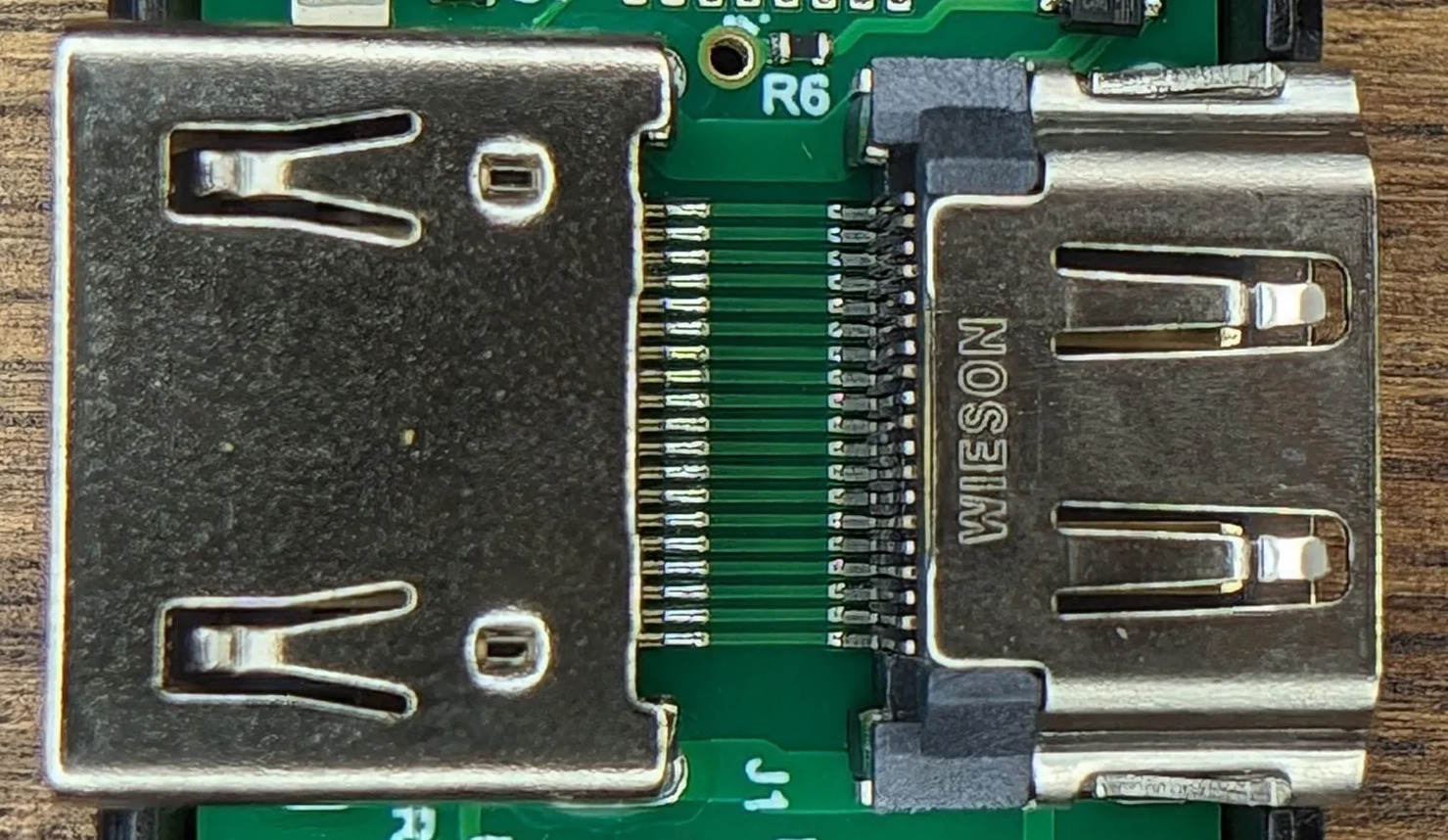
This project's design looks a little different, as it follows best practices in the dark arts of RF design:
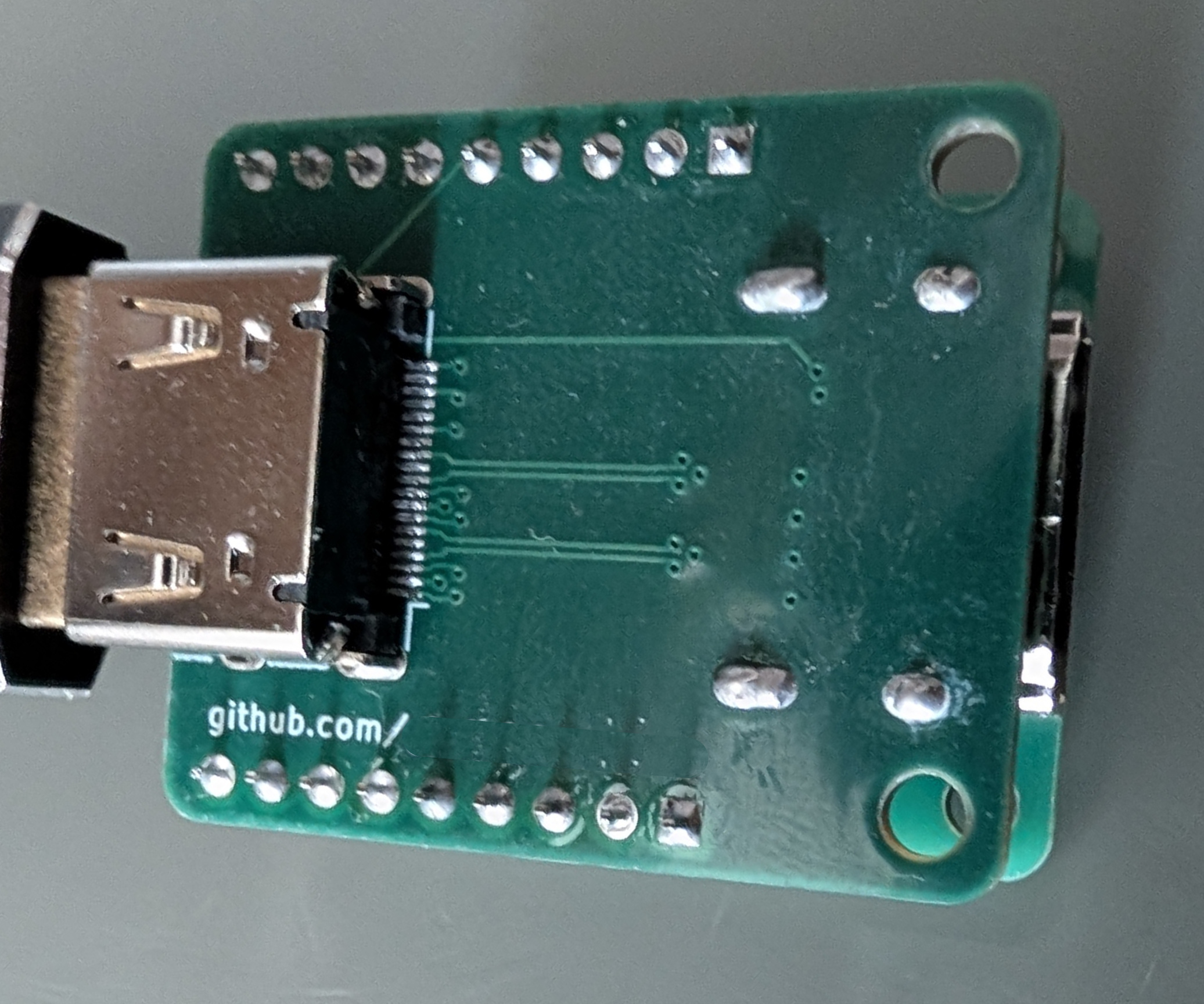
To be clear, this is not a secret technique! I would love to see others use this technique, and offer an updated commercial version of this device! All the details on how it works are in this source repo under pcb/, and I would be happy to talk about it.
The hardware is split across two KiCad projects under pcb/. You will
need to have both these boards produced:
pcb/hdmi-breakout — the HDMI passthrough that breaks
out the CEC and DDC signals. It is a 4-layer board; order it with the
JLC04161H-7628 stackup. The precise stackup is crucial for it to work.pcb/xiao-rp2350-adaptor — a simple breakout for the XIAO RP2350
that connects to the HDMI breakout. This is an ordinary 2-layer board with
no controlled-impedance requirement, so any standard stackup is fine.The latest release has
ready-to-order Gerber and drill archives: adapter.zip for the XIAO RP2350 adapter
and hdmi-breakout.zip for the HDMI board.
Gerber and drill archives for each board can be generated with
jlcpcb_fab.py.
Additional BOM (parts to source separately on top of the fabricated boards):
| Count | Part |
|---|---|
| 2 | HDMI Type-A receptacle (Molex 208658-1001, LCSC C138388) |
| 2 | 0603 100kΩ resistor |
| 1 | XIAO RP2350 |
| 2 | 1×9 2.54mm male pin header strip |
| 2 | 1×9 2.54mm female header / socket strip |
| 2 | M3 × 16mm socket head cap screw |
| 2 | M3 nut |
Remember that you can easily cut a longer 2.54mm header to size with some snips.
Download firmware.uf2 from the
latest release.
Hold the BOOT button while connecting the USB cable. Once powered, you should see a new drive on your computer. Copy-paste the .uf2 file over, and your device should be flashed.
picotool load -v -x ceclink.uf2This project tries to make use of the operating system drivers for the bulk of the integration, but this is unfortunately not fully sufficient. On Linux, inputattach connects the CEC serial interface to the Pulse-Eight kernel driver. A separate helper reads the HDMI physical address from the status interface and applies it to the kernel's CEC device.
These instructions use systemd and udev to start the adapter automatically when it is plugged in, including after reboot.
Install the dependencies for your distribution:
| Distribution family | Install command |
|---|---|
| Debian / Ubuntu | sudo apt install curl inputattach python3-serial ddcutil v4l-utils |
| Fedora | sudo dnf install curl linuxconsoletools python3-pyserial ddcutil v4l-utils |
| Arch Linux | sudo pacman -S curl linuxconsole python-pyserial ddcutil v4l-utils |
Download the physical-address helper into /opt/ceclink and configure the kernel modules to load at boot:
sudo install -d -m755 /opt/ceclink
sudo curl --fail --location https://raw.githubusercontent.com/flaviut/ceclink/HEAD/nix/physical-address.py -o /opt/ceclink/physical-address.py
sudo curl --fail --location https://raw.githubusercontent.com/flaviut/ceclink/HEAD/linux/ceclink.conf -o /etc/modules-load.d/ceclink.conf
sudo modprobe pulse8-cec
sudo modprobe i2c-dev
If modprobe pulse8-cec reports that the module is missing, your kernel needs the Pulse-Eight CEC driver (CONFIG_USB_PULSE8_CEC). Install your distribution's additional kernel modules package or use a kernel that includes this driver before continuing.
Install the two systemd service templates. The first attaches the CEC control port to the kernel driver; the second keeps the kernel's HDMI physical address synchronized with the adapter:
sudo curl --fail --location https://raw.githubusercontent.com/flaviut/ceclink/HEAD/linux/pulse8-cec-inputattach@.service -o /etc/systemd/system/pulse8-cec-inputattach@.service

sudo curl --fail --location https://raw.githubusercontent.com/flaviut/ceclink/HEAD/linux/ceclink-physical-address@.service -o /etc/systemd/system/ceclink-physical-address@.service
Install the udev rules that start these services for the correct USB interfaces. Interface 00 carries CEC commands; interface 02 carries physical-address status:
sudo curl --fail --location https://raw.githubusercontent.com/flaviut/ceclink/HEAD/linux/99-ceclink.rules -o /etc/udev/rules.d/99-ceclink.rules
sudo systemctl daemon-reload
sudo udevadm control --reload-rules
Connect the adapter in the HDMI path, then unplug and reconnect its USB cable. udev starts both services automatically; no systemctl enable is needed. Check that they are running and that the CEC device has a physical address:
systemctl status 'pulse8-cec-inputattach@*' 'ceclink-physical-address@*'
sudo cec-ctl -d /dev/cec0
If you have multiple CEC devices, substitute the adapter's /dev/cecN path. To inspect service logs:
journalctl -b -u 'pulse8-cec-inputattach@*' -u 'ceclink-physical-address@*'Things are much easier on NixOS. Add this repository to your system flake's inputs:
inputs.ceclink.url = "github:flaviut/ceclink";Include ceclink in your flake's outputs arguments and add its module to the host's existing nixosSystem module list:
outputs = { nixpkgs, ceclink, ... }: {
  nixosConfigurations.myhost = nixpkgs.lib.nixosSystem {
    modules = [
      ./configuration.nix
      ceclink.nixosModules.default
    ];
  };
};nix develop
cargo build --locked --profile release-with-debug
picotool uf2 convert target/thumbv8m.main-none-eabihf/release-with-debug/ceclink -t elf ceclink.uf2If direnv is enabled in your shell, run direnv allow once in this directory to enter the flake dev shell automatically.
For a reproducible production artifact:
nix build .#firmware
ls result/ceclink.{uf2,elf}
Format the Nix and Rust sources with nix fmt.
| XIAO pin | RP2350 GPIO | Role |
|---|---|---|
| D9 | GPIO4 | Bidirectional CEC, open drain |
| D4 | GPIO6 | DDC SDA input only |
| D5 | GPIO7 | DDC SCL input only |
D4 and D5 are receive-only GPIO inputs, not I²C master pins. Use a 100kΩ resistor between the HDMI bus and the RP2350.
| Qty | Value | Footprint | References |
|---|---|---|---|
| 2 | 100k | Resistor_SMD:R_0603_1608Metric_Pad0.98x0.95mm_HandSolder | R1, R2 |
| 2 | Conn_01x09 | Connector_PinHeader_2.54mm:PinHeader_1x09_P2.54mm_Vertical | J1, J4 |
| 2 | HDMI_A_1.4 | Connector_Video:HDMI_A_Molex_208658-1001_Horizontal | J2, J3 |
flaviut/ceclink
The CECLink is a small device that can be used to allow a Linux computer to control a TV using the CEC protocol over HDMI.

MicroCoreLabs/Projects
Ted Fried's MicroCore Labs Projects - FPGA CPU cores and emulators for the 8088, 8086, 8051, 6502, 68000, Z80, Risc-V, and also Typewriter and EPROM Emulator projects.


lucanastasio/PCIexpress-KiCad
PCI express libraries and templates for KiCad

BerkeleyHCI/PolymorphicBlocks
A Python-based hardware description language for PCBs for higher-level (block-diagram / system-architecture level) PCB design through libraries of directly reusable subcircuit generators.

buganini/Kikakuka
Kikakuka — KiCad Workspace, Panelization, Build Variants, Differ & FreeCAD PCB Bending and Assembly

matthuszagh/fmcw
6GHz frequency-modulated continuous-wave radar with real-time range detection

google/myelin-acorn-electron-hardware
Phillip Pearson's retro hardware projects for the Acorn Electron
It measures 35 × 29 mm and has 4 copper layers, 1.61 mm thick.
6 parts. The full list of its parts is on this page, with links to each part's symbol and footprint where PCBKit's library has them.
From the flaviut/ceclink repository on GitHub, at the commit this page was made from: the board is pcb/hdmi-breakout/hdmi-breakout.kicad_pcb and its schematic pcb/hdmi-breakout/hdmi-breakout.kicad_sch. PCBKit opens the board in the browser, with nothing to install.
Its repository states no licence, so its author keeps all rights: ask flaviut before reusing the design.